OPEN-SOURCE SCRIPT
Cập nhật Buy Signal Only with Multiple Indicators and Stop Loss
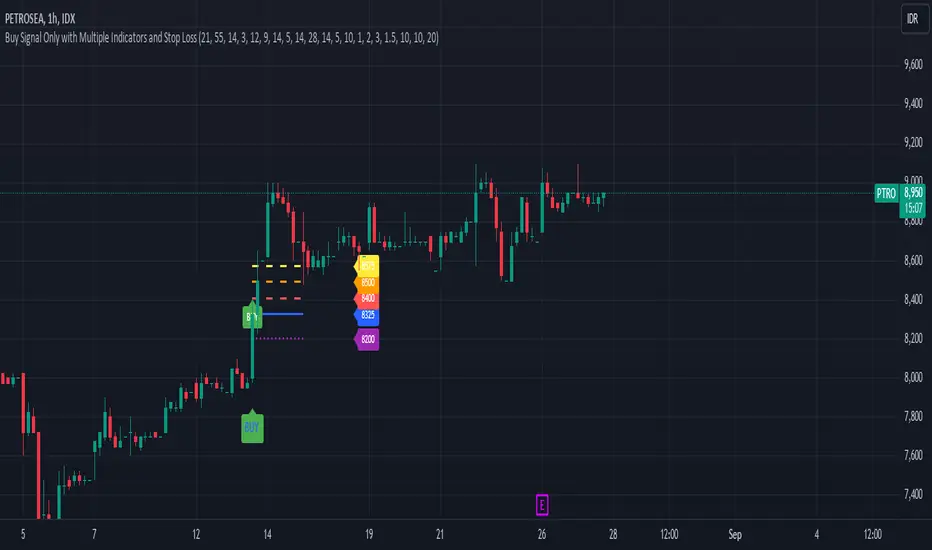
Description: This custom Pine Script indicator is designed to help traders identify optimal buy signals using a combination of multiple technical indicators. It provides visual markers for entry points, take profit levels, and stop loss, offering a comprehensive tool for decision-making.
Features:
Parameters:
Usage:
Identify Buy Opportunities: The indicator helps identify potential buy signals using multiple indicators.
Manage Trades: Visualize entry points, take profit targets, and stop loss levels to manage trades effectively.
Customization: Tailor the indicator to fit your trading strategy by adjusting the parameters.
Notes:
This is what we call version 1.
Ensure that the indicator's settings align with your trading strategy and market conditions.Use in conjunction with other analysis tools for a comprehensive trading approach.
Features:
- Buy Signal: Generates a buy signal based on a combination of EMA Cloud, SuperTrend, Zero Lag MACD, QQE, Volume Oscillator, and ATR Bands.
- Entry Point: Displays a horizontal line at the entry price with a price label, extended to the right for visibility.
- Take Profit Levels:
- 1% Take Profit: A dashed red line with a price label for the first take profit level.
- 2% Take Profit: A dashed orange line with a price label for the second take profit level.
- Stop Loss: A dotted purple line with a price label to indicate the stop loss level set at 3%.
Parameters:
- EMA Short Length: Adjust the period for the short EMA.
- EMA Long Length: Adjust the period for the long EMA.
- ATR Length: Set the length for ATR calculation.
- Multiplier: Define the factor for the SuperTrend calculation.
- MACD Length and Signal Length: Configure lengths for MACD and its signal line.
- RSI Length and Smooth Length: Set parameters for RSI and its smoothing.
- Volume Lengths: Customize lengths for the volume oscillator.
- ATR Band Length and Multiplier: Set parameters for ATR Bands.
- Delay Bars: Specify the number of bars to wait before showing another buy signal.
- Take Profit Percentages: Adjust percentages for the 1% and 2% take profit levels.
- Stop Loss Percentage: Set the stop loss percentage.
- Line Extension Length: Define the number of bars to extend lines.
- Right Offset Bars: Configure how many bars to offset labels and lines to the right.
Usage:
Identify Buy Opportunities: The indicator helps identify potential buy signals using multiple indicators.
Manage Trades: Visualize entry points, take profit targets, and stop loss levels to manage trades effectively.
Customization: Tailor the indicator to fit your trading strategy by adjusting the parameters.
Notes:
This is what we call version 1.
Ensure that the indicator's settings align with your trading strategy and market conditions.Use in conjunction with other analysis tools for a comprehensive trading approach.
Phát hành các Ghi chú
- add more take profit
- reduce the bar and label length
Mã nguồn mở
Theo đúng tinh thần TradingView, tác giả của tập lệnh này đã công bố nó dưới dạng mã nguồn mở, để các nhà giao dịch có thể xem xét và xác minh chức năng. Chúc mừng tác giả! Mặc dù bạn có thể sử dụng miễn phí, hãy nhớ rằng việc công bố lại mã phải tuân theo Nội quy.

Thông báo miễn trừ trách nhiệm
Thông tin và các ấn phẩm này không nhằm mục đích, và không cấu thành, lời khuyên hoặc khuyến nghị về tài chính, đầu tư, giao dịch hay các loại khác do TradingView cung cấp hoặc xác nhận. Đọc thêm tại Điều khoản Sử dụng.
Mã nguồn mở
Theo đúng tinh thần TradingView, tác giả của tập lệnh này đã công bố nó dưới dạng mã nguồn mở, để các nhà giao dịch có thể xem xét và xác minh chức năng. Chúc mừng tác giả! Mặc dù bạn có thể sử dụng miễn phí, hãy nhớ rằng việc công bố lại mã phải tuân theo Nội quy.
Thông báo miễn trừ trách nhiệm
Thông tin và các ấn phẩm này không nhằm mục đích, và không cấu thành, lời khuyên hoặc khuyến nghị về tài chính, đầu tư, giao dịch hay các loại khác do TradingView cung cấp hoặc xác nhận. Đọc thêm tại Điều khoản Sử dụng.