OPEN-SOURCE SCRIPT
Risk Manage Position Sizer
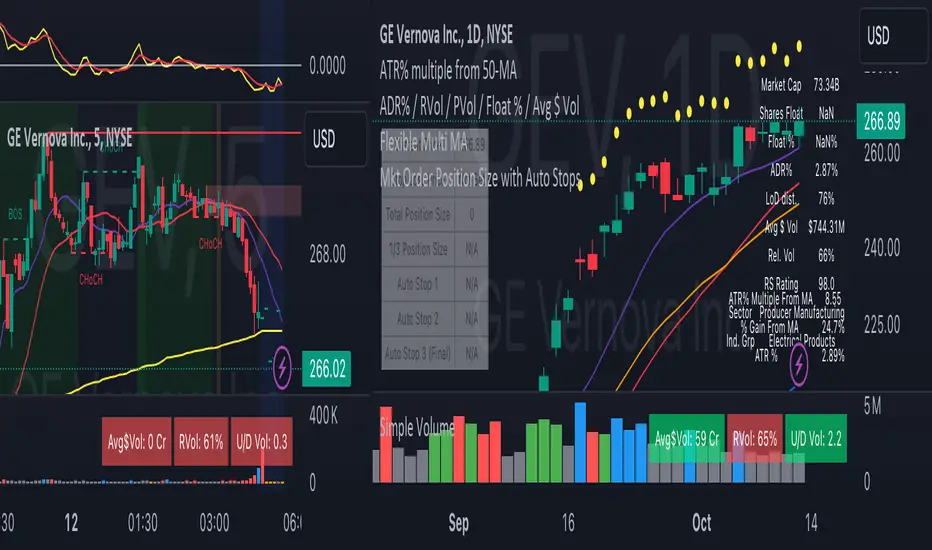
This is a risk management tool for traders. It calculates position sizes based on account balance and risk tolerance, and provides automated stop-loss suggestions. The script displays key information in a small table on the chart and plots important price levels.
How to use it:
Input Parameters:
Account Size: Enter your total trading account balance.
Risk Percentage: Set the percentage of your account you're willing to risk per trade.
Use Custom Stop Loss: Toggle this to use a manually entered stop loss price.
Custom Stop Loss Price: If enabled, enter your desired stop loss price.
Reading the Table:
The table displays:
Current Price
Stop Loss Price
Total Position Size (number of shares/contracts to trade)
1/3 Position Size (for scaling in/out)
Auto Stop 1, 2, and 3 (suggested stop loss levels)
Chart Indicators:
Red Line: Your stop loss level
Green Line: Auto Stop 1 (33% of range from entry to stop)
Yellow Line: Auto Stop 2 (67% of range)
Red Line: Auto Stop 3 (final stop, same as initial stop loss)
Trading Application:
Use the Total Position Size to determine how many shares/contracts to trade.
Consider using the 1/3 Position Size for scaling in or out of trades.
Use the Auto Stops to manage your risk as the trade progresses.
Customization:
Adjust the input parameters to fit your trading style and risk tolerance.
The script can be modified to add more features or change the calculation methods if needed.
This tool helps traders make more informed decisions about position sizing and stop placement, potentially improving risk management in their trading strategy. Remember, while this script provides suggestions, all trading decisions should be made based on your own analysis and risk tolerance.
How to use it:
Input Parameters:
Account Size: Enter your total trading account balance.
Risk Percentage: Set the percentage of your account you're willing to risk per trade.
Use Custom Stop Loss: Toggle this to use a manually entered stop loss price.
Custom Stop Loss Price: If enabled, enter your desired stop loss price.
Reading the Table:
The table displays:
Current Price
Stop Loss Price
Total Position Size (number of shares/contracts to trade)
1/3 Position Size (for scaling in/out)
Auto Stop 1, 2, and 3 (suggested stop loss levels)
Chart Indicators:
Red Line: Your stop loss level
Green Line: Auto Stop 1 (33% of range from entry to stop)
Yellow Line: Auto Stop 2 (67% of range)
Red Line: Auto Stop 3 (final stop, same as initial stop loss)
Trading Application:
Use the Total Position Size to determine how many shares/contracts to trade.
Consider using the 1/3 Position Size for scaling in or out of trades.
Use the Auto Stops to manage your risk as the trade progresses.
Customization:
Adjust the input parameters to fit your trading style and risk tolerance.
The script can be modified to add more features or change the calculation methods if needed.
This tool helps traders make more informed decisions about position sizing and stop placement, potentially improving risk management in their trading strategy. Remember, while this script provides suggestions, all trading decisions should be made based on your own analysis and risk tolerance.
Mã nguồn mở
Theo đúng tinh thần TradingView, tác giả của tập lệnh này đã công bố nó dưới dạng mã nguồn mở, để các nhà giao dịch có thể xem xét và xác minh chức năng. Chúc mừng tác giả! Mặc dù bạn có thể sử dụng miễn phí, hãy nhớ rằng việc công bố lại mã phải tuân theo Nội quy.

Thông báo miễn trừ trách nhiệm
Thông tin và các ấn phẩm này không nhằm mục đích, và không cấu thành, lời khuyên hoặc khuyến nghị về tài chính, đầu tư, giao dịch hay các loại khác do TradingView cung cấp hoặc xác nhận. Đọc thêm tại Điều khoản Sử dụng.
Mã nguồn mở
Theo đúng tinh thần TradingView, tác giả của tập lệnh này đã công bố nó dưới dạng mã nguồn mở, để các nhà giao dịch có thể xem xét và xác minh chức năng. Chúc mừng tác giả! Mặc dù bạn có thể sử dụng miễn phí, hãy nhớ rằng việc công bố lại mã phải tuân theo Nội quy.
Thông báo miễn trừ trách nhiệm
Thông tin và các ấn phẩm này không nhằm mục đích, và không cấu thành, lời khuyên hoặc khuyến nghị về tài chính, đầu tư, giao dịch hay các loại khác do TradingView cung cấp hoặc xác nhận. Đọc thêm tại Điều khoản Sử dụng.