OPEN-SOURCE SCRIPT
Cập nhật Bollinger Bands w/ Squeeze Alert
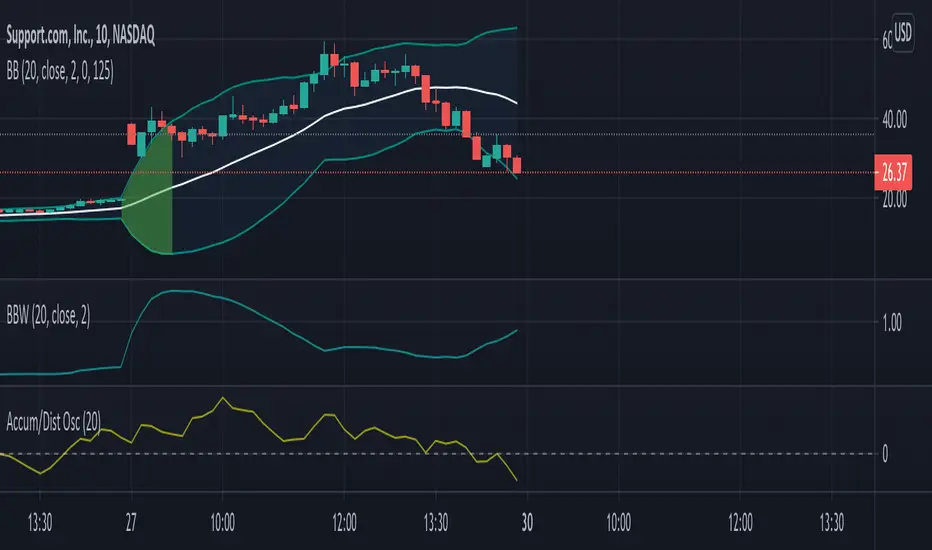
Bollinger's "simple" explanation for a Squeeze is the lowest volatility in the last 6 months. This indicator uses a default look-back period of 125 bars to determine the lowest BandWidth. When current BandWidth drops below the lowest BandWidth of the look-back period, the background of the bands turns red. Default look-back of 125 bars is ~6 months on daily charts.
The source, length, and standard deviation for the Bollinger Bands can all be adjusted. The look-back period for the Squeeze indicator can be adjusted as well.
The image shows my Bollinger Bands w/ Squeeze Alert indicator next to someone else's Bollinger Bandwidth w/ Squeeze Alert indicator to demonstrate how it appears on the chart.
The source, length, and standard deviation for the Bollinger Bands can all be adjusted. The look-back period for the Squeeze indicator can be adjusted as well.
The image shows my Bollinger Bands w/ Squeeze Alert indicator next to someone else's Bollinger Bandwidth w/ Squeeze Alert indicator to demonstrate how it appears on the chart.
Phát hành các Ghi chú
This version adds the "complicated definition" of The Squeeze as detailed by John Bollinger. "A more complicated definition of The Squeeze that is taught at our seminars involves Bollinger Bands on volatility itself. First plot the 20-day standard deviation of the close, or typical price. Now plot the 125-day, 1.5 standard deviation width Bollinger Bands of the standard deviation just plotted. A Squeeze is triggered when the 20-day standard deviation tags the lower band."
-Bollinger, John; Bollinger, John. Bollinger on Bollinger Bands (p. 194). McGraw-Hill Education.
It also adds an indicator for The Bulge. The Bulge is described as the HIGHEST bandwidth during the lookback period, which is set at 125 days (6 months) by default. It can be calculated using the original "simple" definition used for the original Squeeze indicator or you can add the same complicated definition that is used to calculate the complicated Squeeze.
By default, only the "simple" definition is used and the Bulge is not displayed. This allows users to continue to use the indicator as before without needing to understand the changes. However, you can choose to use the "complicated" definition or the Bulge in the settings. If you choose to use the "complicated" definition, it will still use the "simple" definition as well and it will apply the "complicated" definition to the Bulge calculations as well. You cannot use one type for the Squeeze and a different type for the Bulge.
Phát hành các Ghi chú
There was a typo that was causing the Bulge to be displayed improperly. It was showing a Bulge even as BandWidth was decreasing, which is incorrect. This has been fixed.Phát hành các Ghi chú
Additional errors found and fixed.Mã nguồn mở
Theo đúng tinh thần TradingView, tác giả của tập lệnh này đã công bố nó dưới dạng mã nguồn mở, để các nhà giao dịch có thể xem xét và xác minh chức năng. Chúc mừng tác giả! Mặc dù bạn có thể sử dụng miễn phí, hãy nhớ rằng việc công bố lại mã phải tuân theo Nội quy.

Thông báo miễn trừ trách nhiệm
Thông tin và các ấn phẩm này không nhằm mục đích, và không cấu thành, lời khuyên hoặc khuyến nghị về tài chính, đầu tư, giao dịch hay các loại khác do TradingView cung cấp hoặc xác nhận. Đọc thêm tại Điều khoản Sử dụng.
Mã nguồn mở
Theo đúng tinh thần TradingView, tác giả của tập lệnh này đã công bố nó dưới dạng mã nguồn mở, để các nhà giao dịch có thể xem xét và xác minh chức năng. Chúc mừng tác giả! Mặc dù bạn có thể sử dụng miễn phí, hãy nhớ rằng việc công bố lại mã phải tuân theo Nội quy.
Thông báo miễn trừ trách nhiệm
Thông tin và các ấn phẩm này không nhằm mục đích, và không cấu thành, lời khuyên hoặc khuyến nghị về tài chính, đầu tư, giao dịch hay các loại khác do TradingView cung cấp hoặc xác nhận. Đọc thêm tại Điều khoản Sử dụng.