OPEN-SOURCE SCRIPT
Cập nhật Checklist By TAZFX with Trade Score
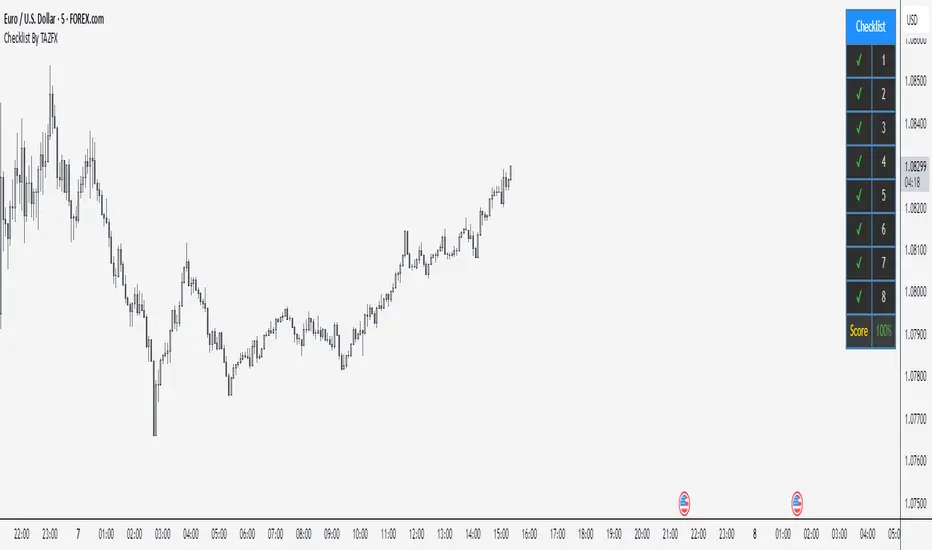
Trading Checklist is a customizable indicator designed for traders who want to stay disciplined and stick to their trading rules. Using this indicator, you can easily create and display your own personalized checklist of trading rules directly on your TradingView chart.
1. Customizable Settings:
•Positioning: Place the table in one of nine positions on the chart (e.g., bottom left, top right).
•Header: Modify the banner text, size, and color.
•Row Content: Define text for each row and control visibility.
•Appearance: Adjust text and background colors.
2. Checklist Table:
•Displays up to 8 rows with checkboxes (✅/❌) and custom labels for trade evaluation.
•Useful for tracking whether specific trade conditions or rules are met.
3. Trade Score Calculation:
•The Trade Score is a percentage that shows how many of your checklist items are checked compared to the total visible items.
1. Customizable Settings:
•Positioning: Place the table in one of nine positions on the chart (e.g., bottom left, top right).
•Header: Modify the banner text, size, and color.
•Row Content: Define text for each row and control visibility.
•Appearance: Adjust text and background colors.
2. Checklist Table:
•Displays up to 8 rows with checkboxes (✅/❌) and custom labels for trade evaluation.
•Useful for tracking whether specific trade conditions or rules are met.
3. Trade Score Calculation:
•The Trade Score is a percentage that shows how many of your checklist items are checked compared to the total visible items.
Phát hành các Ghi chú
UPDATESymbol-Specific: You pick one symbol (e.g., EURUSD) in the settings, and the checklist only appears on that chart. It’s invisible on others.
Phát hành các Ghi chú
UPDATE - Checklist: Up to 8 rows with checkboxes (✔ for yes, ✘ for no) and editable text (e.g., "1" or "Entry Signal").
- Trade Score: Shows a percentage (e.g., "75%") based on checked boxes, colored green (75%+), yellow (50-74%), or red (below 50%).
- Symbol-Specific: Set a "Pinned Symbol" (e.g., EURUSD) in settings—it only shows on that chart and hides elsewhere.
- Modern Design: Dark gray background, blue header, steel blue borders, and a compact layout option.
- Tooltips: Hover over row names in settings for hints (e.g., "Criteria 1"—customizable).
- Customizable: Adjust position, size, colors, and row count (1-8).
Phát hành các Ghi chú
.Phát hành các Ghi chú
.Phát hành các Ghi chú
Border color updatedMã nguồn mở
Theo đúng tinh thần TradingView, tác giả của tập lệnh này đã công bố nó dưới dạng mã nguồn mở, để các nhà giao dịch có thể xem xét và xác minh chức năng. Chúc mừng tác giả! Mặc dù bạn có thể sử dụng miễn phí, hãy nhớ rằng việc công bố lại mã phải tuân theo Nội quy.

Thông báo miễn trừ trách nhiệm
Thông tin và các ấn phẩm này không nhằm mục đích, và không cấu thành, lời khuyên hoặc khuyến nghị về tài chính, đầu tư, giao dịch hay các loại khác do TradingView cung cấp hoặc xác nhận. Đọc thêm tại Điều khoản Sử dụng.
Mã nguồn mở
Theo đúng tinh thần TradingView, tác giả của tập lệnh này đã công bố nó dưới dạng mã nguồn mở, để các nhà giao dịch có thể xem xét và xác minh chức năng. Chúc mừng tác giả! Mặc dù bạn có thể sử dụng miễn phí, hãy nhớ rằng việc công bố lại mã phải tuân theo Nội quy.
Thông báo miễn trừ trách nhiệm
Thông tin và các ấn phẩm này không nhằm mục đích, và không cấu thành, lời khuyên hoặc khuyến nghị về tài chính, đầu tư, giao dịch hay các loại khác do TradingView cung cấp hoặc xác nhận. Đọc thêm tại Điều khoản Sử dụng.