Wizard Dynamic EMA Table
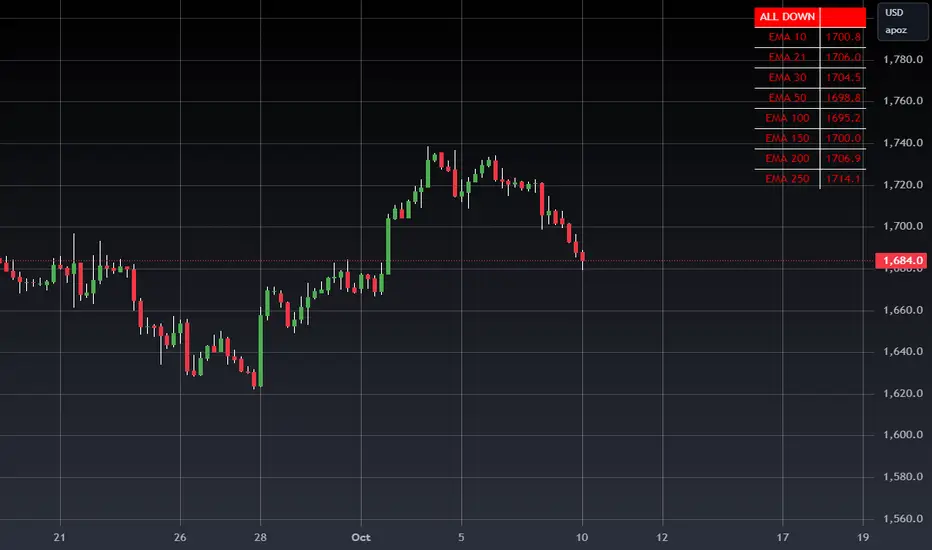
Track Multiple EMAs:
Displays 8 EMAs with their respective values.
Indicates whether each EMA is trending upward (green) or downward (red).
Summary Indicator:
A top cell provides a quick, overall trend:
Green ("ALL UP"): All EMAs are trending upward.
Red ("ALL DOWN"): All EMAs are trending downward.
Gray ("MIXED"): Some EMAs are up, and some are down.
Customizable:
The user can configure EMA periods to match their trading strategy.
Click Add to Chart (top-right corner of the Pine Editor).
The dashboard will appear on your chart.
How to Use the Dashboard
Monitor EMAs:
Look at the EMA table for real-time updates on each EMA's value and trend (up or down).
Quick Market Trend Analysis:
Check the summary cell at the top:
ALL UP (Green): Strong upward trend across all monitored EMAs.
ALL DOWN (Red): Strong downward trend across all monitored EMAs.
MIXED (Gray): Market is indecisive or ranging.
Customize EMA Periods:
Adjust the EMA periods from the script's settings:
Click the gear icon on the indicator in the chart legend.
Modify the EMA periods to match your trading strategy (e.g., 21, 50, 100, etc.).
Apply to Any Asset:
Use this script for any asset (stocks, forex, crypto, futures) available on TradingView.
Trading Strategies with the Dashboard
Trend-Following Strategy:
If the summary cell shows ALL UP, consider looking for long opportunities.
If the summary cell shows ALL DOWN, consider looking for short opportunities.
Reversal Strategy:
When the summary changes from ALL UP to MIXED or ALL DOWN, it might signal a weakening uptrend or potential reversal.
Confluence with Other Indicators:
Apply the dashboard to any timeframe (e.g., 1-minute, 1-hour, daily) depending on your trading style.
Benefits of Using This Script
Saves Time:
Quickly analyze trends across multiple EMAs without manually calculating or interpreting each one.
Visual Clarity:
The color-coded table provides instant insights into market conditions.
Customizable:
Tailor the EMA periods and apply it to any asset or timeframe.
"Disclaimer: This indicator is intended for educational purposes only and does not constitute financial advice. Trading involves significant risk, and users should perform their own research and consult with a licensed financial advisor before making any trading decisions."
Tập lệnh chỉ hiển thị cho người được mời
Chỉ những người dùng được tác giả chấp thuận mới có thể truy cập tập lệnh này. Bạn sẽ cần yêu cầu và được cấp quyền sử dụng. Thông thường quyền này được cấp sau khi thanh toán. Để biết thêm chi tiết, làm theo hướng dẫn của tác giả bên dưới hoặc liên hệ trực tiếp với WIZARDTRENDS.
Lưu ý rằng tập lệnh riêng tư này, chỉ dành cho người được mời, chưa được các quản trị viên tập lệnh xem xét, và việc tuân thủ Nội quy vẫn chưa được xác định. TradingView KHÔNG khuyến nghị bạn trả phí hoặc sử dụng một tập lệnh trừ khi bạn hoàn toàn tin tưởng vào tác giả và hiểu cách hoạt động của tập lệnh. Bạn cũng có thể tìm các lựa chọn miễn phí, mã nguồn mở trong các script cộng đồng của chúng tôi.
Hướng dẫn của tác giả

Thông báo miễn trừ trách nhiệm
Tập lệnh chỉ hiển thị cho người được mời
Chỉ những người dùng được tác giả chấp thuận mới có thể truy cập tập lệnh này. Bạn sẽ cần yêu cầu và được cấp quyền sử dụng. Thông thường quyền này được cấp sau khi thanh toán. Để biết thêm chi tiết, làm theo hướng dẫn của tác giả bên dưới hoặc liên hệ trực tiếp với WIZARDTRENDS.
Lưu ý rằng tập lệnh riêng tư này, chỉ dành cho người được mời, chưa được các quản trị viên tập lệnh xem xét, và việc tuân thủ Nội quy vẫn chưa được xác định. TradingView KHÔNG khuyến nghị bạn trả phí hoặc sử dụng một tập lệnh trừ khi bạn hoàn toàn tin tưởng vào tác giả và hiểu cách hoạt động của tập lệnh. Bạn cũng có thể tìm các lựa chọn miễn phí, mã nguồn mở trong các script cộng đồng của chúng tôi.