OPEN-SOURCE SCRIPT
Cập nhật Sonarlab - Psych/Whole Number Levels
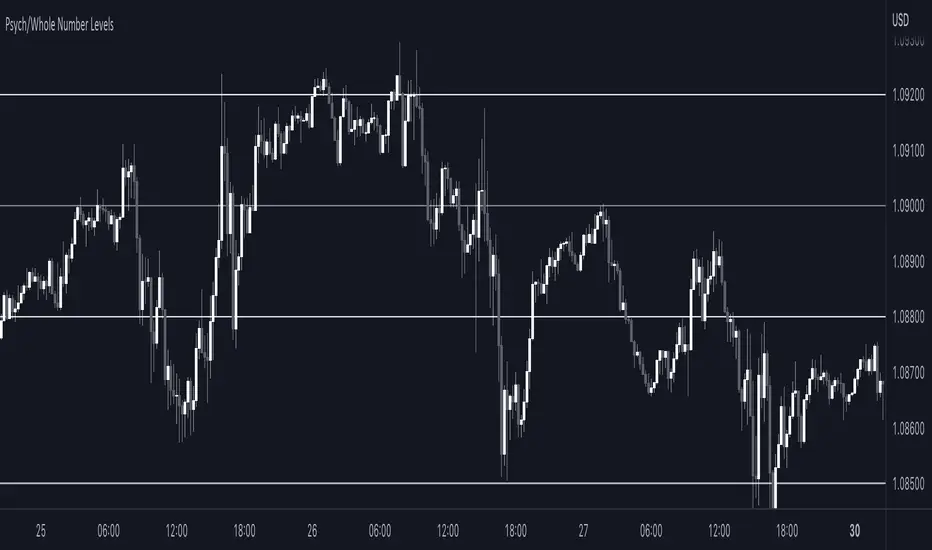
Have you ever noticed that prices seem to stick to certain “round numbers” like $1250, $1300, or $1350? It’s not just your imagination — these round numbers can actually act as psychological levels in the market, influencing trader behavior and shaping price action.
But why do traders care so much about these round numbers? It all comes down to our psychological wiring. Humans are naturally drawn to symmetry and simplicity, and round numbers offer a nice, neat way to measure price levels. Plus, these levels often coincide with important milestones or historical levels of support and resistance, giving them even more psychological weight.
To help you take advantage of these psychological levels in your trading, we’ve created a free TradingView indicator that automatically plots round numbers on your chart. Whether you’re a seasoned trader or just starting out, this indicator can give you a valuable edge in the market.
Here’s how the Indicator works:
1. Install the indicator on your TradingView chart. You can find it in the public library by searching for “Round Numbers Indicator”.
2. Select your preferred round numbers and customize the appearance of the indicator to fit your chart. The default settings are already set good.
3. Watch as the round numbers dynamically adjust to the current price action, providing you with a clear view of the market’s psychological levels.
But why do traders care so much about these round numbers? It all comes down to our psychological wiring. Humans are naturally drawn to symmetry and simplicity, and round numbers offer a nice, neat way to measure price levels. Plus, these levels often coincide with important milestones or historical levels of support and resistance, giving them even more psychological weight.
To help you take advantage of these psychological levels in your trading, we’ve created a free TradingView indicator that automatically plots round numbers on your chart. Whether you’re a seasoned trader or just starting out, this indicator can give you a valuable edge in the market.
Here’s how the Indicator works:
1. Install the indicator on your TradingView chart. You can find it in the public library by searching for “Round Numbers Indicator”.
2. Select your preferred round numbers and customize the appearance of the indicator to fit your chart. The default settings are already set good.
3. Watch as the round numbers dynamically adjust to the current price action, providing you with a clear view of the market’s psychological levels.
Phát hành các Ghi chú
- Added alertsPhát hành các Ghi chú
- Minor bug fixesMã nguồn mở
Theo đúng tinh thần TradingView, tác giả của tập lệnh này đã công bố nó dưới dạng mã nguồn mở, để các nhà giao dịch có thể xem xét và xác minh chức năng. Chúc mừng tác giả! Mặc dù bạn có thể sử dụng miễn phí, hãy nhớ rằng việc công bố lại mã phải tuân theo Nội quy.

Thông báo miễn trừ trách nhiệm
Thông tin và các ấn phẩm này không nhằm mục đích, và không cấu thành, lời khuyên hoặc khuyến nghị về tài chính, đầu tư, giao dịch hay các loại khác do TradingView cung cấp hoặc xác nhận. Đọc thêm tại Điều khoản Sử dụng.
Mã nguồn mở
Theo đúng tinh thần TradingView, tác giả của tập lệnh này đã công bố nó dưới dạng mã nguồn mở, để các nhà giao dịch có thể xem xét và xác minh chức năng. Chúc mừng tác giả! Mặc dù bạn có thể sử dụng miễn phí, hãy nhớ rằng việc công bố lại mã phải tuân theo Nội quy.
Thông báo miễn trừ trách nhiệm
Thông tin và các ấn phẩm này không nhằm mục đích, và không cấu thành, lời khuyên hoặc khuyến nghị về tài chính, đầu tư, giao dịch hay các loại khác do TradingView cung cấp hoặc xác nhận. Đọc thêm tại Điều khoản Sử dụng.