OPEN-SOURCE SCRIPT
Cập nhật XT Basic MA Crossover
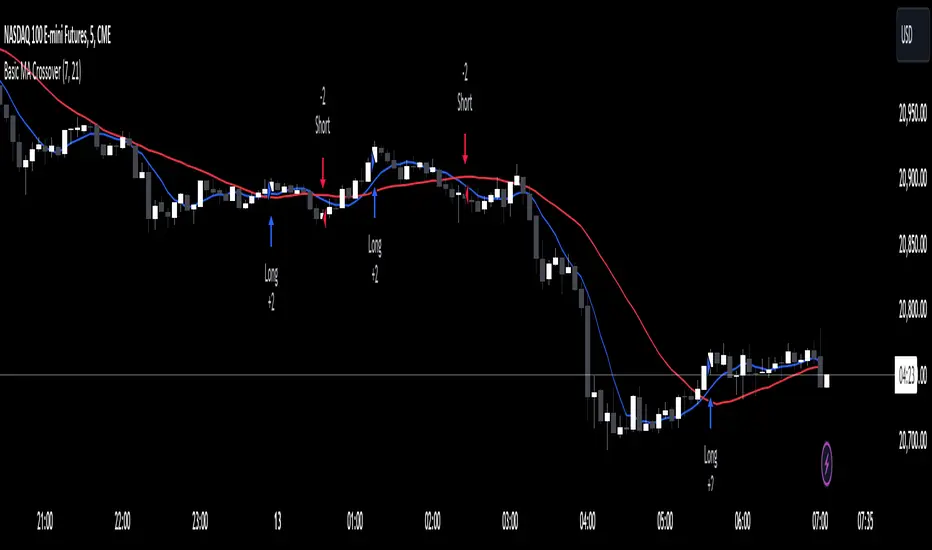
The XT Basic MA Crossover is designed to introduce the use of dynamic variables to your alert messages. Unlike the XT Up/Down Bar Indicator, which preloads the payload into the TradingView alert Message field, strategies do not support this functionality.
You will need to copy and paste into the message window for the alert to work using the strategy actions.
Example Alert Message:
```
key=Your CrossTrade Secret Key;
command=PLACE;
account=sim101;
instrument=ES 12-24;
action={{strategy.order.action}}
qty={{strategy.order.quantity}};
order_type=MARKET;
tif=DAY;
flatten_first=true;
```
You'll need to add your secret key to the message between = and ;
Correct: key=123456789123456789;
Incorrect: key=Your CrossTrade Secret Key123456789123456789;
You'll also need to add your webhook URL to the Notifications tab on the alert.
Visual Signals: The strategy is a simple moving average crossover using a 2 period MA to simulate a lot of frequent trades.
You can also add stops and targets to your strategy alerts by adding "take_profit" and "stop_loss" values to the message. This can be supplied as numerical values, percentages, or tick based values. Learn More.
If you need help: Here is a LINK to our TradingView alerts Help Doc.
Disclaimer: This indicator is designed and offered purely as an educational resource to showcase how to structure your alert messages. We do not suggest, advise, or recommend using this indicator in production with live capital.
You will need to copy and paste into the message window for the alert to work using the strategy actions.
Example Alert Message:
```
key=Your CrossTrade Secret Key;
command=PLACE;
account=sim101;
instrument=ES 12-24;
action={{strategy.order.action}}
qty={{strategy.order.quantity}};
order_type=MARKET;
tif=DAY;
flatten_first=true;
```
You'll need to add your secret key to the message between = and ;
Correct: key=123456789123456789;
Incorrect: key=Your CrossTrade Secret Key123456789123456789;
You'll also need to add your webhook URL to the Notifications tab on the alert.
Visual Signals: The strategy is a simple moving average crossover using a 2 period MA to simulate a lot of frequent trades.
You can also add stops and targets to your strategy alerts by adding "take_profit" and "stop_loss" values to the message. This can be supplied as numerical values, percentages, or tick based values. Learn More.
If you need help: Here is a LINK to our TradingView alerts Help Doc.
Disclaimer: This indicator is designed and offered purely as an educational resource to showcase how to structure your alert messages. We do not suggest, advise, or recommend using this indicator in production with live capital.
Phát hành các Ghi chú
Removed the QTY input to simplify the scriptPhát hành các Ghi chú
Updated to Pine Script V6Phát hành các Ghi chú
Updated to provide inputs for the MA length and plotting on the chartPhát hành các Ghi chú
Swapped the NT8 instrument format for the Pine Script {{ticker}} variable now that CrossTrade supports continuous contracts and will automatically convert the ticker into NT8s format.Mã nguồn mở
Theo đúng tinh thần TradingView, tác giả của tập lệnh này đã công bố nó dưới dạng mã nguồn mở, để các nhà giao dịch có thể xem xét và xác minh chức năng. Chúc mừng tác giả! Mặc dù bạn có thể sử dụng miễn phí, hãy nhớ rằng việc công bố lại mã phải tuân theo Nội quy.

Thông báo miễn trừ trách nhiệm
Thông tin và các ấn phẩm này không nhằm mục đích, và không cấu thành, lời khuyên hoặc khuyến nghị về tài chính, đầu tư, giao dịch hay các loại khác do TradingView cung cấp hoặc xác nhận. Đọc thêm tại Điều khoản Sử dụng.
Mã nguồn mở
Theo đúng tinh thần TradingView, tác giả của tập lệnh này đã công bố nó dưới dạng mã nguồn mở, để các nhà giao dịch có thể xem xét và xác minh chức năng. Chúc mừng tác giả! Mặc dù bạn có thể sử dụng miễn phí, hãy nhớ rằng việc công bố lại mã phải tuân theo Nội quy.
Thông báo miễn trừ trách nhiệm
Thông tin và các ấn phẩm này không nhằm mục đích, và không cấu thành, lời khuyên hoặc khuyến nghị về tài chính, đầu tư, giao dịch hay các loại khác do TradingView cung cấp hoặc xác nhận. Đọc thêm tại Điều khoản Sử dụng.