OPEN-SOURCE SCRIPT
Long/Short Entry with Customizable TP/SL
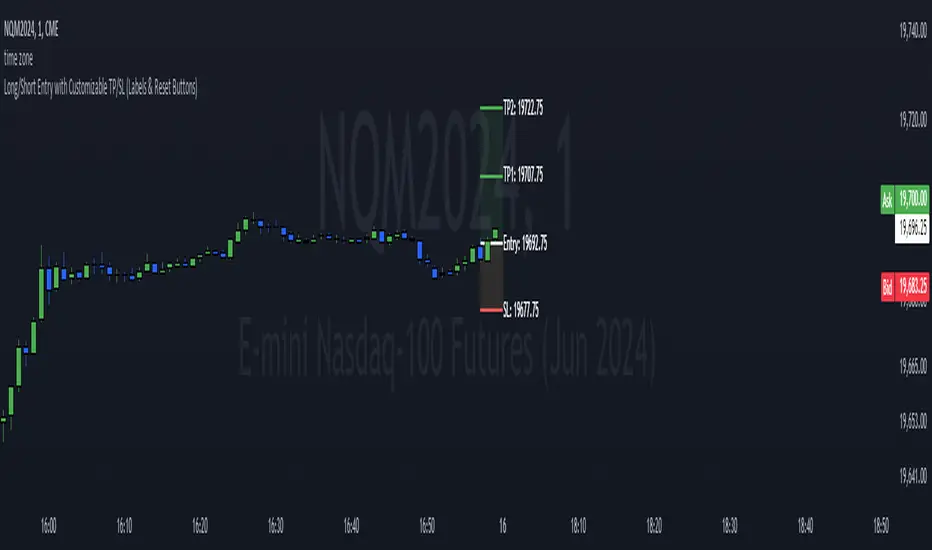
This TradingView indicator is designed to help traders visualize potential trade entries along with their corresponding stop-loss (SL) and take-profit (TP) levels. It offers a high degree of customization, allowing users to:
Choose Entry Type: Select whether the anticipated trade is a Long or Short position.
Set Entry Price: Specify the exact price level at which you intend to enter the trade.
Customize TP/SL:
Enable/Disable: Choose whether to include a stop-loss (SL) and up to five take-profit (TP) levels.
Distance: Set the distance (in price points) for each SL and TP level from the entry price.
Add/Update Trade: Clicking the "Add/Update Trade" button will plot the entry line, SL line (if enabled), and TP lines (if enabled) on the chart, along with their corresponding labels. The lines and boxes will start two candles before the current bar and extend into the future.
Reset Trade: Clicking the "Reset Trade" button will clear all the lines, boxes, and labels from the chart, allowing you to start fresh with a new trade idea.
Visual Cues:
The indicator uses color-coded lines and boxes to distinguish between entry, SL, and TP levels.
Labels are provided next to each line, displaying the type of level (e.g., "Entry," "SL," "TP1") and its corresponding price.
Key Features:
Highly Customizable: Tailor the indicator to your specific trading style and risk management preferences.
Visual Clarity: Clearly visualize potential trade setups and their outcomes.
Easy to Use: The intuitive interface makes it simple to add, update, and reset trades.
Flexibility: Supports both long and short positions.
Limitations:
The indicator is designed for visualization and planning purposes only. It does not automatically execute trades.
The simulated "Add Trade" and "Reset Trade" buttons require manual unchecking after each click.
Choose Entry Type: Select whether the anticipated trade is a Long or Short position.
Set Entry Price: Specify the exact price level at which you intend to enter the trade.
Customize TP/SL:
Enable/Disable: Choose whether to include a stop-loss (SL) and up to five take-profit (TP) levels.
Distance: Set the distance (in price points) for each SL and TP level from the entry price.
Add/Update Trade: Clicking the "Add/Update Trade" button will plot the entry line, SL line (if enabled), and TP lines (if enabled) on the chart, along with their corresponding labels. The lines and boxes will start two candles before the current bar and extend into the future.
Reset Trade: Clicking the "Reset Trade" button will clear all the lines, boxes, and labels from the chart, allowing you to start fresh with a new trade idea.
Visual Cues:
The indicator uses color-coded lines and boxes to distinguish between entry, SL, and TP levels.
Labels are provided next to each line, displaying the type of level (e.g., "Entry," "SL," "TP1") and its corresponding price.
Key Features:
Highly Customizable: Tailor the indicator to your specific trading style and risk management preferences.
Visual Clarity: Clearly visualize potential trade setups and their outcomes.
Easy to Use: The intuitive interface makes it simple to add, update, and reset trades.
Flexibility: Supports both long and short positions.
Limitations:
The indicator is designed for visualization and planning purposes only. It does not automatically execute trades.
The simulated "Add Trade" and "Reset Trade" buttons require manual unchecking after each click.
Mã nguồn mở
Theo đúng tinh thần TradingView, tác giả của tập lệnh này đã công bố nó dưới dạng mã nguồn mở, để các nhà giao dịch có thể xem xét và xác minh chức năng. Chúc mừng tác giả! Mặc dù bạn có thể sử dụng miễn phí, hãy nhớ rằng việc công bố lại mã phải tuân theo Nội quy.

Thông báo miễn trừ trách nhiệm
Thông tin và các ấn phẩm này không nhằm mục đích, và không cấu thành, lời khuyên hoặc khuyến nghị về tài chính, đầu tư, giao dịch hay các loại khác do TradingView cung cấp hoặc xác nhận. Đọc thêm tại Điều khoản Sử dụng.
Mã nguồn mở
Theo đúng tinh thần TradingView, tác giả của tập lệnh này đã công bố nó dưới dạng mã nguồn mở, để các nhà giao dịch có thể xem xét và xác minh chức năng. Chúc mừng tác giả! Mặc dù bạn có thể sử dụng miễn phí, hãy nhớ rằng việc công bố lại mã phải tuân theo Nội quy.
Thông báo miễn trừ trách nhiệm
Thông tin và các ấn phẩm này không nhằm mục đích, và không cấu thành, lời khuyên hoặc khuyến nghị về tài chính, đầu tư, giao dịch hay các loại khác do TradingView cung cấp hoặc xác nhận. Đọc thêm tại Điều khoản Sử dụng.