J&C Indicator 20/40 MA4H SMA Signal Map (20/40) Strategy
Timeframe: 4-Hour
Overview:
This is a momentum-based trend confirmation system using dual moving averages. The strategy identifies potential entry points when price action aligns with moving average positioning.
LONG Signal:
Triggers when the market demonstrates bullish momentum with price confirming an upside breakout while both moving averages are in a favorable uptrend alignment.
SHORT Signal:
Triggers when the market demonstrates bearish momentum with price confirming a downside breakdown while both moving averages are in a favorable downtrend alignment.
Key Features:
Uses a 20-period and 40-period simple moving average on the 4-hour timeframe
Filters out false signals by requiring multi-factor confirmation
Generates clear visual alerts with background highlighting
Real-time dashboard showing current MA values and trend direction
Sound/notification alerts for immediate signal awareness
Best Used For:
Swing trading on higher timeframes with proper risk management and support from additional confluence factors on your trading setup.
Băng tần và kênh

TMAX Divergence by ericfreemanTMAX Divergence 是一套由 EricFreeman 開發的 RSI 背離偵測指標,用於捕捉市場反轉的關鍵位置。
此指標透過:
RSI(14) 高檔/低檔(預設 70 / 30)
價格與 RSI 的高低點不一致(背離)
Pivot 高低點辨識 + 等待最多 X 根 K
ATR x 倍數的 TP / SL 視覺化顯示
協助交易者明確判斷市場是否出現「動能減弱 → 可能反轉」的訊號。
特點:
自動標註看漲 / 看跌背離
可調參數:Pivot、等待 K 棒、ATR 倍數、RSI 區間
不下單、不回測,純視覺輔助
TP / SL 以菱形標示,方便手動交易判斷
適用於:加密貨幣、外匯、指數、股票
此指標屬於 TMAX 系列的一部分,未來將推出更多趨勢與反轉工具。
TMAX Divergence is an RSI-based divergence detection indicator developed by EricFreeman, designed to identify early reversal signals in the market.
This tool analyzes:
RSI(14) overbought & oversold zones (default 70/30)
Bullish & bearish divergences between price and RSI
Pivot-based swing high/low detection
Optional waiting period (X candles) after divergence
ATR-based TP/SL visualization
to help traders spot potential momentum loss and trend reversals.
Features:
Auto-detection of bullish & bearish divergences
Fully adjustable settings: Pivot size, wait bars, ATR multipliers, RSI levels
Pure indicator (no orders, no backtesting)
TP/SL displayed with diamonds for manual trading reference
Works on crypto, forex, stocks, and indices
Part of the growing TMAX indicator series designed for trend and reversal analysis.


sydrox indicator secret stratgy based on sydrox concepts hidden gem free money hehehe muhhh ye secret gatekeep ahhh

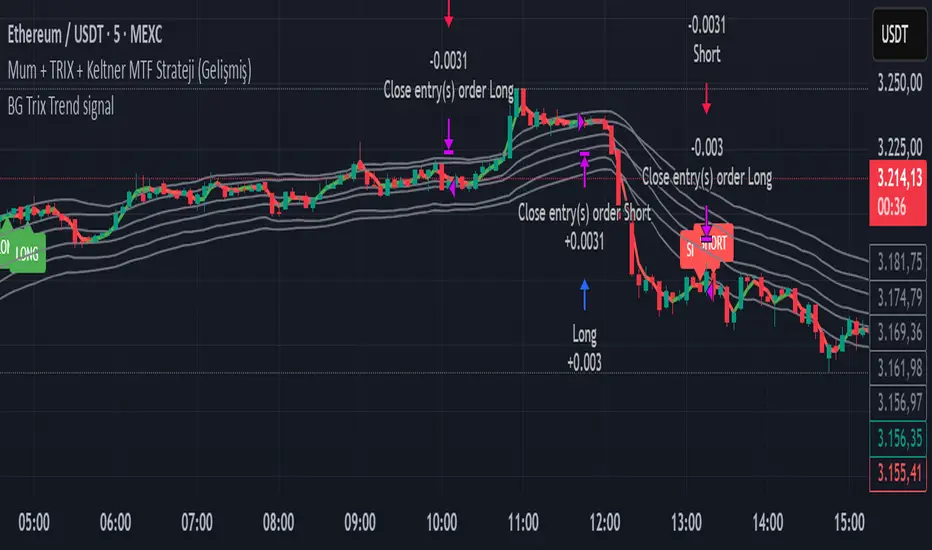
BG Trix Trend signalovides dynamic long and short signals based on a multi-timeframe candle averaging method. It calculates a four-step average of recent candles to determine the trend and changes candle color accordingly (green for upward, red for downward).
Features:
Multi-Timeframe Candle Analysis: Combines current and previous candle data to smooth price action.
Optional TRIX Filter: Adds a TRIX-based trend filter from a separate timeframe. Only triggers signals when TRIX confirms the trend.
Optional Keltner Channel Filter: Prevents signals when the price is inside the Keltner channel. Long signals only trigger above the upper band; short signals only trigger below the lower band. Separate MTF and MA type can be selected for the channel.
Visual Signals: Long and short signals are displayed as arrows on the chart. Candle color reflects trend direction.
Fully Customizable: Users can enable/disable TRIX and Keltner filters and select MA types and timeframes independently.
This indicator is ideal for traders who want clear trend signals while filtering out trades inside key price channels. No exit management is included—signals are purely for entry visualization.
Polynomial BandsPolynomial Bands apply a second-degree least-squares regression model to estimate the underlying non-linear trend of the price series. Over the selected lookback window, the indicator computes the quadratic polynomial
y(x) = A + Bx + Cx^2
and evaluates this function at the most recent bar. This value serves as the Base Line. It represents the fitted trend at the current location within the window.
After fitting the polynomial, the indicator calculates residuals by measuring the difference between observed prices and the regression curve. The sample variance of these residuals provides an estimate of dispersion around the fitted polynomial. The square root of this variance is used as the volatility measure for generating symmetric envelopes around the Base Line at multiples of the standard deviation.
The resulting bands represent regions of statistically expected deviation from the underlying quadratic trend. Narrow bands correspond to stable adherence to the modeled curve, while wide bands reflect increased irregularity or volatility.

XAUUSD Recovery for FamilyXAUUSD Recovery for Family is a trend-tracking tool based on a stepped 109-period EMA.
It highlights market direction using automatic color changes and background shading.
How It Works
A modified 109-period EMA is used to detect trend bias
The line only updates in steps after a fixed number of bars (MA Step = 33)
Background color changes when trend direction shifts
Alerts notify the trader when price crosses above or below the trend line
What It Shows
🟢 Green chart background = bullish bias
🔴 Red chart background = bearish bias
📢 Alert signals are generated when the price crosses the stepped EMA
What It Does NOT Do
❌ It does not execute trades automatically
❌ It does not guarantee profit or accuracy
❌ It does not repaint signals
Important Notes
This is a trend visualization tool only
Always combine with proper risk management and confirmation tools
Past performance is not a guarantee of future results
This script is for educational and research purposes

Bollinger Bands Regression Forecast [BigBeluga]🔵 OVERVIEW
The Bollinger Bands Regression Forecast combines volatility envelopes from Bollinger Bands with a linear regression-based projection model .
It visualizes both current and future price zones by extrapolating the Bollinger channel forward in time, giving traders a statistical forecast of probable support and resistance behavior.
🔵 CONCEPTS
Classic Bollinger Bands use a moving average (basis) and standard deviation (deviation) to form dynamic envelopes around price.
This indicator enhances them with linear regression slope detection , allowing it to forecast how the band may expand or contract in the future.
Regression is applied to both the band’s basis and deviation components to predict their trajectory for a user-defined number of Forecast Bars .
The resulting forecast creates a smoothed, funnel-shaped projection that dynamically adapts to volatility.
▲ and ▼ markers highlight potential mean reversion points when price crosses the outer bounds of the bands.
🔵 FEATURES
Forecast Engine : Uses linear regression to project Bollinger Band movement into the future.
Dynamic Channel Width : Adapts standard deviation and slope for realistic volatility modeling.
Auto-Labeled Levels : Displays live upper and lower forecast values for quick reference.
Cross Signals : Marks potential overbought and oversold zones with ▲/▼ signals when price exits the band.
Trend-Adaptive Basis Color : Basis line automatically switches color to represent short-term trend direction.
Customizable Colors and Widths for complete visual control.
🔵 HOW TO USE
Apply the indicator to visualize both current Bollinger structure and its forward projection.
Use ▲/▼ breakout markers to identify short-term reversals or volatility shifts.
When price consistently rides the upper band forecast, the trend is strong and likely continuing.
When regression shows narrowing bands ahead, expect a volatility contraction or consolidation period.
For range traders, outer projected bands can be used as potential mean reversion entry points .
Combine with volume or momentum filters to confirm whether breakouts are genuine or fading.
🔵 CONCLUSION
Bollinger Bands Regression Forecast transforms classic Bollinger analysis into a predictive forecasting model .
By merging volatility dynamics with regression-based extrapolation, it provides traders with a forward-looking visualization of likely price boundaries — revealing not only where volatility is but also where it’s heading next.

Fibonacci Bands 33 — Pro (auto+fix EMA/ATR + HTF panel)Fibonacci Bands 33 — Pro (auto+fix EMA/ATR + HTF panel)

Jace's Raff ChannelJust a basic, no-frills, Raff Regression channel. You can adjust the regression length and provide a starting point offset.

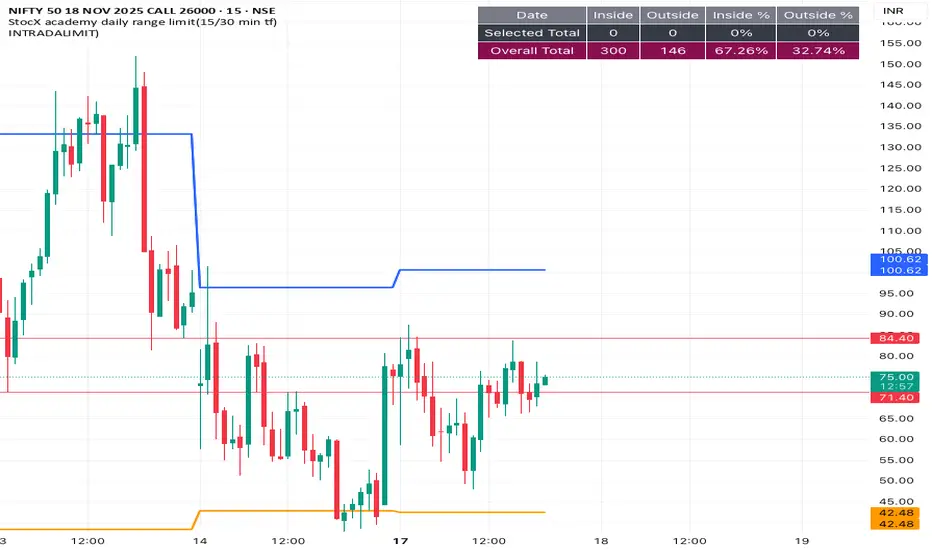
INTRADALIMIT
IDEAL TIME FRAME-15 min
This indicator automatically plots critical daily price levels using Fibonacci extensions.
Instead of manually drawing Fibonacci levels every single morning, this script does the work for you, projecting a potential "map" for the day's price action.
2-Stage Dashboard (SQZPRO Wide + EMA)Dashboard for Darvas Box EMA momentum traders, located in the bottom right, mostly for quickly screening if a setup is viable.
- EMAs are 9 & 21
- SQZPRO set to wide squeezes
Long setup:
- Green SQZPRO row
- Green EMA row
Short setup:
- Green SQZPRO row
- Red EMA row

Hourly ORB Boxes v2 (5/15min/custom min)Draws ORB on 9.30am open and every hour from 11am to 3pm so you can enjoy multiple ORB entries throughout the day with a custom time
Choose 5 min or 10 min or 15 min for ORB.
All open source written from scratch with help of chatgpt lol

Weekly Zones +RSI ColorWeekly analysis of stocks, cryptos etc.
chart, you will see:
The Weekly levels (PWH, PWL, 4 quadrants).
The Weekly control zones (the red, green, or grey boxes).
The Weekly analysis in the table.
Your 1-Hour candles will be colored green (strong), red (weak), or grey (neutral) based on the 1-hour RSI.
This should give you a very effective trading system.

Risk Manager 2:1 (Momentum Trader Version)Manage your RISK - 2:1
Every penny counts
RC - WT , Inspired

CM_MACD_Ult_MTF + Entry SignalsThis script is an enhanced and updated version of the classic CM_Ult_MacD_MTF originally created by ChrisMoody.
It preserves the full functionality, look, and behavior of the original multi-timeframe MACD, including:
Multi-timeframe MACD calculation
4-color histogram based on momentum direction
Optional MACD and Signal line display
Optional crossover dots
Color-changing MACD line on signal cross
Zero-line reference
This upgraded version adds entry signals based on MACD/Signal crossovers:
New Features Added
LONG @ price label when MACD crosses above Signal
SHORT @ price label when MACD crosses below Signal
Labels appear directly at the crossover point
Full support for Pine Script® v6, making it compatible with TradingView’s latest publishing requirements
Why this version?
The original script was written in an older Pine version and was no longer publishable.
This version keeps the full visual identity and logic of the classic MACD while adding modern compatibility and helpful trading signals.
Credits
Original concept and visual framework: ChrisMoody
Added features, Pine v6 migration, and enhancements: tgambinox

Sentiment Heatmap with EMA Sentiment Heatmap with EMA Let’s build a script mini-LuxAlgo-style sentiment heatmap Enhanced Simple Sentiment Heatmap + Right-Side Legend Automatic legend on the right side
Just like professional indicators:
MAX GREED
GREED
NEUTRAL
FEAR
MAX FEAR
✔ Legend stays updated on the last bar
It moves automatically as price moves.
✔ Trend EMA included (optional) 9 EMA → White
20 EMA → Red
50 EMA → Yellow
100 EMA → Blue
200 EMA → Purple Alerts (e.g., “Max Fear – Buy Zone”)
✔ Liquidity line / support-resistance auto zones Full sentiment heatmap (Greed → Fear)
✔ Right-side legend like LuxAlgo
✔ All 5 EMAs added (my colors): EMA trend cloud (9/20, 20/50, 50/200)
Buy/Sell circles based on sentiment reversals Right-side legend: MAX GREED / GREED / NEUTRAL / FEAR / MAX FEAR
5 EMAs:
9 → White
20 → Red
50 → Yellow
100 → Blue
200 → Purple

Smoothed VWAP Bands🎯 Best Smoothing Setting for Scalping (What You Should Use)
Style σ Smoothing Result
Fast scalping (1min) EMA 14 Very responsive, still filters noise
Balanced intraday (1–5min) EMA 20 Best overall reliability
Slow confirmation (5–15min) EMA 30 Eliminates nearly all fakeouts
✅ What We Are Actually Smoothing
You are NOT smoothing VWAP itself.
You are smoothing the standard deviation (σ) that creates the VWAP bands:
✔ What this does:
* Computes the raw standard deviation (σ) of price relative to VWAP
* Smooths that σ using EMA smoothing
* Builds ±1 and ±2 bands using the smoothed σ
* You get clean, stable bands that filter fakeouts
✔ Result:
* Bands do NOT twitch in chop
* Fakeouts are filtered
* Real breakouts show obvious expansion

MACD Divergence Optimizer# MACD Divergence Optimizer - User Guide
## Overview
The **MACD Divergence Optimizer** is a professional-grade technical analysis indicator for TradingView that automatically detects hidden divergences on MACD with volume weighting. It identifies potential reversal points before price action confirms the move, giving traders an early edge.
---
## What is Divergence?
A **divergence** occurs when price and an oscillator (like MACD) move in opposite directions:
- **Bullish Divergence**: Price makes a lower low, but MACD makes a higher low → Potential uptrend reversal
- **Bearish Divergence**: Price makes a higher high, but MACD makes a lower high → Potential downtrend reversal
Divergences are among the most reliable reversal signals in technical analysis.
---
## Indicator Features
### Volume-Weighted MACD
- Standard MACD is calculated on closing price
- This indicator uses **volume-weighted closing prices** for greater accuracy
- Formula: MACD = (Volume-Weighted EMA₁₂ - Volume-Weighted EMA₂₆)
- Volume weighting gives more importance to high-conviction price moves
### Automatic Swing Detection
- Detects local highs and lows (5-bar lookback)
- Tracks the last 5 swings for divergence analysis
- Only meaningful swings are tracked (filtered for noise)
### Smart Signal Generation
- Green triangle (▲) = Bullish Divergence (BUY signal)
- Red triangle (▼) = Bearish Divergence (SELL signal)
- Triangles appear directly on the MACD line for precise entry timing
### Built-in Alerts
- Real-time notifications for divergence signals
- Alerts can trigger mobile push notifications or sound
- Never miss a trading opportunity
---
## How to Use
### Installation
1. Open TradingView and navigate to the Chart
2. Click "Indicator" → Search "MACD Divergence Optimizer"
3. Click "Add to Chart"
4. The indicator appears in a separate panel below the price chart
### Reading the Indicator
**MACD Panel displays:**
- **Blue Line** = MACD (fast momentum)
- **Orange Line** = Signal line (slow momentum)
- **Histogram** (colored bars) = Difference between MACD and Signal
- Green bars = MACD above signal (bullish)
- Red bars = MACD below signal (bearish)
**Divergence Signals:**
- **Green Triangle ▲** = Bullish divergence detected
- Price is lower, but MACD momentum is strengthening
- Look for uptrend reversal
- Confirm with higher closes or volume
- **Red Triangle ▼** = Bearish divergence detected
- Price is higher, but MACD momentum is weakening
- Look for downtrend reversal
- Confirm with lower closes or selling volume
---
## Parameters & Settings
### MACD Fast Length (Default: 12)
- Controls the faster moving average period
- **Lower values** → More responsive, more false signals
- **Higher values** → Smoother, fewer signals
- **Typical range**: 8-15
### MACD Slow Length (Default: 26)
- Controls the slower moving average period
- **Lower values** → Faster divergence detection
- **Higher values** → More reliable, fewer signals
- **Typical range**: 20-35
### Signal Smoothing (Default: 9)
- EMA period applied to MACD itself
- **Lower values** → Faster crossover signals
- **Higher values** → Fewer false crossovers
- **Typical range**: 5-15
### Min Divergence Strength (Default: 0.5%)
- Minimum % difference between current MACD and swing MACD
- **Lower values** → More divergence signals (noisier)
- **Higher values** → Only strong divergences (fewer signals)
- **Recommended**: 0.3% - 1.0%
### Lookback Bars (Default: 75)
- Historical window for analysis
- Larger lookback = more context but slower calculation
- **Typical range**: 50-100
---
## Trading Strategy
### Bullish Divergence (Entry Setup)
1. **Identify Signal**: Green triangle appears on MACD
2. **Confirm Price**: Look for price rejection of the low (bounce)
3. **Volume Check**: Buy on increase in volume at the bounce
4. **Entry**: Above the swing low level
5. **Stop Loss**: Below the most recent swing low
6. **Target**: Next swing high or resistance level
### Bearish Divergence (Entry Setup)
1. **Identify Signal**: Red triangle appears on MACD
2. **Confirm Price**: Look for price rejection of the high
3. **Volume Check**: Sell on increase in volume at rejection
4. **Entry**: Below the swing high level
5. **Stop Loss**: Above the most recent swing high
6. **Target**: Next swing low or support level
### Risk Management
- **Position Size**: Risk only 1-2% per trade
- **Stop Loss**: Place beyond recent swings
- **Take Profit**: Scale out at 1:1, 1:2, 1:3 risk-reward ratios
- **Filter**: Use on higher timeframes (4H, Daily) for reliability
---
## Timeframe Recommendations
| Timeframe | Best For | Signal Quality |
|-----------|----------|---|
| **1H** | Scalping, day trading | Moderate (some noise) |
| **4H** | Swing trading | Excellent |
| **Daily** | Position trading | Excellent |
| **Weekly** | Long-term trends | Excellent |
---
## Tips & Best Practices
### ✅ DO:
- **Use on trends**: Divergences work best when there's a clear trend
- **Combine signals**: Look for confirmation from price action, volume, or moving averages
- **Trade the bounce**: Wait for price to react to the swing, then enter
- **Adjust parameters**: Test different MACD lengths for your trading style
- **Use alerts**: Set up mobile alerts so you don't miss signals
### ❌ DON'T:
- **Trade every signal**: Some signals are stronger than others
- **Trade flat/choppy markets**: Divergences fail in ranging markets
- **Ignore support/resistance**: Trade divergences near key levels for best results
- **Over-leverage**: Divergences are probabilistic, not guaranteed
- **Disable volume analysis**: Always check volume when divergence fires
---
## Advanced Features
### Volume Weighting
The indicator uses **volume-weighted MACD** instead of standard MACD. This means:
- High-volume reversals get more emphasis
- Low-volume moves are smoothed out
- More accurate momentum readings
- Better at identifying true trend changes
### Array Tracking
The indicator tracks the last 5 swings in arrays:
- `swingLows ` = last 5 price lows
- `swingHighs ` = last 5 price highs
- `swingMacds ` = corresponding MACD values
This allows detection of **hidden divergences** not visible in traditional analysis.
---
## Common Questions
**Q: Why didn't the indicator trigger a signal when I see a divergence?**
A: The indicator may require:
- MACD histogram to cross the zero line (confirms momentum shift)
- Minimum strength threshold to be met (adjust Min Divergence Strength)
- At least 5 swings to be recorded in the lookback window
**Q: Can I use this on all timeframes?**
A: Yes, but divergences are more reliable on higher timeframes (4H+). Lower timeframes produce more signals but with more noise.
**Q: Should I trade every green/red triangle?**
A: No. Use them as a heads-up for potential reversals. Always confirm with:
- Price action (rejection of the swing)
- Volume (increasing volume at reversal)
- Key support/resistance levels
**Q: How do I set alerts?**
A:
1. Right-click the indicator → Edit Alerts
2. Check "Bullish Divergence" and/or "Bearish Divergence"
3. Choose notification type (browser, mobile, email)
4. Set frequency to "Once per bar close"
**Q: What's the difference between regular and hidden divergence?**
A: This indicator detects **hidden divergences** (also called continuation divergences):
- **Regular**: Price makes new extreme, but oscillator doesn't
- **Hidden**: Price makes new extreme, oscillator makes new extreme in different direction
- Hidden divergences are often more reliable for continuation plays
---
## Disclaimer
This indicator is provided for educational and informational purposes only. It is not financial advice. Past performance does not guarantee future results. Always use proper risk management and combine with other analysis methods. Trading and investing carry risk of loss. Do your own research before making trading decisions.
---
## Support & Updates
For issues, feature requests, or questions:
- Check the indicator settings and parameter values
- Test on historical data first before live trading
- Adjust parameters to match your trading style and timeframe
---
**Version**: 1.0
**Last Updated**: November 2025
**Compatible**: TradingView v6+

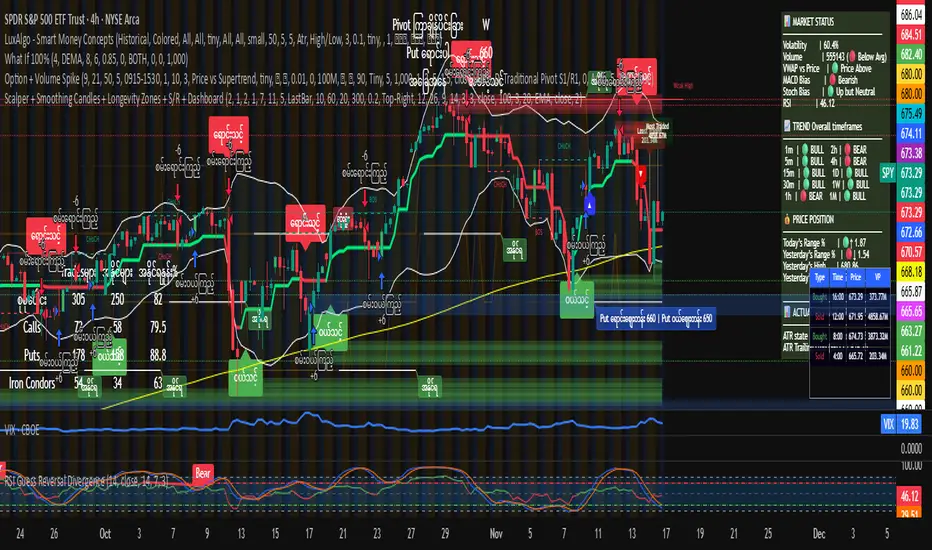
Myanverse Scalper BurmeseThis is Public Indicators from many resources and translated into burmese to use at ease.
I have another option sale indicators to use together.
Position Size CalculatorSet TP SL and entry point, over any chart to follow the points without drawing lines

Color EMA (Green Above, Red Below)olor EMA (Green Above, Red Below) is a simple yet effective trend-visualization tool that colors the Exponential Moving Average (EMA) based on price position.
When the close is above the EMA, the line turns green, indicating bullish strength.
When the close is below the EMA, the line turns red, indicating bearish pressure.

PolarLabs Indicator Pro P3PolarLabs Indicator Pro — Introduction
PolarLabs is a research collective dedicated to the advancement of quantitative trading and automation. We focus on all-weather portfolio strategies, diverse grid trading systems, and perpetual futures, aiming to empower traders and investors with streamlined, efficient, and innovative tools for the modern financial markets.
The PolarLabs Indicator now features enhanced capabilities including:
• Automatic detection of recent resistance ("Arctic Line") and support ("Antarctic Line") levels
• Advanced V-Average pricing with dynamic trend analysis
• Dual Momentum indicators (A-Momentum & T-Momentum) for market strength assessment
• IceFire Meter for real-time volume flow visualization
• Trend Follow Mode with Fibonacci-based entry bands for proactive position management
• Linear Regression Volume Distribution for smart accumulation zone identification
All key metrics are displayed in a clear, accessible dashboard on your chart, making it easy for quant enthusiasts and algorithmic traders to analyze market structures, identify key zones, and execute strategies with enhanced confidence.
Our tools are designed to complement your trading intuition - providing data-driven insights while respecting the art of market interpretation. Whether you're building automated grid systems, monitoring breakouts, or constructing all-weather portfolios, PolarLabs provides practical solutions to help you trade and analyze more effectively.
If you are interested, please send me a private message
X: X.com/PolarLabs_ai
TG: t.me/PolarLabs_ai
Follow us for more quant tools and automated trading strategies!
———————————————————————————————————————
北极熊指标Pro — 简介
北极熊研究所(PolarLabs)专注于量化交易和自动化策略的研究与创新。我们致力于开发全天候资产配置策略、各种网格交易系统以及永续合约解决方案,帮助更多热爱量化与自动化的交易员轻松高效地进行市场分析与策略执行。
北极熊指标现已升级增强功能:
• 自动侦测近期「北极线」(压力线)与「南极线」(支撑线)
• V均價动态趋势分析系统
• 双动能指标(A动能 & T动能)评估市场强度
• 冰火仪实时成交量流向可视化
• 趋势追踪模式配合斐波那契入场带,主动管理仓位
• 线性回归加量分布,智能识别筹码积累区域
所有关键数据均在图表右上角以面板形式直观展示,为您的交易分析提供有力支持。我们的工具旨在增强您的交易直觉——在提供数据驱动洞察的同时,尊重市场解读的艺术。
无论是箱体震荡、网格套利、趋势跟踪还是全自动量化策略,北极熊指标都能为您的交易决策提供深度市场结构分析。
【仅限受邀使用 - 需私人访问权限】
有兴趣请私信我查询
X: X.com/PolarLabs_ai
TG: t.me/PolarLabs_ai
欢迎关注 PolarLabs,获取更多量化与自动化工具和策略!
