Fibonacci Fibonacci automatic drawing - Last 144 barFibonacci automatic drawing:
It automatically plots Fibonacci based on the last 144 bars.
According to the drawing rules, it calculates itself from bottom to top and from top to bottom.
This will answer the most challenging questions about drawing the right thing.
If 144 bar is not reached, it draws using manual input.
This will be a useful and practical perspective.
This is for those who want to see the most valuable Fibonacci values on a chart.
Băng tần và kênh

O.R.B. New York (Opening Range)- Creates open range at New York Open (9:30am - 9:45am)
- Only shows most recent opening range for New York session (prevents clutter)
- Asset Classes: Micro Gold, Micro Silver, Micro ES, Micro NQ.

Smart Chart Patterns: Breakout Boxes## Abstract
This script is an algorithmic pattern recognition tool designed to identify, validate, and trade classical reversal structures (Double/Triple Tops and Bottoms). Unlike subjective drawing tools, this indicator employs a quantitative approach to geometry. It utilizes Volatility Normalization to ensure that angle detection works consistently across all asset classes—from high-priced assets like Bitcoin to low-volatility Forex pairs—without requiring manual recalibration.
## Methodology & Features
1. Pivot Chaining & Integrity Checks The algorithm identifies Swing Highs and Swing Lows (Pivots). It then "chains" them together to form resistance or support barriers.
Integrity Check: The script strictly enforces that price action between pivots must not violate the connecting line. If price cuts through the line, the pattern is invalidated immediately.
2. Angled vs. Horizontal Structures
Angled Mode: Allows for "channel-like" tops and bottoms (e.g., Rising Wedges or Descending Channels) up to a user-defined volatility-adjusted angle.
Horizontal Mode: If angled lines are disabled, the script applies a strict 1-degree tolerance filter, identifying only classical "Flat" Double/Triple patterns.
3. Trend Filtering To reduce false positives in ranging markets, the script includes a directional filter:
Double Tops are only validated if preceded by a quantitative Uptrend.
Double Bottoms are only validated if preceded by a quantitative Downtrend.
Trend Strength is measured by the net price displacement relative to ATR over a lookback period.
4. Automated Risk Management Upon pattern confirmation (breakout), the script automatically projects:
Target (Green): Projected based on the vertical height of the pattern (Pivot to Neckline).
Stop Loss (Red): Calculated dynamically using the Neckline ± (1.5 * ATR), adapting to current market volatility.
## Settings Guide
Min Touches: Set to 2 for Double patterns, 3 for Triple patterns.
Trend Filter: Enable to ensure the pattern is reversing an existing trend.
Angle Control: Adjusts the maximum allowed slope. Because this is normalized, 15.0 is a robust default for almost all assets.
Targets & Stops: Toggles the automated SL/TP lines and adjusts their multipliers.

Kairos QX Indicator [v1.7]What’s New in v1.7?
Streak Analytics (Dashboard Expansion):
The dashboard now tracks Winning and Losing Streaks.
Max Consec. (TP / SL): Displays the highest number of wins and losses that occurred in a row (e.g., 5 / 3).
Avg Consec. (TP / SL): Calculates the average length of your winning and losing streaks (e.g., 2.4 / 1.8).
Updated Default "settings" for MNQ 5 MIN Candles
Full Script Description
This script is a professional-grade Mean Reversion & Trend Following Engine designed for automated execution. It acts as a bridge between discretionary chart analysis and algorithmic trading, allowing you to backtest complex ideas visually and then automate them via alerts without writing code.
1. Core Logic: The "Flip Switch" Strategy
Standard Mode (Mean Reversion):
The script identifies "exhaustion" points where price pierces the Bollinger Bands.
It bets on a reversal (e.g., Price > Upper Band = Short).
Inverse Mode (Trend Following - Default):
With the "Inverse Trades" box checked, the logic flips.
It identifies "breakout" points where price pierces the bands.
It bets on continuation (e.g., Price > Upper Band = Long).
2. Advanced Automation & Safety Features
This system is built to drive trading bots (like TradersPost or 3Commas) safely:
State-Aware Execution: It tracks its own trades (in_trade state). It will never fire a duplicate "Open" signal if a trade is already active, preventing accidental pyramiding.
No Trade Zone (Force Close): You can define a specific time window (default 15:10–17:00). If a trade is open when this time hits, the script immediately triggers a Close Alert, preventing overnight holds.
Signal Cooldown: Configurable "Signals to Skip" allows you to force a cooldown period after a trade closes to avoid over-trading in choppy conditions.
3. Real-Time Analytics Dashboard
The on-chart table provides a transparent, real-time backtest of your settings:
Equity Calculator: You can set a dollar value per point (e.g., $2 for MNQ). The dashboard calculates your estimated Net Profit/Loss based on the total points gained.
Streak Analysis: Shows both the Maximum and Average number of consecutive wins and losses, helping you understand the psychological difficulty of trading the strategy.
Data Integrity: It automatically detects "N/A" trades (candles that hit both SL and TP) and excludes them from the Win Rate calculation to ensure realistic statistics.
4. Modular "Recipe" Building
The strategy is highly customizable via the settings menu (no coding required). You can filter the Bollinger Band trigger with 10 different indicators:
Supported Filters: RSI, Stochastic, CCI, Williams %R, MFI, CMO, Fisher Transform, Ultimate Oscillator, and ROC.
Logic: All selected filters must agree with the main trigger for a trade to fire.
5. Visual Projection Engine
Glowing Outcomes: The script draws exact TP (Green) and SL (Red) boxes for past trades. These boxes glow to indicate the result, allowing for rapid visual verification of the strategy's performance.
Force Close Markers: Special gray markers appear on the chart where a trade was forced to close due to the "No Trade Zone" time limit.

Weekend Asia High/Low Dots + Trading Window (UTC+1)**Weekend Asia High/Low Dots & Trading Window** is a lightweight TradingView indicator designed to **mark the exact Asia session extremes on weekends (Saturday & Sunday)** and highlight predefined **trading time windows** with maximum clarity and minimal chart clutter.
The indicator focuses on **precision, simplicity, and manual trading workflows**.
---
### 🔍 Key Features
#### 🟢 Asia Session High & Low (Weekend Only)
* Tracks the **Asia session on Saturday and Sunday**
* Marks **exactly two points per session**:
* One dot at the **true wick high**
* One dot at the **true wick low**
* Dots are plotted **only once**, at the **end of the Asia session**
* **No lines, no boxes, no extensions** – just clean reference points
* Ideal for traders who prefer to **draw their own ranges manually**
#### 🟩 Trading Window Highlight
* Customizable **trading time windows** for Saturday and Sunday
* Displayed as a **clean outline box** (no background fill)
* Helps visually separate **range formation** from **active trading hours**
---
### ⏰ Time Handling
* All session times are defined in **UTC+1**
* Uses a **fixed UTC+1 timezone** (`Etc/GMT-1`) for consistent behavior
* Easily adjustable to other timezones if needed
---
### ⚙️ Customizable Inputs
* Asia session times (Saturday & Sunday)
* Trading session times (Saturday & Sunday)
* Optional trading window labels
* Easy point size adjustment directly in the code
---
### 🎯 Use Cases
* Weekend trading (Crypto, Indices, Synthetic markets)
* Asia range analysis
* Manual range drawing & breakout planning
* Clean, distraction-free chart layouts
---
### 🧠 Who Is This Indicator For?
* Price action traders
* Range & session-based traders
* Traders who prefer **manual chart markup**
* Anyone trading **weekends with structured time windows**
---
### 🛠 Technical Details
* Pine Script® **Version 6**
* Overlay indicator
* Optimized for clarity and performance
---
If you want, I can also provide:
* a **short description** (1–2 lines for the TradingView header)
* **tags & keywords** for better discoverability
* or a **version with user-adjustable dot size via Inputs**

Kairos QX Indicator [v1.6]This script, Kairos QX , is a sophisticated, highly customizable trading engine designed for automated execution. It serves as a bridge between discretionary charting and algorithmic trading, allowing you to visually backtest complex ideas and then automate them via alerts.
Its core logic is built on Mean Reversion, but it features a powerful "Inverse Mode" that instantly transforms it into a Trend Following system.
1. The Core Strategy: Mean Reversion (Default)
By default, the script operates on the principle that price eventually returns to an average value after an extreme move.
Logic: It fades the move.
Short Signal: Price pierces the Upper Bollinger Band (overbought) + optional confluence filters (e.g., RSI > 70). The bet is that price will revert down.
Long Signal: Price pierces the Lower Bollinger Band (oversold) + optional confluence filters. The bet is that price will revert up.
2. The "Inverse Mode": Trend Following (Flip Switch)
The script includes a unique Inverse Trades checkbox that flips the entire logic engine. This allows you to adapt to market conditions where price isn't reverting but is instead "running" hard.
Logic: It rides the breakout.
Short Signal becomes Long: When price pierces the Upper Bollinger Band, instead of shorting (expecting a drop), the script enters Long (expecting the trend to blast through and continue higher).
Long Signal becomes Short: When price pierces the Lower Bollinger Band, the script enters Short, betting on a trend continuation downward.
Why this matters: If your backtest shows a failing Mean Reversion strategy (e.g., a "F" grade), flipping this switch can instantly invert those losses into wins by aligning with the trend instead of fighting it.
3. Built for Automation & Safety
The script is engineered to safely drive third-party auto-trading bots (like TradersPost, 3Commas, or PineConnector) without manual intervention.
State-Aware Execution: The script tracks its own trade state. It will never fire a duplicate "Open" signal if a trade is already active, preventing accidental double-entries.
No Trade Zone (Force Close): You can set a specific time window (e.g., 15:55 PM) where the script automatically triggers a Close Alert for any open position. This protects you from holding day trades overnight or through major news events.
Signal Cooldown: To prevent over-trading in choppy markets, you can set the script to ignore the next 1-5 signals after a trade finishes, forcing it to wait for a fresh setup.
4. Modular "Recipe" Building
You don't need to know code to change the strategy. The settings menu allows you to mix and match 10 different indicators as confluence filters.
Example Recipe: "Only take a Mean Reversion Long if: Price is below the Bollinger Band AND RSI is < 30 AND MFI is < 20."
If you check the boxes, the script enforces the rules. If you uncheck them, they are ignored.
5. Visual Projection Dashboard
The script doesn't just print arrows; it performs a real-time visual backtest on the chart.
Glowing Projections: It draws the exact Take Profit (Green) and Stop Loss (Red) boxes for historical trades. These boxes glow to indicate if the trade won or lost.
Data Integrity: It automatically detects and isolates "N/A" trades—candles so volatile that they hit both your SL and TP in the same bar—excluding them from your win rate to keep your data realistic.
Live Grading: A dashboard in the corner grades your current settings (A-F) based on their performance over the last 1,000 to 40,000 bars.

Double/Triple Tops & Bottoms & Rectangle BoxesThis indicator is an algorithmic pattern recognition tool designed to automatically identify, validate, and track significant reversal structures—specifically Double/Triple Tops and Bottoms. Unlike subjective drawing tools, this script uses a strict set of quantitative rules based on swing pivots and volatility (ATR) to define market structure.
The Logical Methodology The script operates on a three-stage "scientific" detection process:
Pivot Chaining (Level Detection): The algorithm scans for significant swing highs and lows using a user-defined lookback period. It stores these pivot levels and monitors subsequent price action. If price returns to a previous pivot level within a specific volatility threshold (normalized by ATR), it registers a "touch."
Pattern Construction (Neckline Identification): Once a level has been touched the required number of times (e.g., 2 for Double patterns, 3 for Triple patterns), the script calculates the "Neckline."
For Tops: It identifies the lowest trough between the peaks.
For Bottoms: It identifies the highest peak between the valleys. This creates a valid trading range, visualized as a blue box connecting the pivot level to the neckline.
Signal Validation (Breakout vs. Failure): The pattern remains in a "pending" state until a breakout occurs.
Confirmation: A signal is generated only when a candle closes beyond the neckline (below for Tops, above for Bottoms).
Invalidation: If price breaks the pivot level itself (e.g., makes a higher high on a Double Top) before breaking the neckline, the pattern is immediately marked invalid to prevent false signals.
Key Features
ATR-Based Sensitivity: Uses Average True Range to dynamically adjust how "precise" a re-test must be, adapting to changing market volatility.
Dual-Scanning: Can independently scan for Triple Tops (Bearish) and Double Bottoms (Bullish) simultaneously with separate settings.
Time & Width Constraints: Filters out "noise" by enforcing a minimum pattern width (in bars), ensuring only structurally significant patterns are displayed.
Settings Guide
Min Top/Bottom Touches: Set to 2 for Double patterns or 3 for Triple patterns.
Pivot Lookback: The number of bars used to define a swing point (higher = larger, more significant patterns).
Touch Sensitivity: Adjusts how strictly the price must match the previous level.
Min Pattern Width: Prevents the detection of micro-patterns that are too narrow to be reliable.

Round Strike Price, Levels Options Series➤ Strike Price Range Mode:
➤ Exact Strike Price Mode:
⭐ Overview and How It Works
Round Strike Price or Levels is a precision-focused visual tool designed for options and index traders.
It dynamically plots round strike levels around the current price and presents them either as:
⠀ — Exact strike prices, or
⠀ — Strike price ranges, where each zone represents the midpoint between two adjacent strikes.
The indicator continuously recalculates the base strike using the current price and aligns all surrounding levels using a fixed step size.
All lines and labels are updated only on the last bar for optimal performance and stability.
This makes StrikePrice ideal for:
🔹 Identifying key option strikes.
🔹 Visualizing price acceptance zones.
🔹 Understanding strike-to-strike movement during intraday trading.
⭐ Key Features and Functionality
Strike Price Range:
⠀ — Treats each pair of strike lines as a price zone.
⠀ — Labels are plotted at the midpoint between two lines.
⠀ — Last label is intentionally hidden (no upper range exists)
Exact Strike Price:
⠀ — Labels are plotted directly on each strike line.
⠀ — Useful for precise strike-based analysis.
Dynamic Base Calculation:
⠀ — Automatically snaps price to the nearest round strike.
⠀ — Re-centers the entire grid as price moves.
⠀ — No manual adjustment required.
Efficient Object Management:
⠀ — Uses persistent arrays for lines and labels.
⠀ — Objects are reused instead of recreated.
⠀ — Prevents flickering and avoids TradingView object limits.
🎨 Visualizations and User Experience
Clean horizontal strike grid with configurable:
⠀ — Line width, Line color, Line style (Solid / Dashed / Dotted), Extension direction (Left / Right / Both / None).
Labels are:
⠀ — Positioned to the right of price, Size-adjustable, Fully customizable in text color and background color.
Designed to stay visually clear even on:
⠀ — Fast-moving intraday charts, Options-focused layouts, Multi-indicator setups.
Tip: Increase Right Bars Margin in chart settings to give labels proper spacing.
⭐ Settings and Customization
🔹 Strike Settings:
⠀ — Step (points): Distance between adjacent strike levels (e.g., 50, 100)
⠀ — Levels per side: Number of strike levels plotted above and below the base.
⠀ — Strike Mode: Strike Price Range, Exact Strike Price.
🔹 Line Settings:
⠀ — Line width, Line color, Line style (Solid / Dashed / Dotted), Line extension direction.
🔹 Label Settings:
⠀ — Show / hide labels, Label distance (bars to the right), Label size, Label text color, Label background color.
All label properties are updated dynamically, allowing real-time UI tuning without reloading the script.
⭐ Uniqueness of the Concept:
Unlike generic round-number indicators, StrikePrice:
⠀ — Understands option-style strike structure.
⠀ — Separates range-based thinking from exact price levels.
⠀ — Uses midpoint logic to visualize strike-to-strike movement.
⠀ — Maintains strict performance discipline by updating only when necessary.
This makes it especially useful for:
⠀ • NIFTY / BANKNIFTY options.
⠀ • Index and futures traders.
⠀ • Intraday strike rotation analysis.
⠀ • Premium decay and range-bound setups.
🚀 Conclusion:
StrikePrice is a focused, professional-grade indicator for traders who think in strikes, ranges, and levels rather than arbitrary prices.
It offers:
⠀ • Clear structure
⠀ • Accurate strike alignment
⠀ • Clean visuals
⠀ • Zero repainting logic

Pro trade by Amit// This work is licensed under Creative Commons Attribution-NonCommercial-ShareAlike 4.0 International License (CC BY-NC-SA 4.0) creativecommons.org
//@version=5
import HeWhoMustNotBeNamed/utils/1 as ut
import Trendoscope/ohlc/1 as o
import Trendoscope/LineWrapper/1 as wr
import Trendoscope/ZigzagLite/2 as zg
import Trendoscope/abstractchartpatterns/5 as p
import Trendoscope/basechartpatterns/6 as bp
indicator("Installing Wait....", "Automatic Chart Pattern", overlay = true, max_lines_count=500, max_labels_count=500, max_polylines_count = 100)
openSource = input.source(open, '', inline='cs', group='Source', display = display.none)
highSource = input.source(high, '', inline='cs', group='Source', display = display.none)
lowSource = input.source(low, '', inline='cs', group='Source', display = display.none)
closeSource = input.source(close, '', inline='cs', group='Source', display = display.none, tooltip = 'Source on which the zigzag and pattern calculation is done')
useZigzag1 = input.bool(true, '', group = 'Zigzag', inline='z1', display = display.none)
zigzagLength1 = input.int(8, step=5, minval=1, title='', group='Zigzag', inline='z1', display=display.none)
depth1 = input.int(55, "", step=25, maxval=500, group='Zigzag', inline='z1', display=display.none, tooltip = 'Enable and set Length and Dept of Zigzag 1')
useZigzag2 = input.bool(false, '', group = 'Zigzag', inline='z2', display = display.none)
zigzagLength2 = input.int(13, step=5, minval=1, title='', group='Zigzag', inline='z2', display=display.none)
depth2 = input.int(34, "", step=25, maxval=500, group='Zigzag', inline='z2', display=display.none, tooltip = 'Enable and set Length and Dept of Zigzag 2')
useZigzag3 = input.bool(false, '', group = 'Zigzag', inline='z3', display = display.none)
zigzagLength3 = input.int(21, step=5, minval=1, title='', group='Zigzag', inline='z3', display=display.none)
depth3 = input.int(21, "", step=25, maxval=500, group='Zigzag', inline='z3', display=display.none, tooltip = 'Enable and set Length and Dept of Zigzag 3')
useZigzag4 = input.bool(false, '', group = 'Zigzag', inline='z4', display = display.none)
zigzagLength4 = input.int(34, step=5, minval=1, title='', group='Zigzag', inline='z4', display=display.none)
depth4 = input.int(13, "", step=25, maxval=500, group='Zigzag', inline='z4', display=display.none, tooltip = 'Enable and set Length and Dept of Zigzag 4')
numberOfPivots = input.int(5, "Number of Pivots", , 'Number of pivots used for pattern identification.', group='Scanning', display = display.none)
errorThresold = input.float(20.0, 'Error Threshold', 0.0, 100, 5, 'Error Threshold for trend line validation', group='Scanning', display = display.none)
flatThreshold = input.float(20.0, 'Flat Threshold', 0.0, 30, 5, 'Ratio threshold to identify the slope of trend lines', group='Scanning', display = display.none)
lastPivotDirection = input.string('both', 'Last Pivot Direction', , 'Filter pattern based on the last pivot direction. '+
'This option is useful while backtesting individual patterns. When custom is selected, then the individual pattern last pivot direction setting is used',
group='Scanning', display=display.none)
checkBarRatio = input.bool(true, 'Verify Bar Ratio ', 'Along with checking the price, also verify if the bars are proportionately placed.', group='Scanning', inline = 'br', display = display.none)
barRatioLimit = input.float(0.382, '', group='Scanning', display = display.none, inline='br')
avoidOverlap = input.bool(true, 'Avoid Overlap', group='Scanning', inline='a', display = display.none)
repaint = input.bool(false, 'Repaint', 'Avoid Overlap - Will not consider the pattern if it starts before the end of an existing pattern '+
'Repaint - Uses real time bars to search for patterns. If unselected, then only use confirmed bars.',
group='Scanning', inline='a', display = display.none)
allowChannels = input.bool(true, 'Channels', group='Pattern Groups - Geometric Shapes', display = display.none, inline='g')
allowWedges = input.bool(true, 'Wedge', group='Pattern Groups - Geometric Shapes', display = display.none, inline='g')
allowTriangles = input.bool(true, 'Triangle', group='Pattern Groups - Geometric Shapes', display = display.none, inline='g',
tooltip = 'Channels - Trend Lines are parralel to each other creating equidistance price channels'+
' \t- Ascending Channel \t- Descending Channel \t- Ranging Channel'+
' Wedges - Trend lines are either converging or diverging from each other and both the trend lines are moving in the same direction'+
' \t- Rising Wedge (Expanding) \t- Rising Wedge (Contracting) \t- Falling Wedge (Expanding) \t- Falling Wedge (Contracting)'+
' Triangles - Trend lines are either converging or diverging from each other and both trend lines are moving in different directions'+
' \t- Converging Triangle \t- Diverging Triangle \t- Ascending Triangle (Contracting) \t- Ascending Triangle (Expanding) \t- Descending Triangle(Contracting) \t- Descending Triangle(Expanding)')
allowRisingPatterns = input.bool(true, 'Rising', group='Pattern Groups - Direction', display = display.none, inline = 'd')
allowFallingPatterns = input.bool(true, 'Falling', group='Pattern Groups - Direction', display = display.none, inline = 'd')
allowNonDirectionalPatterns = input.bool(true, 'Flat/Bi-Directional', group='Pattern Groups - Direction', display = display.none, inline = 'd',
tooltip = 'Rising - Either both trend lines are moving up or one trend line is flat and the other one is moving up.'+
' \t- Ascending Channel \t- Rising Wedge (Expanding) \t- Rising Wedge (Contracting) \t- Ascending Triangle (Expanding) \t- Ascending Triangle (Contracting)'+
' Falling - Either both trend lines are moving down or one trend line is flat and the other one is moving down.'+
' \t- Descending Channel \t- Falling Wedge (Expanding) \t- Falling Wedge (Contracting) \t- Descending Triangle (Expanding) \t- Descending Triangle (Contracting)'+
' Flat/Bi-Directional - Trend Lines move in different directions or both flat.'+
' \t- Ranging Channel \t- Converging Triangle \t- Diverging Triangle')
allowExpandingPatterns = input.bool(true, 'Expanding', group='Pattern Groups - Formation Dynamics', display = display.none, inline = 'f')
allowContractingPatterns = input.bool(true, 'Contracting', group='Pattern Groups - Formation Dynamics', display = display.none, inline='f')
allowParallelChannels = input.bool(true, 'Parallel', group = 'Pattern Groups - Formation Dynamics', display = display.none, inline = 'f',
tooltip = 'Expanding - Trend Lines are diverging from each other.'+
' \t- Rising Wedge (Expanding) \t- Falling Wedge (Expanding) \t- Ascending Triangle (Expanding) \t- Descending Triangle (Expanding) \t- Diverging Triangle'+
' Contracting - Trend Lines are converging towards each other.'+
' \t- Rising Wedge (Contracting) \t- Falling Wedge (Contracting) \t- Ascending Triangle (Contracting) \t- Descending Triangle (Contracting) \t- Converging Triangle'+
' Parallel - Trend Lines are almost parallel to each other.'+
' \t- Ascending Channel \t- Descending Channel \t- Ranging Channel')
allowUptrendChannel = input.bool(true, 'Ascending ', group = 'Price Channels', inline='uc', display = display.none)
upTrendChannelLastPivotDirection = input.string('both', '', , inline='uc', group='Price Channels', display = display.none,
tooltip='Enable Ascending Channel and select the last pivot direction filter. Last pivot direction will only be used if the Generic Last Pivot Direction parameter is set to Custom')
allowDowntrendChannel = input.bool(true, 'Descending', group = 'Price Channels', inline='dc', display = display.none)
downTrendChannelLastPivotDirection = input.string('both', '', , inline='dc', group='Price Channels', display = display.none,
tooltip='Enable Descending Channel and select the last pivot direction filter. Last pivot direction will only be used if the Generic Last Pivot Direction parameter is set to Custom')
allowRangingChannel = input.bool(true, 'Ranging ', group = 'Price Channels', inline='rc', display = display.none)
rangingChannelLastPivotDirection = input.string('both', '', , inline='rc', group='Price Channels', display = display.none,
tooltip='Enable Ranging Channel and select the last pivot direction filter. Last pivot direction will only be used if the Generic Last Pivot Direction parameter is set to Custom')
allowRisingWedgeExpanding = input.bool(true, 'Rising ', inline='rwe', group = 'Expanding Wedges', display = display.none)
risingWedgeExpandingLastPivotDirection = input.string('down', '', , inline='rwe', group='Expanding Wedges', display = display.none,
tooltip='Enable Rising Wedge (Expanding) and select the last pivot direction filter. Last pivot direction will only be used if the Generic Last Pivot Direction parameter is set to Custom')
allowFallingWedgeExpanding = input.bool(true, 'Falling ', inline='fwe', group = 'Expanding Wedges', display = display.none)
fallingWedgeExpandingLastPivotDirection = input.string('up', '', , inline='fwe', group='Expanding Wedges', display = display.none,
tooltip='Enable Falling Wedge (Expanding) and select the last pivot direction filter. Last pivot direction will only be used if the Generic Last Pivot Direction parameter is set to Custom')
allowRisingWedgeContracting = input.bool(true, 'Rising ', inline='rwc', group = 'Contracting Wedges', display = display.none)
risingWedgeContractingLastPivotDirection = input.string('down', '', , inline='rwc', group='Contracting Wedges', display = display.none,
tooltip='Enable Rising Wedge (Contracting) and select the last pivot direction filter. Last pivot direction will only be used if the Generic Last Pivot Direction parameter is set to Custom')
allowFallingWedgeContracting = input.bool(true, 'Falling ', inline='fwc', group = 'Contracting Wedges', display = display.none)
fallingWedgeContractingLastPivotDirection = input.string('up', '', , inline='fwc', group='Contracting Wedges', display = display.none,
tooltip='Enable Falling Wedge (Contracting) and select the last pivot direction filter. Last pivot direction will only be used if the Generic Last Pivot Direction parameter is set to Custom')
allowRisingTriangleExpanding = input.bool(true, 'Ascending ', inline='rte', group = 'Expanding Triangles', display = display.none)
risingTriangleExpandingLastPivotDirection = input.string('up', '', , inline='rte', group='Expanding Triangles', display = display.none,
tooltip='Enable Ascending Triangle (Expanding) and select the last pivot direction filter. Last pivot direction will only be used if the Generic Last Pivot Direction parameter is set to Custom')
allowFallingTriangleExpanding = input.bool(true, 'Descending', inline='fte', group = 'Expanding Triangles', display = display.none)
fallingTriangleExpandingLastPivotDirection = input.string('down', '', , inline='fte', group='Expanding Triangles', display = display.none,
tooltip='Enable Descending Triangle (Expanding) and select the last pivot direction filter. Last pivot direction will only be used if the Generic Last Pivot Direction parameter is set to Custom')
allowExpandingTriangle = input.bool(true, 'Diverging ', inline='dt', group = 'Expanding Triangles', display = display.none)
divergineTriangleLastPivotDirection = input.string('both', '', , inline='dt', group='Expanding Triangles', display = display.none,
tooltip='Enable Diverging Triangle and select the last pivot direction filter. Last pivot direction will only be used if the Generic Last Pivot Direction parameter is set to Custom')
allowRisingTriangleConverging= input.bool(true, 'Ascending ', inline='rtc', group = 'Contracting Triangles', display = display.none)
risingTriangleContractingLastPivotDirection = input.string('up', '', , inline='rtc', group='Contracting Triangles', display = display.none,
tooltip='Enable Ascending Triangle (Contracting) and select the last pivot direction filter. Last pivot direction will only be used if the Generic Last Pivot Direction parameter is set to Custom')
allowFallingTriangleConverging = input.bool(true, 'Descending', inline='ftc', group = 'Contracting Triangles', display = display.none)
fallingTriangleContractingLastPivotDirection = input.string('down', '', , inline='ftc', group='Contracting Triangles', display = display.none,
tooltip='Enable Descending Triangle (Contracting) and select the last pivot direction filter. Last pivot direction will only be used if the Generic Last Pivot Direction parameter is set to Custom')
allowConvergingTriangle = input.bool(true, 'Converging ', inline='ct', group = 'Contracting Triangles', display = display.none)
convergingTriangleLastPivotDirection = input.string('both', '', , inline='ct', group='Contracting Triangles', display = display.none,
tooltip='Enable Converging Triangle and select the last pivot direction filter. Last pivot direction will only be used if the Generic Last Pivot Direction parameter is set to Custom')
allowedPatterns = array.from(
false,
allowUptrendChannel and allowRisingPatterns and allowParallelChannels and allowChannels,
allowDowntrendChannel and allowFallingPatterns and allowParallelChannels and allowChannels,
allowRangingChannel and allowNonDirectionalPatterns and allowParallelChannels and allowChannels,
allowRisingWedgeExpanding and allowRisingPatterns and allowExpandingPatterns and allowWedges,
allowFallingWedgeExpanding and allowFallingPatterns and allowExpandingPatterns and allowWedges,
allowExpandingTriangle and allowNonDirectionalPatterns and allowExpandingPatterns and allowTriangles,
allowRisingTriangleExpanding and allowRisingPatterns and allowExpandingPatterns and allowTriangles,
allowFallingTriangleExpanding and allowFallingPatterns and allowExpandingPatterns and allowTriangles,
allowRisingWedgeContracting and allowRisingPatterns and allowContractingPatterns and allowWedges,
allowFallingWedgeContracting and allowFallingPatterns and allowContractingPatterns and allowWedges,
allowConvergingTriangle and allowNonDirectionalPatterns and allowContractingPatterns and allowTriangles,
allowFallingTriangleConverging and allowFallingPatterns and allowContractingPatterns and allowTriangles,
allowRisingTriangleConverging and allowRisingPatterns and allowContractingPatterns and allowTriangles
)
getLastPivotDirectionInt(lastPivotDirection)=>lastPivotDirection == 'up'? 1 : lastPivotDirection == 'down'? -1 : 0
allowedLastPivotDirections = array.from(
0,
lastPivotDirection == 'custom'? getLastPivotDirectionInt(upTrendChannelLastPivotDirection) : getLastPivotDirectionInt(lastPivotDirection),
lastPivotDirection == 'custom'? getLastPivotDirectionInt(downTrendChannelLastPivotDirection) : getLastPivotDirectionInt(lastPivotDirection),
lastPivotDirection == 'custom'? getLastPivotDirectionInt(rangingChannelLastPivotDirection) : getLastPivotDirectionInt(lastPivotDirection),
lastPivotDirection == 'custom'? getLastPivotDirectionInt(risingWedgeExpandingLastPivotDirection) : getLastPivotDirectionInt(lastPivotDirection),
lastPivotDirection == 'custom'? getLastPivotDirectionInt(fallingWedgeExpandingLastPivotDirection) : getLastPivotDirectionInt(lastPivotDirection),
lastPivotDirection == 'custom'? getLastPivotDirectionInt(divergineTriangleLastPivotDirection) : getLastPivotDirectionInt(lastPivotDirection),
lastPivotDirection == 'custom'? getLastPivotDirectionInt(risingTriangleExpandingLastPivotDirection) : getLastPivotDirectionInt(lastPivotDirection),
lastPivotDirection == 'custom'? getLastPivotDirectionInt(fallingTriangleExpandingLastPivotDirection) : getLastPivotDirectionInt(lastPivotDirection),
lastPivotDirection == 'custom'? getLastPivotDirectionInt(risingWedgeContractingLastPivotDirection) : getLastPivotDirectionInt(lastPivotDirection),
lastPivotDirection == 'custom'? getLastPivotDirectionInt(fallingWedgeContractingLastPivotDirection) : getLastPivotDirectionInt(lastPivotDirection),
lastPivotDirection == 'custom'? getLastPivotDirectionInt(convergingTriangleLastPivotDirection) : getLastPivotDirectionInt(lastPivotDirection),
lastPivotDirection == 'custom'? getLastPivotDirectionInt(fallingTriangleContractingLastPivotDirection) : getLastPivotDirectionInt(lastPivotDirection),
lastPivotDirection == 'custom'? getLastPivotDirectionInt(risingTriangleContractingLastPivotDirection) : getLastPivotDirectionInt(lastPivotDirection)
)
theme = input.string('Dark', title='Theme', options= , group='Display', inline='pc',
tooltip='Chart theme settings. Line and label colors are generted based on the theme settings. If dark theme is selected, '+
'lighter colors are used and if light theme is selected, darker colors are used. '+
'Pattern Line width - to be used for drawing pattern lines', display=display.none)
patternLineWidth = input.int(2, '', minval=1, inline='pc', group = 'Display', display = display.none)
showPatternLabel = input.bool(true, 'Pattern Label', inline='pl1', group = 'Display', display = display.none)
patternLabelSize = input.string(size.normal, '', , inline='pl1', group = 'Display', display = display.none,
tooltip = 'Option to display Pattern Label and select the size')
showPivotLabels = input.bool(true, 'Pivot Labels ', inline='pl2', group = 'Display', display = display.none, tooltip = 'Option to display pivot labels and select the size')
pivotLabelSize = input.string(size.normal, '', , inline='pl2', group = 'Display', display = display.none)
showZigzag = input.bool(true, 'Zigzag', inline='z', group = 'Display', display = display.none)
zigzagColor = input.color(color.blue, '', inline='z', group = 'Display', display = display.none, tooltip = 'Option to display zigzag within pattern and the default zigzag line color')
deleteOldPatterns = input.bool(true, 'Max Patterns', inline='do', group = 'Display', display = display.none)
maxPatterns = input.int(20, '', minval=1, step=5, inline = 'do', group = 'Display', display = display.none, tooltip = 'If selected, only last N patterns will be preserved on the chart.')
errorRatio = errorThresold/100
flatRatio = flatThreshold/100
showLabel = true
offset = 0
type Scanner
bool enabled
string ticker
string timeframe
p.ScanProperties sProperties
p.DrawingProperties dProperties
array patterns
array zigzags
method getZigzagAndPattern(Scanner this, int length, int depth, array ohlcArray, int offset=0)=>
var zg.Zigzag zigzag = zg.Zigzag.new(length, depth, 0)
var map lastDBar = map.new()
zigzag.calculate(array.from(highSource, lowSource))
var validPatterns = 0
mlzigzag = zigzag
if(zigzag.flags.newPivot)
while(mlzigzag.zigzagPivots.size() >= 6+offset)
lastBar = mlzigzag.zigzagPivots.first().point.index
lastDir = int(math.sign(mlzigzag.zigzagPivots.first().dir))
if(lastDBar.contains(mlzigzag.level)? lastDBar.get(mlzigzag.level) < lastBar : true)
lastDBar.put(mlzigzag.level, lastBar)
= mlzigzag.find(this.sProperties, this.dProperties, this.patterns, ohlcArray)
if(valid)
validPatterns+=1
currentPattern.draw()
this.patterns.push(currentPattern, maxPatterns)
alert('New Pattern Alert')
else
break
mlzigzag := mlzigzag.nextlevel()
true
method scan(Scanner this)=>
var array ohlcArray = array.new()
var array patterns = array.new()
ohlcArray.push(o.OHLC.new(openSource, highSource, lowSource, closeSource))
if(useZigzag1)
this.getZigzagAndPattern(zigzagLength1, depth1, ohlcArray)
if(useZigzag2)
this.getZigzagAndPattern(zigzagLength2, depth2, ohlcArray)
if(useZigzag3)
this.getZigzagAndPattern(zigzagLength3, depth3, ohlcArray)
if(useZigzag4)
this.getZigzagAndPattern(zigzagLength4, depth4, ohlcArray)
var scanner = Scanner.new(true, "", "",
p.ScanProperties.new(offset, numberOfPivots, errorRatio, flatRatio, checkBarRatio, barRatioLimit, avoidOverlap, allowedPatterns=allowedPatterns, allowedLastPivotDirections= allowedLastPivotDirections, themeColors = ut.getColors(theme)),
p.DrawingProperties.new(patternLineWidth, showZigzag, 1, zigzagColor, showPatternLabel, patternLabelSize, showPivotLabels, pivotLabelSize, deleteOnPop = deleteOldPatterns),
array.new())
if(barstate.isconfirmed or repaint)
scanner.scan()
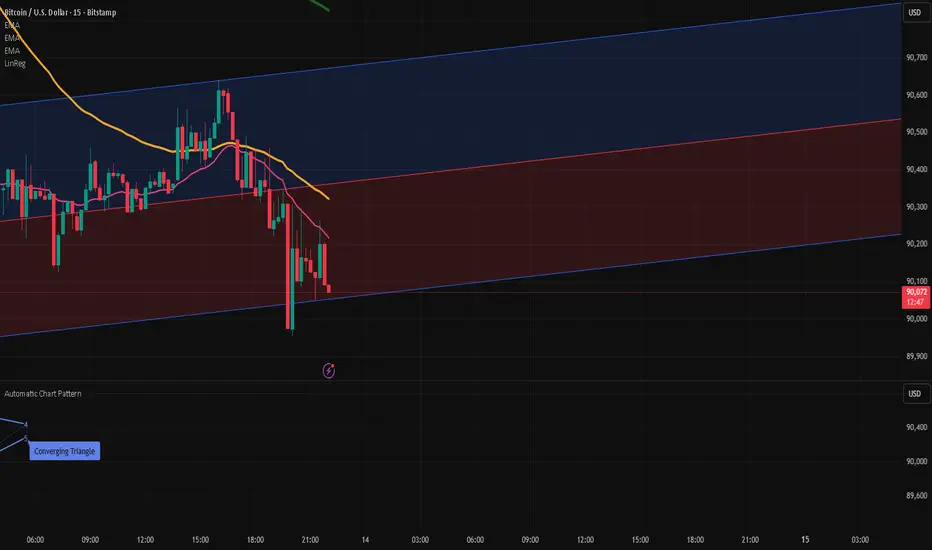
RCI4linesRCI4lines plots four Rank Correlation Index (RCI) lines in a single panel to help you read momentum and trend conditions at a glance.
It shows two short-term RCIs (default: 7 and 9), a middle-term RCI (26), and a long-term RCI (52).
The script also draws shaded threshold zones between +80 to +95 and -80 to -95, making it easier to spot potential overbought / oversold areas and compare short-term moves with the bigger trend.
Useful for scalping to day trading, and for checking whether short-term momentum is aligned with mid/long-term direction.

S50 Complete Hedge & Trade SystemTFEX:S501!
คู่มือการเทรด CALENDAR SPREAD
1. กลยุทธ์หลัก: MEAN REVERSION SPREAD TRADING
หลักการ:
- Spread ระหว่าง series จะมีค่าเฉลี่ย (Mean) และแกว่งไปมารอบๆ ค่าเฉลี่ยนี้
- เมื่อ Spread เบี่ยงเบนไปจาก Mean มากเกินไป จะกลับมาหาค่าเฉลี่ย (Mean Reversion)
2. INDICATORS ที่ใช้
A. Z-Score
Z-Score = (Spread ปัจจุบัน - Spread เฉลี่ย) / Standard Deviation
การตีความ:
- Z > +2.0 → Spread แพงเกินไป → SHORT spread
- Z < -2.0 → Spread ถูกเกินไป → LONG spread
- Z ≈ 0 → Spread อยู่ที่ค่าเฉลี่ย → EXIT
B. Correlation
Correlation > 0.9 = ดีมาก (เคลื่อนไหวพร้อมกัน 90%+)
Correlation > 0.7 = ดี (ใช้ได้)
Correlation < 0.7 = ไม่แนะนำ (Hedge ไม่มีประสิทธิภาพ)
C. Beta & Hedge Ratio
Beta = Cov(S1, S2) / Var(S2)→ บอกว่า S1 เคลื่อนไหวเท่าไหร่เมื่อ S2 เคลื่อนไหว 1 หน่วย
Hedge Ratio = Beta→ ใช้คำนวณจำนวน contract ที่ต้อง hedge
3. วิธีการเทรด SPREAD (ทีละขั้นตอน)
STEP 1: หาโอกาส
เงื่อนไข Entry:
1. |Z-Score| >= 2.0
2. Correlation > 0.7
3. Signal = "SHORT SPREAD" หรือ "LONG SPREAD"
STEP 2: คำนวณ Position Size
ตัวอย่าง:
- Account Size = 1,000,000 บาท
- Risk Per Trade = 2% = 20,000 บาท
- Spread Std Dev = 15 จุด
- Stop Loss = 1.0x Std Dev = 15 จุด
- S50 มูลค่า = 5 บาท/จุด
Position Size = Risk Amount / (SL Distance × Point Value)
= 20,000 / (15 × 5)
= 20,000 / 75
= 266 contracts (ปัดเป็น 26 สัญญา)
STEP 3: คำนวณ Hedge Ratio
สมมติ: Beta (S1:S2) = 1.05
ถ้าเทรด SHORT S2-S1 spread:
- Sell S2: 26 contracts
- Buy S1: 26 × 1.05 = 27.3 → ปัดเป็น 27 contracts
Portfolio Delta ≈ 0 (Market Neutral)
4. ตัวอย่างการเทรดจริง
SCENARIO A: SHORT SPREAD (Z-Score = +2.5)
สถานการณ์:
- S2-S1 Spread = 50 จุด
- Spread MA = 35 จุด
- Spread Std Dev = 6 จุด
- Z-Score = (50-35)/6 = +2.5 ⚠️ แพงเกินไป
- Correlation = 0.92 ✅
- Beta = 1.05
TRADE PLAN:
1. SELL S2: 10 contracts @ 1,200
2. BUY S1: 10 × 1.05 = 10.5 → 11 contracts @ 1,150
Initial Spread = 50 จุด
Take Profit (TP):
- Target Spread = MA = 35 จุด
- TP Distance = 50 - 35 = 15 จุด
- Profit = 15 × 5 = 75 บาท/spread
- Total Profit = 75 × 10 = 750 บาท
Stop Loss (SL):
- SL Spread = MA + (1.5 × Std Dev) = 35 + 9 = 44 จุด
- SL Distance = 50 - 44 = 6 จุด (ผิดพลาด - ควรเป็น 50 + 6 = 56)
- Loss = 6 × 5 × 10 = 300 บาท
Risk:Reward = 300:750 = 1:2.5
SCENARIO B: LONG SPREAD (Z-Score = -2.3)
สถานการณ์:
- S3-S2 Spread = 20 จุด
- Spread MA = 35 จุด
- Spread Std Dev = 6.5 จุด
- Z-Score = (20-35)/6.5 = -2.3 ⚠️ ถูกเกินไป
- Correlation = 0.88 ✅
- Beta = 1.03
TRADE PLAN:
1. BUY S3: 10 contracts @ 1,230
2. SELL S2: 10 × 1.03 = 10.3 → 10 contracts @ 1,210
Initial Spread = 20 จุด
Take Profit:
- Target Spread = 35 จุด
- Profit = (35-20) × 5 × 10 = 750 บาท
Stop Loss:
- SL Spread = MA - (1.5 × Std Dev) = 35 - 9.75 = 25.25 จุด
- SL = 20 - (20-25.25) = 14 จุด
- Loss = 6 × 5 × 10 = 300 บาท
5. RISK MANAGEMENT
A. Position Sizing Rules
1. อย่าเสี่ยงเกิน 2-3% ต่อการเทรด
2. ใช้ Beta Hedge Ratio เสมอ
3. ตรวจสอบ Margin requirement
B. Stop Loss Strategy
วิธีที่ 1: Fixed Std Dev
- SL = Entry ± (1.0-1.5x Std Dev)
วิธีที่ 2: ATR-based
- SL = Entry ± (1.5x ATR)
วิธีที่ 3: Time-based
- ปิดภายใน 3-5 วัน ถ้าไม่ได้กำไร
C. Take Profit Strategy
วิธีที่ 1: Target MA
- TP เมื่อ Spread กลับมาที่ MA
วิธีที่ 2: Partial Profit
- ปิด 50% เมื่อได้ 1x Std Dev
- ปิดอีก 50% เมื่อ Z-Score = 0
วิธีที่ 3: Trailing Stop
- Trailing SL = 0.5x Std Dev
6. สูตรคำนวณสำคัญ
1. Position Size
position_size = (account_size × risk_pct) / (sl_distance × point_value)
2. Hedge Contracts
hedge_contracts = position_size × beta
3. Profit/Loss Calculation
pnl = (exit_spread - entry_spread) × contracts × point_value
4. Risk:Reward Ratio
risk = sl_distance × contracts × point_value
reward = tp_distance × contracts × point_value
rr_ratio = reward / risk // ควร >= 2:1
5. Spread Value
spread_value = price_far - price_near
7. CHECKLIST ก่อนเทรด
☐ Z-Score >= ±2.0
☐ Correlation > 0.7
☐ Beta Hedge Ratio คำนวณแล้ว
☐ Position Size ไม่เกิน 2-3% risk
☐ TP/SL กำหนดชัดเจน
☐ Risk:Reward >= 2:1
☐ Margin เพียงพอ
☐ ตรวจสอบ Expiry Date ทั้ง 2 series
8. เทคนิคขั้นสูง
A. Calendar Roll Strategy
เมื่อ Near series ใกล้หมดอายุ:
1. ปิด Near leg
2. เปิด Next series leg ใหม่
3. รักษา Spread position ต่อไป
B. Butterfly Spread
ใช้ 3 series พร้อมกัน:
- Buy S1
- Sell 2×S2
- Buy S3
เหมาะกับตลาดไซด์เวย์
C. Dynamic Hedging
ปรับ Hedge Ratio ตาม:
- Beta ที่เปลี่ยนแปลง
- Volatility
- Time to Expiry
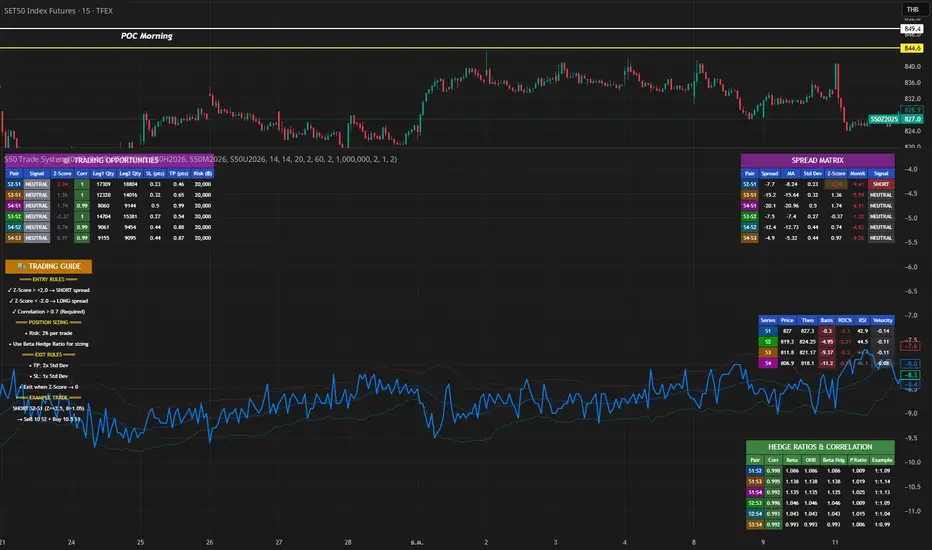
GHOST SNIPERGHOST SNIPER™ – BB Reversal Engine + Smart Entry / Exit Structure Core
MNQ / MES / Stocks / ETFs / Crypto / FX
BB Reversals · Breakouts · PD Structure · Liquidity Sweeps · Displacement · Smart Targets · Quick SL & TP Logic
________________________________________
Summary
Ghost Sniper™ is a high-precision reversal and breakout engine designed for intraday scalping on MNQ/MES, while remaining highly effective across equities, ETFs, crypto, and FX.
It blends a custom Bollinger Reversal Framework (BB Bottom / BB Top Sniper) with an internal ICT-style structure core to filter noise and isolate only high-quality turning points.
The system reads stretch and failure conditions, detects band breakouts, and identifies Bollinger Band failures to anticipate sharp reversals. It includes a Quick TP (QTP) and Quick SL (SL-Q) module for micro-scalps, along with full ICT-style structural targets (TP1, TP2, TP3) for extended runs.
All TP levels and SL placement are derived from smart structural logic, designed to reduce premature stop-outs and improve fill reliability during volatility.
Real-time intrabar logic ensures entries trigger the moment structure confirms — no repainting.
________________________________________
BUY / SELL Signal Activation & Checklist HUD
Ghost Sniper™ uses a rule-based BUY / SELL triggering system driven by real-time structural confirmation — not delayed indicators or hindsight logic.
Entries only activate when a multi-condition internal checklist aligns, combining:
• Bollinger stretch, failure, or breakout behavior
• Liquidity sweep or rejection context
• Micro structure confirmation (BOS / displacement)
• Premium / Discount positioning
• Momentum and reversal candle confirmation
A built-in Checklist Activation HUD visually displays when conditions are forming, aligning, or fully confirmed, allowing traders to see why a signal is valid — not just that it fired.
BUY / SELL signals trigger only when checklist confirmation is reached, filtering low-probability setups and maintaining clean, high-quality entries.
All logic operates intrabar and in real time, with no repainting.
________________________________________
Market Structure & Context Awareness
Ghost Sniper™ incorporates a streamlined ICT-inspired framework, including:
• Liquidity sweep awareness (stop-runs and grabs)
• Micro BOS confirmation
• Premium / Discount context
• Impulse and displacement reads
• Reversal candle assist
• Optional PD / HTF alignment gates
To support institutional-grade context without visual clutter, Ghost Sniper™ also includes a comprehensive set of fully optional, user-selectable tools, allowing traders to tailor the chart to their workflow:
• VWAP
• Up to 5 configurable moving averages
• Bollinger Bands
• Automatic liquidity sweep level detection
• Opening Range Breakout (ORB)
• Midnight Open
• 9:30 AM New York Open
• Previous Day High / Low (PDH / PDL)
• Previous Week High / Low (PWH / PWL)
• Current Week High / Low (CWH / CWL)
• Monthly High / Low
• Previous Month High / Low (PMH / PML)
• Global session tracking, including:
o Asia Session
o London Session
o New York Session
All levels and context tools are individually selectable, designed to provide structure and bias awareness while keeping charts clean and focused.
________________________________________
Execution & Risk Logic
Ghost Sniper™ automatically prints clean, minimal BUY / SELL signals, intelligent stop placement, and progressive target logic:
QTP → TP1 → TP2 → TP3
A built-in Break-Even engine, structural invalidation logic, and one-trade-at-a-time control help maintain disciplined execution and consistent risk management.
Designed for traders who want a fast, decisive, and high-probability entry engine without visual noise or unnecessary complexity.
________________________________________
Disclaimer
This tool is for educational and research purposes only and is not financial advice.
Always test thoroughly in replay or paper trading before using in live markets.

Bollinger Bands with Price Labels============================================================================
BOLLINGER BANDS PRO - ENHANCED TRADING INDICATOR
============================================================================
HEADLINE: Professional Bollinger Bands with Dynamic Price Labels & Smart Alerts
DESCRIPTION:
// This advanced Bollinger Bands indicator goes beyond the basic implementation
// by providing real-time price tracking, customizable visual themes, and
// intelligent alert system for better trading decisions.
// KEY FEATURES:
• Dynamic Price Labels - Auto-formatting for readability (M/B/T for large numbers)
• Smart Alerts - Get notified on key price crossovers and band touches
• Dual Color Themes - Dark and Light modes for any chart background
• Custom Label Styling - Full control over size, shape, position, and colors
• Visual Clarity - Dotted lines connecting bands to labels
• Separate Color Zones - Different fills above/below basis for instant analysis
• Real-time Updates - Labels update dynamically with live price action
// BENEFITS OVER STANDARD BOLLINGER BANDS:
✓ No need to hover over lines to see exact prices
✓ Instant recognition of overbought/oversold zones with color coding
✓ Professional appearance with customizable branding
✓ Automated alerts eliminate constant chart monitoring
✓ Better readability for high-value assets (crypto, stocks)
✓ Cleaner charts with organized label placement
✓ Theme compatibility for day/night trading sessions
// PERFECT FOR:
- Day traders needing quick price reference
- Swing traders monitoring multiple timeframes
- Crypto traders dealing with large price numbers
- Professional chartists wanting clean, branded setups
// ========================================

Custom Weekly SeparatorShows week start with option to customize the separator line and change color, width, style

VD FRFS PROVD FRFS PRO
This trader centric, multi-functional indicator built on Pine Script v6 that seamlessly integrates four of the most critical price and volatility tools into a single overlay. Designed for day traders, swing traders, and institutional analysts, this tool provides a comprehensive view of volatility, trend, volume-based pricing, and structure, all without chart clutter.
Overview & Concept
The VD FRFS PRO is engineered for efficiency and clarity. Instead of layering four separate indicators, which can lead to performance issues and confusion, this script combines the calculations into one, allowing traders to execute complex technical analysis rapidly.
It serves as a powerful foundation for strategies that require:
1. Volatility Assessment (Bollinger Bands)
2. Volume-Weighted Fair Value (VWAP)
3. Price Structure & Swings (Zig Zag)
4. Dynamic Trend Filtering (Configurable SMA)
Customization & Settings
All inputs are logically grouped for ease of use in the indicator's settings menu.
Bollinger Bands Settings
BB Length: Period for the Basis SMA and StdDev calculation (default: 20).
BB Source: Price series for the calculation (default: `close`).
BB StdDev Multiplier: Multiplier for the Standard Deviation (default: 2.0).
BB Offset: Shifts the bands horizontally (default: 0).
VWAP Settings
VWAP Source: Price series for the VWAP calculation (default: `hlc3`).
Zig Zag Settings
Zig Zag High/Low Length: Lookback period for determining swing points (default: 3).
SMA Settings
SMA Period: Lookback period for the configurable SMA (default: 20).
Show SMA: Checkbox to toggle the visibility of this SMA (default: `true`).
Disclaimer
Feel free to reach out for suggestions and modification requests.

Resampling Reverse Engineering Bands XRREB X: Visual Oscillator Projection Bands
Based on the innovative "Resampling Reverse Engineering" concept pioneered by Donovan Wall, this enhanced script fixes the core mathematical symmetry and provides anchored, non-repainting bands for reliable analysis.
This indicator transforms any RSI, Stochastic, or CCI calculation directly onto your price chart as dynamic support/resistance bands. Instead of watching an oscillator below your chart, you see its overbought/oversold levels projected as price levels the market must reach.
RREB X reverses standard oscillator formulas to answer one question: "What price must the market reach for my chosen oscillator to hit an extreme level like RSI=70, Stoch=80, or CCI=100?" It then plots these levels as actionable bands.
Key Improvements
Adjustable Oscillator Values - While the original was hard coded the reverse engineered oscillator length which limited its usefulness, this script finally allows you to visualize any length oscillator as dynamic OB/OS regions directly on the chart.
Dynamic OB/OS levels: This version also lets you dynamically adjust the OB/OS levels location, making bands tighter or wider as your strategy demands.
Mathematical Symmetry: Outer bands are perfect mirrors, providing reliable projected levels.
Fixed Anchoring: Bands don't repaint historically, offering stable reference lines.
Direct Price Translation: Oscillator overbought/oversold conditions are visualized as clear price levels.
The Band Calculation Type switch lets you project different oscillator logics, each with unique characteristics for different market conditions.
RRSI - General trend & momentum. Change RSI Period (e.g., 7 for fast, 21 for slow). Adjust OB/OS (e.g., 80/20 for strong trends). The bands show the price needed to push your custom RSI into overbought/oversold territory.
RStoch - Ranging markets & short-term reversals. Focus on the Stochastic Period. The projected bands are highly sensitive to recent highs/lows. Excellent for spotting reversals at the edges of a range.
RCCI - Strong trends & volatile markets. Use a higher Outer Bands Multiplier. CCI's lack of upper/lower bounds means bands reflect extreme momentum shifts. Great for identifying explosive breakout or breakdown levels in trends.
Use Middle Band as Filter: Price above the white middle band suggests a bullish bias for long setups; below suggests bearish for shorts. Same as the 50 midline on the RSI or Stochastic or 0 for CCI.
Customizing the Calculation:
The power lies in changing the oscillator lengths that the bands reflect. Adjust these in the settings:
Change from 14 to 7 for faster, more reactive bands, or to 21 for slower, smoother bands.
Overbought/Oversold: Change from 70/30 to 80/20 for stronger-trend filters, or to 60/40 for more frequent signals.
Trading the Bands:
Bands as Dynamic S/R: The solid cyan (Upper 100) and magenta (Lower 0) bands act as dynamic support and resistance. A touch and reversal can signal a trade.
Gradient as Momentum: The colored fills between bands visually represent the "pressure" needed to reach the next oscillator level.
Middle Band as Trend Filter: Price above the white middle band suggests a bullish bias for long setups; below suggests bearish for short setups.
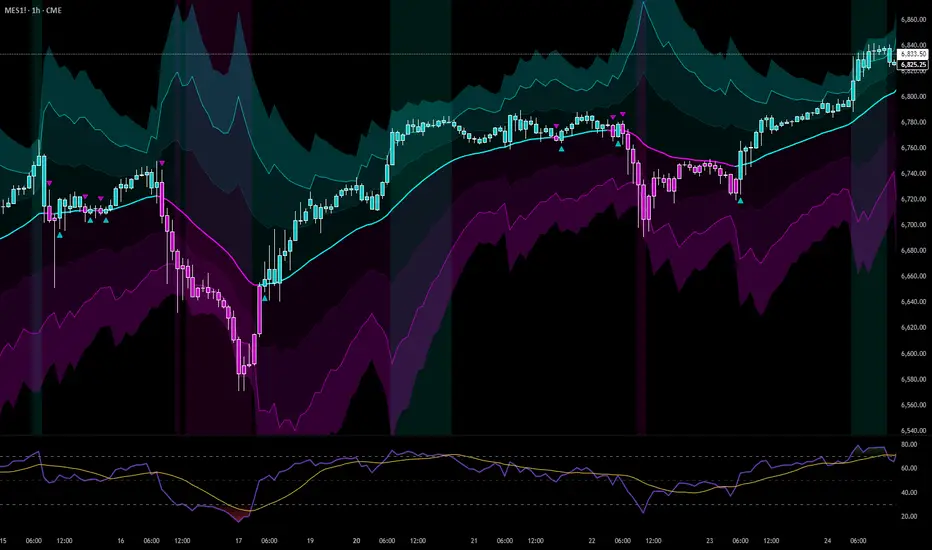
Quantum Darvas BoxesQuantum Darvas Boxes - The Modern Evolution
The original Darvas Box methodology, conceived by Nicolas Darvas in the 1950s, revolutionized breakout trading by identifying consolidation phases as "boxes." However, modern markets move with algorithmic speed and fractal volatility that often trigger false breakouts. Quantum Darvas Boxes were designed not as a nostalgic tribute, but as a computational upgrade. By anchoring boxes to volatility-adjusted boundaries rather than raw highs/lows, and introducing adaptive stability mechanisms, this indicator transforms a classic discretionary tool into a systematic, noise-filtered engine.
Description & Improvements
Quantum Darvas Boxes solve the three fatal flaws of the original: false breakouts, arbitrary box sizing, and lack of confirmation. Instead of drawing boxes at exact recent highs/lows, it creates volatility-buffered boundaries using ATR, ensuring breakouts require meaningful momentum. The boxes remain anchored until a confirmed close beyond the buffer occurs, preventing the constant redrawing that plagued traditional Darvas implementations. Built-in volume and RSI filters add discretionary-grade confirmation to pure price action. Visually, the system presents as a stable, semi-transparent blue zone between red (resistance) and lime (support) lines, with clear triangle signals appearing only on validated breakouts.
How It's Based on Darvas
The core philosophy remains true to Darvas' 1950s methodology:
Identify Consolidation: Finds price ranges where the market consolidates
Draw Box: Creates a "box" representing the accumulation zone
Breakout Trading: Enters when price breaks out of the box with momentum
Volatility-Adjusted Boundaries
Original: Boxes at exact highs/lows → prone to false breakouts
QDB: Boxes set at High - (ATR × Multiplier) and Low + (ATR × Multiplier)
→ Breakouts require meaningful momentum, not just price tags
→ Adapts to different volatility regimes
Signal Logic:
Long: Close above box top, previous close was inside box
Short: Close below box bottom, previous close was inside box
Ideal Settings:
For daily charts, use lookback=13 and mult=2.4.
For intraday (1H-4H), reduce to lookback=8 and mult=1.8. Enable volume filter in trending markets and RSI filter in ranging conditions.
Trade Execution: Enter long on the green triangle below the bar following a close above the red top line; enter short on the red triangle above the bar after a close below the lime bottom line. The background glow provides immediate visual confirmation.
Risk Management: Set stops at the opposite box boundary. The volatility multiplier inherently calculates a risk buffer—larger multipliers create wider, higher-conviction boxes; smaller multipliers produce more frequent, sensitive signals. This system excels in trending markets and provides clear exit/reversal points, transforming Darvas's original speculation into a quantified, repeatable edge.


Ultimate Reversion BandsURB – The Smart Reversion Tool
URB Final filters out false breakouts using a real retest mechanism that most indicators miss. Instead of chasing wicks that fail immediately, it waits for price to confirm rejection by retesting the inner band—proving sellers/buyers are truly exhausted.
Eliminates fakeouts – The retest filter catches only genuine reversions
Triple confirmation – Wick + retest + optional volume/RSI filters
Clear visuals – Outer bands show extremes, inner bands show retest zones
Works on any timeframe – From scalping to swing trading
Perfect for traders tired of getting stopped out by false breakouts.
Core Construction:
Smart Dynamic Bands:
Basis = Weighted hybrid EMA of HLC3, SMA, and WMA
Outer Bands = Basis ± (ATR × Multiplier)
Inner Bands = Basis ± (ATR × Multiplier × 0.5) → The "retest zone"
The Unique Filter: The Real Retest
Step 1: Identify an extreme wick touching the outer band
Step 2: Wait 1-3 bars for price to return and touch the inner band
Why it works: Most false breakouts never retest. A genuine reversal shows seller/buyer exhaustion by allowing price to come back to the "halfway" level.
Optional Confirmations:
Volume surge filter (default ON)
RSI extremes filter (optional)
Each can be toggled ON/OFF
How to Use:
Watch for extreme wicks touching the red/lime outer bands
Wait for the retest – price must return to touch the inner band (dotted line) within 3 bars
Enter on confirmation with built-in volume/RSI filters
Set stops beyond the extreme wick

CHOP-O-METER - Multi-Factor Choppiness DetectorA composite indicator that quantifies market choppiness using four independent measurements, helping you identify when to trade trends vs. when to sit out or fade moves.
━━━━━━━━━━━━━━━━━━━━━━━━━━━━━━━━━━━━━━━━
HOW IT WORKS
The Chop-O-Meter combines four normalized components (each scaled 0-100) into a single weighted score:
1. Price Efficiency (Kaufman-style)
Measures how efficiently price moved from point A to B. If price travels far but nets little distance, efficiency is low = high chop.
2. Direction Change Frequency
Counts how often price direction flips within the lookback period. More flips = more chop.
3. Mean Reversion Intensity
Tracks how often price crosses its moving average. Frequent crosses indicate a ranging, choppy market.
4. ATR Expansion Ratio
Compares the sum of individual bar ranges to the total period range. High ratio means lots of movement within a tight overall range = chop.
━━━━━━━━━━━━━━━━━━━━━━━━━━━━━━━━━━━━━━━━
READING THE INDICATOR
Above 65 (Red Zone): High chop — avoid trend-following, consider mean-reversion or staying flat
Below 35 (Green Zone): Trending — momentum strategies more likely to succeed
35-65 (Orange): Transitional/uncertain regime
━━━━━━━━━━━━━━━━━━━━━━━━━━━━━━━━━━━━━━━━
SIGNALS
🔻 Green triangle (top): Chop breaking down — potential trend starting
🔺 Red triangle (bottom): Trend exhausting — chop may be returning
━━━━━━━━━━━━━━━━━━━━━━━━━━━━━━━━━━━━━━━━
SETTINGS
Lookback Period: Number of bars to analyze (default 20)
Component Weights: Adjust influence of each factor
Thresholds: Customize high/low chop boundaries
Show Components: Toggle individual factor plots for debugging
━━━━━━━━━━━━━━━━━━━━━━━━━━━━━━━━━━━━━━━━
USE CASES
Filter out trend trades when chop score is high
Reduce position size in choppy regimes
Switch between mean-reversion and momentum strategies
Identify regime transitions early
━━━━━━━━━━━━━━━━━━━━━━━━━━━━━━━━━━━━━━━━
ALERTS INCLUDED
Entering High Chop
Entering Trend
Chop Breaking Down


AlphaWave Band + Tao Trend Start/End (JH) v1.1AlphaWave Band + Tao Trend Start/End (JH)
이 지표는 **“추세구간만 먹는다”**는 철학으로 설계된 트렌드 시각화 & 트리거 도구입니다.
예측하지 않고,
횡보를 피하고,
이미 시작된 추세의 시작과 끝만 명확하게 표시하는 데 집중합니다.
🔹 핵심 개념
AlphaWave Band
→ 변동성 기반으로 기다려야 할 자리를 만들어 줍니다.
TAO RSI
→ 과열/과매도 구간에서 지금 반응해야 할 순간을 정확히 짚어줍니다.
🔹 신호 구조 (단순 · 명확)
START (▲ 아래 표시)
추세가 시작되는 구간
END (▼ 위 표시)
추세가 종료되는 구간
> 중간 매매는 각자의 전략 영역이며,
이 지표는 추세의 시작과 끝을 시각화하는 데 목적이 있습니다.
🔹 시각적 특징
20 HMA 추세선
상승 추세: 노란색
하락 추세: 녹색
횡보 구간: 중립 색상
기존 밴드와 세력 표시를 훼손하지 않고
추세 흐름만 직관적으로 강조
🔹 추천 사용 구간
3분 / 5분 (단타 · 스캘핑)
일봉 (중기 추세 확인)
> “예측하지 말고, 추세를 따라가라.”
---
📌 English Description (TradingView)
AlphaWave Band + Tao Trend Start/End (JH)
This indicator is designed with one clear philosophy:
“Trade only the trend.”
No prediction.
No noise.
No meaningless sideways signals.
It focuses purely on visualizing the START and END of trend phases.
🔹 Core Concept
AlphaWave Band
→ Defines where you should wait based on volatility.
TAO RSI
→ Pinpoints when price reaction actually matters near exhaustion zones.
🔹 Signal Logic (Clean & Minimal)
START (▲ below price)
Marks the beginning of a trend
END (▼ above price)
Marks the end of a trend
> Entries inside the trend are trader-dependent.
This tool is about structure, not over-signaling.
🔹 Visual Design
20 HMA Trend Line
Uptrend: Yellow
Downtrend: Green
Sideways: Neutral
Trend visualization without damaging existing bands or volume context
🔹 Recommended Timeframes
3m / 5m for scalping & intraday
Daily for higher timeframe trend structure
> “Don’t predict. Follow the trend.”

AI Adaptive Supertrend ChannelAI Supertrend Channel – The Adaptive Trend System
Beyond Basic Supertrend: An Intelligent Trading Framework
The AI Adaptive Supertrend Channel transcends traditional trend following indicators by delivering a self-optimizing trading system. Its core innovation is a triple-adaptive engine that automatically adjusts channel width based on real-time market conditions:
Market Efficiency Detection – Widens during clean trends, tightens in choppy ranges
Normalized Volatility – Scales appropriately to any asset's price level
Dynamic Momentum Response – Expands aggressively during powerful directional moves
The Result: A smarter tool that reduces false signals in consolidation while giving trends ample room to run—eliminating the constant parameter tweaking required by static indicators.
Visual Signal Framework & Strategic Applications
Channel Architecture:
Primary Trend Line (Thick Green/Red): Your dynamic trailing stop and core trend indicator. Green signals an uptrend (buying bias), Red signals a downtrend (selling bias).
Upper & Lower Bands: Form a dynamic support/resistance channel around the trend.
Mid-Line: A critical mean reversion level and the trigger for key early signals.
Trading Signals & Strategic Meaning:
Primary Signal: Momentum Diamonds (High Conviction)
💎 Green Diamond (Higher High): Price closes above the Upper Band after making a new high. Signals strong bullish momentum continuation. Ideal for adding to long positions or entering new longs in an established uptrend.
💎 Red Diamond (Lower Low): Price closes below the Lower Band after making a new low. Signals strong bearish momentum continuation. Ideal for adding to short positions or entering new shorts in a downtrend.
Secondary Signal: Mid-Line Crosses (Early Action)
🔼 Green Triangle (Bullish Mid-Line Cross - bullMidCross): Price crosses above the Mid-Line. This is an early bullish pullback signal within a larger uptrend or a potential early reversal sign in a downtrend. Use for early entries or to confirm the end of a bearish pullback.
🔽 Red Triangle (Bearish Mid-Line Cross - bearMidCross): Price crosses below the Mid-Line. This is an early bearish pullback signal within a larger downtrend or a potential early warning of weakness in an uptrend. Use for early short entries or to take profits on longs.
Practical Trading Strategies
Trend Following: Align trades with the Primary Trend Line color. Use the line itself as a dynamic stop-loss. The Momentum Diamonds confirm the trend's strength.
Pullback Trading: Use the Mid-Line Cross triangles (bullMidCross/bearMidCross) to identify high-probability entries during trend retracements. The channel bands provide natural profit targets.
Breakout Confirmation: A Momentum Diamond following a period of consolidation often confirms a genuine breakout, offering a signal to enter with the new momentum.
Optimal Settings Guide
Default (Universal)
For most markets, timeframes
ATR: 13 | ER: 144 | Channel Width: 0.7
Volatility Factor: 100 | Vol MA: HMA | Trend MA: EMA
Day Trading (Fast, Responsive)
*15M-1H charts, scalping*
ATR: 8 | ER: 89 | Channel Width: 0.6
Volatility Factor: 120 | Vol MA: EMA | Trend MA: WMA
*Swing Trading (Smooth, Conservative)*
*Daily-Weekly, position trading*
ATR: 21 | ER: 200 | Channel Width: 0.9
Volatility Factor: 80 | Vol MA: HMA | Trend MA: LINREG
Channel Width × Factor
0.5-0.7 → Tighter (more signals, less room)
0.8-1.2 → Wider (fewer signals, more room to run)
Volatility Regime Factor
50-80 → Less sensitive to volatility (stable markets)
100-150 → More sensitive (volatile markets like crypto)
Base ATR Length
8-13 → Faster signals (lower timeframes)
17-21 → Smoother signals (higher timeframes)
Quick Adjustments:
Whipsaws → Increase Channel Width × Factor
Lagging → Decrease ATR Length
Volatile markets → Increase Volatility Regime Factor
Start with Default, adjust one parameter at a time based on your market and trading style.
