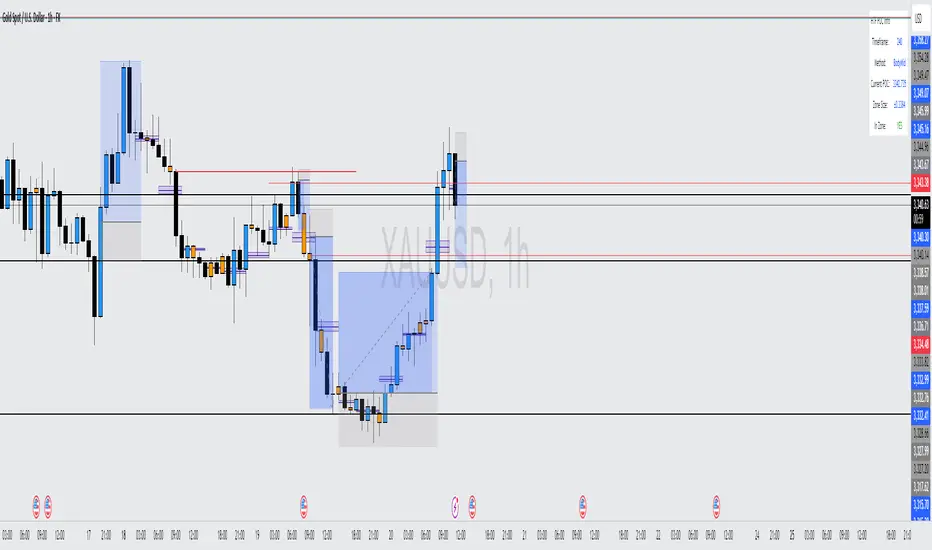
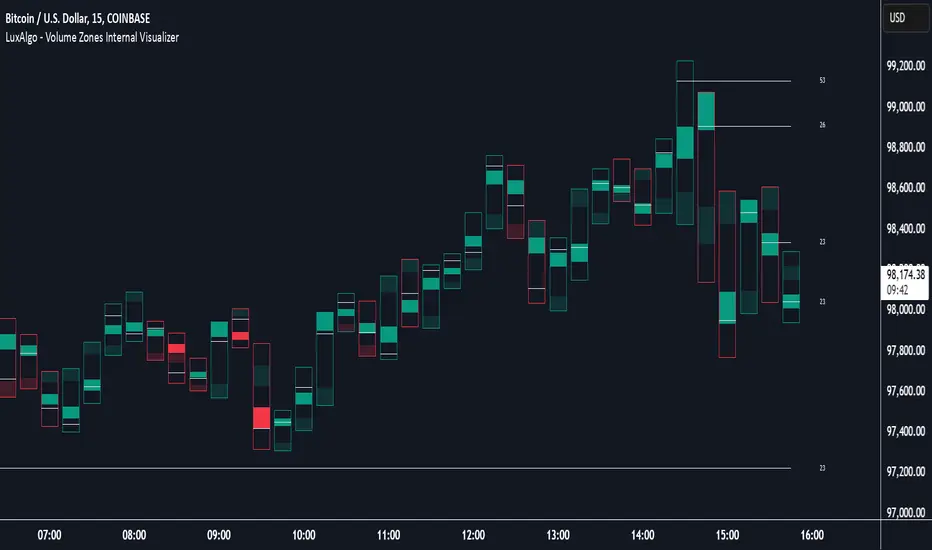
Swing Volume Profile Pro [WillyAlgoTrader]📊 Swing Volume Profile Pro is an overlay indicator that builds a true volume distribution profile for each completed swing leg — distributing each candle's volume across price bins proportionally to how much of the candle's range overlaps each bin (TPO-like allocation), then calculating the Point of Control (highest-volume price), Value Area (70% of volume around POC), buy/sell delta per bin, and swing VWAP. The result is a volume profile that maps exactly to the swing structure, not to arbitrary time intervals.
Most volume profile tools on TradingView are session-based or fixed-period — they split time into equal windows (daily, weekly, or N-bar segments) and build a profile for each. This means a single profile can contain parts of two different swing legs going in opposite directions, mixing bullish and bearish volume into one distribution. The POC and Value Area from such profiles reflect the time window, not the price structure.
This indicator solves that by anchoring each profile to the actual swing structure: a profile starts at one pivot (swing high or swing low) and ends at the next. Every bar within that swing leg contributes its volume to the bins of that specific leg. The POC tells you where the most trading occurred during that exact directional move. The Value Area shows the 70% concentration zone for that move. The delta profile shows which bins were buy-dominant vs sell-dominant within that leg. This structural anchoring makes the volume data directly relevant to the swing you're analyzing.
🧩 WHY THESE COMPONENTS WORK TOGETHER
A volume profile alone tells you where trading concentrated — but without structural context, you don't know whether that concentration happened during an impulse or a correction. A swing detector alone tells you direction changed — but without volume data, you don't know whether the reversal had participation behind it.
This indicator connects them into a single analytical unit:
Pivot detection → Swing leg identification → Candle-range volume distribution → POC/VA/VWAP/Delta calculation → Structural visualization
The swing detector (ta.pivothigh/pivotlow) defines the boundaries of each leg. The volume distribution engine allocates each candle's volume to the correct price bins based on the candle's actual range overlap (not just its close). The POC identifies the price where the market spent the most effort during that specific move. The Value Area defines the consensus price zone. The delta shows whether buyers or sellers dominated at each price level. And the swing VWAP gives the fair value for the entire move. Together, these components answer: "during this specific swing move, where did the market agree on value, and who was in control?"
🔍 WHAT MAKES IT ORIGINAL
1️⃣ Candle-range volume distribution (TPO-like allocation).
Standard volume profiles assign each candle's entire volume to a single bin (usually the close price). This creates distortion: a wide-range candle that spans 10 bins puts all its volume in one, leaving 9 bins empty. This indicator distributes volume proportionally:
For each candle, for each bin:
overlap = max(0, min(candle_high, bin_high) − max(candle_low, bin_low))
portion = overlap / candle_range
allocated_volume = candle_volume × portion
A candle spanning 5 bins distributes its volume across all 5, weighted by how much of its range falls within each bin. This produces a smooth, accurate volume distribution that reflects where the market actually traded within each candle, not just where it closed.
Additionally, each candle is classified as bullish (close ≥ open) or bearish (close < open), and its allocated volume is tracked separately in buy and sell arrays. This enables the delta profile: at every price bin, you can see whether buy or sell volume dominated.
2️⃣ Swing-anchored profiles (not time-anchored).
Profiles are built between confirmed pivot highs and pivot lows detected by ta.pivothigh(high, swingLen, swingLen) and ta.pivotlow(low, swingLen, swingLen). Each completed swing leg (from one pivot to the next) becomes its own volume profile with independent POC, Value Area, delta, and VWAP. The bins span the exact swing range (min to max price within the leg), and only bars within the leg contribute volume.
A noise filter skips swings smaller than 0.3× ATR(200) — preventing micro-swings from generating meaningless profiles.
3️⃣ Value Area calculation using the CME expansion method.
The Value Area is computed using the standard market profile algorithm: starting from the POC bin, expand alternately upward and downward, adding whichever adjacent bin has more volume, until 70% of total swing volume is captured.
In code: starting with accumulated = volume , the algorithm compares volume vs volume . If the upper bin has more volume (or equal), it expands upward and adds that volume. Otherwise, it expands downward. This continues until accumulated ≥ totalVolume × 0.70. The result is VA High (top of the uppermost included bin) and VA Low (bottom of the lowermost included bin).
This is the same expansion method used by the CME for market profile — it's not a simple percentile calculation. The VA wraps around the POC in the direction of volume concentration, which may be asymmetric.
4️⃣ POC zone with persistent extension.
The POC is not just a single line — it includes the full price bin (top and bottom boundaries) displayed as a shaded zone. This zone extends rightward from the end of the swing leg until the next profile appears, providing a forward-looking support/resistance reference. When a new swing completes, the previous POC zone is trimmed to the boundary of the new profile, and the new zone begins extending.
This means you always see the most recent POC zone extending into current price action — if price is trading within the POC zone, it's at the highest-volume price of the last completed swing. If price breaks above/below the zone, it's leaving the area of strongest volume consensus.
5️⃣ Buy/sell delta profile.
When enabled, each profile bin is colored by its buy/sell imbalance: green if buy volume ≥ sell volume, red if sell volume dominates. A bullish swing with mostly green bins confirms strong demand throughout the move. A bullish swing with red bins at the top suggests sellers are absorbing the advance — potential exhaustion. This buy/sell classification is based on candle direction (close ≥ open = buy candle), applied proportionally through the same distribution mechanism as total volume.
6️⃣ Swing VWAP per leg.
A separate VWAP is calculated for each swing leg: sum(typical_price × volume) / sum(volume), where typical_price = (high + low + close) / 3 for each bar within the leg. This gives the volume-weighted fair value for that specific move — distinct from session VWAP or rolling VWAP. If price retests a previous swing VWAP, it's returning to the average traded price of that move.
7️⃣ Dual visualization modes: histogram profile + heatmap.
Two display modes for the volume distribution:
— Profile mode (default): horizontal histogram bars extending from the swing boundary, with a polyline outline. Width proportional to volume at each bin. The highest-volume bin (POC) is highlighted.
— Heatmap mode : fills the entire swing range with color-gradient boxes. Higher volume = more opaque/saturated color. Lower volume = more transparent. This gives a density map of where volume concentrated within the swing.
Both modes support delta coloring. The profile mode includes volume text on the POC bin.
8️⃣ Real-time forming swing profile.
The indicator doesn't wait for a swing to complete — it continuously builds a profile for the current forming swing leg. As each new bar adds volume, the real-time profile updates: bins are recalculated, POC may shift, Value Area may expand. This profile is drawn in a neutral color (gray) to distinguish it from confirmed profiles. When the swing completes (next pivot confirmed), the real-time profile is replaced by the finalized historical profile in the swing's directional color.
9️⃣ Comprehensive tooltip data on swing labels.
Each swing pivot label (▲ for bullish, ▼ for bearish) contains a tooltip with complete swing statistics: total volume, buy volume, sell volume, delta percentage, POC price, Value Area range, and swing VWAP. This compresses all the analytical data into a single hover interaction — you can quickly review any historical swing's volume profile data without cluttering the chart.
⚙️ HOW IT WORKS — CALCULATION FLOW
Step 1 — Swing detection: ta.pivothigh(high, swingLen, swingLen) and ta.pivotlow(low, swingLen, swingLen) detect confirmed pivots. Pivots are confirmed swingLen bars after they form. Direction flips when a new pivot type appears (swing high → bearish direction, swing low → bullish direction).
Step 2 — Swing leg boundaries: When direction flips, the completed leg is defined from the previous pivot index to the current pivot index. The swing range (top − bottom) is divided into N bins (default 20). A noise filter requires swing range > 0.3× ATR(200).
Step 3 — Volume distribution: For each bar in the leg, the candle's volume is distributed across bins proportional to range overlap. Buy/sell arrays track bullish vs bearish candle volume separately. Typical price × volume is accumulated for VWAP.
Step 4 — POC: The bin with the highest total volume is identified. Its center price becomes POC, and its upper/lower boundaries define the POC zone.
Step 5 — Value Area: Starting from the POC bin, expand alternately toward the bin with more volume (up or down) until 70% of total swing volume is accumulated. The top of the upper boundary and bottom of the lower boundary define VA High and VA Low.
Step 6 — Visualization: Profile boxes are drawn with width proportional to volume/maxVolume × halfSpan. The polyline outline traces the profile shape. POC zone extends rightward until the next profile. VA lines span the leg. VWAP line marks the fair value.
Step 7 — Real-time update: On the last bar, the current forming swing is profiled with the same algorithm. All real-time drawings are deleted and recreated each bar (delete-before-create pattern) for clean updates.
📖 HOW TO USE
🎯 Quick start:
1. Add the indicator — profiles appear on each completed swing leg
2. The widest bar in each profile = POC (highest volume price)
3. Blue dashed lines = Value Area boundaries (70% of volume)
4. Green/red bin colors = buy vs sell dominance at each price level
5. The POC zone (shaded) extends rightward — watch how price interacts with it
👁️ Reading the chart:
— 🟢 Green profile = bullish swing leg (low → high)
— 🔴 Red profile = bearish swing leg (high → low)
— ⚫ Gray profile = current forming swing (not yet confirmed)
— 🔵 Dark blue line + shaded zone = POC (extends rightward as S/R reference)
— 🔵 Blue dashed lines = Value Area High / Low
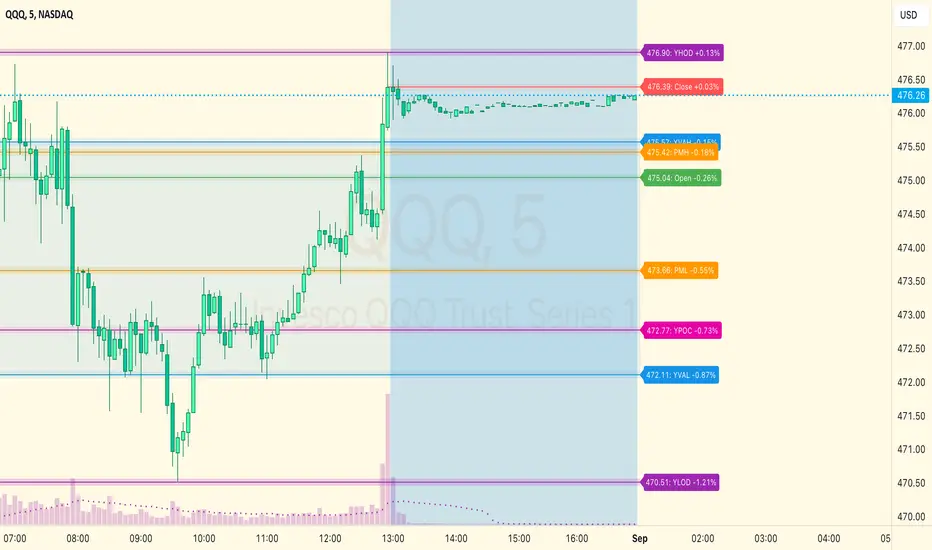
— 🟣 Purple solid line = Swing VWAP (fair value for the leg)
— 🟢🔴 Bin colors (delta mode) = buy vs sell dominance per price level
— ▲/▼ labels at pivots = swing reversals (hover for full volume data)
📊 Key analysis patterns:
— POC at swing extreme : heavy volume at the high/low of the swing → potential exhaustion (climax volume)
— POC in middle of swing : most volume at fair value → healthy acceptance, trend likely to continue
— Wide Value Area : volume distributed broadly → uncertainty, ranging behavior
— Narrow Value Area : volume concentrated tightly → strong consensus, potential breakout energy stored
— Delta divergence : bullish swing with red bins at top → sellers absorbing the rally → watch for reversal
— Price retesting POC zone : if the extended POC zone acts as support/resistance, the volume consensus from the previous swing is holding
📊 Dashboard fields:
— Trend: current swing direction (Bullish ▲ / Bearish ▼)
— POC: point of control price for the current/last swing
— VA 70%: value area range (low — high)
— VWAP: swing VWAP price
— Volume: total volume in the swing leg
— Delta: buy vs sell imbalance percentage (positive = buy dominant)
— Timeframe and version
⚙️ KEY SETTINGS REFERENCE
⚙️ Main:
— Swing Detection Length (default 21): pivot lookback — higher = larger swings, lower = more frequent
— Profile Bins (default 20): price resolution — higher = finer detail, lower = smoother
🎨 Visual:
— Volume Profile (default On): histogram display
— Heatmap (default Off): color-gradient fill instead of histogram
— Delta Profile (default On): buy/sell coloring per bin
— ZigZag (default On): swing connector lines (Dotted/Dashed/Solid)
— POC Line (default On): point of control with extending zone
— POC Zone Fill (default On): shaded POC bin
— Value Area (default On): VA High/Low lines
— Swing VWAP (default Off): volume-weighted average per leg
— Swing Labels (default On): pivot markers with tooltip data
— Reversal Signals (default Off): confirmed swing direction change markers
— Auto / Dark / Light theme
🔧 Advanced:
— POC Width (default 2): POC line thickness
— VA Width (default 1): Value Area line thickness
🔔 Alerts
— 🟢 SWING BULLISH — ticker, price, timeframe, POC, delta %
— 🔴 SWING BEARISH — same fields
Both support plain text and JSON webhook format. Bar-close confirmed.
⚠️ IMPORTANT NOTES
— 🚫 No repainting of confirmed profiles. Historical profiles are built on barstate.isconfirmed when a swing direction flip occurs. Once drawn, they don't change. The real-time forming profile updates each bar (by design — it's a live calculation), but confirmed profiles are final.
— 📊 Volume data required. The profile, POC, Value Area, delta, and VWAP calculations all depend on volume data. On instruments without volume (some forex pairs), the profiles will be flat (all bins equal) and the analysis loses its meaning. The indicator works best on instruments with reliable volume: crypto, stocks, futures.
— 📐 The candle-range distribution is an approximation of intrabar volume distribution. True tick-level distribution would require tick data, which TradingView doesn't provide. The proportional overlap method is the best approximation available and significantly more accurate than assigning all volume to the close price.
— ⚖️ The delta classification (buy vs sell) uses candle direction (close ≥ open), not actual trade-level order flow. A bullish candle's volume is classified as "buy" and a bearish candle's as "sell." This is a standard approximation used by most volume analysis tools on candle data.
— 📏 Swing Detection Length controls profile granularity. Length 21 produces medium-term swing profiles. Length 5–10 produces many small profiles (noisy). Length 50–100 produces few large profiles (macro structure). Choose based on your trading timeframe.
— 🔄 The POC zone extends rightward until the next profile appears. If no new swing occurs for a long time, the zone keeps extending — this is by design (the last known POC remains relevant until a new volume structure forms).
— 🛠️ This is a volume analysis and structural visualization tool , not an automated trading bot. It reveals where volume concentrated within each swing — trade decisions remain yours.
— 🌐 Works on all markets with volume data. All timeframes supported.
Chỉ báo Pine Script®