PROTECTED SOURCE SCRIPT
Cập nhật Demo - Demand Supply Zone Indicator
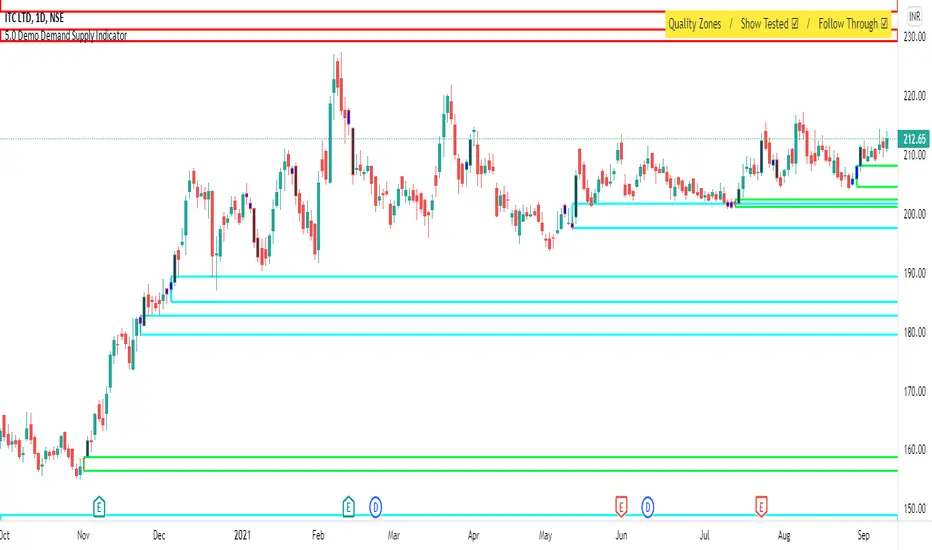
Demand Supply Zone indicator automatically pin points the demand and supply zone on the charts. The demo version will only identify zones on daily timeframe.
Phát hành các Ghi chú
The Demand Supply Zone indicator has been update to Version 2.0. New version has a lot more features added. List of all the features is provided below.1. You can choose which patterns the indicator should identify.
2. Number of candles in basing from 1 to 6.
3. Strength of the legout.
4. Identify follow-through patterns.
5. Hide Single Legout patterns.
6. Strength of the first legout in follow through pattern.
7. Strength of the second legout in the follow through pattern.
8. Customize Basing Color
9. Customize Legout Color
10. Display Pattern Name
11. Proximal and Distal Values
12. Color customization for Demand Supply Zone Labels
NOTE: Demo version will only identify zones on Daily timeframe.
Phát hành các Ghi chú
Bug FixPhát hành các Ghi chú
Bug FixPhát hành các Ghi chú
Version 3Automatically draws the Demand and Supply zones
Phát hành các Ghi chú
Bug FixPhát hành các Ghi chú
This update adds cosmetic changes to the indicator. You can now customize the color of 1. Fresh Demand Zone Border
2. Fresh Supply Zone Border
3. Tested Demand Zone Border
4. Tested Supply Zone Border
5. Fresh Demand Zone Fill Color
6. Fresh Supply Zone Fill Color
7. Tested Demand Zone Fill Color
8. Tested Supply Zone Fill Color
You can also customize the zone border width.
Phát hành các Ghi chú
Demo, upgraded to the full version for trial till 06 August 2021Phát hành các Ghi chú
Trial Over rolled back to the demo version.Phát hành các Ghi chú
Code OptimizedPhát hành các Ghi chú
Features Added in Version 5.01. Automated Curve Analysis.
2. Automated Zone Violations (recent 2 zones)
Phát hành các Ghi chú
Curve analysis will not give error even if the zones are far back in history.Phát hành các Ghi chú
The following 2 new features have been added1. Option to mark the zone using WickToWick or BodyToWick method.
2. Option to display Proximal and Distal values inside the zone.
Phát hành các Ghi chú
Changelog:- New Improved Algorithm for Zone Identification
- Option to select Legin method
- Zones based on GAPS
(NOTE: If you already have an active subscription, please remove the indicator from the chart and add it again to upgrade to the latest version 5.3)
Mã được bảo vệ
Tập lệnh này được đăng dưới dạng mã nguồn đóng. Tuy nhiên, bạn có thể sử dụng tự do và không giới hạn – tìm hiểu thêm tại đây.

Thông báo miễn trừ trách nhiệm
Thông tin và các ấn phẩm này không nhằm mục đích, và không cấu thành, lời khuyên hoặc khuyến nghị về tài chính, đầu tư, giao dịch hay các loại khác do TradingView cung cấp hoặc xác nhận. Đọc thêm tại Điều khoản Sử dụng.
Mã được bảo vệ
Tập lệnh này được đăng dưới dạng mã nguồn đóng. Tuy nhiên, bạn có thể sử dụng tự do và không giới hạn – tìm hiểu thêm tại đây.
Thông báo miễn trừ trách nhiệm
Thông tin và các ấn phẩm này không nhằm mục đích, và không cấu thành, lời khuyên hoặc khuyến nghị về tài chính, đầu tư, giao dịch hay các loại khác do TradingView cung cấp hoặc xác nhận. Đọc thêm tại Điều khoản Sử dụng.