Jinny Volunacci - Magic_xD
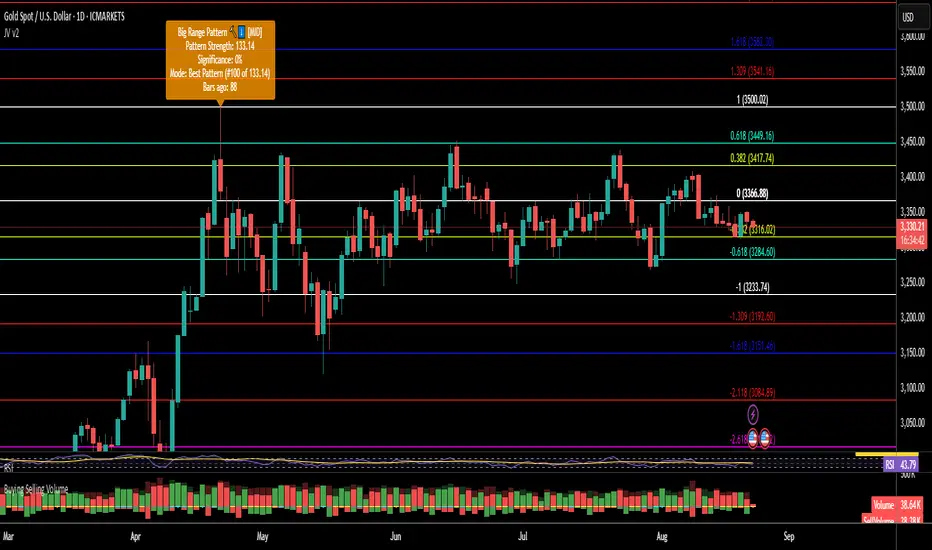
It auto-selects a reference candle (or lets you pick one), then projects Fibonacci levels that adapt to your trading style.
🔧 How to Use
Candle Selection Modes
Auto Volume – automatically picks the highest-volume candle in your chosen Lookback Bars.
Custom Date – manually select any candle by date/time.
Advanced Filter – detects key candlestick setups (Hammer, Shooting Star, Big Range) and ranks them for you.
Cycle Through Candidates (Select Best #)
When multiple candidates qualify (using Advanced Filter), use Select Best # to step through them:
#1 = top match, #2 = next, #3, … — based on your chosen sorting method (Best Pattern, Most Recent, Strongest).
Fibonacci Scaling
Switch between Linear or Logarithmic scale — or plot both simultaneously.
Custom Fib Levels & Styling
Add or remove Fibonacci levels freely.
Adjust each level’s value, label (price, %, or both), line style, and individual color.
Toggle visibility for retracements vs. extensions.
Labels & Info
Enable Show Candle Info to display a quick snapshot: which candle was picked, bars ago, pattern type, and volume context.
Reverse Option
Instantly flip the projection to the opposite direction.
🎯 Why Traders Use It
Turns a high-impact candle into a Fibonacci map of support/resistance.
Flexible selection: auto, pattern-based, custom date.
Quick cycling through ranked candidates with Select Best #.
Full customization of Fib levels, scaling, colors, and labels.
Works for both retracement and extension analysis.
⚠️ Disclaimer: For educational use only. Not financial advice. Always pair with your own system and risk management.
Tập lệnh chỉ hiển thị cho người được mời
Chỉ những người dùng được tác giả chấp thuận mới có thể truy cập tập lệnh này. Bạn sẽ cần yêu cầu và được cấp quyền sử dụng. Thông thường quyền này được cấp sau khi thanh toán. Để biết thêm chi tiết, làm theo hướng dẫn của tác giả bên dưới hoặc liên hệ trực tiếp với Magic_xD.
TradingView KHÔNG khuyến nghị bạn trả phí hoặc sử dụng một tập lệnh trừ khi bạn hoàn toàn tin tưởng vào tác giả và hiểu cách hoạt động của tập lệnh. Bạn cũng có thể tìm các lựa chọn miễn phí, mã nguồn mở trong các script cộng đồng của chúng tôi.
Hướng dẫn của tác giả

Thông báo miễn trừ trách nhiệm
Tập lệnh chỉ hiển thị cho người được mời
Chỉ những người dùng được tác giả chấp thuận mới có thể truy cập tập lệnh này. Bạn sẽ cần yêu cầu và được cấp quyền sử dụng. Thông thường quyền này được cấp sau khi thanh toán. Để biết thêm chi tiết, làm theo hướng dẫn của tác giả bên dưới hoặc liên hệ trực tiếp với Magic_xD.
TradingView KHÔNG khuyến nghị bạn trả phí hoặc sử dụng một tập lệnh trừ khi bạn hoàn toàn tin tưởng vào tác giả và hiểu cách hoạt động của tập lệnh. Bạn cũng có thể tìm các lựa chọn miễn phí, mã nguồn mở trong các script cộng đồng của chúng tôi.