TWP Position Size Display
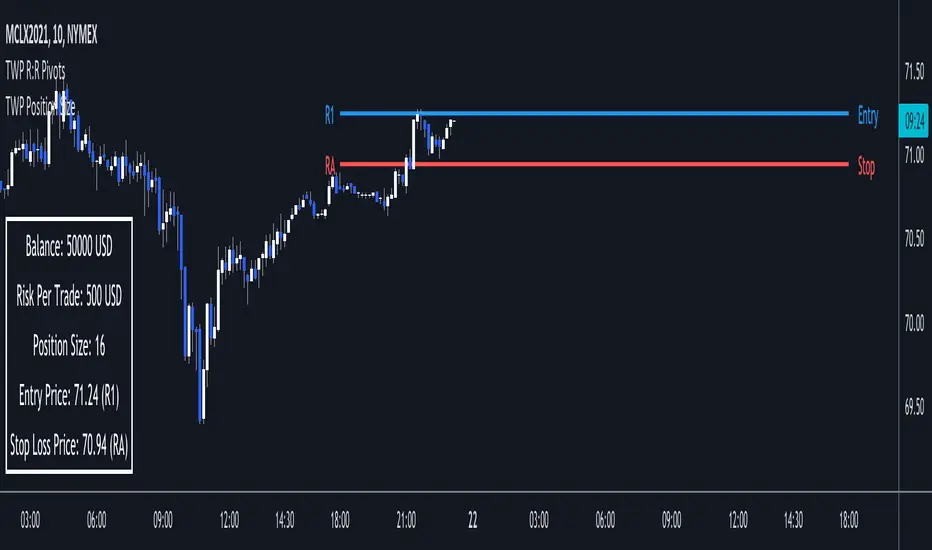
Proper position sizing can significant alter your returns from a positive or negative perspective. Being aware of how much size you should put on per trade can help you in the heat of the trading moment and from blowing your account. This script sheds light on that by displaying your account balance, risk per trade, proper position size per trade relative to the pivot point entry level, entry & stop loss price levels and adjoining pivot point labels. This is a companion tool to be used in conjunction with the Automatic Risk to Reward Pivots and/or Standard Fibonacci Pivot Points.
█ FEATURES
1 — Trade Settings
• Trade bias - long or short
• Entry choice - static or dynamic
• Manual entry choice
2 — Account Settings
• Account Balance
• Account leverage
• Account currency
3 — Risk Settings
• Risk per trade (%)
4 — Text
• Size selection
• Color selection
5 — Display
• Frame color selection
• Display position selection
█ HOW TO USE
• Start your trading session by entering in your account balance into the setting and update after every trade it completed
• Set your risk per trade %
• You are ready to trade in a risk adjusted manner
█ NOTES
• The power of this tool is in its persistent placement on the screen. It is key to know where your account is at. This limit can be played with when dealing with larger values. For instance lets say your daily risk is 100k well you don't want to blow all of that in a day so you can set your risk higher than the usual retailer and still stay within your risk limits.
• The risk to reward pivots is the battery pack behind the indicator because the risk % is based on the trade setups from the pivot points.
1 — Added ability to show/hide any item in the table
2 — Added proper unit identification for each type of security
3 — Changed name for "Trade Entry Choice" input from "Dynamic or Static" to "Auto or Manual"
Tập lệnh chỉ hiển thị cho người được mời
Chỉ những người dùng được tác giả chấp thuận mới có thể truy cập tập lệnh này. Bạn sẽ cần yêu cầu và được cấp quyền sử dụng. Thông thường quyền này được cấp sau khi thanh toán. Để biết thêm chi tiết, làm theo hướng dẫn của tác giả bên dưới hoặc liên hệ trực tiếp với Jauqius.
TradingView KHÔNG khuyến nghị bạn trả phí hoặc sử dụng một tập lệnh trừ khi bạn hoàn toàn tin tưởng vào tác giả và hiểu cách hoạt động của tập lệnh. Bạn cũng có thể tìm các lựa chọn miễn phí, mã nguồn mở trong các script cộng đồng của chúng tôi.
Hướng dẫn của tác giả

Thông báo miễn trừ trách nhiệm
Tập lệnh chỉ hiển thị cho người được mời
Chỉ những người dùng được tác giả chấp thuận mới có thể truy cập tập lệnh này. Bạn sẽ cần yêu cầu và được cấp quyền sử dụng. Thông thường quyền này được cấp sau khi thanh toán. Để biết thêm chi tiết, làm theo hướng dẫn của tác giả bên dưới hoặc liên hệ trực tiếp với Jauqius.
TradingView KHÔNG khuyến nghị bạn trả phí hoặc sử dụng một tập lệnh trừ khi bạn hoàn toàn tin tưởng vào tác giả và hiểu cách hoạt động của tập lệnh. Bạn cũng có thể tìm các lựa chọn miễn phí, mã nguồn mở trong các script cộng đồng của chúng tôi.