PROTECTED SOURCE SCRIPT
C320up EMA by Chart Resolution
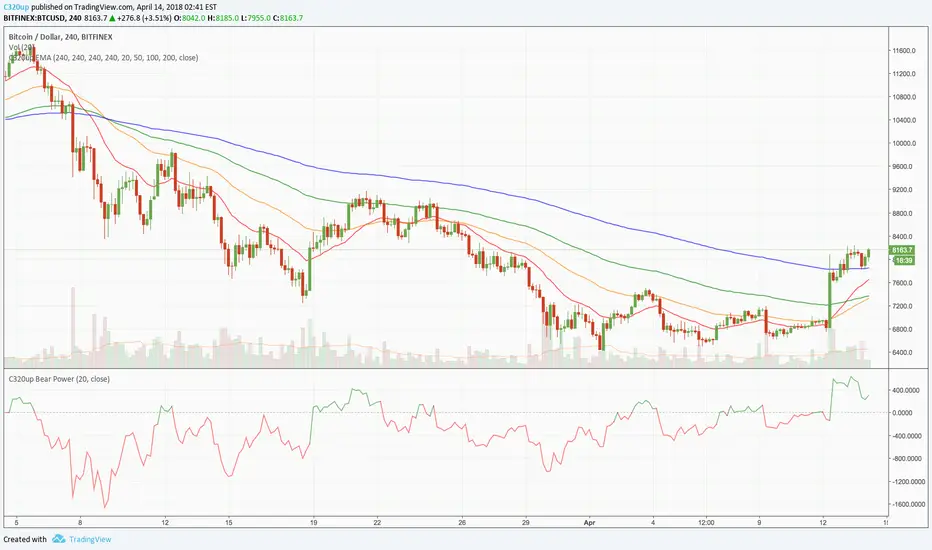
C320up EMA by Chart Resolution
- You may only want your EMA’s to appear on specific chart resolutions.
Use this indicator to select up to four resolutions and four EMA’s.
Sometimes a certain EMA (Exponential Moving Average) doesn’t give a good indication on a smaller time frame or vice versa, so you can customise these to suit.
Default settings are “240” Minutes for all EMA’s to appear.
Default EMA’s are 20, 50, 100, and 200.
To change the resolution, type in one of these examples:
15 = 15 Minutes, 60 = 1 Hour, 240 = 4 Hours, D = Day, W = Week, M = Month, 2M = 2 Months, etc.
You could have just the one EMA appear on multiple time frames, or have 2 appear on 2 time frames, etc.
Check out our scripts page for more indicators.
Any questions, just leave a comment.
- You may only want your EMA’s to appear on specific chart resolutions.
Use this indicator to select up to four resolutions and four EMA’s.
Sometimes a certain EMA (Exponential Moving Average) doesn’t give a good indication on a smaller time frame or vice versa, so you can customise these to suit.
Default settings are “240” Minutes for all EMA’s to appear.
Default EMA’s are 20, 50, 100, and 200.
To change the resolution, type in one of these examples:
15 = 15 Minutes, 60 = 1 Hour, 240 = 4 Hours, D = Day, W = Week, M = Month, 2M = 2 Months, etc.
You could have just the one EMA appear on multiple time frames, or have 2 appear on 2 time frames, etc.
Check out our scripts page for more indicators.
Any questions, just leave a comment.
Mã được bảo vệ
Tập lệnh này được đăng dưới dạng mã nguồn đóng. Tuy nhiên, bạn có thể sử dụng tự do và không giới hạn – tìm hiểu thêm tại đây.

Thông báo miễn trừ trách nhiệm
Thông tin và các ấn phẩm này không nhằm mục đích, và không cấu thành, lời khuyên hoặc khuyến nghị về tài chính, đầu tư, giao dịch hay các loại khác do TradingView cung cấp hoặc xác nhận. Đọc thêm tại Điều khoản Sử dụng.
Mã được bảo vệ
Tập lệnh này được đăng dưới dạng mã nguồn đóng. Tuy nhiên, bạn có thể sử dụng tự do và không giới hạn – tìm hiểu thêm tại đây.
Thông báo miễn trừ trách nhiệm
Thông tin và các ấn phẩm này không nhằm mục đích, và không cấu thành, lời khuyên hoặc khuyến nghị về tài chính, đầu tư, giao dịch hay các loại khác do TradingView cung cấp hoặc xác nhận. Đọc thêm tại Điều khoản Sử dụng.