PROTECTED SOURCE SCRIPT
Cập nhật B4100 - NW Trend
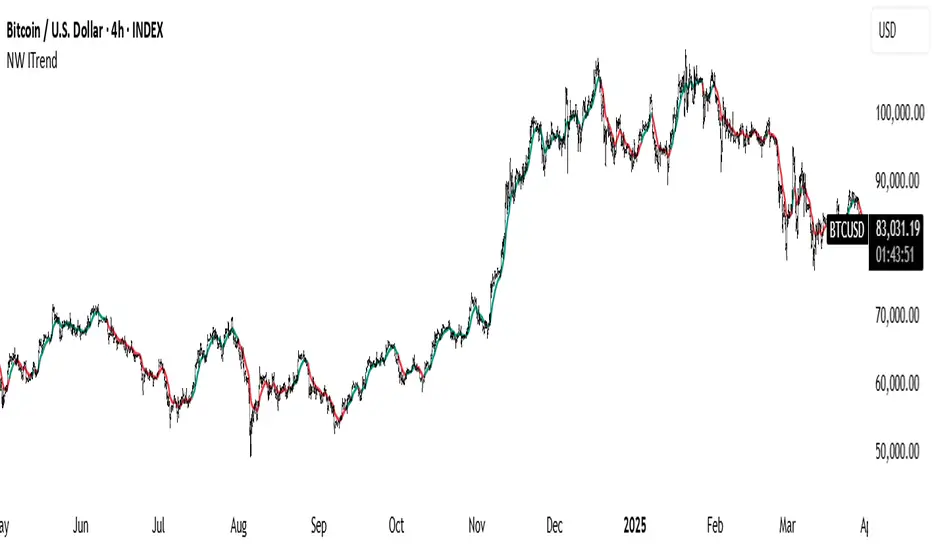
This is a trend-following tool based on the Nadaraya-Watson (NW) kernel regression estimator.
Nadaraya-Watson Estimator:
This indicator employs a weighted average of historical prices where the weights are determined by a kernel function. This kernel function gives more weight to recent prices and less weight to older ones. The kernel function's shape (Gaussian, Epanechnikov, or a combination) can be chosen by the user, and its bandwidth controls the sensitivity of the estimator. A smaller value means more sensitivity to short-term changes; a larger value means smoother curves and less sensitivity.
Trend Confirmation:
The indicator also uses a confirmation period (confirm_period) to minimize whipsaws. The trend only changes once the estimator has moved in a particular direction for a configurable number of consecutive bars.
Bandwidth (h):
This is the key parameter controlling the estimator's sensitivity to price changes.
Smaller values (e.g., 10-40) result in a more reactive and wiggly line. This will be more sensitive to short-term price changes.
Larger values (e.g., 100-200) result in a smoother line, focusing on longer-term trends.
Source:
The price data used in the calculations. The default is close but can be changed to other price values such as high, low, or a mathematical combination.
Kernel Type:
Select the type of kernel function to use.
Confirmation Period:
Adjust this setting to specify how many consecutive bars the estimator must be moving in the same direction before the trend is confirmed.
Lower values result in more trend changes.
Higher values result in fewer trend changes and can filter out some noise.
Enjoy, and good luck.
Nadaraya-Watson Estimator:
This indicator employs a weighted average of historical prices where the weights are determined by a kernel function. This kernel function gives more weight to recent prices and less weight to older ones. The kernel function's shape (Gaussian, Epanechnikov, or a combination) can be chosen by the user, and its bandwidth controls the sensitivity of the estimator. A smaller value means more sensitivity to short-term changes; a larger value means smoother curves and less sensitivity.
Trend Confirmation:
The indicator also uses a confirmation period (confirm_period) to minimize whipsaws. The trend only changes once the estimator has moved in a particular direction for a configurable number of consecutive bars.
Bandwidth (h):
This is the key parameter controlling the estimator's sensitivity to price changes.
Smaller values (e.g., 10-40) result in a more reactive and wiggly line. This will be more sensitive to short-term price changes.
Larger values (e.g., 100-200) result in a smoother line, focusing on longer-term trends.
Source:
The price data used in the calculations. The default is close but can be changed to other price values such as high, low, or a mathematical combination.
Kernel Type:
Select the type of kernel function to use.
Confirmation Period:
Adjust this setting to specify how many consecutive bars the estimator must be moving in the same direction before the trend is confirmed.
Lower values result in more trend changes.
Higher values result in fewer trend changes and can filter out some noise.
Enjoy, and good luck.
Phát hành các Ghi chú
Add Ehlers ITrendMã được bảo vệ
Tập lệnh này được đăng dưới dạng mã nguồn đóng. Tuy nhiên, bạn có thể sử dụng tự do và không giới hạn – tìm hiểu thêm tại đây.

Thông báo miễn trừ trách nhiệm
Thông tin và các ấn phẩm này không nhằm mục đích, và không cấu thành, lời khuyên hoặc khuyến nghị về tài chính, đầu tư, giao dịch hay các loại khác do TradingView cung cấp hoặc xác nhận. Đọc thêm tại Điều khoản Sử dụng.
Mã được bảo vệ
Tập lệnh này được đăng dưới dạng mã nguồn đóng. Tuy nhiên, bạn có thể sử dụng tự do và không giới hạn – tìm hiểu thêm tại đây.
Thông báo miễn trừ trách nhiệm
Thông tin và các ấn phẩm này không nhằm mục đích, và không cấu thành, lời khuyên hoặc khuyến nghị về tài chính, đầu tư, giao dịch hay các loại khác do TradingView cung cấp hoặc xác nhận. Đọc thêm tại Điều khoản Sử dụng.