Ninetails
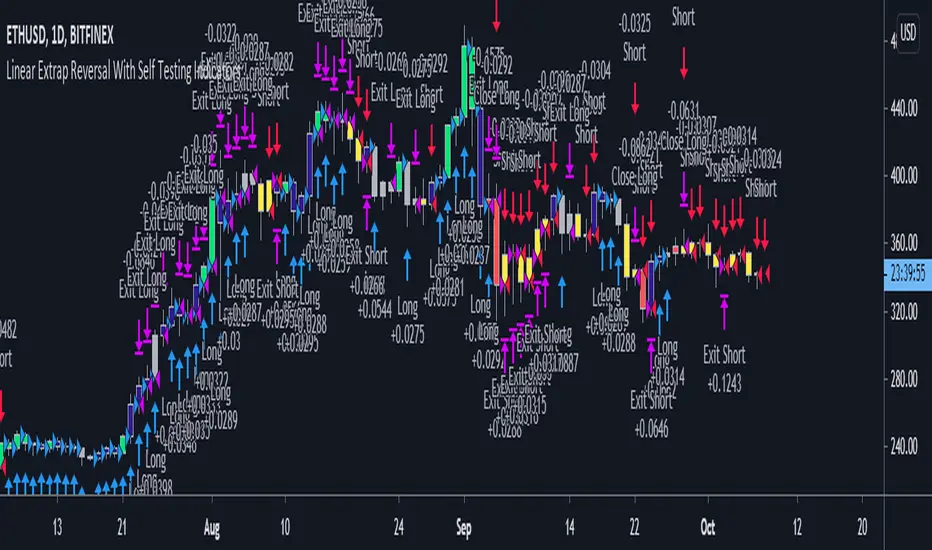
It compares the default values defined by the user to the other values which are specified, determining which has been most effective over the lookback period, which also is defined by the user.
It then groups the most effective settings over the defined period for lagging and leading indicators, and issues a positive or negative score for each individual indicator.
For this iteration there are 4 leading, and 7 lagging indicators.
Green candles show the sum of leading, and also lagging indicator is a positive total greater than 1.
Blue shows a positive sum.
Yellow shows a negative sum.
Red shows a negative sum of leading and also lagging indicators greater than 1.
White shows no defined direction.
Trades are entered on the first red or green candle, and exited on red or yellow for longs, or green or blue for shorts.
If you use a lookback period which exceeds the amount of periods available, then it will just show defaults.
nonoyeslearns
on twitter for more information!
Lagging indicators crossing long means that the leading indicators were showing positive correlation, and the lagging now crossed into positive correlation.
Leading indicators crossing long means that lagging were showing positive, and leading now crossed into positive correlation.
The same hold true for shorts.
The effects of being able to control these(turn off leading indicator shorts for macro bullish assets) have been greatly postive on the strategy results.
Tests 8 remaining indicators now against their linear extrapolation parameters in order to speed up signals and give clearer reversals instead of continuation of trend.
Tập lệnh chỉ hiển thị cho người được mời
Chỉ những người dùng được tác giả chấp thuận mới có thể truy cập tập lệnh này. Bạn sẽ cần yêu cầu và được cấp quyền sử dụng. Thông thường quyền này được cấp sau khi thanh toán. Để biết thêm chi tiết, làm theo hướng dẫn của tác giả bên dưới hoặc liên hệ trực tiếp với nonoyeslearns.
TradingView KHÔNG khuyến nghị bạn trả phí hoặc sử dụng một tập lệnh trừ khi bạn hoàn toàn tin tưởng vào tác giả và hiểu cách hoạt động của tập lệnh. Bạn cũng có thể tìm các lựa chọn miễn phí, mã nguồn mở trong các script cộng đồng của chúng tôi.
Hướng dẫn của tác giả

Thông báo miễn trừ trách nhiệm
Tập lệnh chỉ hiển thị cho người được mời
Chỉ những người dùng được tác giả chấp thuận mới có thể truy cập tập lệnh này. Bạn sẽ cần yêu cầu và được cấp quyền sử dụng. Thông thường quyền này được cấp sau khi thanh toán. Để biết thêm chi tiết, làm theo hướng dẫn của tác giả bên dưới hoặc liên hệ trực tiếp với nonoyeslearns.
TradingView KHÔNG khuyến nghị bạn trả phí hoặc sử dụng một tập lệnh trừ khi bạn hoàn toàn tin tưởng vào tác giả và hiểu cách hoạt động của tập lệnh. Bạn cũng có thể tìm các lựa chọn miễn phí, mã nguồn mở trong các script cộng đồng của chúng tôi.