OPEN-SOURCE SCRIPT
VWAP Suite
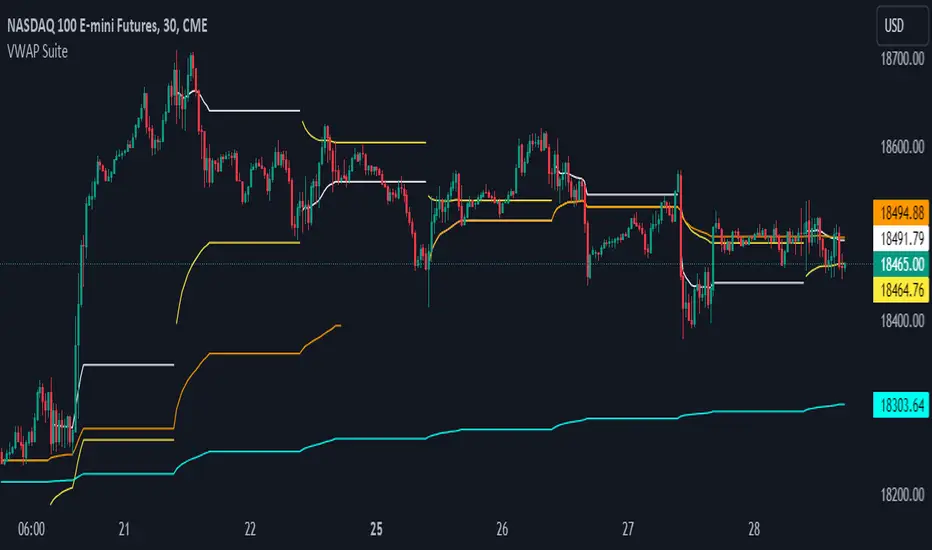
This indicator automates the plotting of various timeframe based VWAP Values. This utilizes a different calculation method for the standard deviations bands compared to the native Tradingview AVWAP. While the Tradingview AVWAP indicator calculates the standard devation based on the VWAP variance, this indicator calculates the std dev based on the price sum variance (i.e. the variance of the hlc3, ohlc4, etc. values).
Current timeframes include:
- Daily VWAP with three user configurable standard deviation bands
- Multi-Day VWAP that allows you to plot 2-day to 5-day VWAP
- Weekly VWAP with three user configurable standard deviation bands
- Monthly VWAP with three user configurable standard deviation bands
Some unique aspects of this indicator is that it allows the user to calculate VWAP for only a specific session range if you are only interested in the VWAP when specific participants are active in the market. For example, the default session range only calculates VWAP for the New York RTH session (0930-1600).
If the user wants to compare how the session range chosen varies from the VWAP calculation with ETH you can select the 'Include Extended Trading Hours' check box which will ignore the session range input variable and simply calculate what is exactly on the chart without filtering.
You can also toggle whether the VWAP values show up in the price scale, status line, or both which can limit the amount of clutter that shows up on the chart based upon the user's preferences.
Current timeframes include:
- Daily VWAP with three user configurable standard deviation bands
- Multi-Day VWAP that allows you to plot 2-day to 5-day VWAP
- Weekly VWAP with three user configurable standard deviation bands
- Monthly VWAP with three user configurable standard deviation bands
Some unique aspects of this indicator is that it allows the user to calculate VWAP for only a specific session range if you are only interested in the VWAP when specific participants are active in the market. For example, the default session range only calculates VWAP for the New York RTH session (0930-1600).
If the user wants to compare how the session range chosen varies from the VWAP calculation with ETH you can select the 'Include Extended Trading Hours' check box which will ignore the session range input variable and simply calculate what is exactly on the chart without filtering.
You can also toggle whether the VWAP values show up in the price scale, status line, or both which can limit the amount of clutter that shows up on the chart based upon the user's preferences.
Mã nguồn mở
Theo đúng tinh thần TradingView, tác giả của tập lệnh này đã công bố nó dưới dạng mã nguồn mở, để các nhà giao dịch có thể xem xét và xác minh chức năng. Chúc mừng tác giả! Mặc dù bạn có thể sử dụng miễn phí, hãy nhớ rằng việc công bố lại mã phải tuân theo Nội quy.

Thông báo miễn trừ trách nhiệm
Thông tin và các ấn phẩm này không nhằm mục đích, và không cấu thành, lời khuyên hoặc khuyến nghị về tài chính, đầu tư, giao dịch hay các loại khác do TradingView cung cấp hoặc xác nhận. Đọc thêm tại Điều khoản Sử dụng.
Mã nguồn mở
Theo đúng tinh thần TradingView, tác giả của tập lệnh này đã công bố nó dưới dạng mã nguồn mở, để các nhà giao dịch có thể xem xét và xác minh chức năng. Chúc mừng tác giả! Mặc dù bạn có thể sử dụng miễn phí, hãy nhớ rằng việc công bố lại mã phải tuân theo Nội quy.
Thông báo miễn trừ trách nhiệm
Thông tin và các ấn phẩm này không nhằm mục đích, và không cấu thành, lời khuyên hoặc khuyến nghị về tài chính, đầu tư, giao dịch hay các loại khác do TradingView cung cấp hoặc xác nhận. Đọc thêm tại Điều khoản Sử dụng.