PROTECTED SOURCE SCRIPT
Breakout Shasthra with buffer and target option by RP
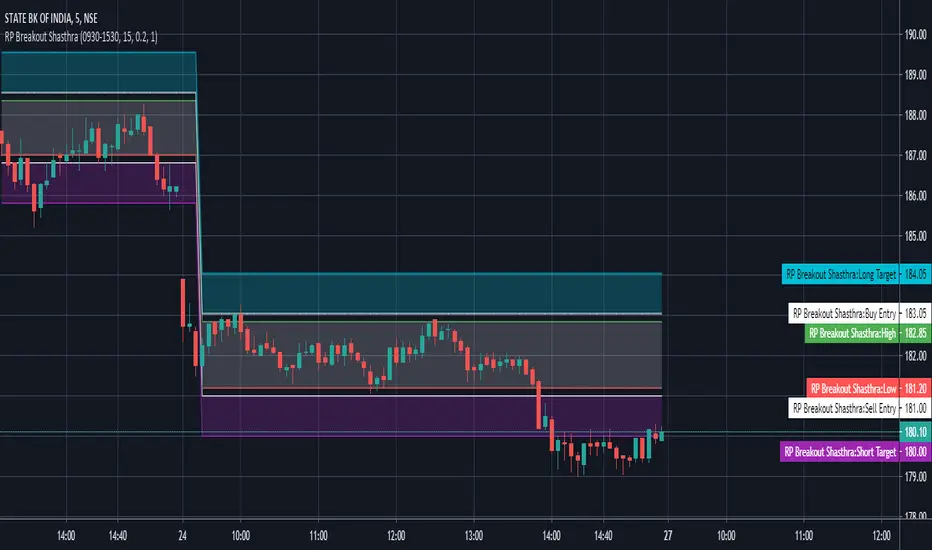
The RP Breakout Shasthra indicator is designed to show custom breakout levels.
There are many ORB (Opening range breakout) indicators which either take 9:15 as the default start time and the resolution is also fixed.
There are many successful breakouts like 10:15 - 30mins breakout, 12:30 - 1 hour breakouts etc.
So this indicator is designed to deliver you custom options to set the beakout time and duration.
Also there is an option to plot previous breakout lines to backtest.
The options window is simple.
In the INPUT Tab
Breakout start time - This is set to default sessions. Here you only need to select the start time.
Breakout Timeframe - The duration to consider can be set here.
Enter Buffer - Set the point above which to take entry. Use Keyboard to enter decimals
Enter Target - Set the point for target to take exit. Use Keyboard to enter decimals
Example:- If you wanted 11:30 - 15 mins breakout. Change Breakout start time from 9:15 to 11:30
Change Breakout Timeframe from 60 to 15
And hit OK.
In the Styles Tab
You can customize the color
There are many ORB (Opening range breakout) indicators which either take 9:15 as the default start time and the resolution is also fixed.
There are many successful breakouts like 10:15 - 30mins breakout, 12:30 - 1 hour breakouts etc.
So this indicator is designed to deliver you custom options to set the beakout time and duration.
Also there is an option to plot previous breakout lines to backtest.
The options window is simple.
In the INPUT Tab
Breakout start time - This is set to default sessions. Here you only need to select the start time.
Breakout Timeframe - The duration to consider can be set here.
Enter Buffer - Set the point above which to take entry. Use Keyboard to enter decimals
Enter Target - Set the point for target to take exit. Use Keyboard to enter decimals
Example:- If you wanted 11:30 - 15 mins breakout. Change Breakout start time from 9:15 to 11:30
Change Breakout Timeframe from 60 to 15
And hit OK.
In the Styles Tab
You can customize the color
Mã được bảo vệ
Tập lệnh này được đăng dưới dạng mã nguồn đóng. Tuy nhiên, bạn có thể sử dụng tự do và không giới hạn – tìm hiểu thêm tại đây.

Thông báo miễn trừ trách nhiệm
Thông tin và các ấn phẩm này không nhằm mục đích, và không cấu thành, lời khuyên hoặc khuyến nghị về tài chính, đầu tư, giao dịch hay các loại khác do TradingView cung cấp hoặc xác nhận. Đọc thêm tại Điều khoản Sử dụng.
Mã được bảo vệ
Tập lệnh này được đăng dưới dạng mã nguồn đóng. Tuy nhiên, bạn có thể sử dụng tự do và không giới hạn – tìm hiểu thêm tại đây.
Thông báo miễn trừ trách nhiệm
Thông tin và các ấn phẩm này không nhằm mục đích, và không cấu thành, lời khuyên hoặc khuyến nghị về tài chính, đầu tư, giao dịch hay các loại khác do TradingView cung cấp hoặc xác nhận. Đọc thêm tại Điều khoản Sử dụng.