PROTECTED SOURCE SCRIPT
Cập nhật ALGOME - Standard SupeRTrend_V22.14.0
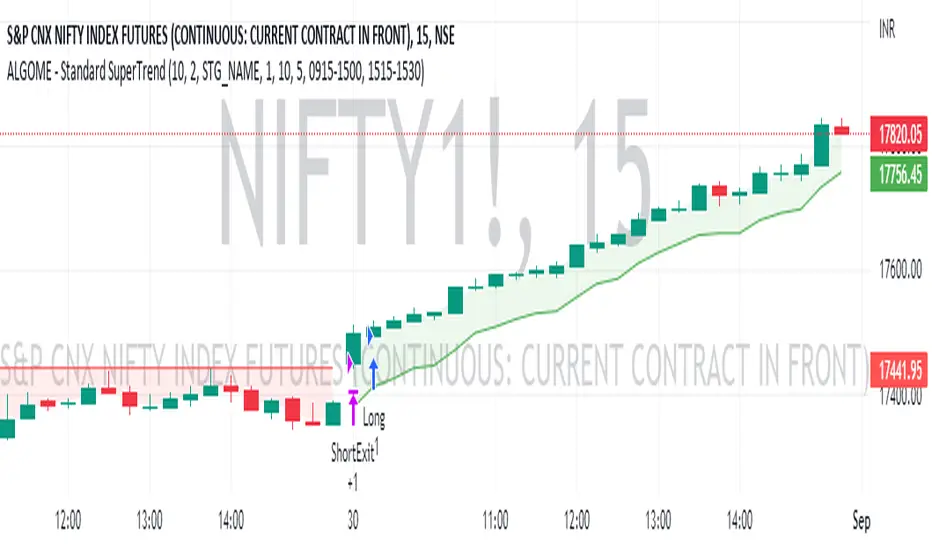
SuperTrend indicator helps analyze the trend & customize the setup for various scrips.
About SuperTrend:
tradingview.com/chart/?solution=43000634738
Directional Indication:
Useful Parameters & Settings:
Alert Message:
Type in the alert message as "{{strategy.order.alert_message}}"
How To Access, Setup, Integrate & Execute Live Alerts?
algome.in/post/how-to-setup-strategy-create-alerts-on-tradingview
About SuperTrend:
tradingview.com/chart/?solution=43000634738
Directional Indication:
- Enter LONG position when Super Trend changes direction from down-trend to up-trend (Red to Green trend line )
- Enter SHORT position when Super Trend changes direction from up-trend to down-trend (Green to Red trend line )
Useful Parameters & Settings:
- Set ATR Length, Factor & Time Frame values that best suits
- Tick "Intraday-First Bar Entry" to enter a trade at the first bar of the day based on the SuperTrend trend indication.
- To trade on the Real-time bar, Go to Strategy Settings >> Properties >> Recalculate and select the "On Every Tick" option.
- Untick the "Signal Labels" option from Settings >> Style property window for a clean chart view.
Alert Message:
Type in the alert message as "{{strategy.order.alert_message}}"
How To Access, Setup, Integrate & Execute Live Alerts?
algome.in/post/how-to-setup-strategy-create-alerts-on-tradingview
Phát hành các Ghi chú
Minor updates: Cleaner chart & populating minimal required information.Mã được bảo vệ
Tập lệnh này được đăng dưới dạng mã nguồn đóng. Tuy nhiên, bạn có thể sử dụng tự do và không giới hạn – tìm hiểu thêm tại đây.

Thông báo miễn trừ trách nhiệm
Thông tin và các ấn phẩm này không nhằm mục đích, và không cấu thành, lời khuyên hoặc khuyến nghị về tài chính, đầu tư, giao dịch hay các loại khác do TradingView cung cấp hoặc xác nhận. Đọc thêm tại Điều khoản Sử dụng.
Mã được bảo vệ
Tập lệnh này được đăng dưới dạng mã nguồn đóng. Tuy nhiên, bạn có thể sử dụng tự do và không giới hạn – tìm hiểu thêm tại đây.
Thông báo miễn trừ trách nhiệm
Thông tin và các ấn phẩm này không nhằm mục đích, và không cấu thành, lời khuyên hoặc khuyến nghị về tài chính, đầu tư, giao dịch hay các loại khác do TradingView cung cấp hoặc xác nhận. Đọc thêm tại Điều khoản Sử dụng.