Expected Move ProExpected Move is the amount that an asset is predicted to increase or decrease from its current price, based on the current levels of volatility.
This Expected Move Pro indicator uses a maximum likelihood estimation for Asymmetric Laplace distribution parameters, and is an upgrade from the regular Expected Move indicator that uses a Normal Distribution. The use of the Asymmetric Laplace distribution ensures a probability range more accurate than the more common expected moves based on a normal distribution assumption for returns. Asymmetric Laplace distribution takes in account fatter tails and volatility clustering during low volatility. So it will be thinner in the body (eg: <70% range) and fatter in the tails (>95% range) which fits the stock return better.
When we compare the more peaked asymmetric laplace to the bell curve shaped normal distribution we can see that the asymmetric laplace fits the empirical data (blue histogram) significantly better. The fit is improved in both the body (middle peaked part) as well as in the fatter tails (more of extreme occurrences far from the center)
EXPECTED MOVE PROBABILITY:
In the expected move settings, the user can specify the range probability they wish to display. In a normal distribution a 1 standard deviation range corresponds to a range within which just under 70% of observations fall. So to specify a 70% probability range one would set 15% probability for both the upper and lower range.
For the more extreme ranges a two tail function is used so the user can only specify one probability. When 5% probability is specified the range will cover 95% and on each side of the range the probability of an occurence that extreme will be 2.5%. In the above Image we can see two tail probabilities specified at 5% and 1%, covering the 95% and 99% ranges respectively.
The indicator also allows for multi timeframe usecases. One can request a daily or perhaps even weekly expected move on an hourly chart, like we see below.
SETTINGS:
Resolution: Specify the timeframe and if you want to use the multi timeframe functionality.
Real Time : Do you wish the expected move to adjust with the current open price or do you wish it to be a forecast based on the yesterdays close. If latter, keep it OFF.
Sample Size : Lookback or the number of bars we sample in the calculation.
Optimization : Keep it on for speed purposes, only slightly higher precision will be achieved without optimization.
Probabilities: One tail - left and right, specify probability for each side of the range, two tail - single probability split in half for each side of the range
Center : Displays the central line which is the central tendency of a distribution / the median
Hide History : Hides expected moves and only the expected move for the current bar remains.
Plot Style Settings : One can adjust the line styles, box styles as well as width and transparency.
Forecasting

Probability Cone█ Overview:
Probability Cone is based on the Expected Move . While Expected Move only shows the historical value band on every bar, probability panel extend the period in the future and plot a cone or curve shape of the probable range. It plots the range from bar 1 all the way to bar 31.
In this model, we assume asset price follows a log-normal distribution and the log return follows a normal distribution.
Note: Normal distribution is just an assumption; it's not the real distribution of return.
The area of probability range is based on an inverse normal cumulative distribution function. The inverse cumulative distribution gives the range of price for given input probability. People can adjust the range by adjusting the standard deviation in the settings. The probability of the entered standard deviation will be shown at the edges of the probability cone.
The shown 68% and 95% probabilities correspond to the full range between the two blue lines of the cone (68%) and the two purple lines of the cone (95%). The probabilities suggest the % of outcomes or data that are expected to lie within this range. It does not suggest the probability of reaching those price levels.
Note: All these probabilities are based on the normal distribution assumption for returns. It's the estimated probability, not the actual probability.
█ Volatility Models :
Sample SD : traditional sample standard deviation, most commonly used, use (n-1) period to adjust the bias
Parkinson : Uses High/ Low to estimate volatility, assumes continuous no gap, zero mean no drift, 5 times more efficient than Close to Close
Garman Klass : Uses OHLC volatility, zero drift, no jumps, about 7 times more efficient
Yangzhang Garman Klass Extension : Added jump calculation in Garman Klass, has the same value as Garman Klass on markets with no gaps.
about 8 x efficient
Rogers : Uses OHLC, Assume non-zero mean volatility, handles drift, does not handle jump 8 x efficient.
EWMA : Exponentially Weighted Volatility. Weight recently volatility more, more reactive volatility better in taking account of volatility autocorrelation and cluster.
YangZhang : Uses OHLC, combines Rogers and Garmand Klass, handles both drift and jump, 14 times efficient, alpha is the constant to weight rogers volatility to minimize variance.
Median absolute deviation : It's a more direct way of measuring volatility. It measures volatility without using Standard deviation. The MAD used here is adjusted to be an unbiased estimator.
You can learn more about each of the volatility models in out Historical Volatility Estimators indicator.
█ How to use
Volatility Period is the sample size for variance estimation. A longer period makes the estimation range more stable less reactive to recent price. Distribution is more significant on larger sample size. A short period makes the range more responsive to recent price. Might be better for high volatility clusters.
People usually assume the mean of returns to be zero. To be more accurate, we can consider the drift in price from calculating the geometric mean of returns. Drift happens in the long run, so short lookback periods are not recommended.
The shape of the cone will be skewed and have a directional bias when the length of mean is short. It might be more adaptive to the current price or trend, but more accurate estimation should use a longer period for the mean.
Using a short look back for mean will make the cone having a directional bias.
When we are estimating the future range for time > 1, we typically assume constant volatility and the returns to be independent and identically distributed. We scale the volatility in term of time to get future range. However, when there's autocorrelation in returns( when returns are not independent), the assumption fails to take account of this effect. Volatility scaled with autocorrelation is required when returns are not iid. We use an AR(1) model to scale the first-order autocorrelation to adjust the effect. Returns typically don't have significant autocorrelation. Adjustment for autocorrelation is not usually needed. A long length is recommended in Autocorrelation calculation.
Note: The significance of autocorrelation can be checked on an ACF indicator.
ACF
Time back settings shift the estimation period back by the input number. It's the origin of when the probability cone start to estimation it's range.
E.g., When time back = 5, the probability cone start its prediction interval estimation from 5 bars ago. So for time back = 5 , it estimates the probability range from 5 bars ago to X number of bars in the future, specified by the Forecast Period (max 1000).
█ Warnings:
People should not blindly trust the probability. They should be aware of the risk evolves by using the normal distribution assumption. The real return has skewness and high kurtosis. While skewness is not very significant, the high kurtosis should be noticed. The Real returns have much fatter tails than the normal distribution, which also makes the peak higher. This property makes the tail ranges such as range more than 2SD highly underestimate the actual range and the body such as 1 SD slightly overestimate the actual range. For ranges more than 2SD, people shouldn't trust them. They should beware of extreme events in the tails.
The uncertainty in future bars makes the range wider. The overestimate effect of the body is partly neutralized when it's extended to future bars. We encourage people who use this indicator to further investigate the Historical Volatility Estimators , Fast Autocorrelation Estimator , Expected Move and especially the Linear Moments Indicator .
The probability is only for the closing price, not wicks. It only estimates the probability of the price closing at this level, not in between.

Position Size Calculator + Live R/R Panel — SMC/ICT (@PueblaATH)Position Size + Live R/R Panel — SMC/ICT (@PueblaATH)
Position Size + Live R/R Panel — SMC/ICT (@PueblaATH) is a professional-grade risk management and execution module built for Smart Money Concepts (SMC) and ICT Traders who require accurate, repeatable, institution-style trade planning.
This tool delivers precise position sizing, R:R modeling, leverage and margin projections, fee-adjusted PnL outcomes, and real-time execution metrics—all directly on the chart. Optimized for crypto, forex, and futures, it provides scalpers, day traders, and swing traders with the clarity needed to execute high-quality trades with confidence and consistency.
What the Indicator Does
Institutional Position Sizing Engine
Calculates position size based on account balance, % risk, and SL distance.
Supports custom minimum lot size rounding across crypto, FX, indices, and derivatives.
Intelligent direction logic (Auto / Long / Short) based on SMC/ICT structure.
Advanced Risk/Reward & Profit Modeling
Real-time R:R ratio using actual rounded position size.
Live PnL readout that updates with price movements.
Gross & net profit projections with full fee deduction.
Execution Planning with Draggable Levels
Entry, SL, and TP levels fully draggable for fast scenario modeling.
Automatic projected lines backward/forward with clean label alignment.
TP and SL tags include % movement from Entry, ideal for SMC/ICT journaling.
Precise modeling of real exchange fee structures
Maker fee per side
Taker fee per side
Mixed fee modes (Maker entry, Taker exit, Average, etc.)
Leverage & Margin Forecasting
Margin requirements displayed for 3 customizable leverage settings.
Helps traders understand capital commitment before executing the trade.
Useful for futures, crypto perps, and CFD setups.
Clean HUD Panel for Rapid Decision-Making
A full professional trading panel displays:
Target & actual risk
Position size
Entry / SL / TP
TP/SL percentage distance
Gross profit
Net profit (after fees)
Fees @ TP and @ SL
Live PnL
Margin requirements
Optimized for SMC & ICT Workflows
Perfect for traders using:
Breakers, FVGs, OBs
Liquidity sweeps
Session models
Precision entries (OTE, Displacement, Rebalancing)
Leverage-based execution (crypto perps, futures)
How to Use It
Attach the indicator to your chart.
Set account balance, risk %, fee model, and leverage presets.
Drag Entry, SL, and TP to shape the setup.
View instant calculations of: Position size; R:R; Net PnL after fees; Margin required
Use it as your pre-trade checklist & execution model.
Originality & Credits
This script is an original creation by @PueblaATH, released under the MPL 2.0 license.
It does not copy, modify, or repackage any existing TradingView code.
All logic—including the fee engine, margin calculator, responsive HUD, dynamic risk model, and visual execution system—is authored specifically for this indicator.

CG.8 - LONG & SHORTAccurately detects Pivot High / Pivot Low from a higher timeframe (HTF) and displays them directly on your current chart.
Key Highlights:
Draws clean horizontal lines + “LONG” / “SHORT” labels, extendable to the right
Two completely independent alerts: simply select “LONG SIGNAL” or “SHORT SIGNAL” when creating an alert (never mixed)
Full alert message: symbol + timeframe + exact price level
No repaint, no bugs, runs smoothly on all markets (crypto, forex, stocks, futures…)
Easy customization: choose HTF, Left/Right strength, toggle labels and line extension
How to use (super simple):
Paste → Add to Chart → Add Alert → choose “LONG SIGNAL” or “SHORT SIGNAL” → done!
From now on, every “beep” means a fresh higher-timeframe structure is confirmed – perfect entry timing.
Ideal for Price Action, Smart Money Concept (SMC), and ICT traders – catches tops and bottoms like textbook examples!
Author: Chinh CG
2025 Perfect Edition – zero errors, zero repaint, zero missed signals.
Wishing you all green candles and heavy profits! 🍜🚀

Quarter + 50 BandsThe indicator does two main things:
Draws a red quarter-point grid (every 25 points by default).
Draws green and blue “bands” that sit 50 points below and above each big 100-point figure.
Think of it like:
Red = your normal 25-point quarters
Green = “sweet spot” 50 points below each 100-pt handle
Blue = “sweet spot” 50 points above each 100-pt handle
It fully customizable.

Yesterday Low LineTraces a red dotted line on the low of yesterdays session for the present graph - and extends into the future

BTC Mon 8am Buy / Wed 2pm Sell (NY Time, Daily + Intraday)This strategy implements a fixed weekly time-based trading schedule for Bitcoin, using New York market hours as the reference clock. It is designed to test whether a consistent pattern exists between early-week accumulation and mid-week distribution in BTC price behavior.
Entry Rule — Monday 8:00 AM (NY Time)
The strategy enters a long position every Monday at exactly 08:00 AM Eastern Time, one hour after the U.S. equities market pre-open activity begins influencing global liquidity.
This timing attempts to capture early-week directional moves in Bitcoin, which sometimes occur as traditional markets come online.
Exit Rule — Wednesday 2:00 PM (NY Time)
The strategy closes the position every Wednesday at 2:00 PM Eastern Time, a point in the week where:
U.S. equity markets are still open
BTC often experiences mid-week volatility rotations
Liquidity is generally high
This exit removes exposure before later-week uncertainty and gives a consistent, measurable time window for each trade.
Timeframe Compatibility
Works on intraday charts (recommended 1h or lower) using precise time-based triggers.
Also runs on daily charts, where entries and exits occur on the Monday and Wednesday bars respectively (daily charts cannot show intraday timestamps).
All timestamps are synced to America/New_York regardless of the exchange’s native timezone.
Trading Frequency
Exactly one trade per week, preventing overtrading and allowing comparison of weekly performance across years of historical BTC price data.
Purpose of the Strategy
This is not a value-based or trend-following system, but a behavioral/time-cycle analysis tool.
It helps evaluate whether a repeating short-term edge exists based solely on:
Weekday timing
Liquidity cycles
Institutional market influence
BTC’s habitual early-week momentum patterns
It is ideal for:
Backtesting weekly BTC behavior
Studying time-based edges
Comparing alternative weekday/time combinations
Visualizing weekly P&L structure
Risk Notes
This strategy does not attempt to predict price direction and should not be assumed profitable without robust backtesting.
Time-based edges can appear, disappear, or invert depending on macro conditions.
There is no stop loss or risk management included by default, so the strategy reflects raw timing-based performance.

Macro Monte Carlo 10000 Prob with BootstrapMacro Monte Carlo 10000 Prob with Bootstrap — by Wongsakon Khaisaeng
1) Core Concept: Monte Carlo as a Macro-Probabilistic Lens on Future Price Paths
The Macro Monte Carlo 10000 Prob with Bootstrap indicator is designed to view future price evolution through a probabilistic and statistically grounded lens. Instead of predicting a single deterministic outcome, it generates thousands of simulated future price paths (Monte Carlo Paths) to estimate the range of possible outcomes. By analyzing the lowest and highest values reached within each simulated path, the indicator provides a macro-level understanding of how far price could realistically decline or rally within a specified forecast horizon. This approach shifts the focus from price forecasting to probability distribution estimation, enabling more robust decision-making for systematic traders, risk managers, and options strategists.
2) Historical Data Foundation: Extracting Log Returns as the Statistical Engine
Before any simulation takes place, the indicator constructs a historical library of logarithmic returns (log returns) derived from the asset’s recent price history. The user defines the lookback window (e.g., 1000 bars), allowing the system to characterize how returns behaved across various market regimes. Log returns are used because they preserve mathematical properties essential for multiplicative price processes, making them highly suitable for probabilistic modeling. This historical dataset forms the core statistical engine from which blocks of returns will later be sampled and recombined to create forward-looking scenarios.
3) Simulation Methodology: Block Bootstrap to Preserve Market Structure
Unlike traditional Monte Carlo methods that randomize every return independently, this indicator employs Block Bootstrap—a technique that samples consecutive clusters of returns rather than isolated points. By using these blocks (e.g., 24 bars per block), the simulation preserves vital market characteristics such as volatility clustering, trending behavior, and short-term autocorrelation. Each simulated path is built by sequentially appending multiple randomly selected return blocks until the forecast horizon is reached. This method produces realistic price trajectories that reflect the inherent temporal structure of financial markets rather than artificially smoothed or over-randomized paths.
4) Macro Perspective: Tracking Path-Level Minimums and Maximums
For each simulated price path, the indicator tracks two critical values:
(1) the lowest price reached within the entire future path, and
(2) the highest price reached within the same horizon.
This macro approach focuses on the extremes—how deep a drawdown could extend, or how high a rally could potentially reach—rather than the shape of the trajectory itself. The method reflects practical concerns in risk management and trading:
How low could price fall before my stop is hit?
How high could price rise before a take-profit trigger?
By generating thousands of such paths, the indicator builds a statistical distribution of future minimums and maximums across all simulations.
5) Percentile Bands: Converting Thousands of Paths into Statistical Insight
Once all minimum and maximum values are collected, the indicator calculates key percentiles of these distributions (e.g., 10th, 50th, 90th). These percentiles represent probabilistic thresholds:
The 10th percentile of minimums suggests a price level below which only 10% of simulated future paths ever fell.
The 90th percentile of maximums indicates a level reached by only the strongest 10% of simulated rallies.
User-defined percentile settings are then applied to generate Band Low and Band High, which are plotted on the chart at the final bar. These levels form a probabilistic corridor showing where future price movements are statistically likely—or unlikely—to reach within the chosen horizon. This creates a forward-looking “probability envelope” that adapts to volatility, market structure, and historical dynamics.
6) Touch Probabilities: Estimating the Likelihood of Hitting Key Price Levels
A defining feature of the indicator is the calculation of Touch Probabilities—the probability that price will hit a certain lower or upper level at least once within the simulation window.
The lower touch level defaults to 90% of the current spot price (unless overridden).
The upper touch level defaults to 110% of spot.
The indicator then measures the percentage of paths in which:
the path’s minimum falls below or equal to the lower level → P(Touch ≤ X)
the path’s maximum rises above or equal to the upper level → P(Touch ≥ Y)
This mirrors advanced risk-management methods in trading, especially in options pricing, where the central question is often: Will price breach a barrier within a given timeframe?
These probabilities can guide decisions related to hedging, position sizing, stop-loss design, or probability-based expectations for take-profit scenarios.
7) Visual Output: Probability Bands and a Structured Summary Table
To help traders interpret results visually, the indicator plots Band Low and Band High as horizontal forward-looking reference levels at the most recent bar. This provides a quick visual sense of the statistical “territory” price is expected to explore under randomized future paths.
Additionally, a structured summary table is displayed on-chart, presenting:
symbol
number of paths, horizon, block length
spot price
percentile metrics for min/max distributions
Band Low / Band High
touch probabilities
sample counts and lookback window
This table transforms the complex underlying simulation into a clear, interpretable snapshot ideal for systematic analysis and trading decisions.
8) Practical Interpretation: A Probability-Driven Tool for Systematic Decision-Making
The purpose of this indicator is not to generate trading signals but to provide a statistical foundation for evaluating risk and opportunity. Systematic traders can use the information to answer practical questions such as:
“Is the expected downside risk greater than the upside opportunity?”
“What is the probability that price reaches my take-profit before my stop?”
“How wide should my volatility-adjusted stop-loss realistically be?”
“Does the market currently favor expansion or contraction in price range?”
The tool can also assist in options strategies (e.g., barrier options, credit spreads), portfolio risk assessment, or position sizing in trend-following and mean-reversion systems. In short, it provides a macro-probability framework that enhances decision quality by grounding expectations in simulated statistical reality rather than subjective bias.

Bifurcation Early WarningBifurcation Early Warning (BEW) — Chaos Theory Regime Detection
OVERVIEW
The Bifurcation Early Warning indicator applies principles from chaos theory and complex systems research to detect when markets are approaching critical transition points — moments where the current regime is likely to break down and shift to a new state.
Unlike momentum or trend indicators that tell you what is happening, BEW tells you when something is about to change. It provides early warning of regime shifts before they occur, giving traders time to prepare for increased volatility or trend reversals.
THE SCIENCE BEHIND IT
In complex systems (weather, ecosystems, financial markets), major transitions don't happen randomly. Research has identified three universal warning signals that precede critical transitions:
1. Critical Slowing Down
As a system approaches a tipping point, it becomes "sluggish" — small perturbations take longer to decay. In markets, this manifests as rising autocorrelation in returns.
2. Variance Amplification
Short-term volatility begins expanding relative to longer-term baselines as the system destabilizes.
3. Flickering
The system oscillates between two potential states before committing to one — visible as increased crossing of mean levels.
BEW combines all three signals into a single composite score.
COMPONENTS
AR(1) Coefficient — Critical Slowing Down (Blue)
Measures lag-1 autocorrelation of returns over a rolling window.
• Rising toward 1.0: Market becoming "sticky," slow to mean-revert — transition approaching
• Low values (<0.3): Normal mean-reverting behavior, stable regime
Variance Ratio (Purple)
Compares short-term variance to long-term variance.
• Above 1.5: Short-term volatility expanding — energy building before a move
• Near 1.0: Volatility stable, no unusual pressure
Flicker Count (Yellow/Teal)
Counts state changes (crossings of the dynamic mean) within the lookback period.
• High count: Market oscillating between states — indecision before commitment
• Low count: Price firmly in one regime
INTERPRETING THE BEW SCORE
0–50 (STABLE): Normal market conditions. Existing strategies should perform as expected.
50–70 (WARNING): Elevated instability detected. Consider reducing exposure or tightening risk parameters.
70–85 (DANGER): High probability of regime change. Avoid initiating new positions; widen stops on existing ones.
85+ (CRITICAL): Bifurcation likely imminent or in progress. Expect large, potentially unpredictable moves.
HOW TO USE
As a Regime Filter
• BEW < 50: Normal trading conditions — apply your standard strategies
• BEW > 60: Elevated caution — reduce position sizes, avoid mean-reversion plays
• BEW > 80: High alert — consider staying flat or hedging existing positions
As a Preparation Signal
BEW tells you when to pay attention, not which direction. When readings elevate:
• Watch for confirmation from volume, order flow, or other directional indicators
• Prepare for breakout scenarios in either direction
• Adjust take-profit and stop-loss distances for larger moves
For Volatility Adjustment
High BEW periods correlate with larger candles. Use this to:
• Widen stops during elevated readings
• Adjust position sizing inversely to BEW score
• Set more ambitious profit targets when entering during high-BEW breakouts
Divergence Analysis
• Price making new highs/lows while BEW stays low: Trend likely to continue smoothly
• Price consolidating while BEW rises: Breakout incoming — direction uncertain but move will be significant
SETTINGS GUIDE
Core Settings
• Lookback Period: General reference period (default: 50)
• Source: Price source for calculations (default: close)
Critical Slowing Down (AR1)
• AR(1) Calculation Period: Bars used for autocorrelation (default: 100). Higher = smoother, slower.
• AR(1) Warning Threshold: Level at which AR(1) is considered elevated (default: 0.85)
Variance Growth
• Variance Short Period: Fast variance window (default: 20)
• Variance Long Period: Slow variance window (default: 100)
• Variance Ratio Threshold: Level for maximum score contribution (default: 1.5)
Regime Flickering
• Flicker Detection Period: Window for counting state changes (default: 20)
• Flicker Bandwidth: ATR multiplier for state detection — lower = more sensitive (default: 0.5)
• Flicker Count Threshold: Number of crossings for maximum score (default: 4)
TIMEFRAME RECOMMENDATIONS
• 5m–15m: Use shorter periods (AR: 30–50, Var: 10/50). Expect more noise.
• 1H: Balanced performance with default or slightly extended settings (AR: 100, Var: 20/100).
• 4H–Daily: Extend periods further (AR: 100–150, Var: 30/150). Cleaner signals, less frequent.
ALERTS
Three alert conditions are included:
• BEW Warning: Score crosses above 50
• BEW Danger: Score crosses above 70
• BEW Critical: Score crosses above 85
LIMITATIONS
• No directional bias: BEW detects instability, not direction. Combine with trend or momentum indicators.
• Not a timing tool: Elevated readings may persist for several bars before the actual move.
• Parameter sensitive: Optimal settings vary by asset and timeframe. Backtest before live use.
• Leading indicator trade-off: Early warning means some false positives are inevitable.
CREDITS
Inspired by research on early warning signals in complex systems:
• Dakos et al. (2012) — "Methods for detecting early warnings of critical transitions"
DISCLAIMER
This indicator is for educational and informational purposes only. It does not constitute financial advice. Past performance is not indicative of future results. Always conduct your own analysis and risk management. Use at your own risk.

Per Bak Self-Organized CriticalityTL;DR: This indicator measures market fragility. It measures the system's vulnerability to cascade failures and phase transitions. I've added four independent stress vectors: tail risk, volatility regime, credit stress, and positioning extremes. This allows us to quantify how susceptible markets are to disproportionate moves from small shocks, similar to how a steep sandpile is primed for avalanches.
Avalanches, forest fires, earthquakes, pandemic outbreaks, and market crashes. What do they all have in common? They are not random.
These events follow power laws - stable systems that naturally evolve toward critical states where small triggers can unleash catastrophic cascades.
For example, if you are building a sandpile, there will be a point with a little bit additional sand will cause a landslide.
Markets build fragility grain by grain, like a sandpile approaching avalanche.
The Per Bak Self-Organized Criticality (SOC) indicator detects when the markets are a few grains away from collapse.
This indicator is highly inspired by the work of Per Bak related to the science of self-organized criticality .
As Bak said:
"The earthquake does not 'know how large it will become'. Thus, any precursor state of a large event is essentially identical to a precursor state of a small event."
For markets, this means:
We cannot predict individual crash size from initial conditions
We can predict statistical distribution of crashes
We can identify periods of increased systemic risk (proximity to critical state)
BTW, this is a forwarding looking indicator and doesn't reprint. :)
The Story of Per Bak
In 1987, Danish physicist Per Bak and his colleagues discovered an important pattern in nature: self-organized criticality.
Their sandpile experiment revealed something: drop grains of sand one by one onto a pile, and the system naturally evolves toward a critical state. Most grains cause nothing. Some trigger small slides. But occasionally a single grain triggers a massive avalanche.
The key insight is that we cannot predict which grain will trigger the avalanche, but you can measure when the pile has reached a critical state.
Why Markets Are the Ultimate SOC System?
Financial markets exhibit all the hallmarks of self-organized criticality:
Interconnected agents (traders, institutions, algorithms) with feedback loops
Non-linear interactions where small events can cascade through the system
Power-law distributions of returns (fat tails, not normal distributions)
Natural evolution toward fragility as leverage builds, correlations tighten, and positioning crowds
Phase transitions where calm markets suddenly shift to crisis regimes
Mathematical Foundation
Power Law Distributions
Traditional finance assumes returns follow a normal distribution. "Markets return 10% on average." But I disagree. Markets follow power laws:
P(x) ∝ x^(-α)
Where P(x) is the probability of an event of size x, and α is the power law exponent (typically 3-4 for financial markets).
What this means: Small moves happen constantly. Medium moves are less frequent. Catastrophic moves are rare but follow predictable probability distributions. The "fat tails" are features of critical systems.
Critical Slowing Down
As systems approach phase transitions, they exhibit critical slowing down—reduced ability to absorb shocks. Mathematically, this appears as:
τ ∝ |T - T_c|^(-ν)
Where τ is the relaxation time, T is the current state, T_c is the critical threshold, and ν is the critical exponent.
Translation: Near criticality, markets take longer to recover from perturbations. Fragility compounds.
Component Aggregation & Non-Linear Emergence
The Per Bak SOC our index aggregates four normalized components (each scaled 0-100) with tunable weights:
SOC = w₁·C_tail + w₂·C_vol + w₃·C_credit + w₄·C_position
Default weights (you can change this):
w₁ = 0.34 (Tail Risk via SKEW)
w₂ = 0.26 (Volatility Regime via VIX term structure)
w₃ = 0.18 (Credit Stress via HYG/LQD + TED spread)
w₄ = 0.22 (Positioning Extremes via Put/Call ratio)
Each component uses percentile ranking over a 252-day lookback combined with absolute thresholds to capture both relative regime shifts and extreme absolute levels.
The Four Pillars Explained
1. Tail Risk (SKEW Index)
Measures options market pricing of fat-tail events. High SKEW indicates elevated outlier probability.
C_tail = 0.7·percentrank(SKEW, 252) + 0.3·((SKEW - 115)/0.5)
2. Volatility Regime (VIX Term Structure)
Combines VIX level with term structure slope. Backwardation signals acute stress.
C_vol = 0.4·VIX_level + 0.35·VIX_slope + 0.25·VIX_ratio
3. Credit Stress (HYG/LQD + TED Spread)
Tracks high-yield deterioration versus investment-grade and interbank lending stress.
C_credit = 0.65·percentrank(LQD/HYG, 252) + 0.35·(TED/0.75)·100
4. Positioning Extremes (Put/Call Ratio)
Detects extreme hedging demand through percentile ranking and z-score analysis.
C_position = 0.6·percentrank(P/C, 252) + 0.4·zscore_normalized
What the Indicator Really Measures?
Not Volatility but Fragility
Markets Going Down ≠ Fragility Building (actually when markets go down, risk and fragility are released)
The 0-100 Scale & Regime Thresholds
The indicator outputs a 0-100 fragility score with four regimes:
🟢 Safe (0-39): System resilient, can absorb normal shocks
🟡 Building (40-54): Early fragility signs, watch for deterioration
🟠 Elevated (55-69): System vulnerable
🔴 Critical (70-100): Highly susceptible to cascade failures
Further Reading for Nerds
Bak, P., Tang, C., & Wiesenfeld, K. (1987). "Self-organized criticality: An explanation of 1/f noise." Physical Review Letters.
Bak, P. & Chen, K. (1991). "Self-organized criticality." Scientific American.
Bak, P. (1996). How Nature Works: The Science of Self-Organized Criticality. Copernicus.
Feedback is appreciated :)


Echo Chamber [theUltimator5]The Echo Chamber - When history repeats, maybe you should listen.
Ever had that eerie feeling you've seen this exact price action before? The Echo Chamber doesn't just give you déjà vu—it mathematically proves it, scales it, and projects what happened next.
📖 WHAT IT DOES
The Echo Chamber is an advanced pattern recognition tool that scans your chart's history to find segments that closely match your current price action. But here's where it gets interesting: it doesn't just find similar patterns - It expands and contracts the time window to create a uniquely scaled fractal. Patterns don't always follow the same timeframe, but they do follow similar patterns.
Using a custom correlation analysis algorithm combined with flexible time-scaling, this indicator:
Finds historical price segments that mirror your current market structure
Scales and overlays them perfectly onto your current chart
Projects forward what happened AFTER that historical match
Gives you a visual "echo" from the past with a glimpse into potential futures
══════════════════════════════
HOW TO USE IT
This indicator starts off in manual mode, which means that YOU, the user, can select the point in time that you want to project from. Simply click on a point in time to set the starting value.
Once you select your point in time, the indicator will automatically plot the chosen historical chart pattern and correlation over the current chart and project the price forwards based on how the chart looked in the past. If you want to change the point in time, you can update it from the settings, or drag the point on the chart over to a new position.
You can manually select any point in time, and the chart will quickly update with the new pattern. A correlation will be shown in a table alongside the date/timestamp of the selected point in time.
You can switch to auto mode, which will automatically search out the best-fit pattern over a defined lookback range and plot the past/future projection for you without having to manually select a point in time at all. It simply finds the best fit for you.
You can change the scale factor by adjusting multiplication and division variables to find time-scaled fractal patterns.
══════════════════════════════
🎯 KEY FEATURES
Two Operating Modes:
🔧 MANUAL MODE - Select any historical point and see how it correlates with current price action in real-time. Perfect for:
• Analyzing specific past events (crashes, rallies, consolidations)
• Testing historical patterns against current conditions
• Educational analysis of market structure repetition
🤖 AUTO MODE - It automatically scans through your lookback period to find the single best-correlated historical match. Ideal for:
• Quick pattern discovery
• Systematic trading approach
• Unbiased pattern recognition
Time Warp Technology:
The time warp feature expands and compresses the correlation window to provide a custom fractal so you can analyze windows of time that don't necessarily match the current chart.
💡 *Example: Multiplier=3, Divisor=2 gives you a 1.5x time stretch—perfect for finding patterns that played out 50% slower than current price action.*
Drawing Modes:
Scale Only : Pure vertical scaling—matches price range while maintaining temporal alignment at bar 0
Rotate & Scale : Advanced geometric transformation that anchors both the start AND end points, creating a rotated fit that matches your current segment's slope and range
Visual Components:
🟠 Orange Overlay : The historical match, perfectly scaled to your current price action
🟣 Purple Projection : What happened NEXT after that historical pattern (dotted line into the future)
📦 Highlight Boxes : Shows you exactly where in history these patterns came from
📊 Live Correlation Table : Real-time correlation coefficient with color-coded strength indicator
══════════════════════════════
⚙️ PARAMETERS EXPLAINED
Correlation Window Length (20) : How many bars to match. Smaller = more precise matches but noisier. Larger = broader patterns but fewer matches.
Note: if this value is too high in auto mode, the script may time out from computational overload.
Multiplication Factor : Historical time multiplier. 2 = sample every 2nd bar from history. Higher values find slower historical patterns.
Division Factor : Historical time divisor applied after multiplication. Final sample rate = (Length × Factor) ÷ Divisor, rounded down.
Lookback Range : How far back to search for patterns. More history = better chance of finding matches but slower performance.
Note: if this value is too high in auto mode, the script may time out from computational overload.
Future Projection Length : How many bars forward to project from the historical match. Your crystal ball's focal length.
══════════════════════════════
💼 TRADING APPLICATIONS
Trend Continuation/Reversal :
If the purple projection continues the current trend, that's your historical confirmation. If it reverses, you've found a potential turning point that's happened before under similar conditions.
Support/Resistance Validation :
Does the projection respect your S/R levels? History suggests those levels matter. Does it break through? You've found historical precedent for a breakout.
Time-Based Exits :
The projection shows not just WHERE price might go, but WHEN. Use it to anticipate timing of moves.
Multi-Timeframe Analysis :
Use time compression to overlay higher timeframe patterns onto lower timeframes. See daily patterns on hourly charts, weekly on daily, etc.
Pattern Education :
In Manual Mode, study how specific historical events correlate with current conditions. Build your pattern recognition library.
══════════════════════════════
📊 CORRELATION TABLE
The table shows your correlation coefficient as a percentage:
80-100%: Extremely strong correlation—history is practically repeating
60-80%: Strong correlation—significant similarity
40-60%: Moderate correlation—some structural similarity
20-40%: Weak correlation—limited similarity
0-20%: Very weak correlation—essentially random match
-20-40%: Weak inverse correlation
-40-60%: Moderate inverse correlation
-60-80%: Strong inverse correlation
-80-100%: Extremely strong inverse correlation—history is practically inverting
**Important**: The correlation measures SHAPE similarity, not price level. An 85% correlation means the price movements follow a very similar pattern, regardless of whether prices are higher or lower.
══════════════════════════════
⚠️ IMPORTANT DISCLAIMERS
- Past performance does NOT guarantee future results (but it sure is interesting to study)
- High correlation doesn't mean causation—markets are complex adaptive systems
- Use this as ONE tool in your analytical toolkit, not a standalone trading system
- The projection is what HAPPENED after a similar pattern in the past, not a prediction
- Always use proper risk management regardless of what the Echo Chamber suggests
══════════════════════════════
🎓 PRO TIPS
1. Start with Auto Mode to find high-correlation matches, then switch to Manual Mode to study why that period was similar
2. Experiment with time warping on different timeframes—a 2x factor on a daily chart lets you see weekly patterns
3. Watch for correlation decay —if correlation drops sharply after the match, current conditions are diverging from history
4. Combine with volume —check if volume patterns also match
5. Use "Rotate & Scale" mode when the current trend angle differs from the historical match
6. Increase lookback range to 500-1000+ on daily/weekly charts for finding rare historical parallels
══════════════════════════════
🔧 TECHNICAL NOTES
- Uses Pearson correlation coefficient for pattern matching
- Implements range-based scaling to normalize different price levels
- Rotation mode uses linear interpolation for geometric transformation
- All calculations are performed on close prices
- Boxes highlight actual historical bar ranges (high/low)
- Maximum of 500 lines and 500 boxes for performance optimization

FUSED 9.5 INSTITUTIONAL [FINAL] - AgTradezInstitutional style Indicator that gives you trend direction, MSS, with Tp levels and much more.

BTC Price Prediction Model [Global PMI]V2🇺🇸 English Guide
1. Introduction
This indicator was created by GW Capital using Gemini Vibe Coding technology. It leverages advanced AI coding capabilities to reconstruct complex macroeconomic models into actionable trading tools.
2. Credits
Special thanks to the original model author, Marty Kendall. His research into the correlation between Bitcoin's price and macroeconomic factors lays the foundation for this algorithm.
3. Model Principles & Formula
This model calculates the "Fair Value" of Bitcoin based on four key macroeconomic pillars. It assumes that Bitcoin's price is a function of Global Liquidity, Network Security, Risk Appetite, and the Economic Cycle.
💡 Unique Insight: PMI & The 4-Year Cycle
A key distinguishing feature of this model is the hypothesis that Bitcoin's famous "4-Year Halving Cycle" may be intrinsically linked to the Global Business Cycle (PMI), rather than just supply shocks.
Therefore, the model incorporates PMI as a valuation "Amplifier".
Note: Due to TradingView data limitations, US PMI is currently used as the proxy for the global cycle.
The Formula
$$\ln(BTC) = \alpha + (1 + \beta \cdot PMI_{z}) \times $$
Global Liquidity (M2): Sum of M2 supply from US, China, Eurozone, and Japan (converted to USD). Represents the pool of fiat money available to flow into assets.
Network Security (Hashrate): Bitcoin's hashrate, representing the physical security and utility of the network.
Risk Appetite (S&P 500): Used as a proxy for global risk sentiment.
Economic Cycle (PMI Z-Score): US Manufacturing PMI is used to amplify or dampen the valuation based on where we are in the business cycle (Expansion vs. Contraction).
4. How to Use
The indicator plots the Fair Value (White Line) and four sentiment bands based on statistical deviation (Z-Score).
Sentiment Zones
🚨 Extreme Greed (Red Zone): Price > +0.3 StdDev. Historically indicates a market top or overheated sentiment.
⚠️ Greed (Orange Zone): Price > +0.15 StdDev. Bullish momentum is strong but caution is advised.
⚖️ Fair Value (White Line): The theoretical "correct" price based on macro data.
😨 Fear (Teal Zone): Price < -0.15 StdDev. Undervalued territory.
💎 Extreme Fear (Green Zone): Price < -0.3 StdDev. Historically a generational buying opportunity.
Sentiment Score (0-100)
100: Maximum Greed (Top)
50: Fair Value
0: Maximum Fear (Bottom)
5. Usage Recommendations
Timeframe: Daily (1D) or Weekly (1W) ONLY.
Reason: The underlying data sources (M2, PMI) are updated monthly. The S&P 500 and Hashrate are daily. Using this indicator on intraday charts (e.g., 15m, 1h, 4h) adds no value because the fundamental data does not change that fast.
Long-Term View: This is a macro-cycle indicator designed for identifying cycle tops and bottoms over months and years, not for day trading.
6. Disclaimer
This indicator is for educational and informational purposes only. It does not constitute financial advice. The model relies on historical correlations which may not hold true in the future. All trading involves risk. GW Capital and the creators assume no responsibility for any trading losses.
7. Support Us ❤️
If you find this indicator useful, please Boost 👍, Comment, and add it to your Favorites! Your support keeps us going.
🇨🇳 中文说明 (Chinese Version)
1. 简介
本指标由 GW Capital 使用 Gemini Vibe Coding 技术制作。利用先进的 AI 编程能力,将复杂的宏观经济模型重构为可执行的交易工具。
2. 致谢
特别感谢模型原作者 Marty Kendall。他对这一算法的研究奠定了基础,揭示了比特币价格与宏观经济因素之间的深层联系。
3. 模型原理与公式
该模型基于四大宏观经济支柱计算比特币的“公允价值”。它假设比特币的价格是全球流动性、网络安全性、风险偏好和经济周期的函数。
💡 独家洞察:PMI 与 4年周期
本模型的一个核心独特之处在于:我们认为比特币著名的“4年减半周期”背后的真正驱动力,可能与全球商业周期 (PMI) 高度同步,而不仅仅是供应减半。
因此,模型特别引入 PMI 作为估值的“放大器” (Amplifier)。
注:由于 TradingView 数据源限制,目前采用历史数据最详尽的美国 PMI 作为全球周期的代理指标。
模型公式
$$\ln(BTC) = \alpha + (1 + \beta \cdot PMI_{z}) \times $$
全球流动性 (M2): 美、中、欧、日四大经济体的 M2 总量(折算为美元)。代表可流入资产的法币资金池。
网络安全性 (Hashrate): 比特币全网算力,代表网络的物理安全性和实用价值。
风险偏好 (S&P 500): 作为全球风险情绪的代理指标。
经济周期 (PMI Z-Score): 美国制造业 PMI 用于根据商业周期(扩张 vs 收缩)来放大或抑制估值。
4. 指标用法
指标会在图表上绘制 公允价值 (白线) 以及基于统计偏差 (Z-Score) 的四条情绪带。
情绪区间
🚨 极度贪婪 (红色区域): 价格 > +0.3 标准差。历史上通常预示市场顶部或情绪过热。
⚠️ 一般贪婪 (橙色区域): 价格 > +0.15 标准差。多头动能强劲,但需谨慎。
⚖️ 公允价值 (白线): 基于宏观数据的理论“正确”价格。
😨 一般恐惧 (青色区域): 价格 < -0.15 标准差。进入低估区域。
💎 极度恐惧 (绿色区域): 价格 < -0.3 标准差。历史上通常是代际级别的买入机会。
情绪评分 (0-100)
100: 极度贪婪 (顶部)
50: 公允价值
0: 极度恐惧 (底部)
5. 使用建议
周期: 仅限日线 (1D) 或周线 (1W)。
原因: 底层数据源(M2, PMI)是月度更新的。标普500和算力是日度更新的。在日内图表(如15分钟、1小时、4小时)上使用此指标没有任何意义,因为基本面数据不会变化得那么快。
长期视角: 这是一个宏观周期指标,旨在识别数月甚至数年的周期顶部和底部,而非用于日内交易。
6. 免责声明
本指标仅供教育和参考使用,不构成任何财务建议。该模型依赖于历史相关性,未来可能不再适用。所有交易均涉及风险。GW Capital 及制作者不对任何交易损失承担责任。

BTC Price Prediction Model [Global PMI]🇨🇳 中文说明 (Chinese Version)
1. 简介
本指标由 GW Capital 使用 Gemini Vibe Coding 技术制作。利用先进的 AI 编程能力,将复杂的宏观经济模型重构为可执行的交易工具。
2. 致谢
特别感谢模型原作者 Marty Kendall。他对这一算法的研究奠定了基础,揭示了比特币价格与宏观经济因素之间的深层联系。
3. 模型原理与公式
该模型基于四大宏观经济支柱计算比特币的“公允价值”。它假设比特币的价格是全球流动性、网络安全性、风险偏好和经济周期的函数。
模型公式
$$\ln(BTC) = \alpha + (1 + \beta \cdot PMI_{z}) \times $$
全球流动性 (M2): 美、中、欧、日四大经济体的 M2 总量(折算为美元)。代表可流入资产的法币资金池。
网络安全性 (Hashrate): 比特币全网算力,代表网络的物理安全性和实用价值。
风险偏好 (S&P 500): 作为全球风险情绪的代理指标。
经济周期 (PMI Z-Score): 美国制造业 PMI 用于根据商业周期(扩张 vs 收缩)来放大或抑制估值。
4. 指标用法
指标会在图表上绘制 公允价值 (白线) 以及基于统计偏差 (Z-Score) 的四条情绪带。
情绪区间
🚨 极度贪婪 (红色区域): 价格 > +0.3 标准差。历史上通常预示市场顶部或情绪过热。
⚠️ 一般贪婪 (橙色区域): 价格 > +0.15 标准差。多头动能强劲,但需谨慎。
⚖️ 公允价值 (白线): 基于宏观数据的理论“正确”价格。
😨 一般恐惧 (青色区域): 价格 < -0.15 标准差。进入低估区域。
💎 极度恐惧 (绿色区域): 价格 < -0.3 标准差。历史上通常是代际级别的买入机会。
情绪评分 (0-100)
100: 极度贪婪 (顶部)
50: 公允价值
0: 极度恐惧 (底部)
5. 使用建议
周期: 仅限日线 (1D) 或周线 (1W)。
原因: 底层数据源(M2, PMI)是月度更新的。标普500和算力是日度更新的。在日内图表(如15分钟、1小时、4小时)上使用此指标没有任何意义,因为基本面数据不会变化得那么快。
长期视角: 这是一个宏观周期指标,旨在识别数月甚至数年的周期顶部和底部,而非用于日内交易。
6. 免责声明
本指标仅供教育和参考使用,不构成任何财务建议。该模型依赖于历史相关性,未来可能不再适用。所有交易均涉及风险。GW Capital 及制作者不对任何交易损失承担责任。
🇺🇸 English Guide (英文说明)
1. Introduction
This indicator was created by GW Capital using Gemini Vibe Coding technology. It leverages advanced AI coding capabilities to reconstruct complex macroeconomic models into actionable trading tools.
2. Credits
Special thanks to the original model author, Marty Kendall. His research into the correlation between Bitcoin's price and macroeconomic factors lays the foundation for this algorithm.
3. Model Principles & Formula
This model calculates the "Fair Value" of Bitcoin based on four key macroeconomic pillars. It assumes that Bitcoin's price is a function of Global Liquidity, Network Security, Risk Appetite, and the Economic Cycle.
The Formula
$$\ln(BTC) = \alpha + (1 + \beta \cdot PMI_{z}) \times $$
Global Liquidity (M2): Sum of M2 supply from US, China, Eurozone, and Japan (converted to USD). Represents the pool of fiat money available to flow into assets.
Network Security (Hashrate): Bitcoin's hashrate, representing the physical security and utility of the network.
Risk Appetite (S&P 500): Used as a proxy for global risk sentiment.
Economic Cycle (PMI Z-Score): US Manufacturing PMI is used to amplify or dampen the valuation based on where we are in the business cycle (Expansion vs. Contraction).
4. How to Use
The indicator plots the Fair Value (White Line) and four sentiment bands based on statistical deviation (Z-Score).
Sentiment Zones
🚨 Extreme Greed (Red Zone): Price > +0.3 StdDev. Historically indicates a market top or overheated sentiment.
⚠️ Greed (Orange Zone): Price > +0.15 StdDev. Bullish momentum is strong but caution is advised.
⚖️ Fair Value (White Line): The theoretical "correct" price based on macro data.
😨 Fear (Teal Zone): Price < -0.15 StdDev. Undervalued territory.
💎 Extreme Fear (Green Zone): Price < -0.3 StdDev. Historically a generational buying opportunity.
Sentiment Score (0-100)
100: Maximum Greed (Top)
50: Fair Value
0: Maximum Fear (Bottom)
5. Usage Recommendations
Timeframe: Daily (1D) or Weekly (1W) ONLY.
Reason: The underlying data sources (M2, PMI) are updated monthly. The S&P 500 and Hashrate are daily. Using this indicator on intraday charts (e.g., 15m, 1h, 4h) adds no value because the fundamental data does not change that fast.
Long-Term View: This is a macro-cycle indicator designed for identifying cycle tops and bottoms over months and years, not for day trading.
6. Disclaimer
This indicator is for educational and informational purposes only. It does not constitute financial advice. The model relies on historical correlations which may not hold true in the future. All trading involves risk. GW Capital and the creators assume no responsibility for any trading losses.

SK Trading System v1.6 SK Trading System v0.16 – Rule-Based Market Strategy for Precise Entries & Exits
The SK Trading System v0.16 is a comprehensive, rule-based approach to trading designed to identify market turning points using price action and Fibonacci levels. Built on over 6 years of trading experience and thousands of hours of market analysis, this system combines the power of Fibonacci retracements and extensions with structured price sequences to provide a high-probability framework for identifying trend reversals and market entries.
Key Features:
Price Action-Based: The system leverages market structure, including price highs and lows, to identify significant turning points in the market.
Fibonacci Levels: Key retracement and extension levels (0.382, 0.5, 0.618, 1.618, 2.000) are used to identify optimal entry and exit points for trades.
Clear Sequences: The strategy identifies sequences of price movements (Points 0, A, B, and C) that follow a well-defined pattern of market behavior.
Risk & Money Management: The system enforces strict risk management principles, capping loss exposure to 1-3% per trade and targeting a minimum 1:1 risk/reward ratio.
Automated Trade Setup: Automatic detection of key price levels, including the Golden Pocket zone, targets, and invalidation points.
Visual Trade Markers: Easy-to-read visual indicators, including Fibonacci zones, points of interest, and target levels, to support your trading decisions.
Why Use It:
Disciplined Approach: Follow a strict, rule-driven methodology to eliminate emotional trading and boost consistency.
Multi-Timeframe Analysis: Ideal for traders who analyze multiple timeframes, from higher timeframes for trend direction to lower timeframes for precise entry points.
Comprehensive Risk Management: The system includes built-in stop loss and take profit management to protect your capital and lock in profits.
Continuous Adaptation: The strategy can adapt to changing market conditions, ensuring you stay on the right side of the market.
Who Can Benefit:
Swing Traders: Ideal for traders looking to capture medium- to long-term price movements with high-probability setups.
Trend Followers: Perfect for those who want to trade with the prevailing trend while managing risk.
Fibonacci Enthusiasts: This strategy leverages Fibonacci retracements and extensions to find high-confluence entry and exit zones.
Maximize your trading efficiency and reduce the noise of unpredictable market moves with the SK Trading System v16. Let the system guide your trading decisions with clear, actionable signals and reliable market patterns.

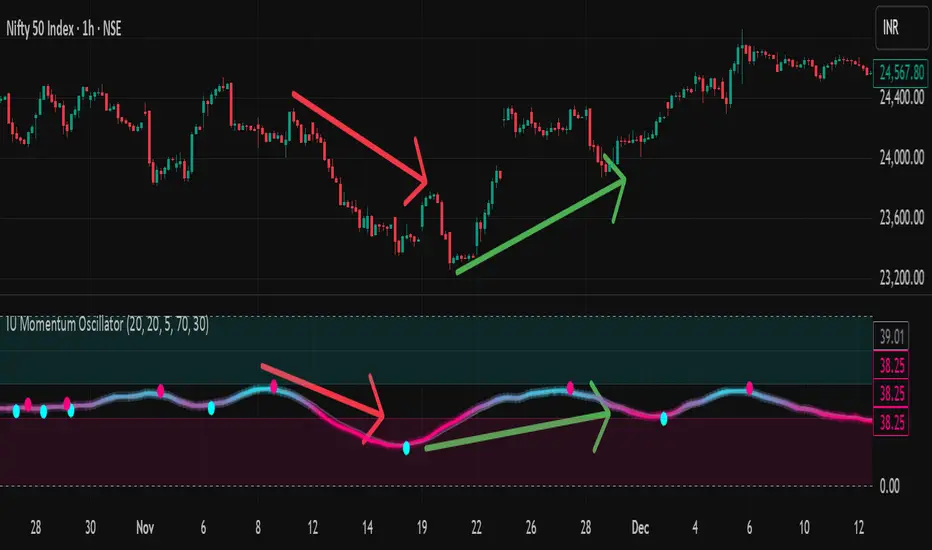
IU Momentum OscillatorDESCRIPTION:
The IU Momentum Oscillator is a specialized trend-following tool designed to visualize the raw "energy" of price action. Unlike traditional oscillators that rely solely on closing prices relative to a range (like RSI), this indicator calculates momentum based on the ratio of bullish candles over a specific lookback period.
This "Neon Edition" has been engineered with a focus on visual clarity and aesthetic depth. It utilizes "Shadow Plotting" to create a glowing effect and dynamic "Trend Clouds" to highlight the strength of the move. The result is a clean, modern interface that allows traders to instantly gauge market sentiment—whether the bulls or bears are in control—without cluttering the chart with complex lines.
USER INPUTS:
- Momentum Length (Default: 20): The number of past candles analyzed to count bullish occurrences.
- Momentum Smoothing (Default: 20): An SMA filter applied to the raw data to reduce noise and provide a cleaner wave.
- Signal Line Length (Default: 5): The length of the EMA signal line used to generate crossover signals and the "Trend Cloud."
- Overbought / Oversold Levels (Default: 60 / 40): Thresholds that define extreme market conditions.
- Colors: Fully customizable Neon Cyan (Bullish) and Neon Magenta (Bearish) inputs to match your chart theme.
LONG CONDITION:
- Signal: A Buy signal is indicated by a small Cyan Circle.
- Logic: Occurs when the Main Momentum Line (Glowing) crosses ABOVE the Grey Signal Line.
- Visual Confirmation: The "Trend Cloud" turns Cyan and expands, indicating that bullish momentum is accelerating relative to the recent average.
SHORT CONDITIONS:
- Signal: A Sell signal is indicated by a small Magenta Circle.
- Logic: Occurs when the Main Momentum Line (Glowing) crosses BELOW the Grey Signal Line.
- Visual Confirmation: The "Trend Cloud" turns Magenta, indicating that bearish pressure is increasing.
WHY IT IS UNIQUE:
1. Candle-Count Logic: Most oscillators calculate price distance. This indicator calculates price participation (how many candles were actually green vs red). This offers a different perspective on trend sustainability.
2. Optimized Performance: The script uses math.sum functions rather than heavy for loops, ensuring it loads instantly and runs smoothly on all timeframes.
3. Visual Hierarchy: It uses dynamic gradients and transparency (Alpha channels) to create a "Glow" and "Cloud" effect. This makes the chart easier to read at a glance compared to flat, single-line oscillators.
HOW USER CAN BENEFIT FROM IT:
- Trend Confirmation: Traders can use the "Trend Cloud" to stay in trades longer. As long as the cloud is thick and colored, the trend is strong.
- Divergence Spotting: Because this calculates momentum differently than RSI, it can often show divergences (price goes up, but the count of bullish candles goes down) earlier than standard tools.
- Scalping: The crisp crossover signals (Circles) provide excellent entry triggers for scalpers on lower timeframes when combined with key support/resistance levels.
DISCLAIMER:
This source code and the information presented here are for educational and informational purposes only. It does not constitute financial, investment, or trading advice.
Trading in financial markets involves a high degree of risk and may not be suitable for all investors. You should not rely solely on this indicator to make trading decisions. Always perform your own due diligence, manage your risk appropriately, and consult with a qualified financial advisor before executing any trades.
Net Futures OI Change + Price/OI Logic – All Bars-This indicator shows Net Change in Open Interest of Futures contract , with Open interest built-up with relation to price, specifically made for Indian Markets. Works on Index futures & Stock Futures (even on chart of underlying *if also traded in F&O segment*).
-This indicator only shows Net Futures open interest, as Tradingview only provides Open Interest for Futures contracts (in pinescript) and updates every 3 Minutes (according to the rule of National Stock Exchange)
-Also works on timeframes: 3 Minutes to 1 Month (only on Indian Scrips)
*Can use on other scrips excluding Indian Markets, but it will work only on Daily Timeframe*
Tip: Turn on/off ‘Pane Labels’ under graphic objects from indicator settings to view price relation with Open Interest (small text will appear on histogram bar)
How to Use:
Rise in Price, Rise in OI = Long Built Up
Rise in Price, Slide in OI = Short Covering
Slide in Price, Slide in OI = Short Built Up
Slide in Price, Slide in OI = Long Unwinding
Disclaimer/Warning: This indicator does not provide Buy/Sell signals or nor is an investment advice. This indicator solely for the purpose of study of price and open interest. Users are responsible for their own actions, profit/loss of the users is not the liability of author.

Trend Exhaustion Engine UnMatrixThis indicator combines classic exhaustion engines to detect market trend exhaustion, generate directional setup signals, and plot intelligent ATR-based entry/SL/TP levels.

Relative Strength vs Index - Joe v2This Indicator compares the relative strength of a ticker versus a reference index (QQQ/SPY), offering different calculation modes to capture performance or momentum differences.
Calculation Modes
Each mode analyzes the ticker’s performance against the index in a different way:
1. Moving Averages #1 (DEFAULT)
Compares the performance of the ticker relative to the index using the percentage distance from the moving average. This absolute deviation method may result in larger swings when price is far from the MA, offering a more sensitive view of divergence.
2. Moving Averages #2
Compares the performance of the ticker relative to the index using the ratio of price to moving average. This relative ratio method provides a smoother, proportional comparison and tends to produce stable values even when prices are far from the moving average.
3. % Based
Compares the percentage change in price since the session’s start time (adjustable) for both the ticker and the index.
Use case: Quick, simple snapshot of relative performance.
4. % Based - Bar-By-Bar
It compares the percentage change of the ticker from the previous bar to the percentage change of the index from the previous bar, and expresses the result as a relative strength percentage. It essentially answers: "Did the ticker move more (up or down) than the index in this bar?"
5. Rate of Change (ROC)
Compares the rate of change over a user-defined period. Optionally normalizes using ATR ratios to adjust for volatility.
Use case: Measures price momentum relative to the index.
6. RSI (Relative Strength Index)
Compares the RSI values of the ticker and index.
Effect: Highlights differences in momentum strength, expressed as a percentage difference.
-------------------------------------------------------------------
ATR Normalization (Very Important)
You can normalize the results of any mode using the Daily ATR of the ticker. This adjusts the output to account for the ticker's volatility, helping distinguish between meaningful moves and normal noise.
This is very important as every ticker have its own daily Average True Range (Typically movement in any given day)
-------------------------------------------------------------------
Trading Ideas
This indicator should not be used as the sole signal to enter trades; it works best when combined with your other trading signals.
As shown on the chart, at the open, the ticker was stronger than the index and initially moved upward. However, this strength eventually turned into weakness, and the ticker trended downward. Always keep a chart of the index open to monitor overall market behavior alongside your ticker.
It is well known that stocks generally follow the index. However, if a stock has news or specific reasons to move independently, knowing whether it is stronger or weaker than the index provides valuable insight.
Tip: If a stock is trading stronger than the index while the index is moving downward, once the index reverses and moves upward, the stock is likely to move with even greater strength, assuming it remains correlated with the index. Monitoring both the index and the stock together helps identify these opportunities.
-------------------------------------------------------------------
Important Companion Indicator: Correlation Tracker - Jv2 (Available From my Scripts)
The Correlation Tracker is a powerful tool designed to measure, visualize, and classify the correlation between a symbol and a reference index (QQQ/SPY). It provides an intuitive and customizable way to understand whether a ticker moves with, against, or independently from the market.
It classifies correlation strength into seven categories (from strong negative to strong positive) and highlights them using color-coded visuals, labels, meters, and optional background zones.
It is another part of the same puzzle and both should be used at the same time. One measuring relative strength, and the other correlation.

Empire OS Automated Trading • Institutional-grade executionEmpire OS – 9/40 EMA Dynamic Momentum Strategy
This strategy isn’t just EMAs — it’s a dynamic entry and exit system built around real-time price behavior. The 9/40 EMA setup gives the base trend direction, and the internal engine calculates every entry, stop, and target using recent price action and a 14-ATR volatility model.
Everything adjusts automatically:
• Entries react to momentum shifts based on the 9/40 EMA separation
• Stops tighten or widen based on the current 14-ATR reading
• Targets scale with real market volatility (not fixed numbers)
• Risk-to-Reward is calculated on the fly for cleaner, stronger trades
• Exits are based on structure + volatility, not random lines
Most strategies use fixed stops, fixed R:R, or standard EMA pairs that anyone can copy.
This one adapts to the market in real time — making every trade unique to current conditions.
It’s rare because almost nobody builds a retail strategy that:
Uses a non-standard 9/40 EMA combo
Calculates stops + targets off real volatility
Adjusts risk reward based on live price activity
Filters entries through momentum AND price structure
Keeps drawdown tight while catching high-quality moves
This is the official Empire OS version — built for consistency, momentum accuracy, and prop-firm scalability.

MinsenAMRS 2.0MinsenAMRS 2.0 - Minsen Advanced Momentum Reversal System
Get an Early Warning as Momentum Weakens
Many classic indicators share a common pain point—they tell you a trend "has already happened." When you see a MACD golden cross or death cross, the price has often already moved a significant distance. Entering at that point often means chasing the move or dealing with a widened stop-loss, making trading passive.
MinsenAMRS 2.0 starts from a completely different premise. It doesn't wait for a trend to be fully formed for confirmation. Instead, it issues an alert in the early stages of trend momentum exhaustion, giving you ample time to observe, analyze, and make decisions at an optimal timing. It's like observing a car at high speed—MinsenAMRS's alert doesn't occur when it has already turned around, but at the moment it eases off the throttle and begins to decelerate.
How Does the System Identify Alert Zones?
MinsenAMRS signals are not based on a single, fixed threshold. They are generated by analyzing the historical distribution characteristics of market momentum and its current dynamic structure.
It continuously assesses the current momentum state relative to its position within the entire historical data, understanding what is normal and what is extreme. On this basis, the system dynamically identifies structural changes in momentum, such as decay and divergence. This means the alert logic adapts to different market volatility environments, with the goal of objectively capturing the early signs of a shift in the internal force driving price movement.
Core: The Alert Marker System
The following explains the meaning of all alert markers on the chart:
🟢 Bullish Direction Alerts
* Green Upward Arrow: Bullish Reversal Alert
The system identifies a significant bottom momentum exhaustion structure, suggesting a downtrend may face reversal.
* Green Small Triangle: Bullish Divergence Alert
Indicates a preliminary bottom divergence signal between price and momentum, requiring close attention.
🔴 Bearish Direction Alerts
* Red Downward Arrow: Bearish Reversal Alert
The system identifies a significant top momentum exhaustion structure, suggesting an uptrend may face reversal.
* Red Small Triangle: Bearish Divergence Alert
Indicates a preliminary top divergence signal between price and momentum, requiring close attention.
🔄 Trend Continuation Alerts
* Blue Diamond: Bullish Continuation Alert
Within an overall uptrend, suggests a short-term pullback is possible, but the primary upward direction is expected to remain intact.
* Orange Diamond: Bearish Continuation Alert
Within an overall downtrend, suggests a short-term rally is possible, but the primary downward direction is expected to remain intact.
Important Note: Alert markers represent zones identified by the system as "requiring focused observation." They are the starting point of the decision-making process, not direct trading instructions.
Information Panel
Displays the current state in real-time:
* Alert Status: Whether there is a current alert signal. (Note: The info table may show preliminary alerts based on the latest price before a candle closes on the current timeframe. It is recommended to wait for candle closure and base decisions on the final signal. This indicator is designed for early warning, so there's no need to worry about missing an entry by waiting for one candle.)
* Price Momentum: Accelerating rise/fall, or stable state.
* Composite Momentum: Extremely Strong, Strong, Neutral, Weak, Extremely Weak.
* Volume Status: Exceptionally High, Moderately High, Low, Normal.
* MACD Bias: Bullish Strengthening/Weakening, Bearish Strengthening/Weakening.
Auxiliary Reference: Synchronized MACD Display
For ease of analysis, the indicator simultaneously displays the traditional MACD and its histogram:
* Line: MACD Fast Line.
* Histogram: MACD Histogram colored according to its numerical state.
Please Note: These are auxiliary references. The core value of the system lies in the Alert Markers above.
How to Use: From Alert to Decision
When an alert marker appears, it signals that "the inertia of market momentum may be encountering resistance here, please observe closely," not "reverse your position immediately."
The correct response process is:
1. Increase Focus: Mark this zone as a key observation area on your chart.
2. Seek Confluent Confirmation: Observe if other technical structures (support/resistance, chart patterns, trendlines) align in this price zone.
3. Wait for Price Confirmation: Patiently wait for the market itself to validate the alert's effectiveness through price action (e.g., key level breaks, specific reversal candle patterns).
4. Formulate a Trading Plan: Only after receiving price action confirmation should you develop a trading plan with clear entry and stop-loss levels.
The core value of this system is to help you pre-identify "potential opportunity zones," saving significant time spent blindly scanning charts and focusing your attention on the most critical junctures of market change.
Usage Framework
It is recommended to adopt a multi-timeframe analysis workflow:
1. On the higher timeframe you use for primary analysis and strategy, watch for MinsenAMRS alert signals. This helps you locate potential areas requiring macro-strategic adjustment.
2. Once an alert appears, switch to a lower operational timeframe chart. On this micro scale, look for specific entry timings and risk management points based on more refined price action and structure.
3. Combine the higher timeframe's potential reversal alert with the lower timeframe's precise tactical signals to build a decision-making loop.
A Straightforward Strategy
After an alert signal appears, wait for the completion of one subsequent candle. Then, observe if the MACD histogram has turned to a confirming color (e.g., after a bullish signal, the histogram turns green). Additionally, confirm aligned directionality by observing the price action on two adjacent timeframes you commonly use before deciding to enter.
About Signal Characteristics
* No Repainting: Signals are finalized and plotted once at candle close. Historical signals do not change.
* Multi-Timeframe Applicable: The core analytical method is applicable across different timeframes.
A Frank Note on Applicability
No tool is universal. Understanding its optimal application scenarios is part of using it correctly:
* In Clear Trend Markets: It can effectively depict the evolution of trend momentum strength, helping you identify the accelerating phase, correction phases, and potential warning zones of terminal exhaustion within the main trend.
* During Ranging or Early Trend Reversal Phases: Its value is highest here, helping you focus on genuine potential turning points rather than ordinary fluctuations within a range.
* In Extreme, One-Sided Markets: Momentum may repeatedly touch extreme zones, and the system will continuously signal a state of "risk accumulation." In such cases, alert signals need to be interpreted in the context of the larger trend background—are they signaling a trend continuation or a genuine prelude to a reversal?
Finally: Sensing the Shift in Power Before the Change
Markets fluctuate on the tides of collective sentiment. The greatest danger lies in being swept away by the current, losing oneself in euphoria or fear. True advantage comes from observation—observing when the tide's force reaches its extreme, observing when the internal momentum driving the trend begins to subtly change.
MinsenAMRS 2.0 aims to be that reliable observation instrument in your hands. It does not predict the direction of the tide but strives to alert you to the subtle signs of a shift in its power, helping you direct your attention to where it matters most at critical moments.
May you remain calm and respond with composure amidst the rhythm of the markets.
Disclaimer & Risk Notice
1. Investment Risk Notice: Trading in financial markets carries risks. Past performance does not guarantee future results. MinsenAMRS 2.0 is solely a technical analysis tool and does not constitute any investment advice or trading signal.
2. Tool Nature Statement: This indicator is designed to assist your trading decisions but cannot replace your own analysis and judgment. Final trading decisions should be made by you, and you bear the corresponding responsibility.
3. Technical Limitations: No technical indicator can predict the market with 100% accuracy. Even the most sophisticated analytical system cannot avoid the impact of unexpected market events.
4. Learning and Adaptation: It is recommended to thoroughly test the indicator on a demo account first, familiarize yourself with its signal characteristics and response patterns, and find the usage method that suits you best.
//====中文版====
MinsenAMRS 2.0 - 明心动能反转预警
在动能衰减的初期,获得预警
许多经典指标都有一个共同的痛点——它们告诉你趋势“已经发生”。当你看到MACD金叉或死叉时,价格往往已经运行了一段距离。这时候入场,要么追高,要么止损空间被放大,交易变得被动。
MinsenAMRS 2.0 的出发点完全不同。它不等待趋势完全成型才确认,而是在趋势动能开始衰竭的初期就发出预警,让你有足够的时间观察、分析,并在最佳时机做出决策。这就像观察一辆高速行驶的汽车——MinsenAMRS的预警不发生在它已经掉头的时候,而是在它松油门、开始减速的那个时刻。
系统如何识别预警区域?
MinsenAMRS的信号并非基于单一、固定的阈值,而是通过分析市场动能的历史分布特征和当前动态结构来实现的。
它会持续评估当前动能状态在整个历史数据中的位置,理解什么是常态、什么是极端。在此基础上,系统动态识别动能运行中的衰减、背离等结构变化。这意味着预警逻辑能适应不同的市场波动环境,其目标是客观捕捉推动价格运动的内在力量发生转变的早期迹象。
核心:预警标记系统
以下是图表上所有预警标记的含义说明:
🟢 看涨方向预警
* 绿色向上箭头:看涨反转预警
系统识别出显著的底部动能衰竭结构,提示下跌趋势可能面临反转。
* 绿色小三角:看涨背离预警
提示价格与动能之间出现初步的底部背离迹象,需密切关注。
🔴 看跌方向预警
* 红色向下箭头:看跌反转预警
系统识别出显著的顶部动能衰竭结构,提示上涨趋势可能面临反转。
* 红色小三角:看跌背离预警
提示价格与动能之间出现初步的顶部背离迹象,需密切关注。
🔄 趋势延续预警
* 蓝色菱形:看涨中继预警
在整体上涨趋势中,提示短期可能出现回调,但主要上升方向预计保持不变。
* 橙色菱形:看跌中继预警
在整体下跌趋势中,提示短期可能出现反弹,但主要下降方向预计保持不变。
重要提示:预警标记是系统识别出的“需要重点观察的区域”,它们是决策流程的起点,而非直接交易的指令。
信息面板
实时显示当前状态:
* 预警状态:当前有无预警信号(信息表格预警:在当前级别K线没有走完时,信息表格会根据最新价格提前预警,建议等待K线闭合后,根据最终信号决策,本指标具有提前预警的特性,不必担心1根K线就入场晚了。)
* 价格动能:加速上涨/下跌,还是平稳状态
* 综合动能:极强、强势、中性、弱势、极弱
* 成交量状态:异常放量、温和放量、缩量、正常
* MACD多空:多头增强/减弱、空头增强/减弱
辅助参考:MACD同步显示
为便于分析,指标同步显示了传统MACD及其柱状图:
* 曲线:MACD快线
* 量柱:根据数值状态着色的MACD柱状图
请注意:这些是辅助参考,系统的核心价值在于上方的预警标记。预警信号的生成独立于MACD的传统金叉死叉逻辑。
如何使用:从预警到决策
当预警标记出现时,它意味着“市场动能的惯性在这里可能遇到阻碍,请重点观察”,而不是“立即反向操作”。
正确的应对流程是:
1. 提高关注度:将此区域标记为你图表上的关键观察区。
2. 寻求共振确认:观察该价格区域是否存在其他技术结构与之共振。
3. 等待价格确认:耐心等待市场自身通过K线行为来验证预警的有效性。
4. 制定交易计划:仅在得到价格行为确认后,才制定包含明确入场点和止损位的交易计划。
本系统的核心价值在于帮你提前锁定“潜在的机会区域”,节省大量盲目扫描图表的时间,并将你的注意力聚焦在市场最关键的变化节点上。
使用框架
建议采用大小级别联动的分析流程:
1. 在你主要分析和决策的大级别图表上,关注MinsenAMRS发出的预警信号。这帮你定位到可能需要宏观策略调整的潜在区域。
2. 当预警出现后,切换到更小的操作级别图表。在这个微观尺度上,依据更精细的价格行为和结构来寻找具体的入场时机与风控点位。
3. 将大级别的潜在转折预警与小级别的精确战术信号相结合,构建决策闭环。
一个粗暴的策略
出现预警信号后,等待走完1根K线之后,MACD量柱转变为同色(例如:出现看涨信号后,MACD量柱变绿),联动观察相邻的大小两个常用级别,确认走势同向,再决策入场。
关于信号特性
* 无未来函数:信号在K线收盘时一次性确定,历史信号不会改变
* 多级别适用:核心分析方法适用于不同的时间框架
坦诚的适用性说明
没有工具是万能的。清晰了解其最佳应用场景,本身就是正确使用的一部分:
* 在明确的趋势行情中:它能有效描绘趋势动能的强度演变,帮助你识别主趋势的加速段、调整段以及可能进入末端衰竭的预警区。
* 在震荡或趋势转换初期:此时它的价值最高,能帮助你关注真正的潜在转折点,而非震荡区间内的普通波动。
* 在极端单边行情中:动能可能反复触及极端区域,系统会持续提示“风险积聚”的状态。这时,预警信号需要你结合更大的趋势背景来理解其含义——是趋势中继,还是真正的转折前兆。
最后:在变化前感知力量的消长
市场在群体情绪的潮汐中波动。最危险的莫过于被潮水裹挟,在狂热或恐惧中迷失自我。真正的优势来自于观察——观察潮汐的力道何时达到极致,观察推动趋势的内在动能何时开始悄然变化。
MinsenAMRS 2.0 的目标,就是成为你手中那个可靠的观察仪。它不预测潮水的方向,但致力于提醒你潮汐力量转换的微妙征兆,帮助你在关键时刻,将注意力投向最该关注的地方。
愿你在市场的律动中,保持冷静,从容应对。
免责声明与风险提示
1. 投资风险提示
金融市场交易存在风险,过往表现不代表未来结果。MinsenAMRS 2.0 仅为技术分析工具,不构成任何投资建议或交易信号。
2. 工具性质说明
本指标旨在辅助您进行交易决策,但不能替代您自己的分析和判断。最终的交易决策应由您自己做出,并承担相应责任。
3. 技术局限性
没有任何技术指标能够100%准确预测市场。即使是最完善的分析系统,也无法避免市场突发性事件带来的影响。
4. 学习与适应
建议在使用前先用模拟账户进行充分测试,熟悉系统的信号特征和响应方式,找到适合自己的使用方法。

Combined Crypto Signal📈 Combined Crypto Signal — Trend + Momentum + Volatility Model
Combined Crypto Signal is a multi-factor trading model designed for crypto traders who want clean, high-probability Buy/Sell signals based on three proven pillars:
✅ Trend direction (EMA 200)
✅ Momentum confirmation (MACD + RSI)
✅ Volatility positioning (Bollinger Bands)
This script filters out noise and highlights only the strongest setups where trend, momentum, and volatility align together.
🔍 How It Works
1. Trend Filter — EMA 200
The script uses a long-term exponential moving average to determine market bias.
Price > EMA 200 → Bullish environment
Price < EMA 200 → Bearish environment
Signals only appear in the direction of the prevailing trend.
2. Momentum Confirmation — MACD + RSI
A signal requires momentum to agree with the trend:
Buy Momentum
MACD Line crosses above Signal Line
RSI is below overbought (default 70)
Sell Momentum
MACD Line crosses below Signal Line
RSI is above oversold (default 30)
This filters out weak crossover signals.
3. Volatility Check — Bollinger Bands
Price must be positioned on the favorable side of the middle Bollinger Band:
Buy: Price above BB Middle
Sell: Price below BB Middle
This ensures signals align with volatility expansion.
🎯 Final Buy / Sell Logic
A Buy Signal triggers when:
Trend = Bullish (Price > EMA 200)
Momentum = MACD Bullish Cross + RSI healthy
Volatility = Price above BB Middle
A Sell Signal triggers when:
Trend = Bearish (Price < EMA 200)
Momentum = MACD Bearish Cross + RSI healthy
Volatility = Price below BB Middle
Only when all three systems confirm, a triangle marker appears.
📌 Visuals & Alerts
Green Triangles → Valid Buy Signals
Red Triangles → Valid Sell Signals
EMA 200 plotted for trend visibility
Built-in alert conditions for automated notifications
Perfect for:
✔ Swing Trading
✔ Crypto Trend Trading
✔ Momentum Breakout Strategies
✔ Automated Alert Systems
⚙ Adjustable Inputs
You can customize:
EMA length
RSI length + OB/OS levels
MACD lengths
Bollinger Band settings
🚀 Summary
This tool combines the strength of trend + momentum + volatility into a single, easy-to-use indicator that filters out bad signals and highlights only high-probability trading opportunities.

Dynamic `request` demoPublish a new script-This should help people to make better analysis of the market
