Sector Flow AnalysisSector Flow Analysis - Track market leadership and rotation across 11 major sector ETFs with real-time performance rankings.
Key Features:
Monitors all 11 S&P sector ETFs (XLK, XLF, XLI, XLU, XLV, XLP, XLY, XLB, XLRE, XLC, XLE)
Configurable lookback period (5-60 days) for performance calculation
Color-coded risk indicators: 🟢 Risk-On sectors leading (bullish), 🟠 Risk-Off sectors leading (defensive), 🟡 Neutral sectors
Display top N sectors (1-11) to declutter your chart
Fully customizable positioning, text size, and color
Clean, minimal table overlay that won't obstruct your chart
Use Cases:
Identify sector rotation patterns and market leadership changes
Gauge market sentiment (risk-on vs risk-off behavior)
Find opportunities by tracking which sectors are gaining/losing momentum
Confirm trend strength when your stock's sector is leading
Perfect companion to comprehensive market analysis tools for a complete picture of sector dynamics.
Forecasting

NQ Geometric Trading System NQ Geometric Trading System
Advanced confluence indicator for NQ futures implementing Michael S. Jenkins' geometric methodology.
Core Features:
Automatic spike detection (9:30-9:35) captures institutional footprint
Geometric levels from opening range using Jenkins ratios (R_50, R_25, R_67, extensions)
Rising zero angles provide dynamic time+price support/resistance
Fibonacci time windows highlight natural reversal periods
Weighted confluence algorithm (spike levels = 2x, others = 1x)
Real-time dashboard displays score 0-10 and signal strength
Customizable alerts for high-probability setups
How It Works:
System automatically detects opening spike extremes, calculates geometric ratios from 9:30-10:00 range, projects zero angles rising at 0.75 points/minute, and highlights Fibonacci time windows. When multiple factors align, dashboard shows confluence score with color-coded signals (Strong 5+, Trade 4, Watch 3).
Optimized For:
NQ/MNQ scalping and day trading on 1-5 minute timeframes. Works best during regular trading hours with timezone set to Exchange.
Customizable:
15+ parameters including angle rate, confluence threshold, price tolerance, time windows, and visual settings. Default optimized for NQ but adaptable.
Requirements:
Chart timezone must be "Exchange" or "America/New_York" for proper spike/range detection.
Perfect for traders seeking mechanical, objective signals based on proven geometric principles.

Swing Elite - Futures to CFD calculatorThis utility indicator solves a common challenge faced by traders who analyze futures markets but execute trades through CFD brokers. Since futures contracts and their corresponding CFD instruments trade at different price levels due to factors like contract specifications, rollover timing, and broker pricing models, manually converting trade levels between the two can be time-consuming and error-prone.
The indicator uses a dynamic offset calculation method to convert futures price levels to their CFD equivalents in real-time. When the user selects three reference points on the chart, the tool calculates the price differential and applies this offset consistently across all trade levels. This ensures that entry, stop loss, and take profit levels maintain their relative distances when translated to the CFD instrument.
The conversion methodology works by establishing a fixed offset between the futures price and the CFD price at the moment of setup. This offset is then applied uniformly to all specified trade levels, preserving the original risk-to-reward structure of the trade. The indicator automatically detects whether the trade is long or short based on the relationship between entry and stop loss levels, and calculates the target price according to the user-defined risk-to-reward ratio.
The tool includes automatic instrument detection for major futures contracts including E-mini S&P 500, E-mini Nasdaq 100, E-mini Dow, Russell 2000, Crude Oil, and Gold futures, displaying the corresponding CFD instrument name for quick reference. A visual overlay shows the trade levels directly on the chart with color-coded zones indicating risk and reward areas.
This indicator is designed for traders who prefer the liquidity and price discovery of futures markets for their analysis while utilizing CFD platforms for trade execution due to accessibility, leverage options, or account size considerations.

Ichimoku + Time Theory Cluster PRO++ (ZZZ)## Ichimoku + Time Theory Cluster PRO++ (ZZZ)
### 1) What does this script do?
**Ichi+Time PRO++** combines **Ichimoku + Ichimoku Time Theory (Hosoda’s time cycles)** to:
- Automatically plot **Ichimoku (Tenkan/Kijun/Chikou/Kumo)** as a **trend filter & support/resistance framework**.
- Calculate **projected time targets** derived from **pivots (swing highs/lows)**, then **cluster** nearby targets into **“time windows”** where the probability of **reversal / acceleration / strong volatility** is higher than usual.
- Show **early warnings (countdown “~in N bars”)** and classify clusters as **Normal / Strong** using a **score**.
> Core idea: **Price can travel far/short based on “price”, but it often turns hard around certain “time” marks.** Ichimoku helps define *direction and key areas*, while Time Clusters tell you *when to be on alert*.
---
### 2) How it works (simple overview)
1. **Detect pivots** (swing highs/lows) using Pivot Left/Right
- A pivot is confirmed only after *pivRight* bars → less noise.
2. From each pivot, the script generates **projected time targets** based on Time Theory cycle offsets (bar intervals).
3. Nearby projections are **grouped into clusters** using **“Tolerance ± bars”**.
4. A cluster is kept only if it meets:
- **Min hits**: minimum number of projections inside the same window
- **Min score**: minimum score threshold
Score = **baseScore (weighted hits)** + **contextBonus (Ichimoku context)**
→ Clusters aligned with favorable Ichimoku conditions are **prioritized**.
---
### 3) What you will see on the chart
- **Ichimoku**: Tenkan / Kijun / Chikou / Kumo (to read trend & key zones).
- **Time Cluster Window**:
- **Normal**: meets baseline conditions.
- **Strong (TC++)**: higher score (≥ strongScore) → more important.
- **Tooltips / info labels** (e.g., hits, base, ctx, score, ~in N bars) show:
- How strong a cluster is
- How many bars remain until the “time window”
---
### 4) Practical usage (recommended workflow)
**Step 1 — Filter the trend with Ichimoku**
- Prefer Long when: price is **above Kumo**, Tenkan > Kijun, Chikou is not obstructed.
- Prefer Short when: price is **below Kumo**, Tenkan < Kijun, Chikou is not obstructed.
**Step 2 — Use Time Clusters to pick the “WHEN”**
- When a **Time Cluster (Normal/Strong)** appears, interpret it as:
- A **“sensitive time window”** → higher chance of reversal, breakout, acceleration, or sharp shakeout.
- Not an automatic entry; you still need **price action confirmation**.
**Step 3 — Entry trigger**
- Wait for confirmation such as: structure break, pin/engulf candle, range breakout, Kijun/Kumo retest, etc.
- **Strong clusters** are often useful to:
- Hunt reversals around Ichimoku zones (Kijun/Kumo)
- Hunt breakouts when consolidating and Ichimoku agrees with the trend
**Step 4 — Risk management**
- Place SL using the nearest structure (swing/pivot/Kijun) + buffer.
- If already in a trade, Time Clusters can help you:
- tighten SL, take partial profits, or anticipate volatility.
---
### 5) Presets (A/B) & signal tuning
- **Mode A: “Fewer but stronger”**
Stricter filtering → fewer clusters, higher quality (swing/position-friendly).
- **Mode B: “More early warnings”**
Moderate filtering → more clusters (good for earlier monitoring and flexibility).
- **Custom**
Manually adjust key parameters:
- Pivot Left/Right
- Tolerance ± bars
- Min hits / Min score / Strong score
- Filter small pivots (reduce noise)
> Tip: Higher timeframes (4H–1D) usually work best with Mode A (cleaner). Lower timeframes (15m–1H) can use Mode B, but require disciplined triggers.
---
### 6) Important notes (avoid misinterpretation)
- Pivots require confirmation → pivot-based signals **do not print exactly at the top/bottom**, but after *pivRight* bars.
- Future **projected clusters may shift** when new pivots appear (they update with new data).
Treat Time Clusters as **time windows to be alert**, not “exact entry points”.
- This script does not replace a trading plan; always use proper position sizing and risk control.
---
### 7) Performance
This script uses many drawing objects (box/label/line). If your device is slow:
- Reduce **Max pivots stored**
- Reduce the number of clusters displayed or switch to **Mode A**
- Use a higher timeframe
---
**Disclaimer:** This tool is for technical analysis support only and is not financial advice. You are responsible for your own trading decisions.
---
## User Guide
### 1) What is this indicator for?
This indicator combines **Auto Ichimoku** + **Time Theory Clusters** to:
- Identify **trend & equilibrium zones** via Ichimoku (Kumo, Tenkan/Kijun, Chikou).
- Find **time windows** with higher probability of volatility/reversal/acceleration (Time Clusters).
- Score each time cluster based on **cluster strength (hits)** and **Ichimoku context (context bonus)**.
> Key reminder: Time Clusters answer **WHEN**, not **WHERE**. Always combine them with **price confirmation / Ichimoku / PA** before entering.
---
### 2) Add the indicator & quick setup
1. Open a chart → **Indicators** → choose **Ichimoku + Time Theory Cluster PRO++**.
2. Recommended timeframes:
- Swing/position: **H4 – D1 – W1**
- Intraday: **M15 – H1** (noisier; needs stricter filtering).
3. Choose **Mode (Preset)**:
- **A: Fewer but stronger** → stricter, fewer signals, higher quality (recommended for swing).
- **B: More early warnings** → more signals (recommended for intraday monitoring).
- **Custom** → fine-tune all parameters.
---
### 3) Signal meaning (how to read the chart)
The indicator marks **Time Clusters** in two levels:
- **Time Cluster Enter (Normal)**: meets minimum thresholds (minHits/minScore).
- **Time Cluster Enter (Strong / TC++)**: strong cluster (score ≥ strongScore) → higher priority.
**Correct interpretation:**
- As price approaches a Time Cluster window, the market is more likely to:
- reverse,
- break out of consolidation,
- accelerate a trend,
- or produce strong volatility (sweep/false break).
- Trading direction should be aligned with **Ichimoku context** (see section 4).
---
### 4) Suggested trading rules (practical & simple)
#### A. Trend trading (recommended)
**Prefer LONG when:**
- Price is **above Kumo**, future Kumo is bullish (Span A > Span B).
- Tenkan is **above** Kijun (or just crossed up), Chikou is not trapped by price/cloud.
- At a Time Cluster:
- Look for a **pullback** to Kijun/Tenkan or structural support,
- Wait for confirmation (engulfing/pinbar/micro-structure break),
- Enter.
**Prefer SHORT when:**
- Price is **below Kumo**, future Kumo is bearish (Span A < Span B).
- Tenkan is **below** Kijun, Chikou is pressured/blocked.
- At a Time Cluster:
- Look for a rally into Kijun/cloud edge,
- Wait for rejection, then enter.
✅ Tip: **Strong clusters (TC++)** matter most when they align with:
- Kumo edge,
- Kijun,
- horizontal S/R,
- supply/demand (order block) or swing high/low.
#### B. Reversal trading (only with strong confirmation)
Consider reversals only when:
- Time Cluster is **Strong (TC++)**
- + you see a **structure shift** (BOS/CHoCH) or a clear reversal candle setup,
- + Ichimoku shows weakness (price inside cloud, flat Tenkan/Kijun, Chikou trapped).
---
### 5) Risk management (mandatory)
- Do not enter just because you “reached a Time Cluster”.
- Always set SL by structure:
- LONG: below swing low / below Kijun / below nearest cloud edge.
- SHORT: above swing high / above Kijun / above nearest cloud edge.
- Take profit using:
- minimum R:R **1:1.5 – 1:2**
- or key targets (prior highs/lows, cloud boundaries, fib levels, etc.)
---
### 6) Inputs explained (Custom mode)
- **Pivot Left / Pivot Right**: pivot confirmation (higher = fewer but more reliable pivots).
- **Max pivots stored**: how many pivots are stored for clustering (more = more sensitive but heavier).
- **Tolerance ± bars**: cluster window width (larger = more clusters; smaller = sharper).
- **Min hits**: minimum overlaps to qualify as a cluster.
- **Min score**: minimum score to accept a cluster.
- **Strong score**: threshold to mark strong clusters (TC++).
- **Filter small pivots / Filter mode**: remove small pivots to reduce noise (recommended ON).
---
### 7) Alerts (recommended)
You can create alerts for:
- **Time Cluster Enter (Normal)**
- **Time Cluster Enter (Strong / TC++)**
Recommendation: set alerts on your main trading timeframe (H1/H4/D1) to avoid spam on very small TFs.
---
### 8) Disclaimer
This indicator is for technical analysis support only and is **not financial advice**. All trading decisions are your responsibility. Please test (forward/backtest) and apply risk management before using real money.
---
### 9) Access (Invite-only, if applicable)
To request access, send me a private message on TradingView with:
- TradingView username
- Market you trade (Crypto/FX/Indices…)
- Primary timeframe (e.g., H1/H4/D1)
I will grant access in order of requests.
---

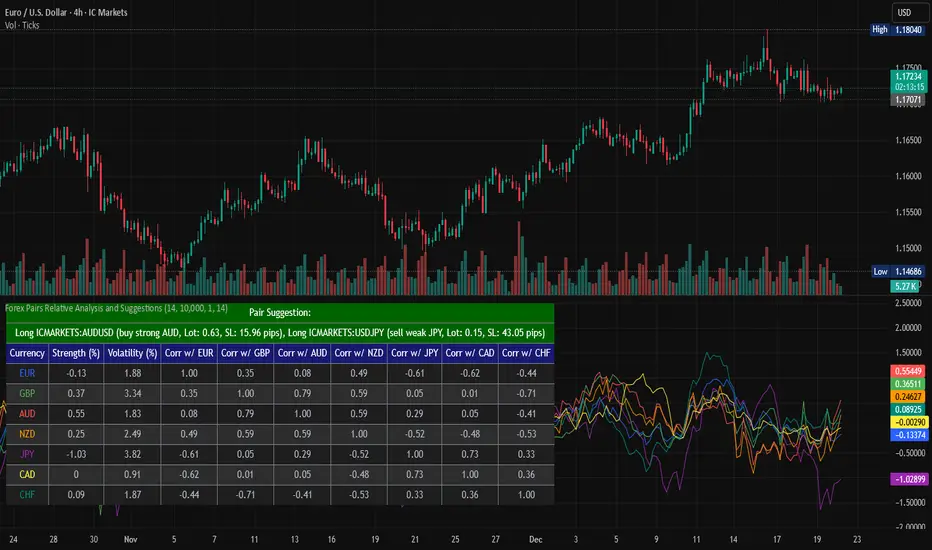
Forex Pairs Relative Analysis and SuggestionsThis Pine Script (version 5) indicator, titled "Forex Pairs Relative Analysis and Suggestions," is designed for use on TradingView charts. It provides real-time analysis of major forex pairs sourced from the IC Markets exchange, facilitating relative value or pair trading strategies by evaluating currency strengths against the US Dollar (USD). The script focuses on seven major currencies—EUR, GBP, AUD, NZD, JPY, CAD, and CHF—through their respective pairs: EURUSD, GBPUSD, AUDUSD, NZDUSD, USDJPY, USDCAD, and USDCHF.
Key features include:
Relative Currency Strengths: Calculated using the Rate of Change (ROC) over a user-defined lookback period (default: 14 bars), normalized to reflect performance versus USD. Positive values indicate strengthening, while negative values denote weakening.
Annualized Volatilities: Derived from the standard deviation of logarithmic returns, annualized assuming 252 trading days, and expressed as percentages to compare risk levels across pairs.
Full Pairwise Correlations: A comprehensive matrix displaying Pearson correlation coefficients between all pairs over the lookback period, aiding in identifying hedging opportunities (e.g., low or negative correlations for diversification).
Automated Pair Suggestions: Identifies the strongest and weakest currencies, proposing a long position in the pair to buy the strong currency and a short position (or opposite direction) to sell the weak currency against USD. Suggestions include estimated lot sizes based on user-input account balance, risk percentage (default: 1%), and a stop-loss proxy using 1x Average True Range (ATR).
Visual Elements: A table displays all metrics with color-coded rows for readability (optimized for dark mode), alternating backgrounds, and merged cells for suggestions. Strengths are also plotted in a separate pane with matching colors for trend visualization.
Customization: Users can adjust the lookback length, ATR period, account balance, and risk percentage via indicator settings to tailor the analysis.
Ensure access to IC Markets data in your TradingView account. The table appears in the top-left position by default and updates on the last bar. This tool is intended for educational and analytical purposes, supporting informed decision-making in forex trading by highlighting relative strengths, risks, and potential hedges.
Guidance on Choosing a Timeframe:
The indicator adapts to the chart's timeframe, with the lookback period influencing the historical window for metrics. Select based on your strategy:
Short-Term (Intraday/Scalping): Use 15-minute to 1-hour charts for timely signals; adjust lookback to 5–10 for responsiveness.
Medium-Term (Swing Trading): Opt for 4-hour to daily charts (recommended default) for balanced trends; 14-bar lookback covers days to weeks.
Long-Term (Position Trading): Choose weekly or monthly charts for macro views; increase lookback to 20–50 for smoother data.
Test across timeframes via backtesting to align with your risk and objectives.
Disclaimer:
This script is provided for informational and educational purposes only and does not constitute financial, investment, or trading advice. Trading forex involves significant risk of loss and is not suitable for all individuals. Past performance is not indicative of future results. The calculations, suggestions, and metrics (including lot sizes) are based on historical data and simplified assumptions, such as using ATR for stop-loss estimation, and may not account for real-time market conditions, slippage, commissions, or other factors. Users should conduct their own research, consult with qualified financial professionals, and verify the script's outputs before making any trading decisions. The author assumes no responsibility or liability for any losses incurred from the use of this script.
Pre-Market + Daily + Weekly RTH Range Boxes📦 Pre-Market + Daily + Weekly RTH Range Boxes
This indicator automatically plots Pre-Market, Daily, and Weekly range boxes based strictly on US Regular Trading Hours (RTH).
What it does:
Pre-Market Box (04:00–09:30)
Captures the full pre-market high and low, then projects the range forward from the RTH open.
Daily RTH Box (09:30–16:00)
Tracks the previous day’s regular session high and low and plots the range starting at 04:00 the next day.
Weekly RTH Box (Mon–Fri, 09:30–16:00)
Accumulates the full weekly RTH range and plots it at 04:00 on Monday.

TP & SL Indicator [TheScalpingAnt]
Overview
TP & SL Levels Clean is a precision trade-management tool designed to instantly plot professional-grade Take Profit and Stop Loss levels directly on your chart. Whether you are scalping, swing trading, or managing high-risk execution, this indicator removes guesswork by automatically calculating your SL and up to three configurable TP targets, displaying them with clean price labels on the right side of the chart.
This tool is built for traders who demand clarity, discipline, and execution accuracy.
Core Concepts
This indicator is designed around three key trading principles:
• Risk Management First
A clearly defined Stop Loss is essential in every professional trading strategy. The indicator ensures your SL is always visible and precise.
• Structured Profit Taking
Instead of randomly exiting trades, the tool delivers predefined TP targets to support scaling out and disciplined exits.
• Clean Visual Execution
Levels are displayed with bold lines and price tags, ensuring immediate readability without cluttering the chart.
LONG and SHORT trading directions are fully supported, ensuring it fits any trading style and asset class.
Key Features
• Automatically plots:
o Entry price level
o Stop Loss level
o TP1 (mandatory)
o TP2 (optional)
o TP3 (optional)
• Works for:
o LONG & SHORT positions
• Adjustable percentages for:
o SL %
o TP1 %
o TP2 %
o TP3 %
• Toggle ON/OFF visibility for TP2 & TP3
• Clean professional design
• Smart decimal precision based on instrument price
• Stable drawing logic using only the latest bar (no historical clutter)
• Precise price labels aligned on the right side of the chart
• Customizable line width
• Lightweight, fast, and optimized for performance
Customization & Flexibility
The indicator allows full personalization to match your trading strategy:
• Manually set Entry Price or let the indicator auto-detect from current price
• Choose Trade Direction: LONG or SHORT
• Define your exact:
o Stop Loss %
o Take Profit % levels
• Enable or disable TP2 and TP3 depending on your strategy
• Adjust line thickness
• Automatically adjusts price label decimal formatting for Forex, Crypto, Indices, and Stocks
This gives you total flexibility to adapt the tool to scalping, day trading, swing trading, or long-term positioning.
How to Use
1. Apply the indicator to your chart
2. Set:
o Entry Price (or leave 0 for automatic detection)
o Trade Direction (LONG / SHORT)
3. Define SL %, TP1 %, and optionally TP2 & TP3 %
4. Enable TP2 / TP3 toggles if needed
5. The indicator instantly plots:
o Entry line
o Stop Loss line
o Take Profit levels
6. Trade with visual confidence knowing your execution levels are clearly defined
Example Use Case
A trader plans a LONG position at 1.20000.
They configure:
• SL = -1.20%
• TP1 = +0.90%
• TP2 = +0.90% (optional)
• TP3 = +0.90% (optional)
The indicator immediately displays:
• Entry Reference Level
• Stop Loss Zone
• Profit Targets
This gives the trader an instant, structured trading framework without manual calculations, improving discipline and execution speed.
Settings Breakdown
Inputs:
• Entry Price (0 = auto)
• Trade Direction (LONG / SHORT)
• Stop Loss %
• TP1 %
• TP2 %
• TP3 %
• Toggle ON / OFF TP2
• Toggle ON / OFF TP3
• Line Width
• Built-in intelligent decimal formatting
Visuals:
• Bold colored levels
• Clear labels with precise price values
• Transparent clean UI
• Optimal spacing for visibility
Conclusion
TP & SL Levels Clean is built for serious traders who understand that consistent profitability comes from structured execution, not emotions. By combining clarity, flexibility, and professional visualization, this indicator helps you manage trades with precision and confidence.
If you are looking to simplify your workflow, improve discipline, and present professional execution management on your charts, this tool is for you.
Disclaimer
This indicator does not provide financial advice or guaranteed profits. It is a technical tool designed to support trade planning and execution. Trading involves risk, and users should always conduct their own analysis and manage risk responsibly

Conditional-range High/Low adoptive-MA Crossover StrategyDeveloped from the doctoral research of Abu-Kadunagra at ****** University on topic of Digital Finance and Crypto in Australia, this strategy implements a "Campaign-Based Adaptive Execution" framework. It moves beyond simple entries and exits by treating each market engagement as a multi-phase campaign with distinct operational states. The system intelligently identifies cyclical turning points, then employs a feedback-driven approach to capital allocation—reinforcing successful momentum with pyramiding while deploying controlled defensive averaging during temporary setbacks. By anchoring its exit mechanism to dynamically updated market structure rather than static profit targets, the algorithm seeks to capture cyclical momentum while maintaining disciplined risk parameters. This research-driven approach represents an evolution toward state-aware algorithmic systems that adapt their tactics in real-time based on market phase recognition.


GODMODE V2.3 ULTIMATE══════════════════════════════════════════════════════════════
⚡ GODMODE V2.3 ULTIMATE ⚡
══════════════════════════════════════════════════════════════
Institutional-grade precision. Unmatched power.
The most advanced trading system ever built.
══════════════════════════════════════════════════════════════
█░█ █░░ ▀█▀ █ █▀▄▀█ ▄▀█ ▀█▀ █▀▀
█▄█ █▄▄ ░█░ █ █░▀░█ █▀█ ░█░ ██▄
────────────────────────────────
⚡ SMART MONEY CONCEPTS (SMC)
────────────────────────────────
✦ Order Block Detection
Auto-identifies bullish & bearish order blocks
Institutional buying/selling zones revealed
✦ Fair Value Gaps (FVG)
Automatically plots imbalance zones
High-probability reversal areas highlighted
✦ Break of Structure (BOS)
Real-time structure break detection
Trend continuation confirmation
✦ Change of Character (CHoCH)
Trend reversal early warning system
Catch reversals before they happen
✦ Liquidity Levels
Equal Highs/Lows detection (EQH/EQL)
Know where liquidity pools form
✦ Premium/Discount Zones
Daily range equilibrium plotted
Buy in discount, sell in premium
────────────────────────────────
📊 MULTI-TIMEFRAME ANALYSIS
────────────────────────────────
✦ 4-Timeframe Trend Dashboard
Current TF + 3 higher timeframes
Instant trend alignment visibility
✦ MTF Confluence Scoring
Signals only fire when timeframes align
Dramatically reduces false signals
✦ MTF Filter Toggle
Enable/disable for different strategies
Full control over signal filtering
✦ Custom Timeframe Selection
Choose your own MTF combination
Adapt to any trading style
────────────────────────────────
🎯 ADVANCED SIGNAL ENGINE
────────────────────────────────
✦ Multi-Confluence Buy/Sell Signals
5+ conditions must align to trigger
Institutional-quality entries
✦ RSI Confluence Filter
Eliminates overbought/oversold traps
Adjustable thresholds
✦ Volume Confirmation Filter
Validates signals with volume spikes
Customizable sensitivity
✦ MTF Trend Filter
Only trades with higher TF trend
Dramatically improves win rate
✦ Session Filter
Optional: Only signal during active hours
Avoid low-liquidity traps
✦ Signal Strength Score (0-100%)
Know exactly how strong each setup is
10+ factors calculated in real-time
✦ Anti-Repaint Mode
Signals only confirm on bar close
What you see is what you get
────────────────────────────────
🔮 PREDICTION SYSTEM
────────────────────────────────
✦ AI-Powered Prediction Line
Linear regression projection
Glowing trajectory visualization
✦ Dynamic Target Calculation
Updates with every tick
Adapts to volatility
✦ Directional Confidence
Bullish/Bearish/Neutral status
Clear actionable signals
────────────────────────────────
💰 MULTI-TARGET SYSTEM
────────────────────────────────
✦ TP1 / TP2 / TP3 Zones
Three take-profit levels
Scale out for maximum profit
✦ ATR-Based Calculations
Volatility-adjusted targets
Works on any market/timeframe
✦ Holographic Zone Display
Glowing TP/SL bands
Visually stunning presentation
✦ Customizable Multipliers
Set your own R:R preferences
Full control over risk
────────────────────────────────
🧮 POSITION SIZE CALCULATOR
────────────────────────────────
✦ Account Size Input
Enter your account balance
✦ Risk Percentage Setting
Define risk per trade (0.1-10%)
✦ Auto Position Sizing
Calculates exact position size
Based on SL distance
✦ Risk Amount Display
Shows dollar amount at risk
No more manual calculations
────────────────────────────────
📈 PERFORMANCE STATISTICS
────────────────────────────────
✦ Live Win Rate Tracker
Real-time accuracy percentage
Based on TP/SL hits
✦ Total Signals Counter
Track signal frequency
✦ Wins/Losses Display
Running W/L tally
✦ Current Streak
Track hot/cold streaks
Positive and negative
✦ Average R:R
Overall risk-reward performance
Measure your edge
────────────────────────────────
📊 KEY LEVELS
────────────────────────────────
✦ Previous Day High/Low (PDH/PDL)
Critical institutional levels
✦ Previous Week High/Low (PWH/PWL)
Swing trading reference points
✦ VWAP (Volume Weighted Average)
Institutional benchmark price
✦ Equilibrium Line
Daily range midpoint
Premium/Discount reference
────────────────────────────────
⏰ SESSIONS & KILLZONES
────────────────────────────────
✦ 4 Major Sessions
London • New York • Tokyo • Sydney
Color-coded backgrounds
✦ Killzone Highlighting
High-probability trading windows
London/NY overlap emphasized
✦ Session Dashboard Display
Current session shown in panel
Never miss prime trading hours
✦ Customizable Times
Adjust session hours to your zone
Full UTC time control
────────────────────────────────
🎨 5 PREMIUM COLOR THEMES
────────────────────────────────
✦ NEON (Default)
Cyan & Purple
Electric, vibrant aesthetic
✦ STEALTH
Grayscale tones
Minimal, professional look
✦ OCEAN
Blue spectrum
Cool, calming visuals
✦ SUNSET
Orange & Pink
Warm, energetic feel
✦ MATRIX
Green monochrome
Hacker aesthetic
────────────────────────────────
⚙️ 3 TRADING MODES
────────────────────────────────
✦ SCALP MODE
Fast MAs (9/21)
1m - 15m timeframes
Quick entries & exits
✦ SWING MODE
Balanced MAs (50/100)
1H - 4H timeframes
Ride the trends
✦ POSITION MODE
Slow MAs (100/200)
Daily+ timeframes
Long-term holds
────────────────────────────────
🎚️ 3 SIGNAL STYLES
────────────────────────────────
✦ AGGRESSIVE
More signals, faster triggers
For active traders
✦ BALANCED (Default)
Optimal signal frequency
Best risk/reward balance
✦ CONSERVATIVE
Fewer signals, higher quality
For patient traders
────────────────────────────────
💎 PREMIUM VISUALS
────────────────────────────────
✦ Neon Glow Moving Averages
Multi-layer glowing effect
Stunning trend visualization
✦ Breathing Gradient Ribbon
Opacity pulses with trend strength
Alive, dynamic display
✦ Trend Zone Background
Subtle chart tinting
Instant trend recognition
✦ Signal Burst Effects
Expanding rings on signals
Satisfying visual feedback
✦ Price Comet Trail
Fading dots follow price
Elegant motion effect
✦ Trend-Colored Candles
Candles match trend direction
Immersive chart experience
✦ Stealth Mode
Hide all visuals instantly
Clean chart when needed
────────────────────────────────
📱 TRIPLE DASHBOARD SYSTEM
────────────────────────────────
✦ MAIN DASHBOARD
12-row comprehensive panel
Trend, Power, RSI, Volume
Momentum, Session, Zone
Structure, Signal, Target
✦ MTF PANEL
4-timeframe trend arrows
Instant confluence check
✦ STATS PANEL
Win rate, W/L, Streak
Average R:R tracking
────────────────────────────────
🔔 ADVANCED ALERTS
────────────────────────────────
✦ Buy Signal Alert
✦ Sell Signal Alert
✦ Strong Buy (80%+ Power)
✦ Strong Sell (80%+ Power)
✦ BOS Bullish Alert
✦ BOS Bearish Alert
✦ CHoCH Bullish Alert
✦ CHoCH Bearish Alert
✦ Killzone Signal Alert
✦ MTF Confluence Alert
All alerts webhook-ready.
Compatible with trading bots.
────────────────────────────────
🛡️ SAFETY FEATURES
────────────────────────────────
✦ Anti-Repaint Mode
Signals confirm on bar close only
Guaranteed accuracy
✦ Stealth Mode
Instant minimal UI toggle
Clean charts when needed
✦ Customizable Everything
Every feature can be toggled
Make it yours
────────────────────────────────
🎬 ACTIVATION EXPERIENCE
────────────────────────────────
✦ Cinematic Startup Animation
"GODMODE V2.3 ULTIMATE ACTIVATED"
Pulsing gold & cyan text
✦ Mode & Theme Display
Shows your configuration
Premium onboarding experience
✦ Watermark Branding
Subtle bottom-left signature
Professional appearance
══════════════════════════════════════════════════════════════
█░█░█ █▀█ █▀█ █▄▀ █▀ █▀█ █▄░█
▀▄▀▄▀ █▄█ █▀▄ █░█ ▄█ █▄█ █░▀█
✓ All Markets (Forex, Crypto, Stocks, Futures, Indices)
✓ All Timeframes (1m to Monthly)
✓ TradingView Desktop & Mobile
✓ Works on Free & Paid TV accounts
══════════════════════════════════════════════════════════════
█▀▀ █▀█ █▀▄▀█ █▀█ ▄▀█ █▀█ █ █▀ █▀█ █▄░█
█▄▄ █▄█ █░▀░█ █▀▀ █▀█ █▀▄ █ ▄█ █▄█ █░▀█
┌─────────────────────────────────────────────────────────────┐
│ FEATURE │ PRO $50 │ ULTIMATE $99 │
├─────────────────────────────────────────────────────────────┤
│ Neon Glow Visuals │ ✓ │ ✓ │
│ Breathing Ribbon │ ✓ │ ✓ │
│ Signal Bursts │ ✓ │ ✓ │
│ Buy/Sell Signals │ ✓ │ ✓ │
│ RSI + Volume Filters │ ✓ │ ✓ │
│ TP/SL Zones │ Single │ TP1/TP2/TP3 │
│ Sessions │ Basic │ + Killzones │
│ Key Levels │ PDH/PDL │ + PWH/PWL │
│ Dashboard │ Standard │ Triple │
│ Modes │ 2 │ 3 │
│ Signal Styles │ — │ 3 │
│ Color Themes │ 1 │ 5 │
│ Smart Money (SMC) │ ✗ │ ✓ │
│ Order Blocks │ ✗ │ ✓ │
│ Fair Value Gaps │ ✗ │ ✓ │
│ BOS / CHoCH │ ✗ │ ✓ │
│ Liquidity Levels │ ✗ │ ✓ │
│ Premium/Discount │ ✗ │ ✓ │
│ Multi-Timeframe Analysis │ ✗ │ 4 TFs │
│ MTF Confluence Filter │ ✗ │ ✓ │
│ Position Size Calculator │ ✗ │ ✓ │
│ Performance Stats │ ✗ │ ✓ │
│ Win Rate Tracking │ ✗ │ ✓ │
│ VWAP │ ✗ │ ✓ │
│ Anti-Repaint Mode │ ✗ │ ✓ │
│ Stealth Mode │ ✗ │ ✓ │
│ MTF Panel │ ✗ │ ✓ │
│ Stats Panel │ ✗ │ ✓ │
│ Advanced Alerts │ 5 │ 10 │
│ Lifetime Updates │ ✗ │ ✓ │
│ Priority Support │ ✗ │ ✓ │
└─────────────────────────────────────────────────────────────┘
══════════════════════════════════════════════════════════════
█░█░█ █░█ ▄▀█ ▀█▀ █▄█ █▀█ █░█ █▀▀ █▀▀ ▀█▀
▀▄▀▄▀ █▀█ █▀█ ░█░ ░█░ █▄█ █▄█ █▄█ ██▄ ░█░
⚡ Lifetime access to GODMODE V2.3 ULTIMATE
⚡ All current features unlocked
⚡ All future updates FREE forever
⚡ Works on unlimited charts/symbols
⚡ Full customization control
⚡ Priority support via DM
⚡ Private Discord community access
⚡ Early access to V3.0
══════════════════════════════════════════════════════════════
█▀▀ ▄▀█ █▀█
█▀░ █▀█ ▀▀█
Q: Does this repaint?
A: No. Anti-Repaint Mode confirms signals on bar close only.
Q: What markets does this work on?
A: All markets — Forex, Crypto, Stocks, Futures, Indices, Commodities.
Q: What timeframe is best?
A: Scalp Mode for 1m-15m. Swing Mode for 1H-4H. Position Mode for Daily+.
Q: What are Smart Money Concepts?
A: Institutional trading strategies — Order Blocks, FVGs, BOS, CHoCH, Liquidity.
Q: How does MTF filtering work?
A: Signals only fire when your current timeframe aligns with 2+ higher timeframes.
Q: Can I customize everything?
A: Yes. Every visual, filter, level, and setting can be toggled and adjusted.
Q: Do I get future updates?
A: Yes. Lifetime updates included. V3.0 early access for ULTIMATE users.
Q: How do I get access?
A: After purchase, DM your TradingView username. Access granted within 24 hours.
Q: Is there a refund policy?
A: Due to digital nature, all sales are final. Test the PRO version first if unsure.
══════════════════════════════════════════════════════════════
▀█▀ █▀▀ █▀ ▀█▀ █ █▀▄▀█ █▀█ █▄░█ █ ▄▀█ █░░ █▀
░█░ ██▄ ▄█ ░█░ █ █░▀░█ █▄█ █░▀█ █ █▀█ █▄▄ ▄█
"Finally an indicator that actually looks as good as it performs.
The SMC features alone are worth $99."
"MTF confluence filter changed my trading. Win rate went from
45% to 67% in two weeks."
"Best purchase I've made for my trading. The dashboard tells
me everything I need at a glance."
══════════════════════════════════════════════════════════════
⚡ GODMODE V2.3 ULTIMATE — $99 ⚡
Lifetime access. Unlimited power.
Trade like an institution.
══════════════════════════════════════════════════════════════

Days Of The Week📌 Indicator Description
Days of the Week (Color + UTC-5 Auto) is a visual time-structure indicator designed to clearly separate trading days on the chart and highlight the day of the week using customizable colors.
It is especially useful for traders who analyze market behavior by weekday or who want a clean and intuitive way to identify weekly cycles, weekend transitions, and session-based structure.
🔹 Key Features
1. Automatic New York Timezone (UTC-5 / UTC-4 with DST)
The indicator automatically calculates time using the America/New_York timezone with full daylight saving time support.
This ensures that day changes, weekdays, and labels always align with the New York trading session regardless of the chart’s local timezone.
2. Day Separator Background (Vertical Highlighting)
A vertical background separator is drawn at the beginning of each New York trading day.
Users can independently customize:
-Weekday separator color
-Saturday separator color
-Sunday separator color
-Separator transparency
This makes weekends and weekly boundaries instantly visible on any timeframe.
3. Day-of-Week Text Labels at NY 09:00
At exactly 09:00 New York time, the indicator displays a text label at the bottom of the chart showing the current day of the week.
Sunday displays “Beginning of week – Sunday”
Monday through Friday display their respective weekday names
Saturday displays “Saturday”
This timing aligns with the New York session open, making it useful for intraday and session-based traders.
4. Separate Color Control for Weekdays vs Weekends
Text colors are fully customizable and separated into:
Weekday text color
Saturday text color
Sunday text color
Additionally, the script supports dark-background and light-background text modes, allowing the user to toggle which version is displayed depending on their chart theme.
5. Minimal, Non-Intrusive Design
No repainting
No future-looking logic
No impact on price data
Lightweight and optimized
The indicator is purely visual and does not interfere with other studies or trading systems.
🔹 Customization Options
Users can control:
Whether the day separator is shown
Separator colors for weekdays, Saturday, and Sunday
Separator transparency
Whether dark or light background text is displayed
Individual text colors for weekdays, Saturday, and Sunday
All settings update instantly from the indicator’s settings panel.

Continuous Round Number LevelsWhat the Indicator Does:
This indicator draws red horizontal lines on the chart at every round price level – that is, prices ending with 00, 000, or other round numbers according to the roundStep setting.
How It Works:
The indicator checks the visible price range on the chart, based on the number of bars defined (lookbackBars).
It calculates the nearest round price levels within this range – both the lowest and highest visible prices.
For each round level within the range, it creates a red horizontal line that extends both forward and backward across the chart (extend.both).
The lines update automatically when you scroll the chart or when the market price changes, so you always see the relevant round levels.
Benefits:
Provides a clear visual of round number levels, which often act as natural support or resistance zones in trading.
Lines are visible across the entire chart, making it easy to see where price may pause or reverse.
Adjustable for different assets by changing the roundStep.
Real-time updating ensures the lines always match the visible price range.
In short, this indicator makes it easy to identify natural support and resistance levels visually, with continuous lines across the chart, helping you make more precise trading decisions.
If you like, Your Majesty, I can also create an advanced version with Decision Zones around each round level, so you have safe entry zones for trades rather than just a single line.
Do you want me to do that?

deKoder | Business Cycle vs BitcoinThis indicator overlays Bitcoin's detrended momentum with the US ISM Manufacturing PMI (a key business cycle proxy) to visually dissect the relationship between crypto cycles and broader economic health.
Inspired by ongoing debates in crypto macro analysis (e.g., "Is there a 4-year halving cycle, or is it just the business cycle?" ), it highlights potential lead-lag dynamics - challenging the popular view that PMI strictly leads Bitcoin rallies and tops.
Key Features
• BTC Momentum Wave (Yellow/Orange Line):
Detrended deviation from Bitcoin's long-term "fair value" (24-month SMA).
Formula: ((close / sma(close, 24)) * 100 - 100) * 0.15
- Positive (yellow): BTC overvalued relative to trend | bullish momentum
- Negative (orange): Undervalued relative to trend | bearish momentum
• PMI Wave (Teal/Red Line):
ISM Manufacturing PMI centered at zero (raw PMI - 50, scaled ×3 for alignment).
- Positive (teal): Expansion (>50 raw) — economic tailwinds.
- Negative (red): Contraction (<50 raw) — headwinds, often linked to risk-off in assets.
• S&P 500 Momentum (White Line, Optional):
Similar deviation for SPX, showing how equities bridge BTC's volatility and PMI's smoothness.
• Divergence Highlights (Bar & Background Colors):
- Teal/Green Zones : BTC momentum positive while PMI negative → BTC signaling early recovery (potential lead by 1-3+ months at bottoms).
- Maroon/Red Zones : BTC momentum negative while PMI positive → BTC warning of rollovers (early bear signals).
- Neutral: No color — aligned cycles.
• Overlaid SMA on Price Chart :
24-month SMA for BTC (teal when price above, red when below) — quick fair value reference.
How to Interpret: Does BTC Lead the Business Cycle?
The chart flips the common meme ( "No 4-year cycle, it's just the business cycle" ) by visually emphasising BTC's potential as a forward-looking signal .
Historical cycles (2013–2025) show:
• BTC Leads at Bottoms : E.g., 2018–2019 and 2022 troughs — BTC momentum crosses positive 2–4 months before PMI, as speculative traders price in liquidity easing/recoveries ahead of manufacturing data.
• Coincident or BTC-Led at Tops : Peaks align closely (e.g., 2017, 2021), with PMI rollovers often coinciding or slightly leading the initial BTC euphoria fade. BTC then rolls over before PMI confirms later.
• Why? Markets are anticipatory (6–12 months forward), while PMI is a lagged survey snapshot. BTC, as a high-beta risk asset, amplifies early sentiment shifts before they hit factory orders/employment.
Inputs & Customization
• BTC Source (Default: BITSTAMP:BTCUSD)
• Fair Value MA Length (Default: 24 months)
• Show S&P (Default: False)
• PMI Multiplier (Default: 3.0)
• BTC Momentum Multiplier (Default: 0.15)
• Cap BTC Momentum at ±100 (Default: True)
• Toggle Early Cross Arrows, Bar/Background Deviation Colors, Difference Histogram

CRT Strategy Education v2Improvements — Description
🔴🟢 Large signal markers — Displayed directly on the chart at entry, stop, and target levels
Chart lines — Yellow = entry, Red = stop, Green = targets
“SIGNAL” block in the table — Highlights red/green when a trade is active
Risk:Reward — Automatic calculation with trade quality assessment
Current P/L — Shows real-time profit or loss
Hints — Guidance on what to do right now

CRT Strategy Education v2Improvements — Description
🔴🟢 Large signal markers — Displayed directly on the chart at entry, stop, and target levels
Chart lines — Yellow = entry, Red = stop, Green = targets
“SIGNAL” block in the table — Highlights red/green when a trade is active
Risk:Reward — Automatic calculation with trade quality assessment
Current P/L — Shows real-time profit or loss
Hints — Guidance on what to do right now

NeuralFlow Forecast Levels | SPY WeeklyThis is a companion script that plots AI-adaptive market equilibrium & expansion mapping levels for SPY on chart.
NeuralFlow Forecast levels are generated though a Artificial Intelligence framework trained to identify where price is statistically inclined to re-balance and where expansion zones historically exhaust rather than extend.
What the Bands Represent
Band Layer Meaning
AI Equilibrium (white core) Primary weekly balance zone where price is most likely to mean-revert
Predictive Rails (aqua / purple) High-confidence corridor of institutional flow containment
Outer Zones (green / red) Expansion limits where continuation historically decays
Extreme Zones (top/bottom) Rare deviation envelope where auction completion is statistically favored
NeuralFlow operates Artificial Intelligence models trained specifically to map statistical re-balancing behavior, not trader predictions or sentiment. No discretionary drawing. No correlations. No lagging overlays.
This engine updates only when underlying structure changes — not when candles fluctuate intraday.
Risk:
Educational & analytical use only. Not financial advice

NeuralFlow Forecast Levels| NIFTY WeeklyThis is a companion script that plots AI-adaptive market equilibrium & expansion mapping levels on chart.
NeuralFlow Forecast levels are generated though a Artificial Intelligence framework trained to identify where price is statistically inclined to re-balance and where expansion zones historically exhaust rather than extend.
What the Bands Represent
Band Layer Meaning
AI Equilibrium (white core) Primary weekly balance zone where price is most likely to mean-revert
Predictive Rails (aqua / purple) High-confidence corridor of institutional flow containment
Outer Zones (green / red) Expansion limits where continuation historically decays
Extreme Zones (top/bottom) Rare deviation envelope where auction completion is statistically favored
NeuralFlow operates Artificial Intelligence models trained specifically to map statistical re-balancing behavior, not trader predictions or sentiment. No discretionary drawing. No correlations. No lagging overlays.
This engine updates only when underlying structure changes — not when candles fluctuate intraday.
Risk:
Educational & analytical use only. Not financial advice

Magical Lines (Dot-to-Dot)Fill the value of Support/Resistance as you like.
This Indicator calculates some Targets for you as Magical Lines.
This Indicator works with any Instruments such Stock/F&O/Index/Commodity.
Note: Use value of ORB 10-15 min or Nearest HH/HL/LH/LL as Support/Resistance.

MTF Momentum Confluence [Free]The MTF Momentum Confluence Strategy identifies high-probability trade setups by analyzing momentum alignment across multiple timeframes. When momentum agrees across 4 different timeframes, the probability of a successful trade increases significantly.
The core principle is simple: trade in the direction where all timeframes agree.
📈 Trading Styles
Choose your style — the indicator handles the rest:
Scalping: Optimized for fast-paced trading
Day Trading: Balanced for intraday moves
Swing Trading: Tuned for larger market swings
📊 Dashboard
Real-time confluence at a glance:
4 timeframes with bullish/bearish/neutral status
Confluence score (-100% to +100%)
Position state (Long / Short / Flat)
Background color shows active bias
🎯 How To Read
Score above +65% → Strong bullish confluence
Score below -65% → Strong bearish confluence
Green background → Bullish momentum active
Red background → Bearish momentum active
💡 Tips
Best setups occur when all 4 timeframes align
Higher score = stronger confluence
Avoid low scores (mixed signals)
Combine with key levels for entries
⚡ Pro Version
Entry & exit signals
Price alerts
Custom thresholds
Full customization

Liquidity Sweep Signals [cx.liquidityhunter]En Construcción
// Breakout bajista: rompe soporte con fuerza
if array.size(lsSupLevels) > 0
for i = array.size(lsSupLevels) - 1 to 0
if array.size(lsSupLevels) > i and i >= 0
lvl = array.get(lsSupLevels, i)
ln = array.get(lsSupLines, i)
// SIMPLE: Vela bajista grande que cierra por debajo del nivel
isBigBearCandle = close < open and lsBody > lsAtr * 0.3
closesBelow = close < lvl and high > lvl
noBottomWick = lsLowerWick < lsBody * 0.3
breakoutConfirm = isBigBearCandle and closesBelow and noBottomWick
breakoutCooldown = sweepCooldown * 2
if breakoutConfirm and bar_index > lastBearSweepBar + breakoutCooldown
lastBearSweepBar := bar_index
entrySell = close
slSell = lvl + lsAtr * lsSLBuffer
riskSell = slSell - entrySell
tp1Sell = entrySell - riskSell * lsRR1
tp2Sell = entrySell - riskSell * lsRR2
if lsShowLabels
bkTxt = "📉 BREAKOUT SELL Entry: " + str.tostring(entrySell, "#.##") + " SL: " + str.tostring(slSell, "#.##") + " TP1: " + str.tostring(tp1Sell, "#.##") + " TP2: " + str.tostring(tp2Sell, "#.##")
label.new(bar_index, low - lsAtr * 0.3, bkTxt, style = label.style_label_up, textcolor = color.white, size = size.small, color = lsBreakoutColor)
if lsShowSLTP
line.new(bar_index, slSell, bar_index + 20, slSell, color = color.red, width = 1, style = line.style_dashed)
line.new(bar_index, tp1Sell, bar_index + 20, tp1Sell, color = color.green, width = 1, style = line.style_dashed)
line.new(bar_index, tp2Sell, bar_index + 20, tp2Sell, color = color.lime, width = 1, style = line.style_dotted)
line.set_color(ln, lsBreakoutColor)
line.set_width(ln, 3)

ParetoCapital AlogrithmThis strategy is a volatility-based breakout system designed to trade only when the market shows sufficient expansion and directional clarity.
It operates by:
Filtering market regime using a long-term trend reference to avoid trading against dominant momentum.
Activating only during elevated volatility, ensuring trades are taken when price movement has enough energy to justify risk.
Entering via breakout orders, not market orders, so trades are triggered only if price confirms continuation.
Applying strict risk control, with capital usage and risk capped per trade.
Separating backtest logic from live execution, using fixed external order sizing for consistency in automation.
The strategy is intended for systematic, automated execution and avoids overtrading by remaining inactive during low-volatility or unclear market conditions.

Look Back Calculator Custom Lookbacks with Individual Colors (Accurate on All Timeframes)
A clean, monochrome-grey indicator that displays historical closing price levels from user-defined lookback periods.
Key Features:
• 4 Custom Hourly Levels (e.g., 1.5h, 3h, 6h, 9h or any value you choose) – fully accurate on 15-minute and lower timeframes
• 4 Custom Daily Levels (e.g., 20d, 40d, 60d, 90d or any number of days)
• Independent toggle for each level
• Individual color selection for every vertical line
• Table column backgrounds match the selected vertical line colors
• Optional candle highlighting (background/border/both) at lookback bars
• Dashed vertical lines at lookback points (toggleable)
• Current price row with automatic spanning
• Time row shown only for daily levels (cleaner layout for intraday)
• Alerts on price crossing any enabled level (with dynamic messages)
• Compact mode for shorter labels
Perfect for support/resistance analysis, order flow, or ICT/SMC concepts. Works seamlessly on any timeframe, including 15min charts.

Chartmojo Candle Lines ProjectorThis script uses the previous and current candles wicks and top and bottom of candle bodies to project direction at any given moment. It connects upper and lower wicks and candle bodies and projects forward as well. I think of the upper wicks as sells/resistance and the lower ones as buys/support. Same with the candle bodies. I personally use it to scalp and wait for say resistance on a chart, then rather than just selling the level I will short when all the lines turn down/red. it It's just part of a system with other correlation and indicators etc. For me it's easier than looking at the candles for these signals. it's direct graphic direction projection. Use at your own risk of course. It's meant to be used within and complement a broader system
