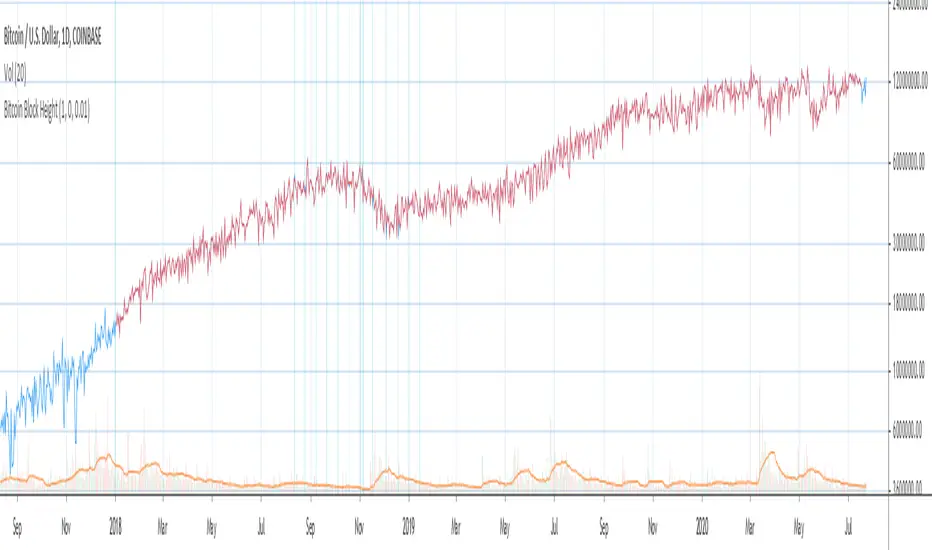
Bitcoin Block Height (Total Blocks)Bitcoin Block Height by RagingRocketBull 2020
Version 1.0
Differences between versions are listed below:
ver 1.0: compare QUANDL Difficulty vs Blockchain Difficulty sources, get total error estimate
ver 2.0: compare QUANDL Hash Rate vs Blockchain Hash Rate sources, get total error estimate
ver 3.0: Total Blocks estimate using different methods
--------------------------------
This indicator estimates Bitcoin Block Height (Total Blocks) using Difficulty and Hash Rate in the most accurate way possible, since
QUANDL doesn't provide a direct source for Bitcoin Block Height (neither QUANDL:BCHAIN, nor QUANDL:BITCOINWATCH/MINING).
Bitcoin Block Height can be used in other calculations, for instance, to estimate the next date of Bitcoin Halving.
Using this indicator I demonstrate:
- that QUANDL data is not accurate and differ from Blockchain source data (industry standard), but still can be used in calculations
- how to plot a series of data points from an external csv source and compare it with another source
- how to accurately estimate Bitcoin Block Height
Features:
- compare QUANDL Difficulty source (EOD, D1) with external Blockchain Difficulty csv source (EOD, D1, embedded)
- show/hide Quandl/Blockchain Difficulty curves
- show/hide Blockchain Difficulty candles
- show/hide differences (aqua vertical lines)
- show/hide time gaps (green vertical lines)
- count source differences within data range only or for the whole history
- multiply both sources by alpha to match before comparing
- floor/round both matched sources when comparing
- Blockchain Difficulty offset to align sequences, bars > 0
- count time gaps and missing bars (as result of time gaps)
WARNING:
- This indicator hits the max 1000 vars limit, adding more plots/vars/data points is not possible
- Both QUANDL/Blockchain provide daily EOD data and must be plotted on a daily D1 chart otherwise results will be incorrect
- current chart must not have any time gaps inside the range (time gaps outside the range don't affect the calculation). Time gaps check is provided.
Otherwise hardcoded Blockchain series will be shifted forward on gaps and the whole sequence become truncated at the end => data comparison/total blocks estimate will be incorrect
Examples of valid charts that can run this indicator: COINBASE:BTCUSD,D1 (has 8 time gaps, 34 missing bars outside the range), QUANDL:BCHAIN/DIFF,D1 (has no gaps)
Usage:
- Description of output plot values from left to right:
- c_shifted - 4x blockchain plotcandles ohlc, green/black (default na)
- diff - QUANDL Difficulty
- c_shifted - Blockchain Difficulty with offset
- QUANDL Difficulty multiplied by alpha and rounded
- Blockchain Difficulty multiplied by alpha and rounded
- is_different, bool - cur bar's source values are different (1) or not (0)
- count, number of differences
- bars, total number of bars/data points in the range
- QUANDL daily blocks
- Blockchain daily blocks
- QUANDL total blocks
- Blockchain total blocks
- total_error - difference between total_blocks estimated using both sources as of cur bar, blocks
- number_of_gaps - number of time gaps on a chart
- missing_bars - number of missing bars as result of time gaps on a chart
- Color coding:
- Blue - QUANDL data
- Red - Blockchain data
- Black - Is Different
- Aqua - number of differences
- Green - number of time gaps
- by default the indicator will show lots of vertical aqua lines, 138 differences, 928 bars, total error -370 blocks
- to compare the best match of the 2 sources shift Blockchain source 1 bar into the future by setting Blockchain Difficulty offset = 1, leave alpha = 0.01 =>
this results in no vertical aqua lines, 0 differences, total_error = 0 blocks
if you move the mouse inside the range some bars will show total_error = 1 blocks => total_error <= 1 blocks
- now uncheck Round Difficulty Values flag => some filled aqua areas, 218 differences.
- now set alpha = 1 (use raw source values) instead of 0.01 => lots of filled aqua areas, 871 differences.
although there are many differences this still doesn't affect the total_blocks estimate provided Difficulty offset = 1
Methodology:
To estimate Bitcoin Block Height we need 3 steps, each step has its own version:
- Step 1: Compare QUANDL Difficulty vs Blockchain Difficulty sources and estimate error based on differences
- Step 2: Compare QUANDL Hash Rate vs Blockchain Hash Rate sources and estimate error based on differences
- Step 3: Estimate Bitcoin Block Height (Total Blocks) using different methods in the most accurate way possible
QUANDL doesn't provide block time data, but we can calculate it using the Hash Rate approximation formula:
estimated Hash rate/sec H = 2^32 * D / T, where D - Difficulty, T - block time, sec
1. block time (T) can be derived from the formula, since we already know Difficulty (D) and Hash Rate (H) from QUANDL
2. using block time (T) we can estimate daily blocks as daily time / block time
3. block height (total blocks) = cumulative sum of daily blocks of all bars on the chart (that's why having no gaps is important)
Notes:
- This code uses Pinescript v3 compatibility framework
- hash rate is in THash/s, although QUANDL falsely states in description GHash/s! THash = 1000 GHash
- you can't read files, can only embed/hardcode raw data in script
- both QUANDL and Blockchain sources have no gaps
- QUANDL and Blockchain series are different in the following ways:
- all QUANDL data is already shifted 1 bar into the future, i.e. prev day's value is shown as cur day's value => Blockchain data must be shifted 1 bar forward to match
- all QUANDL diff data > 1 bn (10^12) are truncated and have last 1-2 digits as zeros, unlike Blockchain data => must multiply both values by 0.01 and floor/round the results
- QUANDL sometimes rounds, other times truncates those 1-2 last zero digits to get the 3rd last digit => must use both floor/round
- you can only shift sequences forward into the future (right), not back into the past (left) using positive offset => only Blockchain source can be shifted
- since total_blocks is already a cumulative sum of all prev values on each bar, total_error must be simple delta, can't be also int(cum()) or incremental
- all Blockchain values and total_error are na outside the range - move you mouse cursor on the last bar/inside the range to see them
TLDR, ver 1.0 Conclusion:
QUANDL/Blockchain Difficulty source differences don't affect total blocks estimate, total error <= 1 block with avg 150 blocks/day is negligible
Both QUANDL/Blockchain Difficulty sources are equally valid and can be used in calculations. QUANDL is a relatively good stand in for Blockchain industry standard data.
Links:
QUANDL difficulty source: www.quandl.com
QUANDL hash rate source: www.quandl.com
Blockchain difficulty source (export data as csv): www.blockchain.com
Tìm kiếm tập lệnh với "curve"
Dual_Spread_FTX[Schmittie]//This script displays 2 spreads between FTX perpetuals contracts and futures contracts.
//In the settings, you can choose which curves to display for direct comparison.
//It is based on Thojdid's Multi-Spread script, but loads faster as there are only 2 coins
//An high-low range can be added
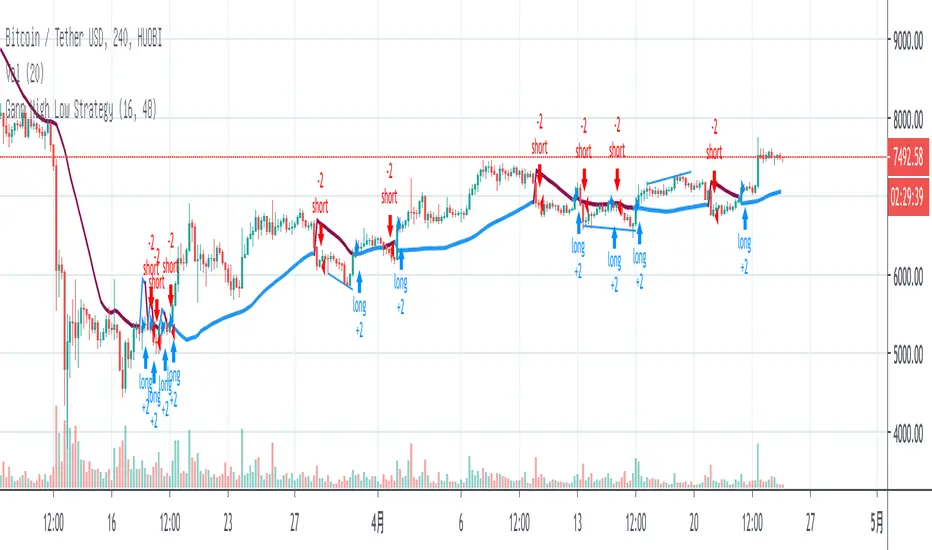
Gann High Low StrategyGann High Low is a moving average based trend indicator consisting of two different simple moving averages.
The Gann High Low Activator Indicator was described by Robert Krausz in a 1998 issue of Stocks & Commodities Magazine. It is a simple moving average SMA of the previous n period's highs or lows.
The indicator tracks both curves (of the highs and the lows). The close of the bar defines which of the two gets plotted.
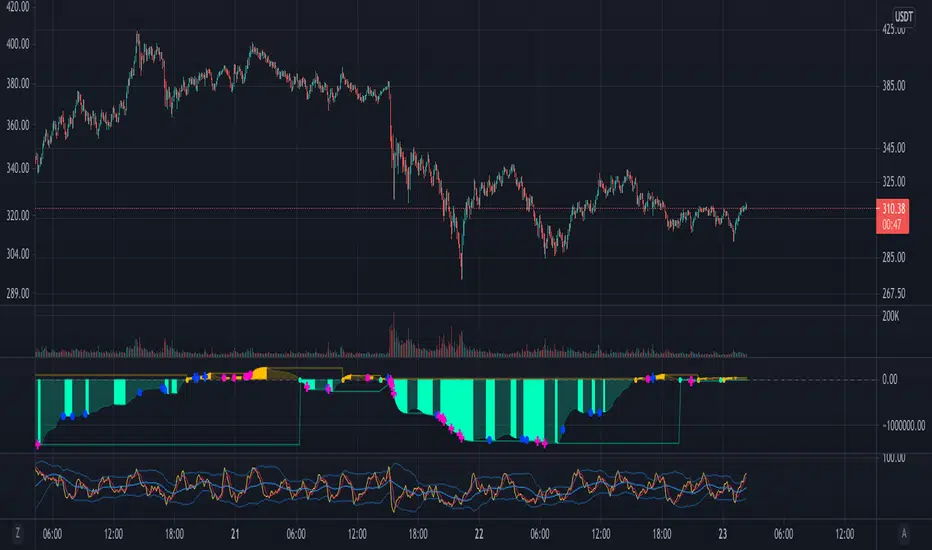
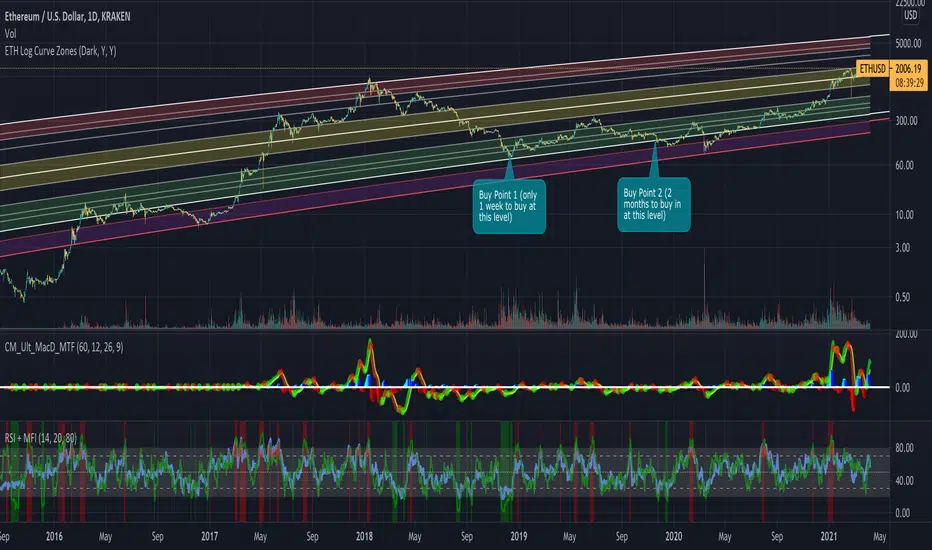
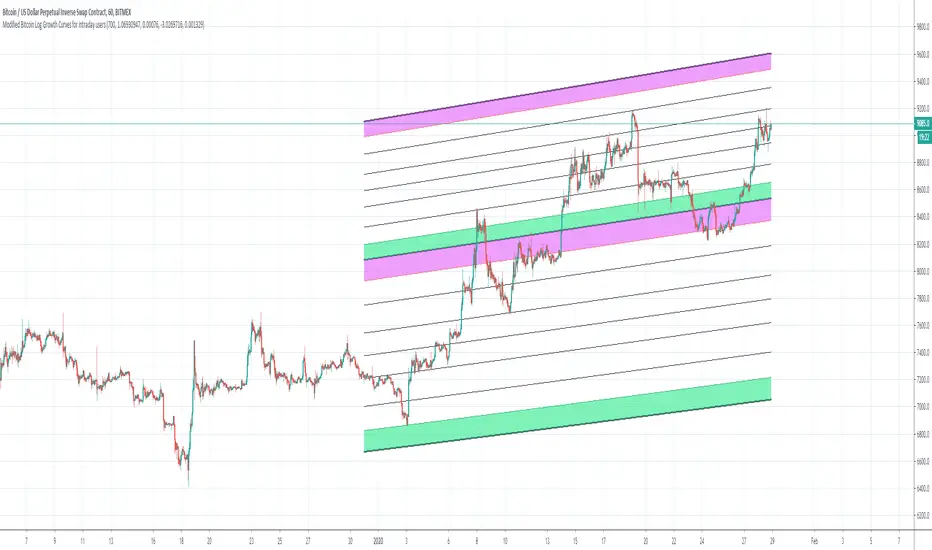
Bitcoin Logarithmic Growth Curves for intraday usersI wish to thank @Quantadelic who created this great indicator and leaving it open for others to improve.
I have made changes to make it user-friendly for the intraday traders.
The changes made have been;
1. Compartmentalized each area of the major Fibonacci level;
2. Added minor Fibonacci levels;
3. Color-coded the support and resistance levels, for better viewing;
4. Zoned each area of the major Fibonacci level; and
5. Created a time-frame display period for quicker loading of the indicator.
I have removed a few things to allow the indicator to run quicker;
1. Future projections; and
2. The major higher levels of the Fibonacci, which may be useful when Bitcoin reaches 100k.
Enjoy
Hull SuiteHull is its extremely responsive and smooth moving average created by Alan Hull in 2005.
Minimal lag and smooth curves made HMA extremely popular TA tool.
alanhull.com
Script was made to regroup multiple hull variants in one indicator,maintaining flexible customization and intuitive visualization
Option to chose between 3 Hull variations
Option to chose between 2 visualization modes ( Bands or single line)
Option to Paint hull and/or candlesticks according to hulls trend
Shortcut for personalizing Line/band thickness,instead of changing every object manually ,there is global option in inputs
HMA
THMA ( 3HMA)
EHMA
HMA:
Alan Hull
EHMA:
Slower than hull by default.
Raudys, Aistis & Lenčiauskas, Vaidotas & Malčius, Edmundas. (2013). Moving Averages for Financial Data Smoothing ( 403. 34-45. 10.1007/978-3-642-41947-8_4.) Vilnius University, Faculty of Mathematics and Informatics
3HMA (THMA) :
Documentation on link below
alexgrover
Gann High LowGann High Low is a moving average based trend indicator consisting of two different simple moving averages.
The Gann High Low Activator Indicator was described by Robert Krausz in a 1998 issue of Stocks & Commodities Magazine. It is a simple moving average SMA of the previous n period's highs or lows.
The indicator tracks both curves (of the highs and the lows). The close of the bar defines which of the two gets plotted.
This version is showing the channel that needs to be broken if the trend is going to be changed, and it allows you to chose from the 4 basic averages type for calculation (by definition, Gann High Low Activator uses only simple moving average, but some other averages can give you results that are probably more acceptable for trading in some conditions).
Increasing HPeriod and decreasing LPeriod better for short trades, vice versa for long positions.
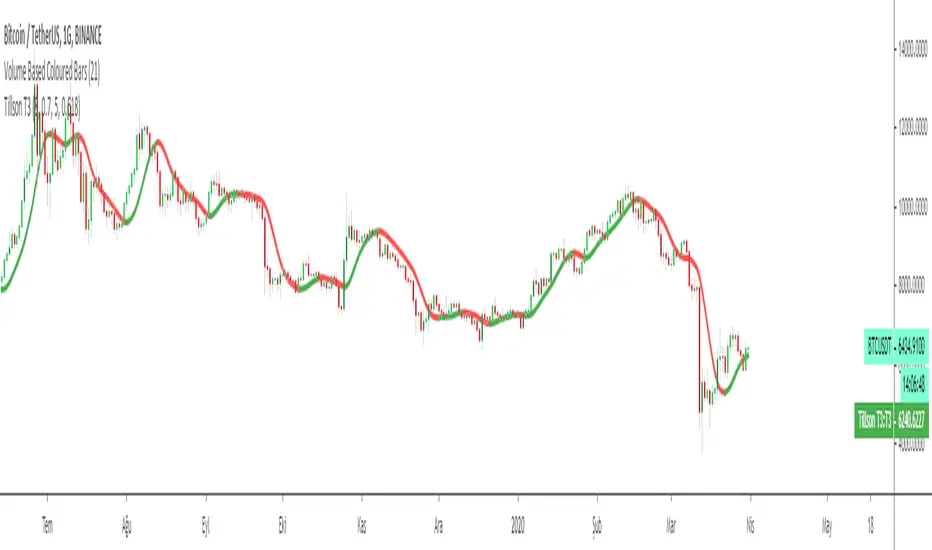
Tillson T3 Moving Average MTFMULTIPLE TIME FRAME version of Tillson T3 Moving Average Indicator
Developed by Tim Tillson, the T3 Moving Average is considered superior -1.60% to traditional moving averages as it is smoother, more responsive and thus performs better in ranging market conditions as well. However, it bears the disadvantage of overshooting the price as it attempts to realign itself to current market conditions.
It incorporates a smoothing technique which allows it to plot curves more gradual than ordinary moving averages and with a smaller lag. Its smoothness is derived from the fact that it is a weighted sum of a single EMA , double EMA , triple EMA and so on. When a trend is formed, the price action will stay above or below the trend during most of its progression and will hardly be touched by any swings. Thus, a confirmed penetration of the T3 MA and the lack of a following reversal often indicates the end of a trend.
The T3 Moving Average generally produces entry signals similar to other moving averages and thus is traded largely in the same manner. Here are several assumptions:
If the price action is above the T3 Moving Average and the indicator is headed upward, then we have a bullish trend and should only enter long trades (advisable for novice/intermediate traders). If the price is below the T3 Moving Average and it is edging lower, then we have a bearish trend and should limit entries to short. Below you can see it visualized in a trading platform.
Although the T3 MA is considered as one of the best swing following indicators that can be used on all time frames and in any market, it is still not advisable for novice/intermediate traders to increase their risk level and enter the market during trading ranges (especially tight ones). Thus, for the purposes of this article we will limit our entry signals only to such in trending conditions.
Once the market is displaying trending behavior, we can place with-trend entry orders as soon as the price pulls back to the moving average (undershooting or overshooting it will also work). As we know, moving averages are strong resistance/support levels, thus the price is more likely to rebound from them and resume its with-trend direction instead of penetrating it and reversing the trend.
And so, in a bull trend, if the market pulls back to the moving average, we can fairly safely assume that it will bounce off the T3 MA and resume upward momentum, thus we can go long. The same logic is in force during a bearish trend .
And last but not least, the T3 Moving Average can be used to generate entry signals upon crossing with another T3 MA with a longer trackback period (just like any other moving average crossover). When the fast T3 crosses the slower one from below and edges higher, this is called a Golden Cross and produces a bullish entry signal. When the faster T3 crosses the slower one from above and declines further, the scenario is called a Death Cross and signifies bearish conditions.
I Personally added a second T3 line with a volume factor of 0.618 (Fibonacci Ratio) and length of 3 (fibonacci number) which can be added by selecting the box in the input section. traders can combine the two lines to have Buy/Sell signals from the crosses.
Developed by Tim Tillson
Tillson T3 Moving Average by KIVANÇ fr3762Developed by Tim Tillson, the T3 Moving Average is considered superior to traditional moving averages as it is smoother, more responsive and thus performs better in ranging market conditions as well. However, it bears the disadvantage of overshooting the price as it attempts to realign itself to current market conditions.
It incorporates a smoothing technique which allows it to plot curves more gradual than ordinary moving averages and with a smaller lag. Its smoothness is derived from the fact that it is a weighted sum of a single EMA , double EMA , triple EMA and so on. When a trend is formed, the price action will stay above or below the trend during most of its progression and will hardly be touched by any swings. Thus, a confirmed penetration of the T3 MA and the lack of a following reversal often indicates the end of a trend.
The T3 Moving Average generally produces entry signals similar to other moving averages and thus is traded largely in the same manner. Here are several assumptions:
If the price action is above the T3 Moving Average and the indicator is headed upward, then we have a bullish trend and should only enter long trades (advisable for novice/intermediate traders). If the price is below the T3 Moving Average and it is edging lower, then we have a bearish trend and should limit entries to short. Below you can see it visualized in a trading platform.
Although the T3 MA is considered as one of the best swing following indicators that can be used on all time frames and in any market, it is still not advisable for novice/intermediate traders to increase their risk level and enter the market during trading ranges (especially tight ones). Thus, for the purposes of this article we will limit our entry signals only to such in trending conditions.
Once the market is displaying trending behavior, we can place with-trend entry orders as soon as the price pulls back to the moving average (undershooting or overshooting it will also work). As we know, moving averages are strong resistance/support levels, thus the price is more likely to rebound from them and resume its with-trend direction instead of penetrating it and reversing the trend.
And so, in a bull trend, if the market pulls back to the moving average, we can fairly safely assume that it will bounce off the T3 MA and resume upward momentum, thus we can go long. The same logic is in force during a bearish trend .
And last but not least, the T3 Moving Average can be used to generate entry signals upon crossing with another T3 MA with a longer trackback period (just like any other moving average crossover). When the fast T3 crosses the slower one from below and edges higher, this is called a Golden Cross and produces a bullish entry signal. When the faster T3 crosses the slower one from above and declines further, the scenario is called a Death Cross and signifies bearish conditions.
I Personally added a second T3 line with a volume factor of 0.618 (Fibonacci Ratio) and length of 3 (fibonacci number) which can be added by selecting the box in the input section. traders can combine the two lines to have Buy/Sell signals from the crosses.
Developed by Tim Tillson
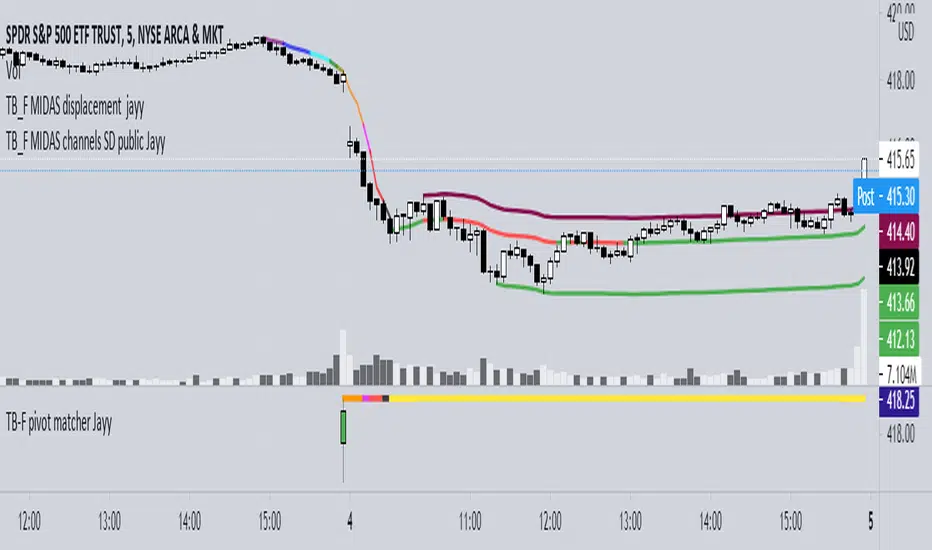
Topfinder Bottomfinder pivot matcher Midas- jayyMidas Technical Analysis: A VWAP Approach to Trading and Investing in Today’s Markets by
Andrew Coles, David G. Hawkins Copyright © 2011 by Andrew Coles and David G. Hawkins.
Appendix C: TradeStation Code for the MIDAS Topfinder/Bottomfinder Curves ported to tradingview
This code is used to assist in adjusting D volume to intersect pivot candle at a pivot candle when using this script: Top Bottom Finder Public version- Jayy found here:
The "n" number entered into the TB-F script is the topfinder/bottomfinder starting point or anchor
Be sure to enter the correct number in the "Topfinder bottomfinder initiation/anchor candle: 1 for CANDLE low - top finder, 2 for CANDLE high - bottom finder, 3 for CANDLE MIDPOINT (hl2) dialogue box
The location of the match point of the pivot candle is extremely important in the: "Match to PIVOT CANDLE: use 1 for CANDLE low, 2 for midtail of the candle below the BODY, 3 for candle BODY low, 4 for CANDLE HIGH, 5 for midpoint of candletail above body, 6 for candle BODY high". Do not
confuse body high with candle high. The body low will either be the candle open or close. The body high will be either the open or close.
If you expect a trend up the pivot candle is likely the low of the pivot candle ie 1 (2 and 3 are alternatives).
In a trend down the high of the pivot candle is often selected ie 4 (5 or 6 are alternatives)
If the candle body is aqua increase D volume if it is orange reduce D volume. Adjust iteratively until the candle body turns yellow. That will mean that the TB-F line passes through the pivot candle at the selected point.
Jayy
Vix FIX / StochRSI StrategyThis strategy is based off of Chris Moody's Vix Fix Indicator . I simply used his indicator and added some rules around it, specifically on entry and exits.
Rules :
Enter upon a filtered or aggressive entry
If there are multiple entry signals, allow pyramiding
Exit when there is Stochastic RSI crossover above 80
This works great on a number of stocks. I am keeping a list of stocks with decent Profit Factors and clean equity curves here .
Possible ways to use this:
Modify this script and setup alerts around the various entries
Use as is with different stocks or currency pairs
Modify entry / exit points to make it more profitable for even more symbols and currencies
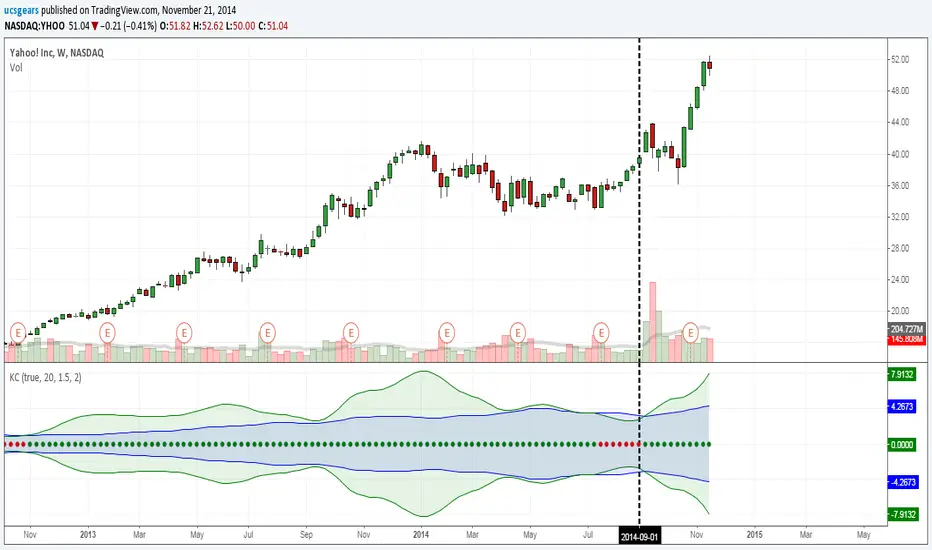
UCS_Squeeze_Timing-V1There is an important information the Squeeze indicator is missing, which is the Pre Squeeze entry. While the Bollinger band begins to curves out of the KC, The breakout usually happens. There are many instances that the Squeeze indicator will fire, after the Major move, I cant blame the indicator, thats the nature (lagging) of all indicators, and we have to live with it.
Therefore pre-squeeze-fire Entry can be critical in timing your entry. Timing it too early could result in stoploss if it turns against you, ( or serious burn on options premium), because we never know when the squeeze will fire with the TTM squeeze, But now We know. Its a little timing tool. Managing position is critical when playing options.
I will code the timing signal when I get some time.
Updated Versions -
Momentum Average [SWT]
Momentum Average (MMA)
What is the Momentum Average? This is not your typical trend follower. MMA Pro is an algorithmic convergence tool designed for traders who seek to filter market noise and trade with the true momentum on their side. Its core engine allows you to fuse the "DNA" of up to three different moving averages into a single, high-precision "Master Line."
🛠️ Key Tool Benefits
Data Convergence: By averaging up to three different MA types (EMA, SMA, WMA, VWMA, etc.), the indicator eliminates the erratic signals of individual averages, offering a smoothed curve that reacts primarily to institutional movements.
Volatility Visualization (Cloud): Thanks to the "Trend Cloud" between the two primary averages, you can immediately visualize price expansion and contraction.
Visual Confirmation (Pivot Dots): Identify the exact candle where the market slope shifts, ensuring you stay on the right side of the trend.
⚠️ Usage Philosophy: A Confirmation Tool, Not a Signal Generator
It is vital to understand that MMA Pro is not a "blind signal" tool. It is not designed to be traded every time a dot appears. Its true power lies in serving as a high-quality filter and confirmation layer:
Bias Validation: Use it to confirm the direction of your primary strategy. If your system gives a "Buy," the MMA Pro should ideally show bullish momentum.
Entry Filtering: Avoid entries during "chop" or sideways markets when the "Master Line" is flat or pivot dots are frequently flipping.
Exit Management: Many traders use it as a visual Trailing Stop; if the slope changes against your position, it may be time to protect profits.
💡 User Tips:
Nasdaq 1m/5m: Try combining an EMA with a VWMA to capture intraday volume averaged with price action.
Aesthetics: Customize the "Pivot Dots" colors to match your chart theme (Light/Dark).
TSM: Time-Series Momentum & Volatility Targeting [Moskowitz]TSM: Institutional Time-Series Momentum & Volatility Targeting (Moskowitz)
SUMMARY
TSM is a trend and risk-sizing indicator designed to convert price movement into a risk-adjusted regime signal and a single Recommended Exposure output. It addresses a common trend problem: direction can be correct while sizing is wrong during volatility expansions.
Recommended Exposure is a signed value where positive indicates bullish bias and negative indicates bearish bias. The magnitude reflects confidence after the volatility and quality filters are applied.
The engine combines volatility-scaled time-series momentum across multiple horizons with optional volatility targeting and an optional efficiency filter to reduce noise sensitivity and improve sizing discipline.
WHAT THIS INDICATOR GIVES YOU
A risk-adjusted momentum signal that is scaled by realized volatility rather than raw returns, so high-volatility noise is less likely to look like strong trend.
An optional volatility targeting layer that mechanically scales Recommended Exposure down when realized volatility rises and up when it falls, capped by Max Leverage.
An ensemble approach using fast, medium, and slow horizons with configurable weights, reducing dependence on a single lookback and lowering curve-fitting risk.
An optional R-squared efficiency filter that reduces exposure in choppy, low-quality trends, with a floor to avoid over-suppressing exposure.
Optional workflow features including a dashboard, trend cloud bands, threshold-based signals with cooldown, and alerts.
SCIENTIFIC FOUNDATION (PLAIN ENGLISH)
Time-Series Momentum (Moskowitz, Ooi, Pedersen 2012) describes the empirical tendency for an asset’s own past returns to predict its future returns in expectation, distinct from cross-sectional momentum which compares assets to each other.
Volatility clustering means markets alternate between calm and violent regimes; many traditional trend tools misread volatility shocks as sustainable trend. This indicator normalizes momentum by realized volatility to express trend significance relative to the regime.
Volatility targeting (Harvey et al. 2018) scales exposure inversely to realized volatility to stabilize risk. When volatility rises, recommended exposure is reduced mechanically; when volatility falls, exposure can increase, subject to a max leverage cap.
DATA AND SOURCES
This indicator uses only the chart symbol’s OHLC data. No external feeds, no COT libraries, and no third-party data sources are required.
It supports multi-timeframe calculation. You can compute the signal on the current chart timeframe, or use a fixed timeframe such as Daily to keep volatility math consistent when viewing intraday charts.
HOW THE ENGINE WORKS (HIGH LEVEL)
Step 1 estimates realized volatility from log returns over a chosen lookback. Step 2 computes a volatility-scaled momentum statistic for three horizons (fast, medium, slow) to measure how meaningful the move is relative to volatility. Step 3 clamps extreme values so outliers do not dominate. Step 4 combines the horizons into a weighted ensemble. Step 5 optionally applies an efficiency filter to reduce exposure in choppy trends. Step 6 optionally applies volatility targeting to scale exposure inversely with realized annualized volatility, capped by Max Leverage. The final output is Recommended Exposure as the combined result of direction, risk scaling, and quality filtering.
OUTPUTS AND HOW USERS SHOULD APPLY THEM
Recommended Exposure is the primary output. Positive values indicate bullish regime bias, negative values indicate bearish regime bias, and larger magnitude indicates higher risk-adjusted conviction after filters.
Typical use is as a position-sizing overlay: keep your own entry method and use Recommended Exposure to decide how aggressive or defensive sizing should be in the current regime.
Signals are optional and trigger when Recommended Exposure crosses user-defined thresholds. A cooldown reduces repeated triggers during consolidations, and direction can be restricted to long only, short only, or both.
The dashboard is optional and displays realized volatility versus target, ensemble momentum, the efficiency metric, the volatility scalar, the quality multiplier, and final Recommended Exposure, including the fast/medium/slow breakdown.
Trend cloud bands are optional and provide range context; they are not the signal and are intended as visual regime support.
SETTINGS GUIDE (WHAT MATTERS MOST)
Fixed Timeframe mode is recommended for consistent volatility math across chart timeframes; Current Chart mode is more sensitive to the displayed timeframe.
Momentum horizons control responsiveness versus stability. Shorter lookbacks react faster but whipsaw more; longer lookbacks are smoother but slower. Weights allow emphasizing fast responsiveness or slow regime confirmation.
Volatility targeting turns the tool into a sizing engine by scaling exposure inversely to realized volatility. Target annualized volatility sets the risk budget, and the annualization basis (365 vs 252) aligns conventions for crypto versus traditional markets. Max Leverage caps the scalar in very low-volatility regimes.
The efficiency filter reduces exposure in choppy conditions; the floor controls how harshly exposure is reduced. Threshold and cooldown control how selective discrete signals are.
LIMITATIONS (IMPORTANT FOR USERS)
This is a trend-following framework, so it will lag turning points by design. Sideways markets can still cause whipsaws; cooldown and the efficiency filter may reduce but cannot eliminate this. Volatility targeting can reduce drawdowns during volatility expansions but may reduce participation during sharp V-shaped reversals after volatility increases. The efficiency metric is a practical proxy for trend straightness and can misclassify certain price paths.
REFERENCES
Moskowitz, T. J., Ooi, Y. H., and Pedersen, L. H. (2012). Time series momentum. Journal of Financial Economics, 104(2), 228-250.
Harvey, C. R., Rattray, S., Sinclair, A., and Van Hemert, O. (2018). The impact of volatility targeting. Journal of Portfolio Management, 45(1), 14-33.
Hurst, B., Ooi, Y. H., and Pedersen, L. H. (2017). A century of evidence on trend-following investing. Journal of Portfolio Management, 44(1), 15-29.
DISCLAIMER
Educational and informational purposes only. Not financial advice. Trading involves risk. Past performance is not indicative of future results.
Gaussian MA - Progressive Multi-FilterThe previously published indicator based on Watson's Quadratic kernel was a bit complicated and "quadratic" in its calculations – it's an old indicator, and I've updated it a bit. I'm currently using Gaussian MA due to its simpler design and additional features that the former lacked.
Gaussian MA is an advanced trend-following indicator that combines statistical data smoothing with dynamic noise filtering. Here's a step-by-step analysis:
1. Gaussian Kernel Regression - the heart of the script is the gaussian_regression_max function. Instead of a simple average, it calculates a weight for each past price using a Gaussian distribution (bell curve):
Weights: Prices closest to the current candlestick have the greatest impact on the result, while those further away lose their importance exponentially.
The result: A very smooth line (yhat) that reacts faster than traditional moving averages while maintaining high resistance to short-term price spikes.
2. Progressive Volume Filter (ALMA Volume) - this is a unique part of the code that adjusts the indicator's sensitivity to market activity:
- the script calculates the moving average volume using the ALMA algorithm. The vol_ratio (current volume / average volume) is calculated.
Logic: If volume increases, the prog_factor decreases. This makes the filter thresholds "tighter," allowing the indicator to react more quickly to strong moves supported by high volume.
3. Dynamic Thresholds (Hysteresis) Instead of reacting to every change in the direction of the yhat line, the code calculates a "safety zone" (filter) that the price change must break through to signal a new trend:
- ATR: Threshold based on volatility (Average True Range).
- Percentage: Threshold percentage of the current price.
Both thresholds are multiplied by the previously mentioned prog_factor (volume).
4. Trend Detection and Visualization
Finally, the script compares the change in the regression value (diff) with the calculated thresholds:
- Bullish: If the change is positive and greater than the dynamic threshold.
- Bearish: If the change is negative and less than the negative threshold.
Result: The color of the line on the chart changes (green/red), and the alertcondition function allows you to set a notification when the color changes.
In short: Gaussian MA is an intelligent average that "knows" when the market is chaotic (it then increases the filtering thresholds) and when real momentum with volume is emerging (it then becomes more sensitive).
How to optimize the indicator parameters:
1. for the h parameter - (Lookback Window)
The h parameter controls the degree of regression smoothing. The higher the timeframe (e.g., Daily), the smaller h can be; on lower timeframes (e.g., 1m, 5m), you need more smoothing.
- For Scalping (1m - 5m): Set h in the range of 2.5 - 4.0. Noise on lower timeframes is high, so you need a "heavier" Gaussian kernel.
- For Day Trading (15m - 1h): Set h in the range of 1.5 - 2.5. This is the golden mean for ensuring liquidity without significant lag.
- For Swing (4h - Daily): Set h in the range of 0.75 - 1.5.
Trends on higher timeframes are stronger, so a smaller smoothing will allow for faster movement.
2. Calibrate vol_sens (Volume Sensitivity)
This parameter determines how much a "volume spike" facilitates a trend change.
- High Sensitivity (0.7 - 1.0): Aggressive approach. Even a small increase in trading volume will cause the indicator to react to price changes. Good for currency pairs with low liquidity.
- Low Sensitivity (0.1 - 0.4): Conservative approach. The indicator will ignore price movements unless accompanied by heavy volume (so-called "smart money"). Ideal for filtering out false positives (fakeouts).
It's safest to start with a setting of 0.5...
The above guidelines are indicative and are intended only to facilitate the use of the indicator - there are no perfect trading solutions; this indicator attempts to mathematically indicate points where entries/exits are statistically highly probable...
Works well with the MACD ALMA Edition ;)
Volume Weighted Intra Bar KurtosisThis indicator analyzes market sentiment by providing a detailed
view of Excess Kurtosis ("Fat Tails"). It uses data from a lower,
intra-bar timeframe to separate the total kurtosis of a single bar
into distinct, interpretable components.
Key Features:
1. **Intra-Bar Kurtosis Decomposition:** For each bar on the chart,
the indicator analyzes the underlying price action on a smaller
timeframe ('Intra-Bar Timeframe'). Unlike Variance, the Fourth
Central Moment (Kurtosis) decomposes into three parts:
- **Between-Bar Kurtosis (Gold):** Peakedness of the price
path *between* the intra-bar candles. High values indicate
that the macro movement happened in jumps or gaps rather
than a smooth progression.
- **Within-Bar Kurtosis (Blue):** Fat tails derived from the
microstructure (extreme wicks) *inside* the intra-bar candles.
- **Interaction Variance (Dark Grey):** The comovement of variance
and mean deviations (volatility clustering relative to trend).
- **Interaction Skewness (Darker Grey):** The comovement of skewness
and mean deviations (asymmetry relative to trend).
2. **Visual Decomposition Logic:** Total Excess Kurtosis is the
primary metric displayed. Since Kurtosis coefficients are not
linearly additive, this indicator calculates the *exact* Total
Kurtosis and partitions the columns based on the additive
Fourth Moment Decomposition (`M4Tot = M4Btw + M4Wtn + M4Int`).
3. **Dual Display Modes:** The indicator offers two modes to
visualize this information:
- **Absolute Mode:** Plots the *total* kurtosis as a
stacked column chart, showing the *absolute magnitude* of
tail risk and the contribution of each component.
- **Relative Mode:** Plots the components as a 100% stacked
column chart (scaled from 0 to 1), focusing purely on the
*energy ratio* of the components.
4. **Calculation Options:**
- **Normalization:** An optional 'Normalize' setting
calculates an **Exponential Regression Curve** (log-space),
making the analysis suitable for comparing assets with
different scales (e.g., BTC vs EURUSD).
- **Volume Weighting:** An option (`Volume weighted`) applies
volume weighting to all mean and moment calculations.
5. **Kurtosis Cycle Analysis:**
- **Pivot Detection:** Includes a built-in pivot detector
that identifies significant turning points (peaks/valleys) in
the *total* kurtosis line. (Note: This is only visible
in 'Absolute Mode').
- **Flexible Pivot Algorithms:** Supports various underlying
mathematical models for pivot detection provided by the
core library.
6. **Note on Confirmation (Lag):** Pivot signals are confirmed
using a lookback method. A pivot is only plotted *after*
the `Pivot Right Bars` input has passed, which introduces
an inherent lag.
7. **Multi-Timeframe (MTF) Capability:**
- **MTF Analysis Lines:** The entire intra-bar analysis can be
run on a higher timeframe (using the `Timeframe` input),
with standard options to handle gaps (`Fill Gaps`) and
prevent repainting (`Wait for...`).
- **Limitation:** The Pivot detection (`Calculate Pivots`) is
**disabled** if a Higher Timeframe (HTF) is selected.
8. **Integrated Alerts:** Includes alerts for:
- Kurtosis magnitude (High Positive / High Negative).
- Kurtosis character changes/emerging/fading.
- Total Kurtosis pivot (High/Low) detection.
**Caution: Real-Time Data Behavior (Intra-Bar Repainting)**
This indicator uses high-resolution intra-bar data. As a result, the
values on the **current, unclosed bar** (the real-time bar) will
update dynamically as new intra-bar data arrives. This behavior is
normal and necessary for this type of analysis. Signals should only
be considered final **after the main chart bar has closed.**
---
**DISCLAIMER**
1. **For Informational/Educational Use Only:** This indicator is
provided for informational and educational purposes only. It does
not constitute financial, investment, or trading advice, nor is
it a recommendation to buy or sell any asset.
2. **Use at Your Own Risk:** All trading decisions you make based on
the information or signals generated by this indicator are made
solely at your own risk.
3. **No Guarantee of Performance:** Past performance is not an
indicator of future results. The author makes no guarantee
regarding the accuracy of the signals or future profitability.
4. **No Liability:** The author shall not be held liable for any
financial losses or damages incurred directly or indirectly from
the use of this indicator.
5. **Signals Are Not Recommendations:** The alerts and visual signals
(e.g., crossovers) generated by this tool are not direct
recommendations to buy or sell. They are technical observations
for your own analysis and consideration.
Volume Weighted Intra Bar SkewnessThis indicator analyzes market sentiment by providing a detailed
view of skewness (asymmetry). It uses data from a lower, intra-bar
timeframe to separate the total skewness of a single bar into
distinct, interpretable components.
Key Features:
1. **Intra-Bar Skewness Decomposition:** For each bar on the chart,
the indicator analyzes the underlying price action on a smaller
timeframe ('Intra-Bar Timeframe'). Unlike Variance, the Third
Central Moment (Skewness) decomposes into three parts:
- **Between-Bar Skewness (Gold):** Asymmetry of the price
path *between* the intra-bar candles. Indicates if the macro
movements within the bar accelerated in one direction.
- **Within-Bar Skewness (Blue):** Asymmetry of the
microstructure (wicks vs. tails) *inside* the intra-bar candles.
- **Interaction Skewness (Grey):** The component arising from
the comovement of local means and local variances (e.g.,
does volatility increase when price drops?).
2. **Visual Decomposition Logic:** Total Skewness is the
primary metric displayed. Since Skewness coefficients are not
linearly additive, this indicator calculates the *exact* Total
Skewness and partitions the columns based on the additive
Third Moment Decomposition (`M3Tot = M3Btw + M3Wtn + M3Int`).
3. **Dual Display Modes:** The indicator offers two modes to
visualize this information:
- **Absolute Mode:** Plots the *total* skewness as a
stacked column chart, showing the *absolute magnitude* of
asymmetry and the contribution of each component.
- **Relative Mode:** Plots the components as a 100% stacked
column chart (scaled from 0 to 1), focusing purely on the
*energy ratio* of the components.
4. **Calculation Options:**
- **Normalization:** An optional 'Normalize' setting
calculates an **Exponential Regression Curve** (log-space),
making the analysis suitable for comparing assets with
different scales (e.g., BTC vs EURUSD).
- **Volume Weighting:** An option (`Volume weighted`) applies
volume weighting to all mean and moment calculations.
5. **Skewness Cycle Analysis:**
- **Pivot Detection:** Includes a built-in pivot detector
that identifies significant turning points (highs and lows) in
the *total* skewness line. (Note: This is only visible
in 'Absolute Mode').
- **Flexible Pivot Algorithms:** Supports various underlying
mathematical models for pivot detection provided by the
core library.
6. **Note on Confirmation (Lag):** Pivot signals are confirmed
using a lookback method. A pivot is only plotted *after*
the `Pivot Right Bars` input has passed, which introduces
an inherent lag.
7. **Multi-Timeframe (MTF) Capability:**
- **MTF Analysis Lines:** The entire intra-bar analysis can be
run on a higher timeframe (using the `Timeframe` input),
with standard options to handle gaps (`Fill Gaps`) and
prevent repainting (`Wait for...`).
- **Limitation:** The Pivot detection (`Calculate Pivots`) is
**disabled** if a Higher Timeframe (HTF) is selected.
8. **Integrated Alerts:** Includes alerts for:
- Skewness magnitude (High Positive / High Negative).
- Skewness character changes/emerging/fading.
- Total Skewness pivot (High/Low) detection.
**Caution: Real-Time Data Behavior (Intra-Bar Repainting)**
This indicator uses high-resolution intra-bar data. As a result, the
values on the **current, unclosed bar** (the real-time bar) will
update dynamically as new intra-bar data arrives. This behavior is
normal and necessary for this type of analysis. Signals should only
be considered final **after the main chart bar has closed.**
---
**DISCLAIMER**
1. **For Informational/Educational Use Only:** This indicator is
provided for informational and educational purposes only. It does
not constitute financial, investment, or trading advice, nor is
it a recommendation to buy or sell any asset.
2. **Use at Your Own Risk:** All trading decisions you make based on
the information or signals generated by this indicator are made
solely at your own risk.
3. **No Guarantee of Performance:** Past performance is not an
indicator of future results. The author makes no guarantee
regarding the accuracy of the signals or future profitability.
4. **No Liability:** The author shall not be held liable for any
financial losses or damages incurred directly or indirectly from
the use of this indicator.
5. **Signals Are Not Recommendations:** The alerts and visual signals
(e.g., crossovers) generated by this tool are not direct
recommendations to buy or sell. They are technical observations
for your own analysis and consideration.
Volume Weighted Intra Bar LR CorrelationThis indicator analyzes market character by providing a detailed
view of correlation. It applies a Linear Regression model to
intra-bar price action, dissecting the total correlation of
each bar into three distinct components.
Key Features:
1. **Three-Component Correlation Decomposition:** The indicator
separates correlation based on the 'Estimate Bar Statistics' option.
- **Standard Mode (`Estimate Bar Statistics` = OFF):** Calculates
correlation based on the selected `Source` (this results
mainly in 'Trend' and 'Residual' correlation).
- **Decomposition Mode (`Estimate Bar Statistics` = ON):** The
indicator uses a statistical model ('Estimator') to
calculate *within-bar* correlation.
(Assumption: In this mode, the `Source` input is
**ignored**, and an estimated mean for each bar is used
instead).
This separates correlation into:
- **Trend Correlation (Green/Red):** Correlation explained by the
regression's slope (Directional Alignment).
- **Residual Correlation (Yellow):** Correlation from price
oscillating around the regression line (Mean-Reversion/Cointegration).
- **Within-Bar Correlation (Blue):** Correlation from the
high-low range of each bar (Microstructure/Noise).
2. **Visual Decomposition Logic:** Total Correlation is the
primary metric displayed. Since Correlation Coefficients are not
linearly additive, this indicator plots the *exact* Total
Correlation and partitions the area underneath based on the
Covariance Ratio. This ensures the displayed total correlation
remains mathematically accurate while showing relative composition.
3. **Dual Display Modes:** The indicator offers two modes to
visualize this decomposition:
- **Absolute Mode:** Displays the *total* correlation as a
stacked area chart, partitioned by the ratio of
the three components.
- **Relative Mode:** Displays the direct *energy ratio*
(proportion) of each component relative to the total (0-1),
ideal for identifying the dominant market character.
4. **Calculation Options:**
- **Normalization:** An optional 'Normalize' setting
calculates an **Exponential Regression Curve** (log-space),
making the analysis suitable for growth assets.
- **Volume Weighting:** An option (`Volume weighted`) applies
volume weighting to all regression and correlation calculations.
5. **Correlation Cycle Analysis:**
- **Pivot Detection:** Includes a built-in pivot detector
that identifies significant turning points (highs and lows) in
the *total* correlation line. (Note: This is only visible
in 'Absolute Mode').
- **Flexible Pivot Algorithms:** Supports various underlying
mathematical models for pivot detection provided by the
core library.
6. **Note on Confirmation (Lag):** Pivot signals are confirmed
using a lookback method. A pivot is only plotted *after*
the `Pivot Right Bars` input has passed, which introduces
an inherent lag.
7. **Multi-Timeframe (MTF) Capability:**
- **MTF Correlation Lines:** The correlation lines can be
calculated on a higher timeframe, with standard options
to handle gaps (`Fill Gaps`) and prevent repainting
(`Wait for...`).
- **Limitation:** The Pivot detection (`Calculate Pivots`) is
**disabled** if a Higher Timeframe (HTF) is selected.
8. **Integrated Alerts:** Includes comprehensive alerts for:
- Correlation magnitude (High Positive / High Inverse).
- Correlation character changes/emerging/fading.
- Total Correlation pivot (High/Low) detection.
**Caution! Real-Time Data Behavior (Intra-Bar Repainting)**
This indicator uses high-resolution intra-bar data. As a result, the
values on the **current, unclosed bar** (the real-time bar) will
update dynamically as new intra-bar data arrives. This behavior is
normal and necessary for this type of analysis. Signals should only
be considered final **after the main chart bar has closed.**
---
**DISCLAIMER**
1. **For Informational/Educational Use Only:** This indicator is
provided for informational and educational purposes only. It does
not constitute financial, investment, or trading advice, nor is
it a recommendation to buy or sell any asset.
2. **Use at Your Own Risk:** All trading decisions you make based on
the information or signals generated by this indicator are made
solely at your own risk.
3. **No Guarantee of Performance:** Past performance is not an
indicator of future results. The author makes no guarantee
regarding the accuracy of the signals or future profitability.
4. **No Liability:** The author shall not be held liable for any
financial losses or damages incurred directly or indirectly from
the use of this indicator.
5. **Signals Are Not Recommendations:** The alerts and visual signals
(e.g., crossovers) generated by this tool are not direct
recommendations to buy or sell. They are technical observations
for your own analysis and consideration.
Volume Weighted Intra Bar CorrelationThis indicator analyzes market character by providing a detailed
view of correlation. It uses data from a lower, intra-bar timeframe
to separate the total correlation of a single bar into two distinct
components.
Key Features:
1. **Intra-Bar Correlation Decomposition:** For each bar on the chart,
the indicator analyzes the underlying price action on a smaller
timeframe ('Intra-Bar Timeframe') and quantifies two types of correlation:
- **Between-Bar Correlation (Directional):** Calculated from price
movements *between* the intra-bar candles. This component
represents the **macro-movement** correlation within the main bar.
- **Within-Bar Correlation (Non-Directional):** Calculated from
price fluctuations *inside* each intra-bar candle. This
component represents the **microstructure/noise** correlation.
2. **Visual Decomposition Logic:** Total Correlation is the
primary metric displayed. Since Correlation Coefficients are not
linearly additive, this indicator plots the *exact* Total
Correlation and partitions the area underneath based on the
Covariance Ratio. This ensures the displayed total correlation
remains mathematically accurate while showing relative composition.
3. **Dual Display Modes:** The indicator offers two modes to
visualize this information:
- **Absolute Mode:** Plots the *total* correlation as a
stacked column chart, showing the *absolute magnitude* of
correlation and the contribution of each component.
- **Relative Mode:** Plots the components as a 100% stacked
column chart (scaled from 0 to 1), focusing purely on the
*energy ratio* of 'between-bar' (macro) and 'within-bar' (micro)
correlation.
4. **Calculation Options:**
- **Normalization:** An optional 'Normalize' setting
calculates an **Exponential Regression Curve** (log-space),
making the analysis suitable for comparing assets with
different scales (e.g., BTC vs EURUSD).
- **Volume Weighting:** An option (`Volume weighted`) applies
volume weighting to all mean and covariance calculations.
5. **Correlation Cycle Analysis:**
- **Pivot Detection:** Includes a built-in pivot detector
that identifies significant turning points (highs and lows) in
the *total* correlation line. (Note: This is only visible
in 'Absolute Mode').
- **Flexible Pivot Algorithms:** Supports various underlying
mathematical models for pivot detection provided by the
core library.
6. **Note on Confirmation (Lag):** Pivot signals are confirmed
using a lookback method. A pivot is only plotted *after*
the `Pivot Right Bars` input has passed, which introduces
an inherent lag.
7. **Multi-Timeframe (MTF) Capability:**
- **MTF Analysis Lines:** The entire intra-bar analysis can be
run on a higher timeframe (using the `Timeframe` input),
with standard options to handle gaps (`Fill Gaps`) and
prevent repainting (`Wait for...`).
- **Limitation:** The Pivot detection (`Calculate Pivots`) is
**disabled** if a Higher Timeframe (HTF) is selected.
8. **Integrated Alerts:** Includes alerts for:
- Correlation magnitude (High Positive / High Inverse).
- Correlation character changes/emerging/fading.
- Total Correlation pivot (High/Low) detection.
**Caution: Real-Time Data Behavior (Intra-Bar Repainting)**
This indicator uses high-resolution intra-bar data. As a result, the
values on the **current, unclosed bar** (the real-time bar) will
update dynamically as new intra-bar data arrives. This behavior is
normal and necessary for this type of analysis. Signals should only
be considered final **after the main chart bar has closed.**
---
**DISCLAIMER**
1. **For Informational/Educational Use Only:** This indicator is
provided for informational and educational purposes only. It does
not constitute financial, investment, or trading advice, nor is
it a recommendation to buy or sell any asset.
2. **Use at Your Own Risk:** All trading decisions you make based on
the information or signals generated by this indicator are made
solely at your own risk.
3. **No Guarantee of Performance:** Past performance is not an
indicator of future results. The author makes no guarantee
regarding the accuracy of the signals or future profitability.
4. **No Liability:** The author shall not be held liable for any
financial losses or damages incurred directly or indirectly from
the use of this indicator.
5. **Signals Are Not Recommendations:** The alerts and visual signals
(e.g., crossovers) generated by this tool are not direct
recommendations to buy or sell. They are technical observations
for your own analysis and consideration.
Volume Weighted LR CorrelationThis indicator analyzes the structural relationship between two
assets by decomposing the Total Correlation into three distinct,
interpretable components using a Weighted Linear Regression model
and a Hybrid Copula Estimator.
Key Features:
1. **Hybrid Copula Estimator:** Unlike standard correlation, which
often fails on High/Low range data, this indicator fuses two
metrics to ensure mathematical rigor:
- **Magnitude:** Derived from Rogers-Satchell Volatility (robust to trend).
- **Direction:** Derived from Log-Returns.
This allows for precise correlation estimates even on intra-bar data.
2. **Three-Component Correlation Decomposition:** The indicator
separates correlation based on the 'Estimate Bar Statistics' option.
- **Standard Mode (`Estimate Bar Statistics` = OFF):** Calculates
correlation based on the selected `Source`.
- **Decomposition Mode (`Estimate Bar Statistics` = ON):** The
indicator uses a statistical model ('Estimator') to
calculate *within-bar* correlation.
This separates the relationship into:
- **Trend Correlation (Green/Red):** Correlation of the regression
slopes. Indicates if assets are trending in the same direction.
- **Residual Correlation (Yellow):** Correlation of the noise
around the trend (Cointegration). Indicates if assets
mean-revert together, even if trends differ.
- **Within-Bar Correlation (Blue):** Correlation of the
microstructure (intra-bar volatility).
3. **Visual Decomposition Logic:** Total Correlation is the
primary metric displayed. Since Correlation Coefficients are not
linearly additive, this indicator calculates the *exact* Total
Correlation and partitions the area/ratios based on the additive
Covariance Decomposition. This ensures the displayed total
correlation remains mathematically accurate.
4. **Dual Display Modes:** The indicator offers two modes to
visualize this decomposition:
- **Absolute Mode:** Displays the *Total Correlation* as the main
line, with the background filled by the stacked components
(Trend, Residual, Within). Shows the *magnitude* of the relationship.
- **Relative Mode:** Displays the **Energy Ratios** (-1.0 to 1.0)
of each component using L1-Normalization. This isolates the
*structure/quality* of the relationship (e.g., "Is the
correlation driven by Trend or just by Noise?").
5. **Calculation Options:**
- **Normalization:** An optional 'Normalize' setting
calculates an **Exponential Regression Curve** (log-space),
creating a constant percentage variance environment. Essential
for comparing assets with different scales (e.g., BTC vs EURUSD).
- **Volume Weighting:** An option (`Volume weighted`) applies
volume weighting to all regression and covariance calculations.
6. **Correlation Cycle Analysis:**
- **Pivot Detection:** Includes a built-in pivot detector
that identifies significant turning points (highs and lows) in
the *Total Correlation* line.
- **Flexible Pivot Algorithms:** Supports various underlying
mathematical models for pivot detection provided by the
core library.
7. **Note on Confirmation (Lag):** Pivot signals are confirmed
using a lookback method. A pivot is only plotted *after*
the `Pivot Right Bars` input has passed, which introduces
an inherent lag.
8. **Multi-Timeframe (MTF) Capability:**
- **MTF Correlation Lines:** The correlation lines can be
calculated on a higher timeframe, with standard options
to handle gaps (`Fill Gaps`) and prevent repainting
(`Wait for...`).
- **Limitation:** The Pivot detection (`Calculate Pivots`) is
**disabled** if a Higher Timeframe (HTF) is selected.
9. **Integrated Alerts:** Includes comprehensive alerts for:
- Correlation magnitude (High Positive / High Inverse).
- Correlation character changes/emerging/fading.
- Total Correlation pivot (High/Low) detection.
---
**DISCLAIMER**
1. **For Informational/Educational Use Only:** This indicator is
provided for informational and educational purposes only. It does
not constitute financial, investment, or trading advice, nor is
it a recommendation to buy or sell any asset.
2. **Use at Your Own Risk:** All trading decisions you make based on
the information or signals generated by this indicator are made
solely at your own risk.
3. **No Guarantee of Performance:** Past performance is not an
indicator of future results. The author makes no guarantee
regarding the accuracy of the signals or future profitability.
4. **No Liability:** The author shall not be held liable for any
financial losses or damages incurred directly or indirectly from
the use of this indicator.
5. **Signals Are Not Recommendations:** The alerts and visual signals
(e.g., crossovers) generated by this tool are not direct
recommendations to buy or sell. They are technical observations
for your own analysis and consideration.
Volume Weighted CorrelationThis indicator analyzes the structural relationship between two
assets by decomposing the Total Correlation into two distinct,
interpretable components: "Between-Bar" (Inter-Bar) and
"Within-Bar" (Intra-Bar) correlation.
Key Features:
1. **Hybrid Copula Estimator:** Unlike standard correlation, which
often fails on High/Low range data, this indicator fuses two
metrics to ensure mathematical rigor:
- **Magnitude:** Derived from Rogers-Satchell Volatility.
- **Direction:** Derived from Log-Returns.
This allows for precise correlation estimates even on intra-bar data.
2. **Two-Component Correlation Decomposition:** The indicator
separates correlation based on the 'Estimate Bar Statistics' option.
- **Standard Mode (`Estimate Bar Statistics` = OFF):** Calculates
correlation based on the selected `Source` (Close-to-Close).
- **Decomposition Mode (`Estimate Bar Statistics` = ON):** The
indicator uses a statistical model ('Estimator') to
calculate *within-bar* correlation.
This separates the relationship into:
- **Between-Bar Correlation (Green/Red):** Correlation of the
price paths (means). Indicates if the macro movements of the
assets are aligned (Inter-Bar correlation).
- **Within-Bar Correlation (Blue):** Correlation of the
microstructure (Intra-Bar volatility/noise).
3. **Visual Decomposition Logic:** Total Correlation is the
primary metric displayed. Since Correlation Coefficients are not
linearly additive, this indicator calculates the *exact* Total
Correlation and partitions the area/ratios based on the additive
Covariance Decomposition (`CovTot = CovBtw + CovWtn`). This
ensures the displayed total correlation remains mathematically accurate.
4. **Dual Display Modes:** The indicator offers two modes to
visualize this decomposition:
- **Absolute Mode:** Displays the *Total Correlation* as the main
line, with the background filled by the stacked components
(Between vs. Within). Shows the *magnitude* of the relationship.
- **Relative Mode:** Displays the **Energy Ratios** (-1.0 to 1.0)
of each component using L1-Normalization. This isolates the
*structure/quality* of the relationship (e.g., "Is the correlation
driven by price movement or just by volatility coupling?").
5. **Calculation Options:**
- **Normalization:** An optional 'Normalize' setting
calculates an **Exponential Regression Curve** (log-space),
creating a constant percentage variance environment. Essential
for comparing assets with different scales (e.g., BTC vs EURUSD).
- **Volume Weighting:** An option (`Volume weighted`) applies
volume weighting to all mean and covariance calculations.
6. **Correlation Cycle Analysis:**
- **Pivot Detection:** Includes a built-in pivot detector
that identifies significant turning points (highs and lows) in
the *Total Correlation* line. (Note: This is only visible
in 'Absolute Mode').
- **Flexible Pivot Algorithms:** Supports various underlying
mathematical models for pivot detection provided by the
core library.
7. **Note on Confirmation (Lag):** Pivot signals are confirmed
using a lookback method. A pivot is only plotted *after*
the `Pivot Right Bars` input has passed, which introduces
an inherent lag.
8. **Multi-Timeframe (MTF) Capability:**
- **MTF Correlation Lines:** The correlation lines can be
calculated on a higher timeframe, with standard options
to handle gaps (`Fill Gaps`) and prevent repainting
(`Wait for...`).
- **Limitation:** The Pivot detection (`Calculate Pivots`) is
**disabled** if a Higher Timeframe (HTF) is selected.
9. **Integrated Alerts:** Includes comprehensive alerts for:
- Correlation magnitude (High Positive / High Inverse).
- Character changes (Inter-Bar vs. Intra-Bar dominance).
- Total Correlation pivot (High/Low) detection.
---
**DISCLAIMER**
1. **For Informational/Educational Use Only:** This indicator is
provided for informational and educational purposes only. It does
not constitute financial, investment, or trading advice, nor is
it a recommendation to buy or sell any asset.
2. **Use at Your Own Risk:** All trading decisions you make based on
the information or signals generated by this indicator are made
solely at your own risk.
3. **No Guarantee of Performance:** Past performance is not an
indicator of future results. The author makes no guarantee
regarding the accuracy of the signals or future profitability.
4. **No Liability:** The author shall not be held liable for any
financial losses or damages incurred directly or indirectly from
the use of this indicator.
5. **Signals Are Not Recommendations:** The alerts and visual signals
(e.g., crossovers) generated by this tool are not direct
recommendations to buy or sell. They are technical observations
for your own analysis and consideration.
BTC - Sentiment (Posts weighted) LSMABTC - Sentiment (Posts Weighted) LSMA | RM
Concept
In the current 2026 market regime, Bitcoin has transitioned into a mature institutional asset. However, retail "Social Liquidity" remains the primary driver of local volatility and blow-off tops. This script serves as a deterministic proxy for crowd conviction, utilizing the LUNARCRUSH:BTC_SENTIMENT feed to identify when social hype has decoupled from fundamental value.
Data Source: LunarCrush Integration
This model utilizes the native LunarCrush data prefix. Unlike simple "mention counts," the BTC_SENTIMENT metric is a percentage-based value (0-100%) representing the "Sentiment of positive posts weighted by interactions."
• Interactions vs. Volume: By weighting sentiment by interactions (likes, shares, comments), the data filters out bot-driven "spam" and focuses on what real participants are actually engaging with.
• Meaning of the Value: 100% indicates that every single interaction-weighted post is positive; 0% indicates total negativity. Historically, BTC sentiment rarely drops below 60% or stays above 90% for long, creating a predictable mean-reverting corridor.
Technical Architecture
• The LSMA Denoising Engine Raw social data is inherently "jittery." To extract a tradable signal, we apply a Least Squares Moving Average (LSMA) with a 28-day lookback.
• Mathematical Advantage: Unlike a Simple Moving Average (SMA), the LSMA calculates a linear regression line for each period to find the "best fit." This allows the indicator to track the velocity of sentiment shifts with significantly less lag, which is critical for identifying "Social Exhaustion" before a price reversal occurs.
• The Social Heat Index (SHI) Calculation: To align this data with the broader Rob Maths ecosystem, we normalize the LSMA output into a standardized 0–10 score using a Linear Feature Scaling (Min-Max) formula: SHI = ((Current LSMA - 65) / 25) * 10 ; This formula treats 65% as the "Floor" (Apathy) and 90% as the "Ceiling" (Hysteria). This 0–10 scale allows for immediate comparison against other institutional risk metrics.
Regime Audits & Usage
• Accumulation (Blue Zone / <72.5%): Social Despair. Retail interest is at a mathematical minimum. Historically, these periods of "Social Apathy" coincide with major local bottoms as institutional "Smart Money" absorbs the lack of retail demand.
• Neutral Zone (Grey): Sustainable growth. Sentiment is within the normal distribution.
• Distribution (Red Zone / >82.5%): Overheated. The crowd is in a state of maximum FOMO. When the SHI exceeds 8.5/10, the risk of a "Liquidity Flush" increases significantly.
Visual Scaling
To ensure the curve is readable, the indicator pane is hard-locked to a 65–90 scale. This prevents the "flat line" effect often seen in 0-100 oscillators and highlights the subtle divergences that occur at cycle peaks.
Disclaimer
Past performance does not guarantee future results. Social metrics are alternative data points and should be used in conjunction with price action and risk management. This is a mathematical model, not financial advice.
Tags
Rob Maths, Rob_Maths, robmaths, Bitcoin, Sentiment, LunarCrush, Quant, LSMA, OnChain, Social Liquidity
Volume Weighted LR Z ScoreThis indicator calculates the Volume Weighted Linear Regression
Z-Score (VWLRZS). Unlike a standard Z-Score which measures
deviation from a static mean, this oscillator measures the
statistical distance of price from a dynamic Volume-Weighted
Linear Regression Line (Analysis of Residuals).
Key Features:
1. **Volatility Decomposition:** The indicator separates volatility
based on the 'Estimate Bar Statistics' option.
- **Standard Mode (`Estimate Bar Statistics` = OFF):** Calculates
standard Regression Residuals using the selected `Source`
for both the regression line (baseline) and the signal.
- **Decomposition Mode (`Estimate Bar Statistics` = ON):**
Uses a hybrid statistical approach:
a) **The Model (Baseline):** Uses an estimator to calculate
the 'within-bar' mean and fits the Linear Regression
through these statistical centers. This creates a
stable, trend-following expectation model.
b) **The Signal (Observation):** Compares the actual `Source`
(e.g., Close) against this regression line.
(Result: A Z-Score that measures deviations from the current
trend slope rather than a flat average).
2. **Visual Decomposition Logic:** Total Standard Deviation (of
Residuals) is the primary metric displayed. Since Standard
Deviations are not linearly additive (sqrt(a+b) != sqrt(a)+sqrt(b)),
this indicator calculates the *exact* Total Z-Score and partitions
the area underneath based on the Variance Ratio. This ensures the
displayed total volatility remains mathematically accurate while
showing relative composition.
3. **Normalization (Exponential Regression):** Includes an optional
'Normalize' mode. When enabled, the indicator calculates the
Linear Regression on logarithmic data. Mathematically, this
transforms the baseline into an **Exponential Regression Curve**,
making it ideal for analyzing assets with compounding growth
characteristics (constant percentage trend).
4. **Full Divergence Suite (Class A, B, C):** The indicator's
primary feature is its integrated divergence engine. It
automatically detects and plots all three major divergence
classes between price and the Z-Score:
- Regular (A): Signals potential trend exhaustion and reversals.
- Hidden (B): Signals potential trend continuations during pullbacks.
- Exaggerated (C): Signals weakness at double tops/bottoms.
5. **Divergence Filtering and Visualization:**
- **Price Tolerance Filter:** Divergence detection is enhanced
with a percentage-based price tolerance (`pivPrcTol`) to
filter out insignificant market noise, leading to more
robust signals.
- **Persistent Visualization:** Divergence markers are plotted
for the entire duration of the signal and are visually
anchored to the oscillator level of the confirming pivot.
- **Flexible Pivot Algorithms:** Supports various underlying
mathematical models for pivot detection provided by the
core library
6. **Note on Confirmation (Lag):** Divergence signals rely on a
pivot confirmation method to ensure they do not repaint.
- The **Start** of a divergence is only detected *after* the
confirming pivot is fully formed (a delay based on
`Pivot Right Bars`).
- The **End** of a divergence is detected either instantly
(if the signal is invalidated by price action) or with
a delay (when a new, non-divergent pivot is confirmed).
7. **Multi-Timeframe (MTF) Capability:**
- **MTF Calculation:** The Z-Score line *itself* can be calculated on a
higher timeframe, with standard options to handle gaps
(`Fill Gaps`) and prevent repainting (`Wait for...`).
- **Limitation:** The Divergence detection engine (`pivDiv`)
is designed for the active timeframe. Using it in MTF mode
is not recommended as step-data can lead to inaccurate
pivot detection.
8. **Integrated Alerts:** Includes a comprehensive set of built-in
alerts for the Z-Score crossing the neutral line, the configured
Threshold levels, and the start/end of all divergence types.
---
**DISCLAIMER**
1. **For Informational/Educational Use Only:** This indicator is
provided for informational and educational purposes only. It does
not constitute financial, investment, or trading advice, nor is
it a recommendation to buy or sell any asset.
2. **Use at Your Own Risk:** All trading decisions you make based on
the information or signals generated by this indicator are made
solely at your own risk.
3. **No Guarantee of Performance:** Past performance is not an
indicator of future results. The author makes no guarantee
regarding the accuracy of the signals or future profitability.
4. **No Liability:** The author shall not be held liable for any
financial losses or damages incurred directly or indirectly from
the use of this indicator.
5. **Signals Are Not Recommendations:** The alerts and visual signals
(e.g., crossovers) generated by this tool are not direct
recommendations to buy or sell. They are technical observations
for your own analysis and consideration.