PROTECTED SOURCE SCRIPT
Chess Game
🧠 Concept
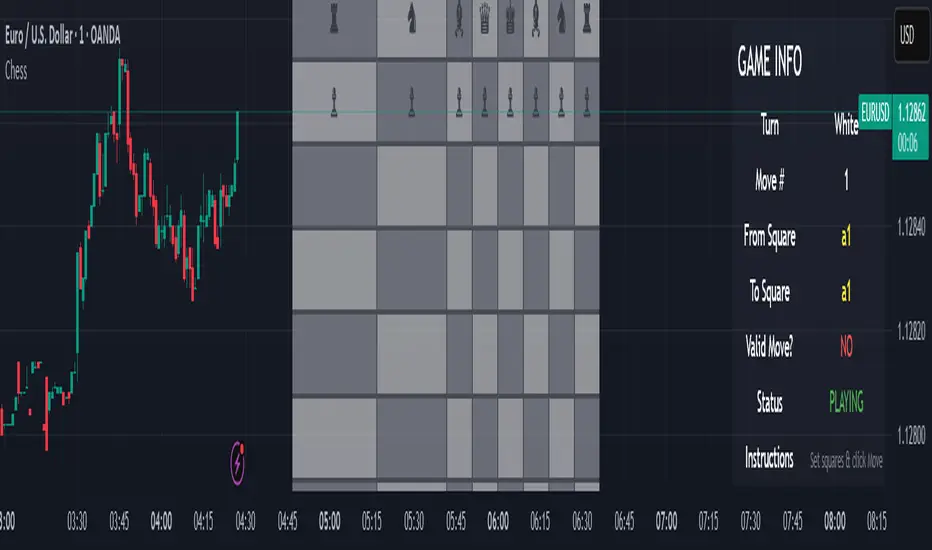
This script is an experimental chess game simulation built entirely in Pine Script, rendered as an overlay on a trading chart. It does not support interactivity like mouse clicks or real-time move detection, but instead relies on manual inputs to simulate moves and visualize board state.
This was created purely for educational purposes—to test the creative boundaries of Pine Script and explore how far visual scripting can be pushed within the limits of a financial charting tool.
🎯 Goals
Render a full 8×8 chessboard with labeled rows (1–8) and columns (a–h)
Display all pieces using Unicode chess symbols
Allow users to simulate moves using manual input
Validate basic move legality
Display turn status, current move, and instructions
🔧 How It Works
Chessboard Rendering
Uses tabel.new() to display 64 tiles and corresponding pieces.
Light and dark squares alternate based on standard chessboard layout logic ((row + column) % 2).
Pieces
All pieces (white and black) are placed at their initial positions using Unicode characters:
♙ ♖ ♘ ♗ ♕ ♔ for White
♟︎ ♜ ♞ ♝ ♛ ♚ for Black
⚠️ Limitations
Pine Script is not a general-purpose programming language. This game is non-interactive and must be controlled using input.int() and input.bool() for every move.
No click or drag-and-drop functionality.No timers, clocks, or multiplayer.No automated check/checkmate detection (yet!).No visual indication of selected squares (though that could be added with color-coded highlights)
📌 Why I Built This
TradingView is made for charting markets, but I wanted to see how far I could stretch it. Chess is grid-based like many financial charts, so I challenged myself to bring chess logic into Pine Script just for fun and learning.
This script is an experimental chess game simulation built entirely in Pine Script, rendered as an overlay on a trading chart. It does not support interactivity like mouse clicks or real-time move detection, but instead relies on manual inputs to simulate moves and visualize board state.
This was created purely for educational purposes—to test the creative boundaries of Pine Script and explore how far visual scripting can be pushed within the limits of a financial charting tool.
🎯 Goals
Render a full 8×8 chessboard with labeled rows (1–8) and columns (a–h)
Display all pieces using Unicode chess symbols
Allow users to simulate moves using manual input
Validate basic move legality
Display turn status, current move, and instructions
🔧 How It Works
Chessboard Rendering
Uses tabel.new() to display 64 tiles and corresponding pieces.
Light and dark squares alternate based on standard chessboard layout logic ((row + column) % 2).
Pieces
All pieces (white and black) are placed at their initial positions using Unicode characters:
♙ ♖ ♘ ♗ ♕ ♔ for White
♟︎ ♜ ♞ ♝ ♛ ♚ for Black
⚠️ Limitations
Pine Script is not a general-purpose programming language. This game is non-interactive and must be controlled using input.int() and input.bool() for every move.
No click or drag-and-drop functionality.No timers, clocks, or multiplayer.No automated check/checkmate detection (yet!).No visual indication of selected squares (though that could be added with color-coded highlights)
📌 Why I Built This
TradingView is made for charting markets, but I wanted to see how far I could stretch it. Chess is grid-based like many financial charts, so I challenged myself to bring chess logic into Pine Script just for fun and learning.
Mã được bảo vệ
Tập lệnh này được đăng dưới dạng mã nguồn đóng. Tuy nhiên, bạn có thể sử dụng tự do và không giới hạn – tìm hiểu thêm tại đây.

Thông báo miễn trừ trách nhiệm
Thông tin và các ấn phẩm này không nhằm mục đích, và không cấu thành, lời khuyên hoặc khuyến nghị về tài chính, đầu tư, giao dịch hay các loại khác do TradingView cung cấp hoặc xác nhận. Đọc thêm tại Điều khoản Sử dụng.
Mã được bảo vệ
Tập lệnh này được đăng dưới dạng mã nguồn đóng. Tuy nhiên, bạn có thể sử dụng tự do và không giới hạn – tìm hiểu thêm tại đây.
Thông báo miễn trừ trách nhiệm
Thông tin và các ấn phẩm này không nhằm mục đích, và không cấu thành, lời khuyên hoặc khuyến nghị về tài chính, đầu tư, giao dịch hay các loại khác do TradingView cung cấp hoặc xác nhận. Đọc thêm tại Điều khoản Sử dụng.