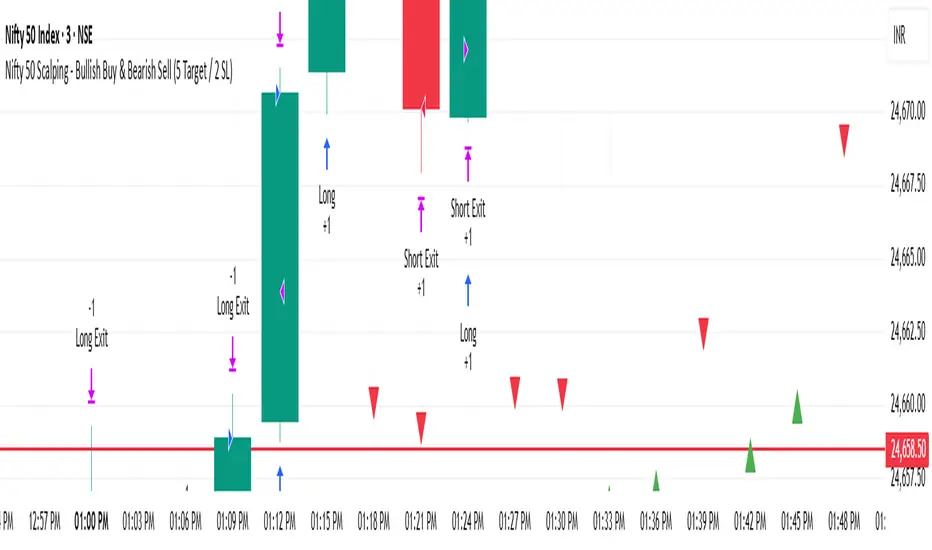
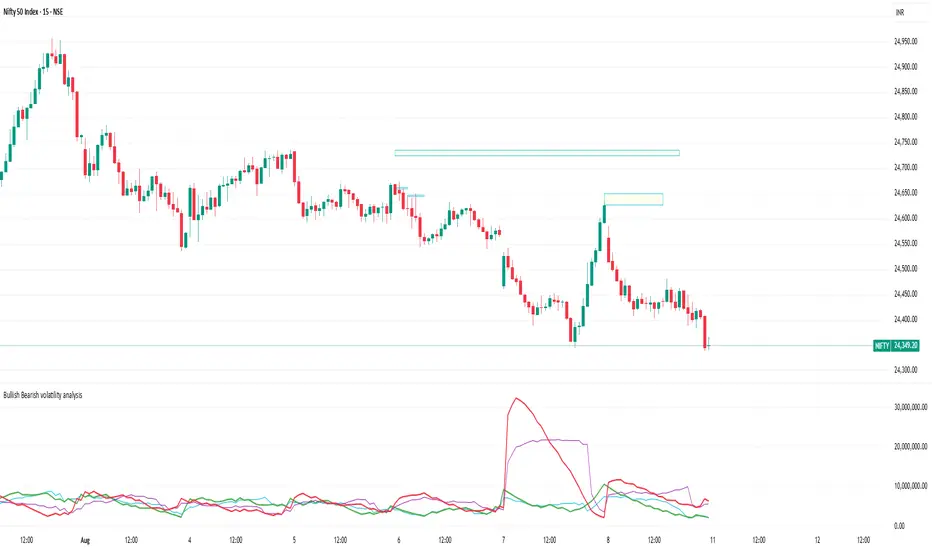
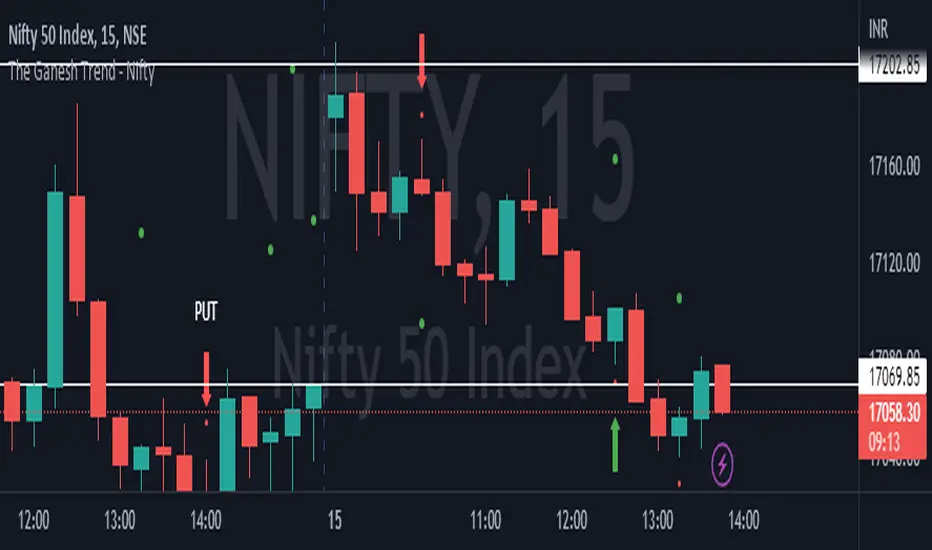
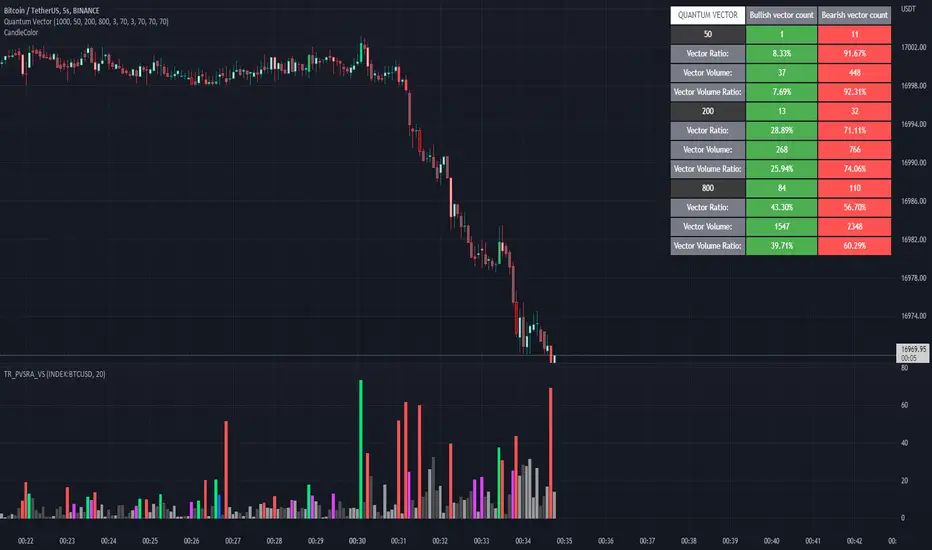
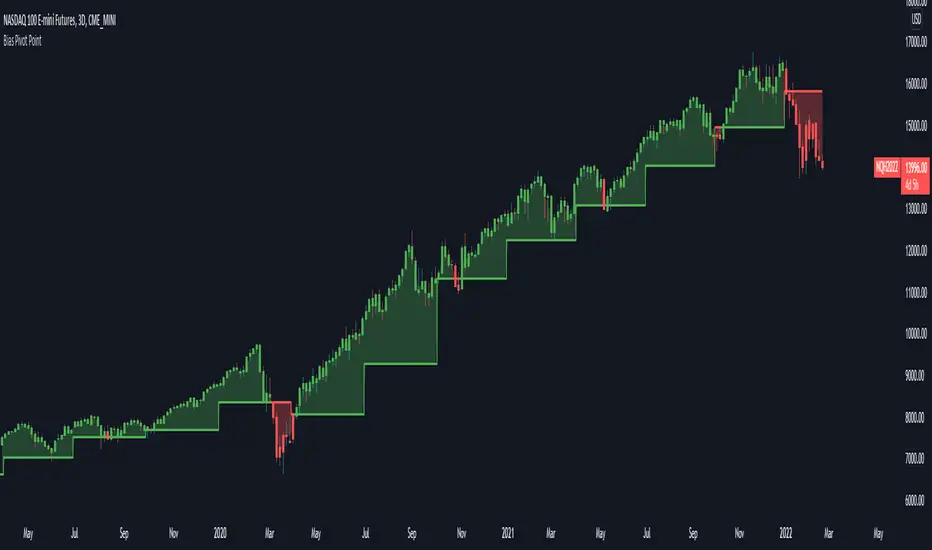
Bias Pivot PointA simple indicator that uses Pivot Points as a filter and to generate a Directional Bias .
How to use this indicator?
1. Directional Bias
Bullish => Closing Price > Pivot Point
Bearish => Closing Price < Pivot Point
2. Support / Resistance
Each Pivot Points can be used as Support or Resistance
3. Take Profit Targets
Each Pivot Points can be used as targets for taking profit
Tìm kiếm tập lệnh với "bear"
RSI Average Swing BotThis is a modified RSI version using as a source a big length(50 candles) and an average of all types of sources for candle calculations such as ohlc4, close, high, open, hlc3 and hl2.
In this case we are going to use a 0-1 scale for an easier calculation, where 0.5 is going to be our middle point.
Above 0.5 we consider a bullish possibility.
Below 0.5 we consider a bearish possibility.
I made a small example bot using that initial logic, together with 2 exit points for long or short positions.
If there are any questions, let me know !
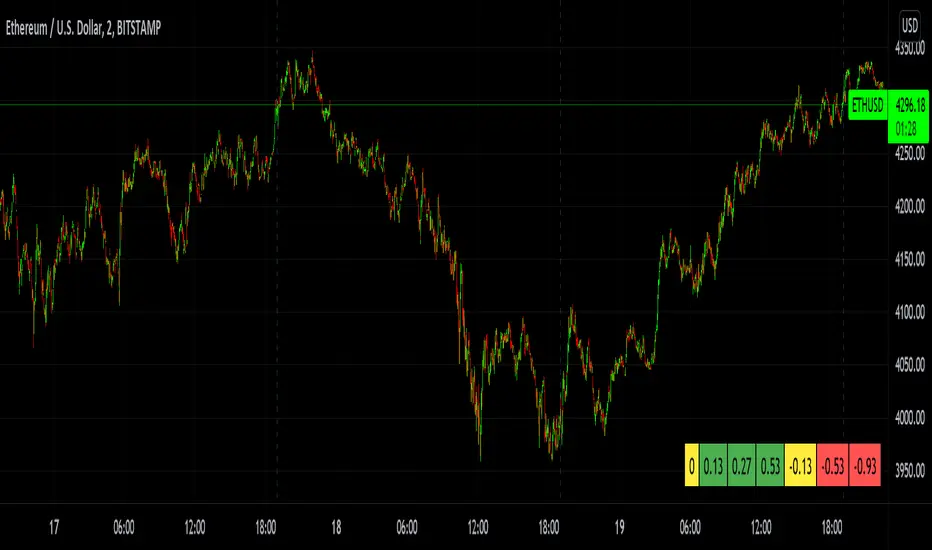
MTF Bullish/Bearish IndicatorThe script plots a bullish/bearish indicator by evaluating a variety of moving averages for a security across multiple timeframes. It's derived from built in Technical Analysis indicator published by TradingView. The result of evaluation is plotted on the chart in green light/red light format in a configurable location.
evaluated moving averages include
- SMA 10, 20, 30, 50, 100, 200
- EMA 10, 20, 30, 50, 100, 200
- Hull MA 9
- VWMA 20
- Ichimoku Cloud
moving averages are evaluated at chart timeframes and 5 min, 15 min, 30 min, 120 min, 240 min, and daily by default but can be customized.
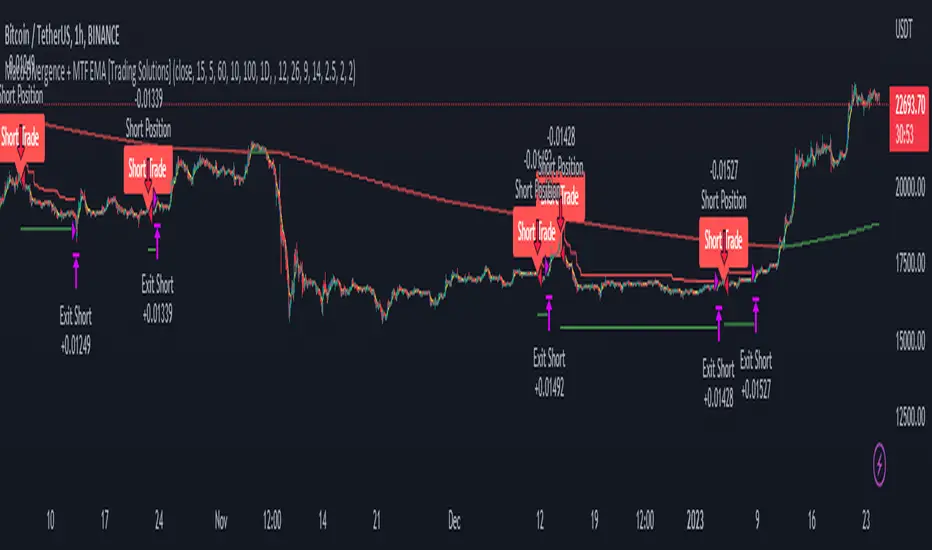
Macd Divergence + MTF EMA MACD Divergence + Multi Time Frame EMA
This Strategy uses 3 indicators: the Macd and two emas in different time frames
The configuration of the strategy is:
Macd standar configuration (12, 26, 9) in 1H resolution
10 periods ema, in 1H resolution
5 periods ema, in 15 minutes resolution
We use the two emas to filter for long and short positions.
If 15 minutes ema is above 1H ema, we look for long positions
If 15 minutes ema is below 1H ema, we look for short positions
We can use an aditional filter using a 100 days ema, so when the 15' and 1H emas are above the daily ema we take long positions
Using this filter improves the strategy
We wait for Macd indicator to form a divergence between histogram and price
If we have a bullish divergence, and 15 minutes ema is above 1H ema, we wait for macd line to cross above signal line and we open a long position
If we have a bearish divergence, and 15 minutes ema is below 1H ema, we wait for macd line to cross below signal line and we open a short position
We close both position after a cross in the oposite direction of macd line and signal line
Also we can configure a Take profit parameter and a trailing stop loss
[SCL] True Market StructureSee market structure at a glance with Higher Highs and Lower Lows. Bullish/Bearish/Ranging market bias is automatically derived. Optionally get alerted for breaks in market structure. Uses true Local Highs/Lows instead of simply the highest/lowest "pivot" for x bars. Can be useful as a support for learning market structure or for alerts for a change in structure while you're not at the computer.
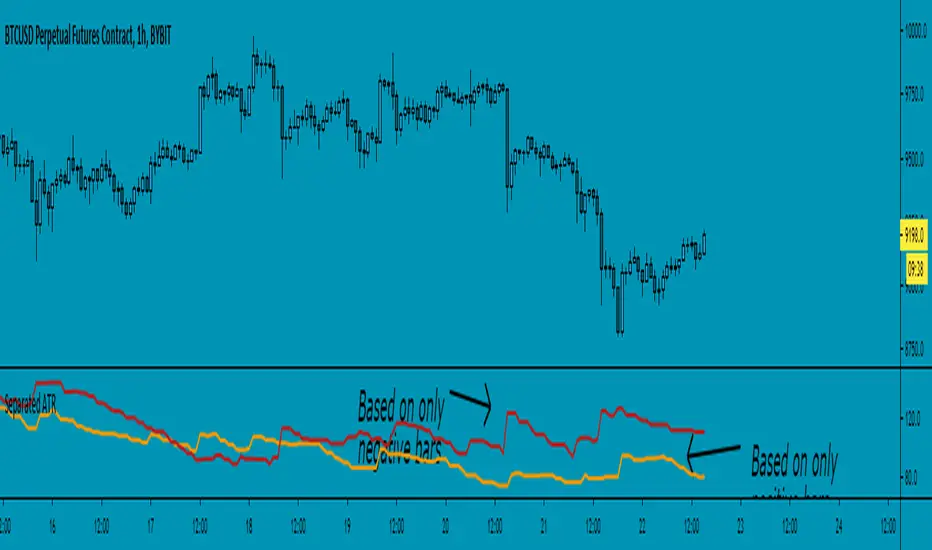
Separated ATR - evoThis script plots two ATR (Average True Range) values, one based on only bullish and the other based on only bearish bars. If the current bar is positive, the negative ATR will use its last known negative bar for the calculation. You can smooth bar directions by using the Heikin Ashi setting.
Use this the same way how you would use the regular ATR indicator, but with the added value of knowing which side of the market has more volatility.
TMMS OscillatorThe TMMS oscillator (aka “Trading Made More Simpler”) is an indicator made of conditions based on both 2 separated Stochastic and 1 RSI.
Bullish zone is green and bearish one is red. When the histogram is grey, no signals is available at that time.
The indicator has an option to show the current trend of an Hull moving average (ascending or descending curve). When the trend is up, green dots are plotted on the zero line. When the trend is down, the dots are coloured in red.
Greetings, success with your trade!!!
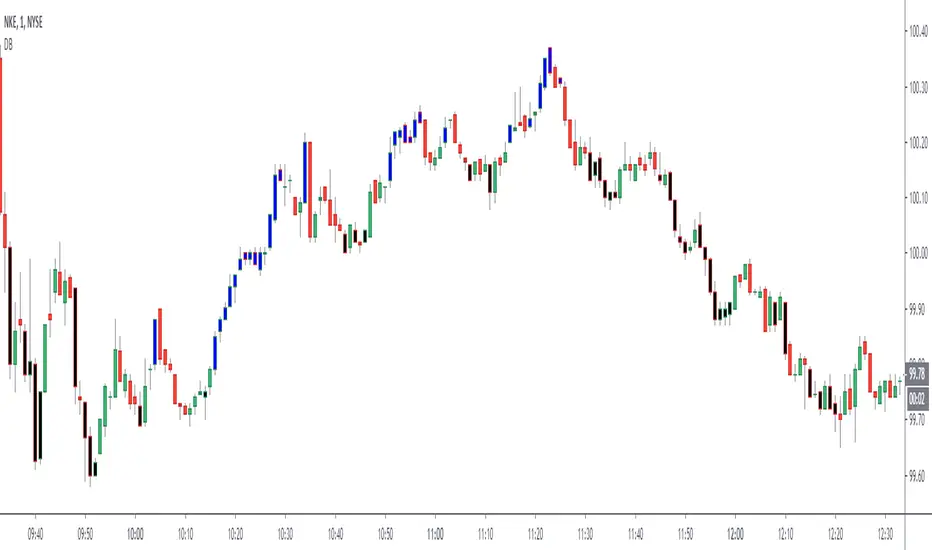
Dreadblitz BarsThese bars can give you good opportunities if you know how to analyze the context.
blue=bullish
black=bearish
thumbs up
Market Thrust IndicatorThe Market Thrust indicator is a powerful measure of the stock market's internal strength or weakness. There are four components to this indicator:
1-Advancing Issues on the New York Stock Exchange (NYSE) – $ADV
2-Advancing Volume on the NYSE – $UVOL
3-Declining Issues on the NYSE – $DECL
4-Declining Volume on the NYSE – $DVOL
The formula for Market Thrust is given below:
($ADV x $UVOL)-($DECL x $DVOL)
When used for day-trading, the trend of the Market Thrust indicator is what is most important.
Rising Market Thrust Indicator: Considered a bullish sign; can act as a confirmation signal when combined with a rising stock, index ETF, or stock index future's price.
Falling Market Thrust Indicator: Considered a bearish sign; can act as a confirmation signal of a decreasing market price.
The Market Thrust indicator could be used for detecting divergences in trends. Divergences occur when:
- Price is trending higher, but the Market Thrust indicator is not moving higher or is even going down.
- Price is trending lower, however, the Market Thrust technical analysis tool is not trending lower, it is either not trending or is trending higher.
Add a fully configurable trend line over MTI.
Read more at: commodity.com
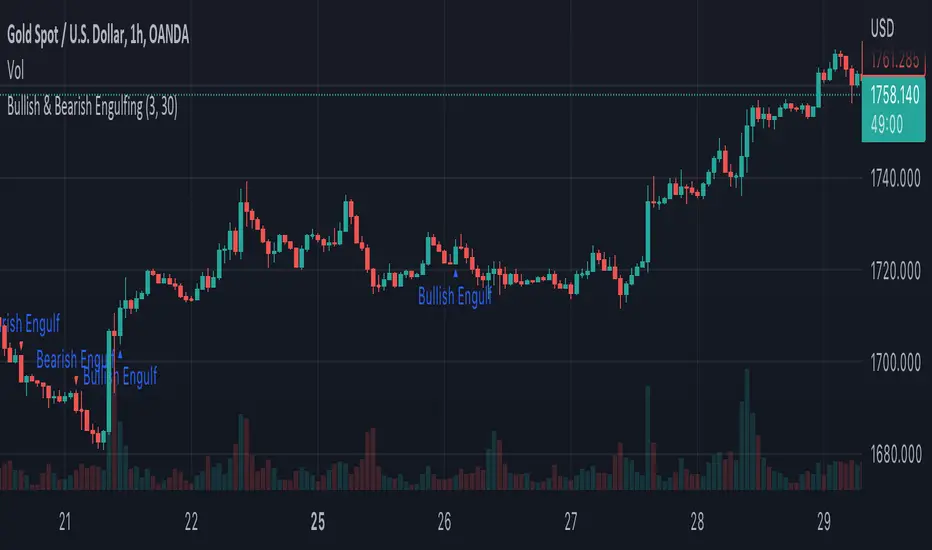
Engulfing Scanner v1This indicator helps you to quickly identify bullish and bearish engulfing patterns.
Works on currencies only (pips required).
Differential Price Counter for Bullish/Bearish BarsThis script can show the cumulative differential price of both bullish/bearish bars with the 0.1pip precision for the currencies having five decimal precision. However, can be useful for all markets.
RepulseThis indicator was originally developed by Eric Lefort, a professional trader and author from France.
It gauges and displays the bullish or bearish pressure.
Like and follow for more open source indicators!
Happy Trading!
RSI_EMA & Bearish EngulfingThis is a RSI-RSI of EMA and bearish candlestick reversal pattern formed by two candlesticks. Following an uptrend, the first candlestick is a up candlestick which is followed by a down candlestick which has a long real body that engulfs or contains the real body of the prior bar. following an uptrend, if RSI and EMA line cross then Sell and for downtrend if RSI and EMA line cross then Buy.
CMYK VRMI◊ Introduction
This script indicates the relative movement of price x volume.
◊ Origin
Based on 'The Relative Momentum Index' by Roger Altman : February, 1993 issue of Technical Analysis of Stocks & Commodities magazine.
While RSI counts up and down days from close to close, the Relative Momentum Index counts up and down days from the close relative to a close x number of days ago.
This results in an RSI that is smoother. The input has been changed to the change of a smoothed close multiplied by a smoothed volume.
The polarity of VRMI indicates bearish/bullish movement.
◊ Adjustments
CMYK color theme applied.
◊ Usage
VRMI indicates the force the market moves with.
◊ Future Prospects
-
◊ ◊ ◊ ◊ ◊ ◊ ◊ ◊ ◊ ◊ ◊ ◊ ◊ ◊ ◊ ◊ ◊ ◊ ◊ ◊ ◊ ◊ ◊ ◊ ◊ ◊ ◊ ◊ ◊ ◊ ◊ ◊ ◊ ◊ ◊ ◊ ◊ ◊ ◊ ◊ ◊ ◊ ◊ ◊ ◊ ◊ ◊ ◊ ◊ ◊ ◊ ◊ ◊ ◊ ◊ ◊ ◊ ◊ ◊ ◊ ◊ ◊ ◊ ◊ ◊ ◊ ◊ ◊ ◊ ◊ ◊ ◊ ◊ ◊ ◊ ◊ ◊ ◊ ◊ ◊ ◊ ◊ ◊ ◊ ◊ ◊ ◊ ◊ ◊ ◊ ◊ ◊ ◊ ◊ ◊ ◊ ◊ ◊ ◊ ◊ ◊ ◊ ◊ ◊ ◊ ◊
CMYK VRMI RAYS ◊ Introduction
Introducing VRMI in this script, an RMI based on price movement and volume, to indicate bullish and bearish trends.
This script marks the background depending on RMI <> VRMI , VRMI polarity and large buy/sell sprees.
◊ Origin
Based on 'The Relative Momentum Index' by Roger Altman : February, 1993 issue of Technical Analysis of Stocks & Commodities magazine.
While RSI counts up and down days from close to close, the Relative Momentum Index counts up and down days from the close relative to a close x number of days ago.
This results in an RSI that is smoother.
In addition VRMI reacts quick, it is used to cut off latency from RMI, and it's polarity indicates the beginning and end of a trend.
Large buy sell sprees and detected in their proportion with an sma on the volume
◊ Adjustments
CMYK color theme applied.
◊ Usage
This indicator can be used to detect trends and mark reversals.
◊ Prospects
◊ ◊ ◊ ◊ ◊ ◊ ◊ ◊ ◊ ◊ ◊ ◊ ◊ ◊ ◊ ◊ ◊ ◊ ◊ ◊ ◊ ◊ ◊ ◊ ◊ ◊ ◊ ◊ ◊ ◊ ◊ ◊ ◊ ◊ ◊ ◊ ◊ ◊ ◊ ◊ ◊ ◊ ◊ ◊ ◊ ◊ ◊ ◊ ◊ ◊ ◊ ◊ ◊ ◊ ◊ ◊ ◊ ◊ ◊ ◊ ◊ ◊ ◊ ◊ ◊ ◊ ◊ ◊ ◊ ◊ ◊ ◊ ◊ ◊ ◊ ◊ ◊ ◊ ◊ ◊ ◊ ◊ ◊ ◊ ◊ ◊ ◊ ◊ ◊ ◊ ◊ ◊ ◊ ◊ ◊ ◊ ◊ ◊ ◊ ◊ ◊ ◊ ◊ ◊ ◊ ◊
Super Envolvente (Bullish y Bearish)Identificador de Super-envolventes (SE), se encarga de darle un color verde a la SE alzista (Bullish) verde y rojo a la bajista (Bearish).
Bearish signal using Point of Control (POC) with PAC by guruThis indicator code helps traders identify potential sell opportunities using several important technical indicators:
Point of Control (POC) – This is the price level where the most volume was traded over the past several days.
Previous Day's Low – This shows the lowest price reached during the previous day.
PAC (Price Action Channel) EMA – These are two moving averages (one based on the low price and one based on the close price) that help determine if the price is trending within a certain range.
Volume SMA – This is a 3-day simple moving average (SMA) of volume, which helps filter out signals based on market activity.
What the Script Does:
Point of Control (POC):
The script looks at the last 50 days (configurable) and calculates which price level had the highest trading volume.
It then plots a red line on the chart at the POC level. This is important because it helps identify areas where there was strong market interest in the past.
Volume Moving Average:
The script calculates a 3-day SMA of volume, but it excludes the current day to avoid premature signals based on today’s trading.
The volume SMA is used to ensure there’s enough market activity (with a threshold set to 25 units) before triggering a sell signal.
Price Action Channel (PAC) EMA:
The PAC consists of two exponential moving averages (EMAs):
The PAC Low EMA: This is based on the low prices over the last 34 periods (configurable).
The PAC Close EMA: This is based on the closing prices over the last 34 periods.
These EMAs help determine if the price is trending above or below certain price levels.
Sell Signal Logic: The script checks three conditions before displaying a "Sell" signal:
Price Below POC and Previous Day’s Low:
The close price must be below both the Point of Control (POC) and the previous day's low.
Volume SMA Above 25:
The 3-day volume SMA must be greater than 25. This ensures the signal only triggers when there’s enough trading volume in the market.
Today’s Low is Above PAC EMAs:
Today's low price must be above both the PAC low EMA and the PAC close EMA. This prevents sell signals when prices are already significantly below the PAC, indicating possible exhaustion in the downtrend.
If all three conditions are met, the script will display a red "Sell" label on the chart, signaling a potential selling opportunity.
No Sell Signal if Price Reverses:
If the price crosses back above the POC or the previous day's low, the script will remove the sell signal and reset for a new opportunity.
Summary of Conditions:
For the script to display a "Sell" label:
The close price must be below the Point of Control (POC) and the previous day’s low.
The 3-day volume SMA (excluding today) must be greater than 25 units.
The low price of the current day must be above both the PAC low EMA and the PAC close EMA.
If these conditions are met, a red sell label appears on the chart as a potential signal for a short (sell) trade.
HTF Pivots SignalsIntroduction :
HPS (HTF Pivot Signals) provides traders with a systematic approach to Higher Timeframe structure analysis and signal confirmation. Designed for traders seeking to identify confirmed structure changes, this indicator detects HTF pivot interactions and generates entry signals when price confirms beyond chart timeframe pivot levels. The indicator helps analysts identify key structure breaks, momentum shifts, and high-probability entry points based on confirmed pivot interactions.
Description :
HPS is rooted in the principle that Higher Timeframe structure changes provide context for lower timeframe price action. When an HTF pivot is interacted with (mitigated), it signals a potential opportunity for a mean reversal. The indicator then waits for confirmation on the chart timeframe before generating a signal, ensuring only confirmed setups are highlighted.
Main indicator screenshot showing HTF pivots and confirmation signals
The system operates by detecting pivot highs and lows on a higher timeframe, tracking when these pivots are interacted with, and confirming signals when price closes beyond chart timeframe pivot levels. This two-step process—interaction followed by confirmation—filters out false signals and provides only actionable setups.
HPS automatically calculates the optimal higher timeframe pairing (typically 15-16x the chart timeframe) or allows manual selection. The indicator remains stable and non-repainting, offering traders reliable, unchanged levels within the given time period. Pivot cleanup is managed by mitigation order rather than age, ensuring the most recent interactions remain visible while older ones are removed systematically.
Key Features:
Automatic HTF Selection: The indicator automatically calculates the optimal higher timeframe pairing based on your chart timeframe, typically using 15-16x multiples (e.g., 5m → 1h, 15m → 4h, 1h → 1D). For a more dynamic experience, the Automatic feature autonomously adjusts the higher timeframe pairing based on the current chart timeframe, ensuring accurate alignment with structure analysis. Manual override is available for custom timeframe selection.
Confirmed Pivot Detection: HPS only displays confirmed HTF pivots that have been interacted with. Unlike basic pivot indicators that show all pivots, HPS requires pivot interaction before displaying, eliminating noise and focusing on actionable structure changes. Pivots are marked with PH (Pivot High) and PL (Pivot Low) labels when enabled.
Signal Confirmation System: When an HTF pivot is interacted with, a pending signal is created signaling a potential mean reversal opportunity. The signal confirms when price closes beyond the chart timeframe pivot level—pivot low for bearish signals, pivot high for bullish signals. Confirmed signals display with OB+ (bullish) or OB- (bearish) labels and extending confirmation lines that mark the entry level.
Mitigation-Based Cleanup: Pivot cleanup is managed by mitigation order rather than age. The system maintains the latest mitigated pivots while removing older ones based on interaction time. This ensures recent interactions remain visible while preventing chart clutter. The maximum number of mitigated pivots displayed is configurable based on the max pivots setting.
Customizable Display: Full control over visual elements including pivot highs/lows visibility, pivot labels (PH/PL), confirmation lines, colors, and line width. Confirmation line labels (OB+/OB-) always display regardless of label toggle settings, ensuring signal visibility. Adjust the maximum number of pivots displayed to match your charting style and analysis needs.
Stop Level Calculation: Automatically calculates stop levels based on the maximum price (for bearish signals) or minimum price (for bullish signals) from signal creation to confirmation. These levels represent the risk point for each confirmed signal, providing clear risk management reference points.
Stop level calculation visualization
Multi-Timeframe Compatibility: Works across all TradingView timeframes and market types including Forex, Crypto, Stocks, and Futures. The automatic HTF selection adapts to any chart timeframe, providing consistent structure analysis regardless of the trading instrument or timeframe selected.
Multi-timeframe compatibility example
Usage Guidance :
Add HPS (HTF Pivot Signals) to your TradingView chart.
Select your preferred HTF pairing (Automatic or Manual) and adjust display settings to match your visual preferences.
Monitor for HTF pivot interactions—when price mitigates an HTF pivot, a pending signal is created signaling a potential mean reversal opportunity. Wait for confirmation when price closes beyond the chart timeframe pivot level, indicated by OB+ or OB- labels.
Use the confirmation lines and stop levels to identify entry points and manage risk. Combine with your existing analysis methods to enhance structure-based trading decisions.
Step-by-step usage guide
Terms and Conditions
Our charting tools are products provided for informational and educational purposes only and do not constitute financial, investment, or trading advice. Our charting tools are not designed to predict market movements or provide specific recommendations. Users should be aware that past performance is not indicative of future results and should not be relied upon for making financial decisions. By using our charting tools, the purchaser agrees that the seller and the creator are not responsible for any decisions made based on the information provided by these charting tools. The purchaser assumes full responsibility and liability for any actions taken and the consequences thereof, including any loss of money or investments that may occur as a result of using these products. Hence, by purchasing these charting tools, the customer accepts and acknowledges that the seller and the creator are not liable nor responsible for any unwanted outcome that arises from the development, the sale, or the use of these products. Finally, the purchaser indemnifies the seller from any and all liability. If the purchaser was invited through the Friends and Family Program, they acknowledge that the provided discount code only applies to the first initial purchase. The purchaser is therefore responsible for cancelling – or requesting to cancel – their subscription in the event that they do not wish to continue using the product at full retail price. If the purchaser no longer wishes to use the products, they must unsubscribe from the membership service, if applicable. We hold no reimbursement, refund, or chargeback policy. Once these Terms and Conditions are accepted by the Customer, before purchase, no reimbursements, refunds or chargebacks will be provided under any circumstances.
By continuing to use these charting tools, the user acknowledges and agrees to the Terms and Conditions outlined in this legal disclaimer.
VWAP Long Entry PROVWAP Long Entry PRO - Instruction Manual
Overview
VWAP Long Entry PRO is a Pine Script v6 indicator designed for day traders following Andrew Aziz's VWAP trading methodology from "How to Day Trade for a Living." The indicator identifies high-probability long entry opportunities when stocks bounce off VWAP with proper trend, volume, and timing confirmation.
What This Indicator Does
The indicator monitors multiple conditions simultaneously and alerts you only when ALL criteria are met for a valid VWAP long entry:
1. ✅ Price is near VWAP (within customizable proximity)
2. ✅ Price crosses above VWAP (bullish candle confirmation)
3. ✅ Uptrend confirmed (EMA 20 > EMA 50)
4. ✅ Volume spike present (volume > 1.5x average)
5. ✅ Within optimal trading hours (default: first 2 hours after market open)
Visual Elements on the Chart
1. VWAP Line (Yellow)
* Shows the Volume Weighted Average Price for the current session
* Acts as dynamic support/resistance
2. EMA Lines
* Blue Line: 20-period Exponential Moving Average
* Red Line: 50-period Exponential Moving Average
* Trend is bullish when blue is above red
3. Green Triangle Markers
* Appear below candles when ALL entry conditions are met
* These are your entry signals
4. Background Colors
* Light Yellow Background: Price is within proximity zone of VWAP
* Light Red Background: Price crossed VWAP but filters failed (helps identify missed opportunities)
5. Filter Status Table (Top Right)
Real-time dashboard showing current status of all filters:
Filter Status
Trend ✓ (green) or ✗ (red)
Volume ✓ (green) or ✗ (red)
Time ✓ (green) or ✗ (red)
Near VWAP ✓ (green) or ✗ (red)
Entry OK ✓ GO (lime) or ✗ (orange)
How to Use the Indicator
Step 1: Apply to Your Watchlist
1. Add VWAP Long Entry PRO to charts of stocks on your morning gappers watchlist
2. Use 1-minute, 2-minute, or 5-minute timeframes
3. Monitor multiple stocks simultaneously
Step 2: Wait for Setup
Watch the Filter Status Table in the top right corner. A valid entry requires:
* All filters showing green ✓
* "Entry OK" showing ✓ GO in lime/green
Step 3: Execute the Trade
When a green triangle appears below a candle:
* Entry: Enter long at or near the close of that candle
* Stop Loss: Place stop just below VWAP (typically 2-5 cents below)
* Profit Target: Use resistance levels, previous highs, or VWAP + ATR
Step 4: Manage the Trade
* Hold as long as price stays above VWAP
* Exit if price closes back below VWAP
* Scale out at resistance levels
Customizable Settings
Access settings by clicking the gear icon next to the indicator name.
VWAP Proximity
* Default: 0.002 (0.2%)
* Purpose: Defines how close price must be to VWAP
* Adjust If:
* Too many signals → increase (e.g., 0.001 = 0.1%)
* Too few signals → decrease (e.g., 0.003 = 0.3%)
Filters Group
Trend Filter
* Use Trend Filter: Toggle on/off
* EMA 20 Length: Default 20
* EMA 50 Length: Default 50
* Purpose: Ensures you're trading with the trend
* Disable If: Trading reversals or range-bound stocks
Volume Filter
* Use Volume Filter: Toggle on/off
* Volume Multiplier: Default 1.5 (volume must be 1.5x average)
* Volume Average Period: Default 20 bars
* Purpose: Confirms institutional participation
* Adjust If:
* Too restrictive → lower to 1.2x
* Need stronger confirmation → increase to 2.0x
Time Filter
* Use Time Filter: Toggle on/off
* Start Hour (EST): Default 9
* Start Minute: Default 30
* Hours to Trade: Default 2
* Purpose: Focus on highest probability time window (9:30-11:30 AM EST)
* Adjust If:
* Trading afternoon momentum → extend hours to 4-6
* Power hour trading → change start to 15:00, 1 hour
Alert Setup
Creating an Alert
1. Click the Alert Icon (clock) in top toolbar
2. Condition: Select "VWAP Long Entry PRO"
3. Alert Trigger: Choose "VWAP Long Entry PRO"
4. Options: Select "Once Per Bar Close"
5. Expiration: Set to desired timeframe (default: 60 days)
6. Alert Actions: Enable:
* ✓ Notify on App
* ✓ Show Popup
* ✓ Send Email (optional)
* ✓ Play Sound
7. Message: The default message includes:
* Ticker symbol
* Close price
* VWAP value
* Confirmation that all filters passed
Multi-Symbol Alert
To monitor multiple stocks with one alert:
1. In the alert creation dialog, use the Symbol dropdown
2. Select multiple tickers from your watchlist
3. The alert will fire when ANY of those stocks meet the criteria
Trading Strategy
Based on Andrew Aziz's VWAP Methodology
Setup Requirements:
* Stock must be "in play" (gap, news, high relative volume from morning scanner)
* Price pulls back to VWAP during the trading day
* VWAP acts as support for longs (or resistance for shorts)
Entry Rules:
1. Wait for price to approach VWAP
2. Confirm VWAP as support with a bullish candle closing above it
3. Enter long on confirmation candle close or next candle open
4. All filters (trend, volume, time) must be green
Stop Loss:
* Place stop 2-5 cents below VWAP
* Adjust based on stock volatility and your risk tolerance
Profit Targets:
* First target: Previous resistance or swing high
* Second target: Daily pivot or Fibonacci extension
* Trailing stop: Move stop to breakeven once up 1:1 risk/reward
Risk Management:
* Risk 1-2% of account per trade
* Position size based on distance from stop loss
* Aim for 2:1 or 3:1 reward-to-risk ratio
Common Scenarios
Scenario 1: Clean VWAP Bounce
* All filters green ✓
* Price pulls back to VWAP
* Green triangle appears
* Action: Enter long immediately
Scenario 2: Failed Volume
* Trend ✓, Time ✓, Near VWAP ✓
* Volume ✗ (red X)
* Action: Wait for volume increase or skip trade
Scenario 3: Wrong Time Window
* All filters green except Time ✗
* Action: If you trade mid-day, consider extending time window in settings
Scenario 4: Downtrend
* Trend ✗ (EMA 20 < EMA 50)
* Action: Skip long entry; consider short setup instead
Scenario 5: False Breakout
* Light red background appears (filters failed)
* Price crossed VWAP but no confirmation
* Action: No entry; indicator correctly filtered out weak signal
Best Practices
1. Pre-Market Preparation
* Run your gappers scanner at 9:00 AM EST
* Identify 3-5 stocks "in play"
* Add VWAP Long Entry PRO to each chart
* Set up alerts for your watchlist
2. Chart Timeframe Selection
* 1-minute: Scalping, high-frequency entries (more signals, more noise)
* 2-minute: Balanced (recommended for beginners)
* 5-minute: Swing entries, fewer but higher-quality signals
3. Combine with Price Action
The indicator is a filter and alert system, not a complete strategy. Also consider:
* Support/resistance levels
* Candlestick patterns (hammer, engulfing)
* Overall market trend (SPY, QQQ)
* Stock-specific news and catalysts
4. Backtesting
* Use TradingView's Bar Replay feature
* Review past signals on your favorite stocks
* Adjust filter settings based on your results
* Document win rate and average R:R
5. Paper Trading First
* Test the indicator with paper trading for 1-2 weeks
* Track all signals and outcomes
* Refine settings before risking real capital
Troubleshooting
Problem: No Signals Appearing
Solutions:
* Check if all filters are enabled (they may be too restrictive)
* Verify stock has sufficient volume and volatility
* Try increasing VWAP proximity from 0.2% to 0.3%
* Disable time filter if trading mid-day
* Check if stock is actually near VWAP on chart
Problem: Too Many Signals
Solutions:
* Decrease VWAP proximity from 0.2% to 0.1%
* Increase volume multiplier from 1.5x to 2.0x
* Enable all filters (trend, volume, time)
* Use 5-minute chart instead of 1-minute
Problem: Filter Status Table Not Visible
Solutions:
* Scroll chart to right (table is in top right corner)
* Check if indicator is loaded (should appear in indicator list on left)
* Refresh chart and re-add indicator
* Close other overlapping indicators
Problem: Alert Not Firing
Solutions:
* Verify alert is set to "Once Per Bar Close" (not "Only Once")
* Check alert hasn't expired
* Ensure correct symbols are selected in alert
* Confirm indicator is applied to chart with alert
Limitations
What This Indicator Does NOT Do:
* ❌ Automatically enter/exit trades
* ❌ Calculate position size
* ❌ Account for fundamental news or earnings
* ❌ Work on stocks without sufficient liquidity
* ❌ Guarantee profitable trades
When NOT to Use:
* Pre-market or after-hours (VWAP resets at market open)
* Low-volume penny stocks (< 100K daily volume)
* Stocks without clear trend or catalyst
* During major news events or FOMC meetings
* First 5 minutes after market open (price discovery phase)
Example Trade Walkthrough
Stock: XYZ (from morning gappers, +5% gap on earnings)
Time: 10:15 AM EST
Timeframe: 2-minute chart
Filter Status Table Shows:
* Trend: ✓ (EMA 20 > EMA 50)
* Volume: ✓ (2.3x average)
* Time: ✓ (within 9:30-11:30 window)
* Near VWAP: ✓ (price at $50.05, VWAP at $50.00)
* Entry OK: ✗ (waiting for bullish close)
Next Candle:
* Opens at $50.02
* Drops to $49.98 (testing VWAP)
* Closes at $50.08 (bullish candle, above VWAP)
* Green triangle appears!
* Entry OK: ✓ GO
Trade Execution:
* Entry: $50.10 (next candle open)
* Stop Loss: $49.95 (5 cents below VWAP)
* Risk: $0.15 per share
* Target 1: $50.40 (previous resistance) = 2:1 R:R
* Target 2: $50.70 (daily high) = 4:1 R:R
Outcome:
* Price rallies to $50.45
* Scale out 50% at Target 1
* Move stop to breakeven ($50.10)
* Exit remaining 50% at $50.65
* Result: Profitable trade with 3:1 average R:R
Frequently Asked Questions
Q: Can I use this for short entries?
A: The current version is for long entries only. For shorts, you'd need to reverse the logic (price rejecting VWAP as resistance, downtrend, etc.).
Q: What stocks work best with this indicator?
A: Mid-cap momentum stocks ($1B-$10B market cap), price $10-$100, daily volume > 1M, with a clear catalyst (earnings, news, sector move).
Q: Can I trade this on daily or weekly charts?
A: No. VWAP is an intraday indicator that resets each trading day. Use only on intraday timeframes (1m, 2m, 5m, 15m, 30m).
Q: Should I take every signal?
A: No. Use the indicator as a filter, not a mechanical system. Consider overall market conditions, stock-specific catalysts, and your own price action analysis.
Q: How accurate is this indicator?
A: Accuracy depends on market conditions, stock selection, and your execution. Expect 50-65% win rate with proper 2:1+ risk/reward, similar to Aziz's methodology.
Resources
* Book: "How to Day Trade for a Living" by Andrew Aziz
* VWAP Strategy: Focus on Chapters 7.6 (VWAP Strategy) and supporting examples
* Community: Bear Bull Traders (www.bearbulltraders.com)
* Practice: Use TradingView's Bar Replay and Paper Trading features
Support & Updates
For questions, issues, or feature requests, refer to the TradingView script comments or the Bear Bull Traders community.
Version: 1.0
Pine Script Version: v6
Last Updated: December 30, 2025
Disclaimer: This indicator is for educational purposes only. Trading involves substantial risk. Past performance does not guarantee future results. Always practice proper risk management and never risk more than you can afford to lose.
1. www.tradingview.com