Composite Trend IndicatorsTrend recognition: Based on ZigZag (depth/deviation/backtracking adjustable) annotation HH/HL/LH/LL, draw high and low point lines and labels, and selectable up/down trend coloring and BOS dot hints.
Moving average group: Optional display of 21/55/89/200 EMA, distinguished by different colors.
Support and Resistance: The second segment ZigZag generates horizontal lines or boxes, which can be extended and have quantity limits; diagonal lines and SR lines can be drawn, and labeled HH/HL/LH/LL.
Trend bar: Adaptive moving average (based on efficiency ratio), coloring the K-line to show short-term bullish and bearish momentum.
Divergence Detection: Finds regular/hidden divergences for multiple indicators such as MACD/Hist/RSI/CCI/MOM/OBV/VWMACD/CMF/MFI, draws lines, and can display indicator abbreviations/counts.
Băng tần và kênh

ICT Killzones & Sessions Pro |MC|ICT Killzones & Sessions Pro |MC|
Credits go to LuxAlgo for the great work 👍
This indicator has been further developed and enhanced with additional features.
This indicator highlights key market sessions and killzones directly on your chart, helping traders identify high-probability trading periods.
💎 Key features include 💎
🔸Display of major market sessions such as Asia, London, and New York (AM/PM) with customizable times and colors.
🔸Transparent session highlighting for visual clarity without cluttering the chart.
🔸Configurable vertical border lines with adjustable style, width, and color.
🔸Timeframe-based display limits to hide killzones on higher timeframes.
🔸Fully adjustable label size for easy identification of sessions.
🔸Customizable UTC offset to align sessions with your preferred timezone.
Designed for day traders and scalpers, it visually separates market sessions for better trade planning and timing.
Happy Trading!

RSI Structure Engine (Aggressive Soft) | It measures the direction (trend) and turning points of the market via RSI(7).
But unlike the classic RSI:
It doesn't say "sell at 70 - buy at 30" ❌
Instead:
It reveals the STRUCTURE of the RSI (HH–HL / LH–LL).
That is:
Is there a trend?
Is the trend continuing?
Has the trend ended?
It divides the RSI into 3 zones:
Zone Meaning
RSI ≥ 70 Strong upward momentum (peak regime)
RSI ≤ 30 Strong downward momentum (bottom regime)
30–70 Transition / breathing space
But the key point is this 👇
The bottom/top RSI is FOLLOWED within these regimes, it doesn't lock in immediately.
What and How
🔺 🔻 Locked RSI peak/trough
HH/HL RSI upward trend
LH/LL RSI downward trend
Small points being followed (not yet locked)
If RSI HL breaks, the trend ends
WHAT YOU SHOULDN'T DO?
❌ Don't assume it's a buy-sell indicator alone
❌ Don't short just because you see RSI 70
❌ Don't long just because you see RSI 30
This indicator:
Answers the question "Which side should I be on?"
It doesn't say "Enter right here"
TREND FILTER (MAIN USE)
LONG LOOK:
Last structure: HH + HL
RSI doesn't fall below 30
🔻 HL is protected
SHORT LOOK:
Last structure: LH + LL
RSI cannot rise above 70
🔺 LH is protected
❌ Don't take a trade in the opposite direction.

Opening Price Lines Pro |MC|Opening Price Lines Pro |MC|
Credits go to tradeforopp for the great work 👍
This indicator has been further developed and enhanced with additional features.
💎 Features 💎
This indicator plots key opening prices, session times, and previous day high/low levels directly on the chart. It allows users to:
🔸Display multiple horizontal lines for daily and session open prices with customizable colors, styles, and label sizes.
🔸Show previous day high (PDH), low (PDL), and midline (50% level) for quick reference.
🔸Add vertical timestamp lines for major market sessions or custom times.
🔸Set cutoff times to limit line extensions and control the number of drawn lines on the chart.
🔸Adjust timezone offsets for accurate session and open price visualization.
🔸Fully customize label positions, offsets, colors, and line styles.
🔸Limit visibility based on timeframe and number of days for cleaner charts.
It’s designed to help traders quickly identify key levels and market sessions while maintaining a clean and organized chart layout.
Happy Trading!


Vertical Timelines Pro |MC|Vertical Timelines Pro |MC|
Credits go to lucemanb for the great work 👍
This indicator has been further developed and enhanced with additional features.
Vertical Timelines Pro is a customizable time-based indicator designed to mark important intraday timestamps directly on the chart. It helps traders visualize recurring market moments such as True Day Open, session opens, macro events, or personal timing models with precise vertical reference lines.
The indicator allows you to define multiple custom times, each with its own color and on/off toggle. All timestamps are calculated using a selectable timezone, ensuring consistent and accurate alignment across different markets and chart settings.
Optional labels can be displayed at each timeline to clearly identify the corresponding time. To keep the chart clean and readable, the number of visible labels can be limited retroactively. Due to Pine Script limitations, this setting only affects labels—plotted lines are not impacted.
💎 Key Features 💎
Multiple configurable intraday time markers
Timezone-aware calculations
Individual color and visibility control per line
Optional time labels with customizable size and colors
Historical label limiting to reduce chart clutter
Lightweight and suitable for all intraday timeframes
This indicator is ideal for traders who rely on time-based market behavior, session structure, or repeatable intraday cycles.
Happy Trading!

Liquidity ZonesLiquidity Zones
Liquidity Zones is a price-action–based indicator designed to identify high-probability support and resistance areas where liquidity has historically accumulated.
Instead of drawing single lines, the script builds dynamic price zones based on repeated pivot reactions validated by volume, helping traders focus on meaningful levels rather than noise.
How It Works
Pivot Detection
The indicator scans historical price data for pivot highs and pivot lows using a fixed pivot strength.
Each pivot represents a potential liquidity interaction point.
Volume Qualification
A pivot is only considered valid if the volume at the pivot bar exceeds:
Volume SMA × Sensitivity
This filters out weak or low-participation levels and keeps zones formed during strong market interest.
Zone Construction
Nearby pivots are grouped into a single zone if their price difference stays within an ATR-based threshold.
Each time price reacts within this threshold, the zone’s touch count increases.
Once the minimum number of touches is reached, a liquidity zone is drawn and extended to the right.
Adaptive Zone Expansion
As new qualifying pivots appear, zones automatically expand to reflect the true liquidity range instead of staying static.
Dynamic Zone Coloring
Zones update their color in real time based on price position:
Green (Support) → Price is above the zone
Red (Resistance) → Price is below the zone
Gray (In-Zone) → Price is trading inside the zone
This allows instant visual feedback on whether a level is acting as support, resistance, or an active liquidity area.
Settings Overview
Bars to Apply
Controls how much historical data is scanned for liquidity zones.
Volume Sensitivity
Higher values require stronger volume spikes to validate pivots, resulting in fewer but higher-quality zones.
Styling Options
Fully customizable colors and transparency for support, resistance, and in-zone states.
Best Use Cases
Identifying high-liquidity support and resistance zones
Planning entries, exits, and stop placement
Combining with trend-following or momentum indicators
Filtering out weak levels in sideways or choppy markets

Support and ResistanceSupport & Resistance Zones
This indicator automatically identifies support and resistance zones by clustering confirmed pivot highs and lows into statistically valid price areas.
Instead of drawing single horizontal lines, it creates price zones whose width is dynamically controlled using ATR (Average True Range), allowing the zones to adapt to market volatility.
Core Logic
The indicator scans a user-defined number of historical bars and detects pivot highs and pivot lows using a configurable pivot strength.
Each new pivot is evaluated against previously detected zones:
A zone becomes visible only after receiving sufficient confirmation (minimum number of pivot touches).
This ensures that only structurally meaningful levels are drawn.
Zone Construction Rules
Zones are formed by grouping pivot points whose total price range remains within ATR range
Each zone expands dynamically as new pivots confirm it
Zones are drawn as rectangular areas, not lines
Zones extend to the right, remaining active until price structure changes
This approach avoids over-plotting and reduces noise commonly seen in traditional support/resistance tools.
Dynamic Zone Coloring
Zones automatically change color based on current price position:
Support Color → Price is above the zone
Resistance Color → Price is below the zone
Neutral (In-Zone) Color → Price is trading inside the zone
This makes it easy to visually assess market context without additional indicators.
Inputs Explained
Logic Settings
Bars to Apply
Number of historical bars scanned to detect pivots and construct zones.
Pivot Strength
Number of candles required on both sides of a pivot high/low for confirmation.
Min Pivot Confirmation
Minimum number of aligned pivots required before a zone is drawn.
Styling
Support, resistance, and in-zone colors
Zone fill transparency
Why This Approach
Uses price structure, not arbitrary levels
Adapts to market volatility via ATR
Filters out weak, single-touch levels
Works across all markets and timeframes
This indicator is designed to highlight areas of interest, not generate buy or sell signals.
It is best used in combination with trend, momentum, or volume-based tools.

ICT Asian Range |MC|ICT Asian Range |MC| Indicator
💎 Overview 💎
Automatically highlights the Asian trading session on the chart with session High, Low, Midline, and a shaded box. Shows both current and previous sessions for quick reference.
Range Definition: Identify the highest and lowest prices during this session
Trading Setup: Use the defined range to anticipate future breakouts or liquidity sweeps
💎 Key Inputs 💎
ICT Session Range Time: 7:00pm – 0:00am EST (default, 👉 customizable)
Label Text customizable: e.g. “ASIA RANGE”
Line Colors: High/Low (customizable)
Line Style & Width:(customizable)
Midline: optional, calculated as session average
Box Color: (customizable)
Extension: how far lines extend into the future (customizable)
Happy Trading!

ICT CBDR Range |MC|This indicator plots the CBDR Range on the Chart (Credits go to TFlab)
💎 What Is the Central Bank Dealers Range (CBDR)? 💎
In the Inner Circle Trader (ICT) Strategy, the CBDR identifies the projected high and low of a trading day. This range is calculated between 2:00 PM and 8:00 PM New York time. By observing specific deviations from the average price within this window, traders estimate potential price movements for the next session.
The range is derived from average price action.
Deviation levels above and below this average help forecast price behavior.
These deviations indicate how far prices may extend from the central range.
💎 Ideal Range Parameters for CBDR 💎
To optimize CBDR effectiveness, traders should consider the following:
Range Height: Determined by measuring the highest and lowest price within the CBDR window. It is preferable to use candlestick bodies, although wicks can be considered when body size is minimal.
Optimal Range: The most reliable CBDR measurements occur within a range of 10 to 20 pips, ideally remaining under 40 pips.
Large Ranges: When the range exceeds 40 pips, short-term trades tend to perform more favorably.
💎 Benefits of Implementing CBDR 💎
Using the Central Bank Dealers Range offers multiple advantages:
Improved Price Forecasting: Enhances accuracy in predicting price movements.
Risk Minimization: Enables traders to avoid unfavorable trade conditions.
Higher Success Probability: Identifies high-probability trade setups.
Versatility: Applicable to various assets and timeframes.
💎 How to Apply CBDR in Daily Trading 💎
Each trading day, the market tends to move price 1–2 times the CBDR range against the prevailing trend to gather liquidity. Following this, a directional move in line with the trend often occurs, typically equivalent to four times the CBDR range.
💎 Bearish Market Scenario 💎
On bearish days:
Price may exceed the upper CBDR boundary by a maximum of two units.
A typical move is one unit above the range to collect stop orders.
The projected daily low is often three units below the CBDR, usually forming at the end of the London session.
💎 Bullish Market Scenario 💎
On bullish days:
Price generally drops no more than two units below the CBDR.
A downward movement of one unit is common to gather liquidity.
The projected high of the day appears three units above the CBDR, typically near the London session close.
💎 Best Timeframes for CBDR Strategy 💎
CBDR is most effective on the following intraday timeframes:
15-Minute Chart: Offers precise insight into short-term price fluctuations.
30-Minute Chart: Provides a broader perspective for swing trading and market planning.
💎 Most Suitable Markets and Pairs for CBDR 💎
Originally developed for NASDAQ and S&P 500, the CBDR approach has since been adapted for other financial instruments.
Recommended Currency Pairs:
GBP/USD
EUR/USD
Precious Metals:
XAU/USD
XAG/USD
These markets demonstrate favorable price behavior around the CBDR, making them ideal for this strategy.
Happy Trading!

Scanner Pro MTF v9.3Manual Script Trading Scanner Pro MTF v9.3
How to Interpret Your New Tool
• Total Alignment (The Holy Grail): When you see the chart turn green (LONG) from 15m to D1, it's a high-probability signal that the cycle's bottom has been confirmed.
• Inside Bars (Yellow Dots): When they appear near a support level, they indicate indecision. If the next candle breaks upwards with high volume ('V' on the chart), it's your entry confirmation.
Here's an explanation of the symbols:
1. The Fuchsia Diamond (The "Little Squares")
This symbol represents a Squeeze (Volatility Compression).
• What it means: It appears when the Bollinger Bands move inside the Keltner Channels.
• Interpretation: It indicates that the market is in a period of extreme calm or accumulation. Historically, after a "Squeeze," an explosive price movement occurs.
• Use in your Roadmap: If Bitcoin reaches $59,000 and these fuchsia diamonds start appearing, get ready: the market is building energy for the next big surge.
2. The White "V" (Unusual Volume)
This signal appears at the top of the chart when there is a spike in volume.
• What it means: It is activated when the volume of the current candle is 50% higher than the average of the last 20 candles (volume > ta.sma(volume, 20) * 1.5).
• Interpretation: It confirms the intention. A breakout from support or resistance with a "V" is much more reliable than one without volume.
• Use in your Roadmap: If you see a strong green candle bouncing off a support level with a "V" above it, it's a sign that institutions ("Smart Money") are buying.
3. The Yellow Circle (Inside Bar)
This symbol appears above candles that are "trapped" within the range of the previous candle.
• What it means: The high of the candle is lower than the previous one, and its low is higher than the previous one.
• Interpretation: It is a sign of pause and indecision. The market is compressing the price into a narrow range.
• Strategy: Often, the price breaks out strongly after an Inside Bar. It's like a spring being compressed.
________________________________________
Trading Summary:
• Ideal Buy Signal: Price near support + Fuchsia Diamond (Squeeze) + Yellow Circle (Inside Bar) + Bullish breakout with a "V" (Volume).
• Confirmation: All of the above occurs while the chart in row D1 or H4 changes to LONG (Green).
• Ideal Sell Signal: Price near resistance + Fuchsia Diamond (Squeeze) + Yellow Circle (Inside Bar) + Bearish breakout with a "V" (Volume).
• Confirmation: All of the above occurs while the chart in row D1 or H4 changes to SHORT (Red).


Trend Pulse Channel StrategyOverview
Trend Pulse Channel Strategy is a long-only trend-following breakout strategy built around an adaptive multi-pole smoothing filter and a volatility-adjusted price channel.
The strategy is designed to participate in sustained directional moves by entering only when price confirms momentum strength beyond a dynamic upper boundary, while avoiding mean-reversion and low-quality consolidation phases.
This script is published as a strategy and includes realistic backtesting assumptions for position sizing, commissions, and slippage.
Core Concept
At the heart of the strategy is a multi-pole adaptive EMA-based filter, inspired by advanced digital signal smoothing techniques.
Using multiple poles allows the filter to reduce noise while preserving responsiveness to genuine trend changes.
To adapt the channel width to changing market conditions, the strategy applies the same filtering logic to True Range, producing a volatility-aware envelope rather than a static or fixed-percentage band.
This combination allows the strategy to:
Track directional bias using a smoothed central filter
Adjust channel width dynamically based on market volatility
Trigger entries only when price expansion confirms trend strength
Entry Logic
A long position is opened when:
Price crosses above the upper channel band
The signal occurs within the user-defined date range
This condition represents a volatility-confirmed breakout aligned with the prevailing directional filter.
Exit Logic
The long position is closed when:
Price crosses back below the upper band
This exit logic aims to stay in trending moves while exiting when upside momentum weakens.
The strategy does not open short positions by design.
Inputs and Defaults
The default inputs are selected to balance smoothness, responsiveness, and stability:
Source (HLC3): Reduces single-price noise by averaging high, low, and close
Period (144): Defines the primary smoothing horizon of the adaptive filter
Poles (4): Controls the smoothness vs. responsiveness trade-off
Range Multiplier (1.414): Scales the volatility envelope using filtered True Range
Reduced Lag (optional): Applies lag compensation to improve responsiveness
Fast Response (optional): Blends multi-pole and single-pole filters for quicker reaction at the cost of smoothness
All inputs are fully configurable and can be adjusted to suit different instruments and timeframes.
Risk Management & Position Sizing
The strategy uses:
Position size: 10% of equity per trade
No pyramiding
Long positions only
This sizing approach is intended to reflect sustainable risk exposure rather than aggressive capital deployment. Users may further adjust position size based on their own risk tolerance.
Backtesting Assumptions
The strategy is tested using :
Initial capital: 10,000
Commission: 0.1%
Slippage: 1 tick
Order fill model: Standard OHLC
These settings are chosen to provide more realistic performance estimates compared to idealized backtests.
This strategy is best suited for :
Trend-oriented markets
Higher timeframes where breakouts are more reliable
Users seeking systematic trend participation rather than frequent scalping
In sideways or range-bound market conditions, price may cross the channel boundaries frequently.
This can result in a higher number of entry and exit signals that do not develop into sustained trends.
For this reason, the strategy should be used with an understanding of basic technical analysis concepts, including market structure, trend identification, and consolidation behavior.
It is intended as a decision-support tool, not a standalone trading system.
Users—whether beginners or experienced traders—should avoid relying solely on this strategy and are encouraged to combine it with broader market context and additional analysis methods.
Disclaimer
This script is provided for educational and analytical purposes only. It does not constitute financial advice. Past performance does not guarantee future results.
Structure Lite - Automatic Major Trend LinesStructure Lite – Pivot-Based Market Structure Visualization
OVERVIEW
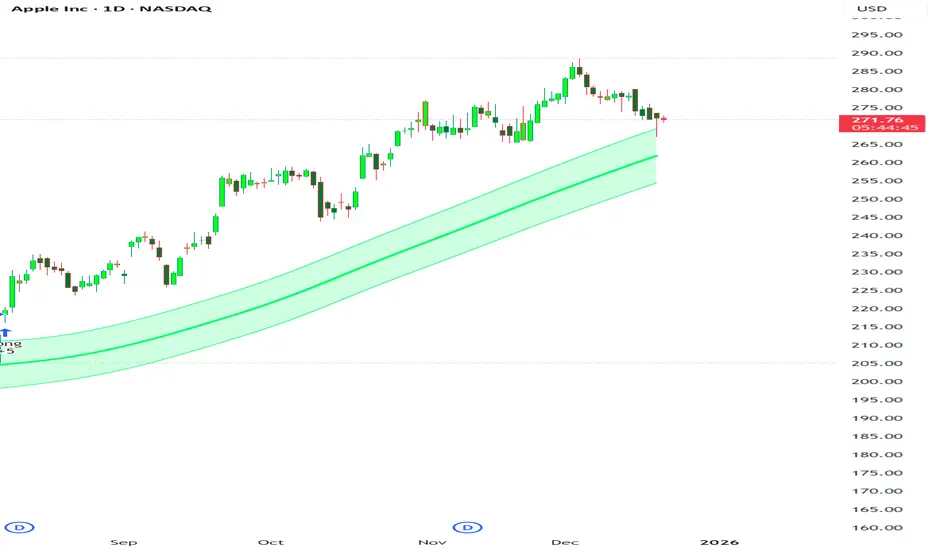
Structure Lite is an open-source charting tool designed to assist traders in visualizing higher-timeframe market structure. The script identifies major swing points using high-period pivot analysis and projects structural support and resistance lines directly on the chart. Its purpose is to highlight persistent market structure while minimizing visual noise.
CORE CONCEPTS & CALCULATIONS
Pivot Identification
The script uses Pine Script’s built-in ta.pivothigh() and ta.pivotlow() functions to identify confirmed swing highs and lows. A pivot is only validated after a user-defined number of bars (Major Pivot Lookback) have formed on both sides of the price extreme, ensuring that only structurally significant pivots are selected.
Structural Pairing
Each structural line is created only after two consecutive pivots of the same type are confirmed (high-to-high or low-to-low). The script stores the price and bar index of these pivots and uses them as fixed anchor points.
Line Projection
Once a valid pivot pair is formed, the script draws a line between the two points using line.new() and extends it forward using extend.right. These lines represent projected structural boundaries rather than trade signals.
Object Management
To maintain chart clarity and performance, the script manages all drawn objects through a line array. A FIFO (First-In, First-Out) method is applied so that only the three most recent structural lines remain visible. Older lines are automatically deleted as new ones are created.
DESIGN PHILOSOPHY & ORIGINALITY
While many indicators plot frequent swing points or short-term pivots, Structure Lite focuses on structural persistence. By filtering for higher-period pivots and limiting the number of displayed projections, the script emphasizes dominant market structure rather than short-term fluctuations. This approach is intended to support discretionary analysis, not replace it.
HOW TO USE
Major Pivot Lookback
Increase the value to focus on higher-timeframe structure (e.g., swing or position trading).
Decrease the value to visualize intraday structural levels.
Visual Encoding
Green lines represent projected structural support
Red lines represent projected structural resistance
Visibility Control
A boolean input allows all structure lines to be hidden instantly to restore a clean price chart.
LIMITATIONS & DISCLAIMER
This script is a visualization tool only. It does not generate trade signals, entry or exit points, alerts, or directional forecasts. All plotted levels are derived from historical price action and may change as new pivots form. The script is provided for educational and analytical purposes and should be used in conjunction with other forms of market analysis

Gyakkou Kyokushou System (Invite-only Overlay)This is an invite-only overlay indicator designed to help visually organize market context and reduce chart clutter. It does not execute trades. It provides visual guidance and optional alerts for decision support.
It overlays multiple visual modules such as trend ribbons (short/long moving-average ribbons), a moving-average bundle (GMMA-style visualization), Bollinger Bands for volatility reference, market session highlighting (Tokyo/London/New York with configurable time windows), and optional take-profit alerts based on a Heikin Ashi reference. Each module can be enabled/disabled, and colors/session times can be customized in settings.
This indicator is not financial advice. Signals/alerts are for reference only and do not guarantee results.
これは招待専用のオーバーレイ型インジケーターです。相場の状況を見やすく整理し、判断の補助として使います。自動売買は行いません。
短期帯/長期帯の移動平均の帯、移動平均線の束(GMMA風)、ボリンジャーバンド、市場時間(東京・ロンドン・NY)の背景ハイライト(時間は設定で変更可能)、平均足を参照した利確補助アラート等を、チャート上に重ねて表示します。各表示はオン/オフでき、色や時間などは設定から調整できます。
本インジケーターは投資助言ではありません。表示やアラートは参考情報であり、結果を保証しません。

MTF Multi Indicator Table by JAB76TABLE for trading with EMA and ICHIMOKU , HELPS IN ANALYSIS OF TREND

Best Algo (SIIT) By Nagaraj HiremathBest Algo (SIIT) By Nagaraj Hiremath is Based on Ema,Pivot,Renko Candle

Sistema Neutro GOULART HUD Regime Radar ORB VWAPSistema Neutro GOULART is an advanced visual trading indicator that integrates:
• A unified HUD displaying session status, ORB, VWAP, risk and market bias
• A Regime Radar heatmap (GO / WAIT / NO) designed to provide clarity without chart clutter
• ORB with straight daily lines and a clean zone limited to the current session
• Direction filtering using VWAP and VWAP slope
• Condition assessment based on risk and overall market context
• A harmonized visual design focused on objective decision-making
⚠️ This indicator does NOT generate trade signals.
It provides market context, regime classification, and quality assessment to support discretionary trading decisions.
Ideal for:
• Futures markets (ES, NQ, YM)
• Day trading using ORB + VWAP
• Traders who prioritize context, discipline, and structure over signals
For educational purposes only.

RSI with 3 Separate Smoothing AveragesRSI has 3 moving averages, to help trade better
RSI period can be adjusted
Moving average has multiple selections (SMA, EMA, HMA)
moving average cross over can be used as signal for trades
Trade at your own risk

Stoch RSI M5 / M30 / H1_Brando ValenciaIndicator Description
This indicator displays the Stochastic RSI for 5-minute, 30-minute, and 1-hour timeframes simultaneously in one stable MTF panel — no lookahead, no repainting.
Red (5m) → entry timing
Green (30m) → short-term / intraday bias
Blue (1h) → higher-timeframe context & direction
The calculation matches the TradingView default Stoch RSI (%K) exactly:
RSI length: 14
Stochastic length: 14
Smoothing: 3
Levels
Above 80 → overbought
Below 20 → oversold
50 → trend filter / equilibrium
Purpose
This indicator is not a standalone entry trigger, but a context and timing tool:
1h & 30m define direction
5m provides precise entry windows
Ideal for scalping and day trading (e.g. EUR/USD during London & New York sessions).

Institutional ADR Regime System [Pro]# 📊 Institutional ADR Regime System - Advanced Average Daily Range Analysis
## 🎯 Overview
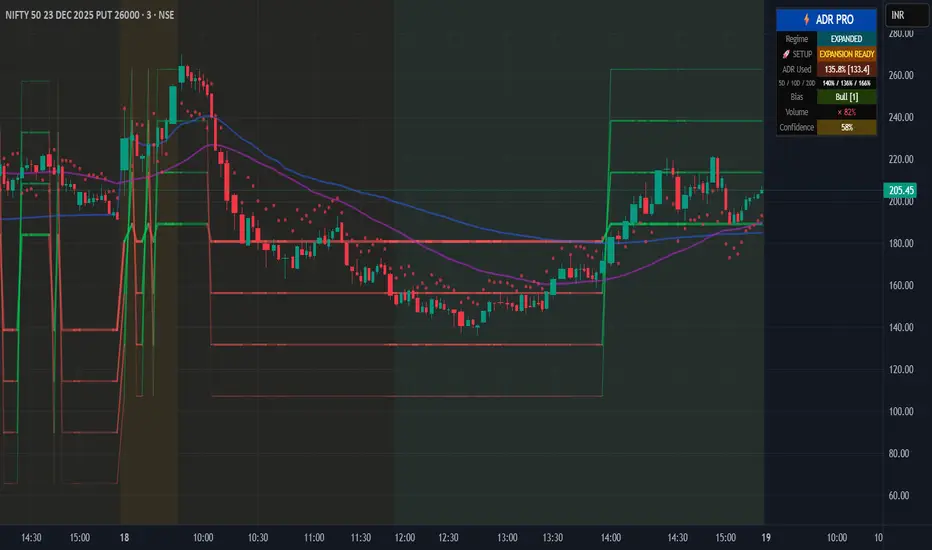
The **Institutional ADR Regime System** is a comprehensive volatility and regime analysis tool designed for professional traders who use Average Daily Range (ADR) as a cornerstone of their intraday strategy. This indicator goes far beyond simple ADR calculation by integrating **multi-timeframe analysis**, **directional bias detection**, **volume confirmation**, **regime classification**, and **probability-based target projections**.
Built specifically for **Nifty, Bank Nifty, Stock Futures, Forex, and Crypto** traders, this system helps you identify high-probability setups based on volatility regimes and ADR expansion/compression cycles.
***
## 🚀 Key Features
### 📈 **Multi-Timeframe ADR Engine**
- **Three ADR Lookbacks**: Fast (5-period), Medium (10-period), Slow (20-period) for complete volatility context
- **Real-time Session Tracking**: Live calculation of current day's range vs ADR percentages
- **Multiple Calculation Methods**: True Range (gap-adjusted), High-Low (intraday), Close-to-Close
- **Configurable Base Timeframes**: Daily or Weekly ADR projections
### 🧠 **Intelligent Regime Classification**
- **4 Market Regimes**: Compressed (<65% ADR), Normal (65-120%), Expanded (120-150%), Exhausted (>150%)
- **Compression Cluster Detection**: Identifies "coiled spring" setups when market compresses for multiple consecutive days
- **Visual Regime Indicators**: Background color-coding for instant regime recognition
- **Automated Expansion Alerts**: Get notified when compression clusters are ready to break
### 🎯 **Dynamic Target Projection System**
- **4 Probabilistic Targets**: 50% / 75% / 100% / 125% ADR levels
- **Historical Hit-Rate Tracking**: See success rates for each target level over last N sessions
- **Confidence Scoring (0-100%)**: Multi-factor scoring based on regime, trend, volume, and statistics
- **Adaptive Transparency**: Target lines fade when confidence is low, highlight when high
### 📊 **Directional Context Engine**
- **Trend Filter**: Higher timeframe EMA alignment (auto-detects bullish/bearish bias)
- **VWAP Integration**: Monitors price position relative to VWAP for institutional bias
- **Multi-TF Trend Confirmation**: Optional higher timeframe trend filter (Weekly/Monthly)
- **Bias Scoring System**: -3 to +3 score combining trend, VWAP, and HTF alignment
- **Auto/Manual Mode**: Let the system decide bull/bear targets or override manually
### 📈 **Volume Confirmation Layer**
- **Volume MA Threshold**: Requires volume confirmation above customizable threshold (default 1.2×)
- **Real-time Volume Status**: Displays current volume as % of moving average
- **Volume-Gated Alerts**: Smart alerts only fire when volume confirms the move
### ⚖️ **Risk Management Module**
- **ATR-Based Stop Suggestions**: Auto-calculates suggested stop loss based on ATR multiplier
- **R:R Calculator**: Shows risk-reward ratios for each target level
- **Position Sizing Hints**: Helps determine appropriate lot size based on account risk %
- **Dynamic Stop Visualization**: Plots suggested stop level on chart
### 📊 **Professional Statistics Dashboard**
- **Real-Time ADR Usage Meter**: Shows % of ADR consumed (color-coded risk zones)
- **Multi-Period Comparison**: Current range vs 5D / 10D / 20D ADR
- **Historical Hit-Rates**: Target success rates tracked over configurable lookback
- **Playbook Hints**: Context-aware trading suggestions (Breakout Play, Fade Zone, Trend Day, etc.)
- **Compact/Full/Minimal Modes**: Choose your preferred panel size
- **Mobile-Optimized**: Readable on all screen sizes
### 🔔 **Smart Alert System**
- **Target 1 Approach**: Fires when price approaches T1 with high confidence + volume
- **Exhaustion Zone**: Alerts when ADR >150% used (fade opportunity)
- **Coiled Spring**: Triggers on compression cluster completion (expansion setup)
- **High-Probability Confirmation**: Multi-factor confirmation alerts (trend + volume + T1 break)
***
## 💡 Use Cases & Trading Applications
### ✅ **Intraday Range Traders**
- Identify compressed days for range-bound strategies
- Avoid overextended days with exhaustion warnings
- Scale into positions at probabilistic support/resistance levels
### ✅ **Breakout & Momentum Traders**
- Detect "coiled spring" compression clusters before expansion
- Enter on confirmed ADR breakouts with volume
- Use confidence scoring to filter low-probability setups
### ✅ **Mean Reversion & Fade Specialists**
- Identify exhaustion zones (>150% ADR) for counter-trend entries
- Fade extremes when price reaches 125% target with weak volume
- Use HTF resistance/support confluence with ADR targets
### ✅ **Position Traders (Swing)**
- Weekly ADR projections for multi-day targets
- Trend + ADR alignment for high-conviction entries
- R:R-based position sizing at each target level
### ✅ **Options Traders**
- Volatility regime classification for straddle/strangle timing
- Compression clusters = pre-expansion option buying opportunity
- Exhaustion zones = premium selling setups
***
## 🔧 Configuration Guide
### **Core Settings**
- **Market Type**: Equity / Futures / Forex / Crypto (affects session detection)
- **Base Timeframe**: Daily or Weekly ADR calculation
- **Target Direction**: Auto (trend-based) / Bull / Bear (manual override)
### **ADR Parameters**
- **Fast/Med/Slow Periods**: Customize ADR lookbacks (default: 5/10/20)
- **Calculation Method**: True Range (recommended) / High-Low / Close-to-Close
- **Regime Thresholds**: Adjust compression/expansion levels to your instrument
### **Session Settings** (Critical for Intraday)
- **Enable Session Filter**: Only calculate ADR during RTH (Regular Trading Hours)
- **Session Hours**: Set your market's trading hours (e.g., 09:15-15:30 IST for Nifty)
- **Timezone**: Select your market's timezone
### **Filters & Confirmations**
- **Trend EMA Length**: Adjust trend filter sensitivity (default: 50)
- **Volume Threshold**: Set volume confirmation multiplier (default: 1.2×)
- **Higher TF Trend**: Enable weekly/monthly trend filter
### **Risk Management**
- **Stop ATR Multiplier**: Default stop distance (default: 1.5× ATR)
- **Account Risk %**: For position sizing calculations
### **Statistics**
- **Statistical Lookback**: Hit-rate calculation period (default: 50 sessions)
- **Enable Stats**: Toggle historical probability tracking
***
## 📖 Interpretation Guide
### **Regime Colors** (Background)
- 🟠 **Orange**: Compressed (<65% ADR) - Range-bound day likely
- 🔵 **Aqua**: Expanded (120-150%) - Strong trending day
- 🔴 **Red**: Exhausted (>150%) - Overextended, fade zone
- ⚪ **Neutral**: Normal (65-120%) - Standard volatility
### **Target Line Transparency**
- **Bold/Solid**: High confidence (>70%) - Strong probability
- **Medium**: Moderate confidence (50-70%)
- **Faded**: Low confidence (<50%) - Caution advised
### **Bias Score**
- **+2 to +3**: Strong bullish alignment (trend + VWAP + HTF)
- **+1**: Weak bullish bias
- **0**: Neutral
- **-1**: Weak bearish bias
- **-2 to -3**: Strong bearish alignment
### **Playbook Hints**
- ⚡ **"BREAKOUT PLAY"**: Coiled spring detected, expansion imminent
- ⚠️ **"FADE ZONE"**: Exhausted + volume = reversal opportunity
- 📈 **"TREND DAY"**: Expanded regime + directional bias = follow trend
- 💤 **"RANGE TRADE"**: Compressed regime = buy support, sell resistance
- ➡️ **"NORMAL DAY"**: Standard conditions, no special setup
***
## 🎓 Trading Strategy Examples
### **Strategy 1: Compression Breakout**
1. Wait for 3+ consecutive compressed days (<65% ADR)
2. Monitor for "🚀 EXPANSION READY" alert
3. Enter on first 50% target break with volume confirmation
4. Target: 100-125% levels | Stop: Suggested ATR stop
### **Strategy 2: Exhaustion Fade**
1. Price reaches 125-150% ADR target
2. Volume confirmation present but regime shows "EXHAUSTED"
3. Enter counter-trend at target level
4. Target: Mean reversion to 75% level | Stop: 1.5× ATR beyond entry
### **Strategy 3: Trend Following**
1. Bias score ≥ +2 (or ≤ -2 for bearish)
2. Price in expanded regime (120-150%)
3. Enter on pullbacks to 50-75% levels
4. Target: Next sequential target | Stop: VWAP or EMA
***
## ⚙️ Technical Specifications
- **Pine Script Version**: v6
- **Chart Type**: Overlay indicator
- **Max Labels/Lines**: 500 each (optimized for performance)
- **Calculation Frequency**: Real-time (tick-by-tick)
- **Memory Usage**: Efficient array management for long-term statistics
- **Repaint Behavior**: No repainting - uses confirmed HTF data only
***
## 🔔 Alert Setup Guide
1. **Add Indicator** to chart
2. Click **"Create Alert"** (TradingView alert icon)
3. **Condition**: Select desired alert from dropdown:
- 🎯 T1 Approach
- ⚠️ Exhaustion Zone
- 🚀 Coiled Spring Active
- ✅ High-Probability Setup
4. **Configure frequency**: Once Per Bar Close (recommended)
5. **Enable notifications** (Email, SMS, Webhook)
***
## 📱 Best Practices
### ✅ **DO:**
- Combine with support/resistance zones for confluence
- Wait for volume confirmation on target breaks
- Use confidence score to filter low-probability setups
- Adjust session hours for your specific market
- Track hit-rates over time to calibrate thresholds
### ❌ **DON'T:**
- Trade against strong directional bias (score ≤ -2 or ≥ +2)
- Ignore regime classification (don't fade in expansion, don't breakout in compression)
- Chase targets in exhaustion zone without mean reversion plan
- Trade without volume confirmation in low-liquidity sessions
- Override auto bias without clear technical reason
***
## 🎯 Ideal For
✅ **Day Traders** (Nifty, Bank Nifty, Stock Futures)
✅ **Scalpers** (using 5-min / 15-min charts)
✅ **Swing Traders** (Weekly ADR mode)
✅ **Options Traders** (volatility regime analysis)
✅ **Prop Traders** (institutional-grade risk management)
***
## 📜 Disclaimer
This indicator is a **decision-support tool** and does not constitute financial advice. Past performance of hit-rates does not guarantee future results. Always use proper risk management, position sizing, and stop losses. The creator is not responsible for any trading losses incurred using this tool. Test thoroughly on paper/demo accounts before live trading.
***
## 🔄 Updates & Support
**Current Version**: 1.0
**Last Updated**: December 2025
For questions, feedback, or feature requests, comment below or message directly.
***
## 🏆 Credits
Developed by a quantitative trader for institutional-grade ADR analysis. Inspired by PivotBoss ADR methodology and enhanced with modern regime detection, multi-factor confirmation, and probability-based targeting.
***
**Tags**: #ADR #AverageDailyRange #VolatilityIndicator #RegimeAnalysis #IntradayTrading #NiftyTrading #BankNifty #Options #BreakoutStrategy #MeanReversion
***
**🌟 If this indicator helps your trading, please leave a like and share with fellow traders!**
Whale Trading Network Technical Indicator
Whale Trading Network — Technical Indicator (WTN)
What it does — signal families
WTN produces three signal types across three user‑selected timeframes: (1) Green : bottom setup candidates, (2) Gold : continuation confirmations, and (3) Red : early top warnings. It blends momentum with trend/structure context and suppresses prints during sustained downtrends or late‑stage rallies. Defaults target 4h, 1d, and 5d workflows.
Preamble — originality and invite‑only context
WTN is a controller‑driven, regime‑aware indicator that coordinates classic elements (RSI, MACD, Stochastic RSI, MAs, BBs) into a governed signal layer rather than a simple overlay. A latched Down‑Channel regime, a Top‑Zone swing gate, cross‑asset/timeframe normalization, confluence‑based dot permissions, and multi‑timeframe orchestration (gold‑only on the highest frame) work together to actively manage when signals are allowed. The sections below explain why this is not a mashup and why the closed‑source / vendor value resides in WTN’s state‑machine logic, interlock rules, normalization framework, and cross‑frame roles—presented at the concept level so traders and moderators can understand how it operates without exposing proprietary thresholds.
Why it’s not a simple mashup (originality & usefulness)
WTN is not a bundle of classic tools; it is a controller‑driven indicator with regime awareness, gating, and normalization that coordinates otherwise independent signals into a single, coherent decision layer. Instead of overlaying RSI + MACD + BB + MAs, WTN governs when those tools matter, how long their states persist, and when prints must be blocked—using rules a basic mashup does not provide.
What the controller actually governs
Identifies and latches regimes (e.g., sustained down‑channel) so print permissions change with context—not just oscillator ticks.
Applies gates (e.g., Top‑Zone) when swing positioning suggests late‑stage risk.
Normalizes and weights evidence so MACD, RSI, Stoch RSI, histogram behavior, and price context contribute coherently.
Coordinates timeframes so dots form a workflow (tactical → swing → continuation) rather than three unrelated overlays.
Regime awareness & hysteresis (stability by design)
A core source of originality is hysteresis : once WTN recognizes a down‑channel, it latches that regime and suppresses prints until persistent breakout evidence plus momentum stabilization appear. This prevents flip‑flopping during chop, “first‑bounce” head fakes, and lower‑high rallies that a simple overlay will often misclassify. The regime state is visible (tinted panel), so users know why signals are paused.
Context gates that actively refuse bad timing
Two key context gates reduce “chase‑the‑top” and “bottom‑fish” problems:
Down‑Channel Latch: Blocks bottom candidates while momentum/structure remain impaired, then re‑enables only after sustained improvement.
Top‑Zone Gate: Detects upper‑swing positioning with momentum decay and blocks prints until positioning resets, avoiding confirmations into exhaustion.
Normalization that makes confluence real
Classic indicators have incompatible scales that vary across assets and timeframes. WTN normalizes them:
MACD line/signal/histogram, RSI, and Stoch RSI are mapped to consistent ranges so slope tests and region checks are comparable.
This lets confluence be meaningful : no single tool dominates due to scale; each contributes proportionally to permissions.
Multi‑timeframe orchestration (coordinated, not duplicated)
WTN assigns roles across the three selected timeframes:
Shorter timeframe: Tactical green setups (higher risk), ideally validated by gold .
Middle timeframe: Swing validation with more selective gold .
Highest timeframe: Gold‑only continuation, prioritizing higher‑confidence confirmation.
On lower frames, gold requires a prior green ; on the highest frame, green never prints . This structure turns dots into a sequence rather than three independent overlays.
Permission lattice & precedence (how conflicts are resolved)
Signals must pass a permission lattice where evidence sources interlock:
Momentum alignment: MACD slope and histogram behavior must agree; a single crossover is not enough.
Oscillator state: RSI/Stoch RSI must be supportive (e.g., stabilization from weak zones for a bottom candidate).
Structure & volatility context: MA stack, BB basis/width, and ATR‑aware checks help confirm or veto timing.
Regime/gate status: Down‑Channel or Top‑Zone states can override otherwise bullish micro‑signals.
Precedence rules mean a strong veto (e.g., active latch) can inhibit a print even if oscillators briefly improve.
Debounce, persistence & resumption (time matters)
WTN emphasizes persistence windows and debounce behavior:
Breakouts must persist (not one‑bar spikes) before the latch releases.
Oscillator stabilization must sustain before green candidates are permitted.
Continuations ( gold ) require maintained alignment , not transient ticks, so you avoid prints on single‑bar noise.
Failure modes addressed by the controller
RSI oversold during falling MACD: Basic mashups flag “bottom”; WTN keeps the latch until histogram and RSI recover together .
Momentum crossover inside the Top‑Zone: Overlays confirm continuation; WTN blocks until price resets out of the upper swing.
Event‑driven spikes (gap/volatility bursts): Transient improvements are debounced ; permissions wait for sustained evidence.
Indicator scale drift across assets/timeframes: Normalization ensures confluence rules remain consistent when you switch symbols.
Interpretability: see the “why,” not just the “what”
WTN’s pane is structured for auditability :
Tinted background exposes regime state (e.g., down‑channel latch).
Histogram anchored at 0 , RSI in the upper sub‑pane (0–100), Stoch RSI in the lower sub‑pane (−100–0) with clear overbought/oversold coloring.
Traders can visually trace the permission path: regime → positioning → momentum → oscillator → dot allowed/blocked.
Bottom line: WTN’s originality lives in the controller, regime latch, context gates, normalization, permission lattice, and timeframe orchestration that actively manage when a print is allowed. It is a coordinated decision system—not a simple overlay of classic indicators—and that governance is the reason it adds practical value for traders.
Why closed‑source / vendor value
WTN is powered by a proprietary engine written from the ground up in Pine v6; the source does not reuse any third‑party open‑source code. Its originality lies in the controller architecture and interlock logic that govern regime detection, context gates, normalization, and cross‑frame coordination. While it reads familiar elements (RSI, MACD, Stochastic RSI, MAs, BBs), the value comes from how those elements are orchestrated—state‑machine gating with hysteresis, context‑aware suppression and resumption, normalized confluence tests, and gold‑only continuation on the highest timeframe—yielding behavior that is not achievable by simply overlaying built‑ins.
What is original (and protected)
State‑machine gating: Rules define regimes, transitions, hysteresis, and re‑enable conditions across evidence sources (momentum slope, histogram decay/recovery, oscillator zones, MA/BB context).
Permission graph & interlocks: RSI, MACD (line/signal/histogram), Stoch RSI, price‑structure gates, and MA/BB context vote together through precedence rules—this coordination is proprietary.
Normalization framework: Mapping and using normalized ranges for momentum/oscillators to make confluence tests stable across assets/timeframes is a deliberate design central to WTN’s consistency.
Multi‑timeframe controller roles: Gold‑only behavior on the highest timeframe and the green‑precedence rule on lower frames are coordinated workflows specific to WTN.
Context‑aware suppression/resumption: Suppressing dots during down‑channels and top‑zones, then resuming only on verified persistence, reduces “false‑print drift” common to naive mashups.
Why protection is appropriate
Not reproducible through overlays: While anyone can overlay RSI, MACD, and BBs, WTN’s controller decisions (state transitions, permission checks, persistence windows, evidence requirements) are not trivially inferred from outputs and are central to its behavior.
Integrity of the workflow: Protection preserves a single, tested implementation so users do not encounter fragmented clones with altered rules that undermine the controller’s intent.
Ongoing calibration: Profiles for Crypto vs. Stocks (across three timeframes each) are curated to typical volatility traits. Maintaining these calibrations and the permission graph is part of the product’s vendor value.
What traders get (concept level, not black‑box hype)
Regime‑aware signals: Fewer prints into multi‑leg downtrends or late‑stage tops because the system explicitly refuses to signal in those contexts.
Consistent confluence: Normalization makes cross‑asset/timeframe confluence checks meaningful; users aren’t whipsawed by indicator scale differences.
Coherent workflow: Green → Gold on tactical frames, Gold‑only on the highest frame for continuation—an interpretable sequence that is easy to audit on the pane.
Transparent context: Tinted backgrounds and sub‑pane organization show why a dot was allowed or blocked (regime, swing position, oscillator state), letting traders understand how the script does what it claims—without exposing proprietary thresholds.
How it works — components & flow (concept level)
1) Normalized momentum & context
WTN reads RSI , MACD (line, signal, histogram), Stochastic RSI , ATR‑aware volatility , moving averages , Bollinger Bands , and price‑structure gates . Internals normalize oscillator values to a common pane so slopes, threshold checks, and histogram behavior are comparable across assets and timeframes. The histogram remains centered on 0, RSI uses 0–100 in the upper sub‑pane, and Stoch RSI maps to the lower sub‑pane.
Conceptual effect:
Normalization mitigates asset‑specific amplitude differences (e.g., MACD’s variable scale) so confluence tests don’t break when you switch symbols/timeframes.
Visual cues (line colors for overbought/oversold) make state changes obvious.
2) Regime detection — Down‑Channel Latch
Synchronized evidence (weak MA stack, negative momentum slope, fading histogram, RSI/Stoch RSI weak zones, price‑structure traits) latches the down‑channel regime. When latched, green prints are suppressed . The latch releases only after breakout persistence and improvements in RSI/histogram confirm trend resumption. The panel tints red while latched.
Design intent: Cut bottom‑fishing noise during multi‑leg downtrends, then resume prints only after sustained recovery.
3) Swing‑positioning — Top‑Zone Gate
A “top‑zone” derived from recent swing bounds with BB/Fibonacci context and momentum checks blocks new prints when price is in the upper swing and momentum decays, reducing confirmations into exhaustion.
4) Dot permissions (confluence gating)
WTN coordinates RSI, MACD, Stoch RSI, histogram behavior, SMA/BB context , and regime gates to determine whether a dot is allowed:
Green (bottom setup): Requires momentum deceleration with histogram improvement, RSI stabilizing upward, and price firming vs recent closes. Suppressed in Down‑Channel latch or Top‑Zone gate.
Gold (continuation): On lower two timeframes, prints only after a prior green and requires aligned momentum/oscillator states and supportive price context; on the highest timeframe, gold‑only prints emphasize higher‑confidence continuation cues.
Red (early top warning): Requires synchronized local peaks/roll‑downs across oscillators with slowing histogram; blocked in specific exhaustion conditions to avoid warnings into capitulation.
5) Multi‑timeframe controller
A controller aligns permissions across the three selected timeframes . Shorter frames provide tactical entries; the middle frame favors swing setups; the highest frame prints gold‑only for major continuation confirmation. Signals are coordinated, not independent overlays.
How to use it
Choose timeframes: Defaults target 4h / 1d / 5d . Use the shorter frame to spot tactical green ; wait for gold on the same or higher frame to confirm. Use the middle frame for swing validation. The highest frame is gold‑only , helping avoid early greens during broader trends.
Watch the tint: A red background band denotes the Down‑Channel latch ; expect suppressed greens until breakout persistence and momentum improvement.
Read the panel: The pane shows normalized momentum (MACD, histogram) with RSI up top and Stoch RSI below, including clear overbought/oversold coloring.
Confirm, then manage exposure: Treat green → gold as the preferred sequence. MA/BB context helps gauge trend strength (e.g., price vs 50/100/200 SMA and BB basis). Greens are higher‑risk; favor gold confirmations.
Crypto vs Stocks — calibrated profiles
Profiles are tuned for typical volatility patterns in each asset class. Each timeframe has its own calibration, yielding six independent tuning sections (3 per asset class).
Screenshots — captions
Screenshot 1 — Down‑Channel latch & release
The red‑tinted band shows the Down‑Channel latch regime on the indicator pane. While latched, green prints are suppressed . The latch only releases after breakout persistence and momentum improvement are visible (MACD/histogram strengthening with RSI and Stochastic RSI stabilizing). Once released, if the Top‑Zone gate is open and price context is supportive, the controller may permit a green dot on the lower timeframes, followed by a gold confirmation when conditions remain aligned.
Screenshot 2 — Pane layout & normalization
The indicator pane is organized for quick audit: the histogram is centered on 0 ; RSI plots in the upper sub‑pane on a 0–100 range; Stochastic RSI plots in the lower sub‑pane on a −100 to 0 normalized range. MACD line/signal/histogram and oscillators are normalized so slope checks, region tests, and confluence are comparable across symbols/timeframes. Line colors reflect overbought/oversold states to make regime/context changes easy to read.
Screenshot 3 — Adaptive dot permissions (sequence example)
This sequence shows adaptive dot permissions at work. After breakout persistence from a latched down‑channel, the controller permits a gold dot on the 5‑day view to confirm continuation (the highest timeframe uses gold‑only ). Soon after, the Top‑Zone gate engages, momentum slows (RSI/Stochastic RSI roll down, histogram decays), and a red dot warns of an early top. If deterioration persists, the Down‑Channel re‑latches and prints remain suppressed until the next verified recovery.
Limits & notes
100% original work: The WTN engine and controller logic are programmed from the ground up. No third‑party open‑source code, educational snippets, or auto‑generated code are reused.
No external libraries: Built in Pine v6 using standard language features only; no external libraries or ports of community scripts are used.
Chart type: Designed for standard time‑based candles only; non‑standard charts (Heikin Ashi, Renko, Kagi, P&F, Range) can produce unrealistic results.
Data handling: No lookahead and no future offsets.
Risk disclosure & legal notice
This tool is provided for educational purposes only and does not constitute financial or investment advice or recommendations.
Trading and investing involve risk, including possible loss of principal.
No guarantees or warranties of performance are expressed or implied. Past results do not predict future outcomes.
This publication does not include solicitation, pricing, or promotional offers; it provides information on the indicator’s design and use.
Use at your own risk. Test settings on paper and consult a qualified investment professional familiar with your risk tolerance before any live use.

Simple Trend Pullback Tool (EMA) v1.1Simple Trend Pullback Filter (EMA)
Overview This script is a lightweight, objective tool designed to filter out market noise and identify high-probability entry zones in trending markets. Built on the core principle of "The Rising Tide," it utilizes a dual-EMA cloud to visualize the trend’s health and highlight where the price is likely to find support after an overextended breakout.
How It Works
Trend Identification: The script tracks the alignment between the EMA 50 and EMA 200. When the price is consistently above this "Cloud," the market is in a confirmed uptrend.
The Pullback Logic: Instead of chasing breakouts (which often lead to FOMO-driven losses), this tool highlights the 'Mean Reversion' zone. It signals an entry when price action "pulls back" into the EMA cloud while the primary trend remains bullish.
Simplicity First: There are no laggy oscillators or repainting signals. It uses price action relative to time-weighted moving averages to keep your chart clean and your decisions logical.
Example Use Case: $CUU.V and NASDAQ:RKLB In the current market (December 2025), we see high-velocity breakouts in sectors like Space and Copper. While a stock like Copper Fox ($CUU.V) may jump 28% on merger news, this script helps traders wait for the necessary consolidation back toward the EMA 20/50 support before committing capital.
Settings
EMA 1 (Fast): Default 50 — Tracks intermediate momentum.
EMA 2 (Slow): Default 200 — The "Line in the Sand" for long-term trend direction.
